Looking to transform your WordPress website into an AI assistant? What if your WordPress site could understand and work by itself? Tasks are getting completed for you automatically, saving time while assisting you with more work. Sounds great, right?
Adding smart tools like ChatGPT, Gemini, DeepSeek, Perplexity, or Claude to a website is hard and needs coding or a team, many people think so. But that’s no longer true. Now, anyone can easily use AI tools without writing code using Bit Flows.
It’s a powerful tool for AI workflow automation. Bit Flows has new smart AI features that let you integrate things like ChatGPT into your workflows. AI can be used not just to trigger actions, but to take part directly in the process. For a broader look at free platforms beyond WordPress, compare the best free AI workflow automation tools.
With Bit Flows, you can create AI-powered automated workflows, and do tasks like automatic Content Generation, Getting Smart Replies, Extracting Data from Texts, Summarising Long Articles, Image Creation, etc.
It is really easy to introduce AI into your website and get more done with less hassle with Bit Flows. Let’s do AI workflow automation on your WordPress site!
Yes! You don’t need to be a developer or write code to connect AI to WordPress. Bit Flows is designed for beginners to advanced users. It has a visual drag-and-drop interface, so that even non-technical users can create complex automation.
You simply select a trigger, like a new post or form submission, and then add actions, which can include AI calls. For example, after a customer submits a support form, you could route the data to OpenAI to create a smart reply. Bit Flows natively runs in your WordPress dashboard, so you never leave your site. It’s truly a no-code AI automation tool for WordPress.
Using AI for WordPress Automation and Integrations can save time, increase engagement, and improve content quality. AI tools can automate routine tasks like writing copy, optimizing images, or answering user questions. For example, AI-powered chatbots provide 24/7 customer support automation, and smart content tools help with SEO and marketing.

AI tools can add new functions such as personalized content, content summarization, automated support, and image generation. AI can help you:
Generate content faster: Writing blog posts, product descriptions, or social media updates can take a lot of time. AI writing tools can help speed things up. Just give a prompt, and they’ll draft content that’s clear, unique, and relevant. You can also use AI to write SEO meta descriptions or even generate content ideas.
Improve user engagement: AI chatbots can answer questions, guide users, and offer instant support, day or night. You can also personalize content, like showing articles or product recommendations based on what someone browses.
Automate tasks and increase efficiency: AI isn’t just about writing. It can do behind-the-scenes work too. It can summarize feedback, translate content, or tag images automatically. Tools like Bit Flows make this even easier by moving form data into a CRM, sending follow-up emails, or using AI to automate submissions.
Increase SEO and creativity: AI can suggest the right keywords, write alt text for images, or even generate charts and graphics. These features help you keep your site fresh, searchable, and more engaging without spending hours on every detail.
Using AI in WordPress is about making your site smarter and more responsive. It means less work for you and more dynamic, personalized experiences for visitors.
Combining AI with automation is a game-changer for WordPress. Automation already saves time by connecting plugins and services. With AI, now the content of those actions can be smart and dynamic. This means sites can operate 24/7.
AI helps quickly create engaging content and optimize sites for higher SEO rankings. It provides personalized experiences, and it handles customer support automation instantly. For example, AI acts like an assistant that can write, answer questions, and analyze data, while automation handles the boring logistics.
Bit Flows makes it easy and affordable to combine AI and automation on WordPress. No coding, no extra fees, just a powerful AI workflow automation tool. With Bit Flows handling the workflow and the AI providers doing the heavy lifting, you can truly add AI to your site’s daily operations.
It frees you from repetitive tasks so you can focus on strategy, while AI powers your content and user interactions. Start building your first AI-powered workflow with Bit Flows in minutes, and you’ll see how much simpler WordPress management becomes.
Bit Flows supports multiple AI services. Below, we cover each one, what it is, which actions Bit Flows provides, and real-world use cases for WordPress.
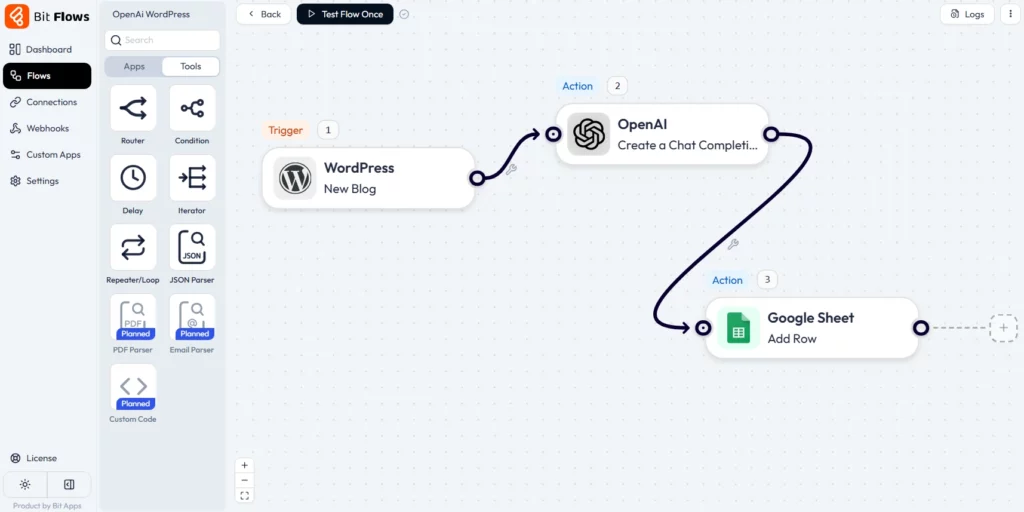
OpenAI provides advanced tools like ChatGPT (GPT-4) for working with text and DALL·E for creating images. These tools are great for writing, summarizing, translating, and generating visuals, and they’re used by people all over the world to get creative work done faster and easier.
Bit Flows includes an OpenAI integration with different action types. These cover chat completions (GPT-style text answers), text completion (general content generation), image generation (DALL·E), data structuring (formatting responses into structured data), moderation (filtering content), and batch processing (handling multiple inputs at once).

You can ask OpenAI to write or refine text, create images from prompts, parse text into JSON, check content safety, etc., all within Bit Flows. Some Use cases:
💡 Discover how to easily integrate OpenAI with Bit Flows by following our comprehensive guide.

DeepSeek is an emerging AI model from TNG that offers open-source large-language capabilities. It’s similar to other LLMs and can be used for text analysis and generation.
There are 3 DeepSeek actions in Bit Flows. These might include asking a question, generating text, or retrieving insights.
If you have a repository of notes or documents, use DeepSeek to answer queries from that knowledge base. An AI workflow automation could send a user a question to DeepSeek to fetch relevant information from your content library. Some Use cases:

Google’s Gemini is a powerful AI model that can handle text. It’s known for speed and adaptability. You can use Gemini to automate your site SEO, like generating meta descriptions, getting some SEO keywords, tags, and more.
The Bit Flows Gemini integration provides at least 2 actions. These likely include chat or text completion functions. You can use Gemini to generate and process text similarly to OpenAI’s models. Some Use cases:
💡 Get started with Gemini and Bit Flows by exploring the detailed integration documentation.

Claude is Anthropic’s conversational AI, designed to produce helpful, harmless dialogue. It’s often praised for understanding and polite responses.
Bit Flows includes 2 actions for Claude. These are likely chat or completion endpoints, allowing you to send a prompt to Claude and get a generated response. You can configure the tone and length like other AI actions. Some Use cases:

Perplexity is an AI-driven search assistant that provides answers with references, acting like an advanced Google search with AI. It excels at retrieving and summarizing information.
Bit Flows offers 2 actions for Perplexity AI. These probably let you ask a question or query a topic and receive Perplexity’s answer/summary. You might get the final answer text and possibly source links. Some Use cases:
| AI Provider | Brief Description | Supported Actions in Bit Flows |
| OpenAI | A leading AI research company known for advanced language models (GPT) and image generation (DALL-E). | Create Chat Completion, Transform Text to Structured Data, List Batches, Get A Batch, Cancel A Batch, Generate An Image, Create A Moderation |
| Gemini (by Google) | Google’s family of multimodal AI models, versatile for text generation, reasoning, and understanding various data types. | Create a Completion, Ask Gemini |
| Claude (Anthropic) | An AI assistant developed by Anthropic, recognized for its strong performance in complex reasoning, nuanced conversations, and safety. | Create a Completion, Ask Claude |
| Perplexity AI | An answer engine that provides direct, sourced answers to questions. It is highly effective for research and factual information. | Create a Completion, Ask Perplexity |
| Deepseek | Offers a range of AI models, including powerful chat completion capabilities, often noted for their efficiency and cost-effectiveness. | Create Chat Completion, List Models, Get User Balance |
Bit Flows brings the future of AI automation to WordPress today. With its no-code drag-and-drop builder, hundreds of integrations, and built-in AI actions, it makes complex automation simple and affordable. You don’t need any special skills or big budgets, just install Bit Flows, set up triggers, plug in your API keys, and you’re ready for AI automation magic.
By automating tasks like content writing, customer support, and marketing workflows with AI, you’ll save time and run a smarter website. Start building your first AI-powered workflow with Bit Flows in minutes. Watch your WordPress site transform into a proactive, AI-driven assistant that works for you around the clock.
Yes. Plugins like Bit Flows let you integrate AI into WordPress entirely via a visual AI workflow automation builder. You just select triggers and AI actions, no code is needed.
AI can help write content, answer user questions, summarize posts, personalize recommendations, optimize SEO, and more. For example, you could generate blog posts or product descriptions with ChatGPT, add a smart chatbot for support, or have AI improve user data workflows.
Popular options include OpenAI (ChatGPT/GPT models), Google Gemini, Anthropic’s Claude, and others like Perplexity and DeepSeek. Bit Flows integrates all of these.
Yes. In each AI action, you can typically select which model to use (e.g. GPT-3.5 vs GPT-4 for OpenAI) and tweak settings like response length. This lets you use different models for different tasks.
You can connect via an API plugin. Bit Flows provides a built-in action for OpenAI, so you just get an OpenAI API key and add it to Bit Flows. Then any workflow can call ChatGPT (OpenAI) to generate content or replies.






 EN
EN  DE
DE  ES
ES  NL
NL  IT
IT  PT
PT  JA
JA