AI workflow automation gets expensive in ways that are easy to miss. A platform may advertise a free plan, then restrict multi-step workflows, charge for every AI action, require a paid tier for agents, or leave you paying separately for model API calls and hosting.
“AI automation” also covers very different products. Some tools automate SaaS apps. Others build AI agents, RAG systems, MCP tools, or self-hosted agentic workflows. A free plan that works well for one job may be a poor fit for another.
If you want to test AI workflow automation before adding another subscription, the useful question is not which tools display $0. It is what you can actually build and run for free, what the limits are, and which costs still sit outside the platform.
The best free AI workflow automation tool depends on where your workflow starts and how much infrastructure you want to manage.
Free software does not always mean zero cost. AI providers may charge for tokens, and self-hosted tools still need server resources.
| Tool | Best for | Free route | Key free limit |
|---|---|---|---|
| Bit Flows | WordPress & WooCommerce | Free WordPress plugin | Unlimited workflows/tasks; AI Agent is free; MCP Client and Human in the Loop are Pro |
| Make | Visual cloud automation | Free cloud plan | 1,000 credits/month |
| Activepieces | Open-source cloud automation | Free cloud plan | 100 credits/day; 1 user |
| Dify | AI apps, agents & RAG | Free cloud + Community | 200 message credits on cloud Sandbox |
| Flowise | Legacy/open-source AI workflows | Free cloud + open source | EOL August 31, 2026; existing free tier may remain visible during sunset |
| n8n | Technical self-hosting | Community Edition | Self-hosted; cloud is trial-based |
| Langflow | Python-based agent workflows | Open-source self-hosting | Hosting/model costs are separate |
If you are comparing free workflow automation software, the word “free” needs a consistent definition. We only included tools with a meaningful permanent free route: a free cloud tier, a free WordPress plugin, or a free self-hosted/community edition. A short trial by itself does not qualify.
We also separate platform cost from model cost. A workflow builder can be free while OpenAI, Anthropic, Google, or another provider charges for model usage. A self-hosted platform can be free software while the server is not free.
The free-plan details below were checked against official product pages, pricing pages, documentation, and WordPress.org on August 30, 2026. These limits can change.
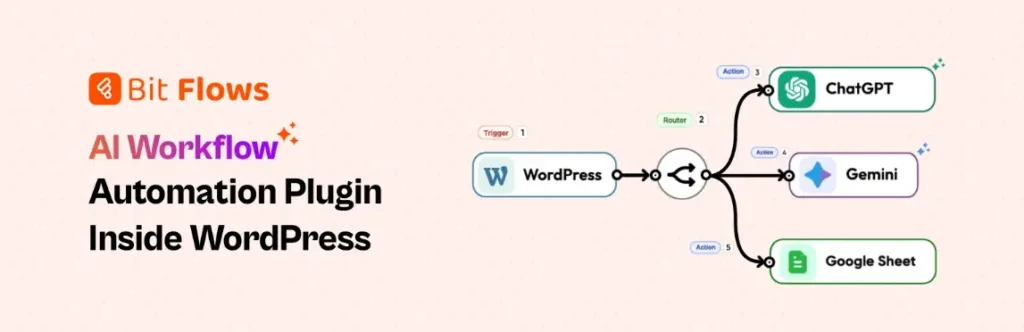
Bit Flows is a self-hosted visual workflow automation plugin inside WordPress. WordPress events, WooCommerce orders, forms, SaaS apps, APIs, webhooks, and AI can run through the same workflow canvas.
Bit Flows free version includes an AI Agent, plus unlimited workflows and tasks, multi-step workflows, conditions, Router, Iterator, Repeater/Loop, parsers, Delay, Schedule, logs, failed-task notifications, re-execution, and Custom Apps. Free actions currently include OpenAI/ChatGPT, Claude, Gemini, DeepSeek, Perplexity, OpenRouter, Groq, API Request, HTTP, Webhook, Google Sheets, WordPress, WhatsApp, Telegram, and SMTP Mail.
That means AI can be one decision step instead of the whole workflow. Bit Flows AI Agent for WordPress guide shows how agent reasoning can sit beside normal automation logic.

Make is a cloud-based visual automation platform with a permanent Free plan. It currently includes 1,000 credits per month, a no-code scenario builder, routers and filters, and thousands of app connections.
Make AI Agents can use Make’s AI Provider on all plans, including Free. AI usage consumes credits based on operations and tokens. Connecting your own AI provider to Make’s built-in AI features requires a paid plan.

Activepieces currently offers a $0 cloud plan with no card, 100 credits per day, one user, unlimited flows, and access to Agents, Flows, Tables, all apps, and the API.
A normal flow run costs one credit, while AI models and agentic actions consume additional credits. There is also a free self-hosted Community Edition, but Activepieces states that Agents and Chat are not included in that Community edition. If agents are your priority, the free cloud tier is the more complete free route.

Dify is closer to an AI application platform than a general SaaS automation tool. It supports Agent, Chatflow, Workflow, knowledge bases, APIs, and trigger-based execution.
The free cloud Sandbox currently includes 200 message credits, five apps, 50 knowledge documents, 3,000 trigger events, and up to two triggers per workflow. Dify also offers a free Community edition with core features for self-hosting under its open-source license.

Flowise is an open-source visual platform for agentic systems. It supports Agentflow for multi-agent orchestration, Chatflow for assistants and RAG, Human in the Loop, execution traces, APIs, SDKs, and on-prem deployment. However, the Flowise team has announced that the project reaches End of Life on August 31, 2026, so it should be considered mainly for existing deployments, experimentation, or teams prepared to maintain a fork rather than as a long-term choice for a new production stack.
Its hosted Free plan currently lists two Flows or Assistants, 100 predictions per month, 5MB storage, evaluations and metrics, and community support. Because the project is being sunset, treat these hosted-plan details as transitional rather than a reason to choose Flowise for a new long-term deployment.
n8n combines workflow automation with AI agents, APIs, code, human guardrails, and multi-agent patterns. Agents can call tools and sit beside deterministic nodes in the same workflow.
The permanent free route is the self-hosted Community Edition. n8n Cloud currently offers a free trial rather than a free-forever hosted plan. This makes n8n attractive when your team can manage infrastructure and wants deeper technical control.

Langflow is an open-source Python framework with a visual editor for agents, RAG systems, MCP-connected applications, and AI workflows. It supports models, prompts, data sources, agents, tools, MCP, and multi-agent orchestration.
Langflow 1.11 added Human in the Loop and Agent2Agent protocol support. The software can be self-hosted for free, but it is better viewed as an AI application framework than a broad SaaS automation service.
Choose Bit Flows if WordPress or WooCommerce starts the workflow. Choose Make for managed cloud automation across many SaaS apps. Choose Activepieces for a free cloud agent plan with an open-source automation core.
Choose Dify for AI apps, RAG, and knowledge workflows. Flowise is now better treated as a legacy open-source option for existing users or teams willing to maintain a fork after its August 31, 2026 EOL. Choose n8n if you want deep self-hosted control with code and APIs. Choose Langflow if you are building Python-friendly agentic applications around RAG, MCP, and custom components.
AI models are the first hidden cost. Some cloud tools include model usage inside platform credits; self-hosted tools often expect your own API key or local model. If model cost is part of your evaluation, our guide to free OpenRouter models explains another route, although provider limits can change.
Hosting is the second cost. Bit Flows uses your WordPress hosting, while self-hosted n8n, Dify, Flowise, and Langflow need compute somewhere.
The third cost is scale. AI agents can use more credits than simple trigger-action workflows because they may make several model and tool calls per run. Map one real workflow and estimate how often it runs before comparing “free” allowances.
Zapier Free currently includes 100 tasks per month and two-step Zaps. Zapier Agents also has a separate Free allowance of 400 activities per month. However, AI by Zapier cannot be published as a live Zap step on the Free plan: free users can preview the step, but publishing it requires a paid Zapier plan. Because this article compares free AI workflow automation inside runnable workflows, that limitation keeps Zapier outside the main list.
Zapier Agents itself can still be useful for free agent experiments, but it is a different usage model from a permanently free AI step inside a published Zap workflow.
Bit Flows has a narrower deployment target than Make or n8n because it runs in WordPress. That is useful when WordPress is already the operational hub. A WooCommerce order, form submission, post change, user event, or plugin trigger can start the AI workflow without first sending the event to a separate automation cloud.
It also lets predictable steps stay deterministic. An AI Agent can classify or interpret data, then a Condition, Router, Iterator, API Request, webhook, or app action can do the predictable work.
For higher-risk decisions, note that Human in the Loop is currently Pro. Our AI job screening workflow shows why approval can matter when an AI result affects a real person or business decision.
A free plan is most valuable when it helps answer one question: does adding AI improve this process enough to keep it?
Pick one repetitive workflow with a clear trigger and output. Use AI only where judgment adds value, and keep predictable steps deterministic. Measure how often it runs, how many model calls it makes, where it fails, and whether a person still needs to review the result.
Once you have that data, deciding between a free tier, self-hosting, or a paid plan becomes much easier. The goal is not to find software that costs nothing forever. It is to avoid paying for an AI automation stack before you know exactly what work it should be doing.
Yes, but the definition depends on deployment. Bit Flows has a free WordPress plugin with AI Agent and unlimited workflow/task execution. n8n, Dify, and Langflow offer active free self-hosted routes, while Flowise can still be self-hosted from its open-source code but reaches EOL on August 31, 2026. Hosting or external AI model usage may still cost money.
Bit Flows is the strongest fit in this comparison for WordPress and WooCommerce because its free plugin includes AI Agent, unlimited workflows and tasks, workflow logic, logs, APIs, webhooks, and multiple AI-provider actions.
Yes. n8n offers a free self-hosted Community Edition. Its cloud service does not have a permanent free plan; current cloud access begins with a trial.
Yes. Make currently states that Make AI Agents can use Make’s AI Provider on all plans. The Free plan includes 1,000 credits per month, and AI usage consumes credits based on operations and tokens.
Sometimes. Cloud platforms may include model usage within platform credits. Self-hosted tools often require your own API key or a locally hosted model. Always separate the workflow-platform cost from the model cost.
For no-code cloud use, Activepieces has a meaningful free agent allowance. Dify is a stronger active option for AI apps and RAG, while Flowise is now a legacy/EOL option rather than a long-term recommendation. n8n and Langflow offer more technical self-hosted control. For WordPress-native agent workflows, Bit Flows is the most direct fit here.
They can be suitable for low-volume or carefully scoped workflows, but free limits may affect credits, concurrency, support, logs, or advanced controls. Test failure handling, model costs, rate limits, and approval requirements before relying on a free plan for a critical process.




 EN
EN  DE
DE  ES
ES  NL
NL  IT
IT  PT
PT  JA
JA