WordPressサイトをAIアシスタントに変身させてみませんか? WordPressサイトが自分で理解し、自分で作業できたらどうなるでしょうか? タスクが自動的に完了し、より多くの作業を支援しながら時間を節約できます。素晴らしいですよね?
スマートツールを追加する ChatGPT、Gemini、DeepSeek、Perplexity、, またはクロード 「ウェブサイトを作るのは難しく、コーディングや専門チームが必要だ」と多くの人が考えています。しかし、もはやそれは過去の話です。今では、Bit Flowsを使えば、誰でもコードを書かずにAIツールを簡単に利用できます。.
これは、AIワークフローの自動化を実現する強力なツールです。Bit Flowsには、ChatGPTなどをワークフローに組み込める新しいスマートAI機能が搭載されています。AIは、アクションをトリガーするだけでなく、プロセスに直接関与させることも可能です。.
Bit Flowsを使えば、AIを活用した自動化ワークフローを作成し、次のようなタスクを自動で行うことができます。 コンテンツ生成、スマートリプライの取得、テキストからのデータ抽出、長文記事の要約、画像生成, など.
Bit Flowsを使えば、ウェブサイトにAIを導入し、手間をかけずに作業効率を向上させるのは本当に簡単です。さあ、WordPressサイトでAIを活用したワークフローの自動化を始めましょう!
はい! WordPressにAIを接続するために、開発者である必要もコードを書く必要もありません。. Bit Flows 初心者から上級者までを対象としています。ビジュアルなドラッグ&ドロップインターフェイスを備えているため、技術的な知識がないユーザーでも複雑な自動化を作成できます。.
新しい投稿やフォームの送信といったトリガーを選択し、AI呼び出しを含むアクションを追加するだけです。例えば、顧客がサポートフォームを送信した後、そのデータをOpenAIに転送してスマートな返信を作成することができます。Bit FlowsはWordPressのダッシュボード上でネイティブに動作するため、サイトから離れる必要はありません。 まさに ノーコードAI WordPress の自動化ツール.
AIを使った WordPressの自動化と連携 できる 時間を節約し、エンゲージメントを高め、コンテンツの質を向上させる. AIツールは、コピーライティング、画像最適化、ユーザーからの質問への回答といった定型業務を自動化できます。例えば、AI搭載のチャットボットは24時間365日、カスタマーサポートの自動化を提供し、スマートコンテンツツールはSEOやマーケティングを支援します。.

AIツールは、〜のような新しい機能を追加できます パーソナライズされたコンテンツ、コンテンツの要約、自動サポート、画像生成. AIは次のようなことに役立ちます:
コンテンツ生成を高速化 ブログ記事、商品説明、ソーシャルメディアの投稿作成には時間がかかります。AIライティングツールは、作業をスピードアップするのに役立ちます。プロンプトを与えるだけで、明確でユニーク、かつ関連性のあるコンテンツをドラフトしてくれます。また、 AIでSEOメタディスクリプションを書く、あるいはコンテンツのアイデアを生成することもできます。.
ユーザーエンゲージメントを向上させる: AIチャットボットは、質問に答えたり、ユーザーを誘導したり、昼夜を問わず即座のサポートを提供したりできます。また、閲覧履歴に基づいて記事や製品のおすすめを表示するなど、コンテンツをパーソナライズすることも可能です。.
タスクを自動化し、効率を向上させる AIは執筆だけではありません。舞台裏の作業もこなします。フィードバックの要約、コンテンツの翻訳、画像の自動タグ付けなどが可能です。 Bit Flows フォームデータをCRMに移行したり、フォローアップメールを送信したり、AIを使用して申請を自動化したりすることで、さらに簡単にします。.
SEOと創造性を高める AIは、適切なキーワードを提案したり、画像のaltテキストを作成したり、さらにはチャートやグラフィックを生成したりすることができます。これらの機能により、細部に時間をかけずに、サイトを新鮮に、検索しやすく、より魅力的に保つことができます。.
WordPressでAIを活用することは、サイトをより賢く、より応答性の高いものにすることです。これにより、あなたの手間が減り、訪問者にはよりダイナミックでパーソナライズされた体験を提供できます。.
AIと自動化を組み合わせることは、WordPressにとってゲームチェンジャーです。自動化はすでにプラグインやサービスを接続することで時間を節約しています。AIを使えば、それらのアクションの内容がスマートでダイナミックになります。これは、サイトが24時間年中無休で稼働できることを意味します。.
AIは、エンゲージメントの高いコンテンツを迅速に作成し、サイトをSEOランキング向上に最適化するのに役立ちます。パーソナライズされた体験を提供し、 カスタマーサポートの自動化 瞬時に。例えば、AIは執筆、質疑応答、データ分析ができるアシスタントのように機能する一方、自動化は退屈なロジスティクスを処理します。.
Bit Flowsを使えば、WordPress上でAIと自動化を簡単かつ手頃な価格で組み合わせることができます。コーディングも不要、追加料金もかからず、強力なAIワークフロー自動化ツールが利用できます。Bit Flowsがワークフローを管理し、AIプロバイダーが主要な処理を担当することで、サイトの日常業務にAIを本格的に導入することが可能です。.
反復的な作業から解放され、戦略立案に集中できるだけでなく、AIがコンテンツやユーザーとのやり取りを強化します。Bit Flowsを使って、わずか数分で最初のAIを活用したワークフローの構築を始めれば、WordPressの管理がいかに簡単になるか実感できるでしょう。.
Bit Flowsは複数のAIサービスをサポートしています。以下では、各サービスの概要、Bit Flowsが提供する機能、およびWordPressにおける実際の活用事例について解説します。.
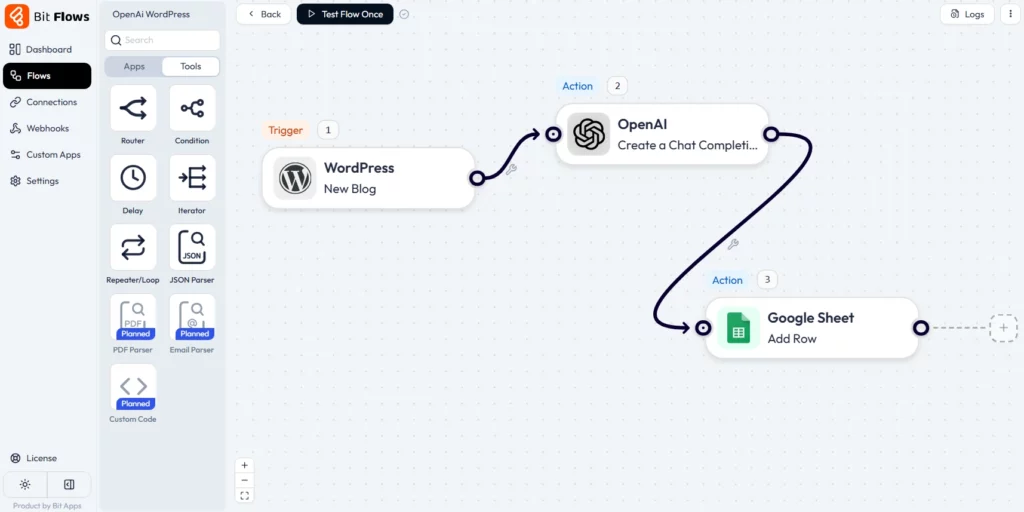
OpenAI provides advanced tools like ChatGPT (GPT-4) for working with text and DALL·E for creating images. These tools are great for writing, summarizing, translating, and generating visuals, and they’re used by people all over the world to get creative work done faster and easier.
Bit Flows includes an OpenAI integration with different action types. These cover chat completions (GPT-style text answers), text completion (general content generation), image generation (DALL·E), data structuring (formatting responses into structured data), moderation (filtering content), and batch processing (handling multiple inputs at once).

You can ask OpenAI to write or refine text, create images from prompts, parse text into JSON, check content safety, etc., all within Bit Flows. Some Use cases:
💡 Discover how to easily integrate OpenAI with Bit Flows by following our comprehensive guide.

DeepSeek is an emerging AI model from TNG that offers open-source large-language capabilities. It’s similar to other LLMs and can be used for text analysis and generation.
There are 3 DeepSeek actions in Bit Flows. These might include asking a question, generating text, or retrieving insights.
If you have a repository of notes or documents, use DeepSeek to answer queries from that knowledge base. An AI workflow automation could send a user a question to DeepSeek to fetch relevant information from your content library. Some Use cases:

Google’s Gemini is a powerful AI model that can handle text. It’s known for speed and adaptability. You can use Gemini to automate your site SEO, like generating meta descriptions, getting some SEO keywords, tags, and more.
The Bit Flows Gemini integration provides at least 2 actions. These likely include chat or text completion functions. You can use Gemini to generate and process text similarly to OpenAI’s models. Some Use cases:
💡 Get started with Gemini and Bit Flows by exploring the detailed integration documentation.

Claude is Anthropic’s conversational AI, designed to produce helpful, harmless dialogue. It’s often praised for understanding and polite responses.
Bit Flows includes 2 actions for Claude. These are likely chat or completion endpoints, allowing you to send a prompt to Claude and get a generated response. You can configure the tone and length like other AI actions. Some Use cases:

Perplexity is an AI-driven search assistant that provides answers with references, acting like an advanced Google search with AI. It excels at retrieving and summarizing information.
Bit Flows offers 2 actions for Perplexity AI. These probably let you ask a question or query a topic and receive Perplexity’s answer/summary. You might get the final answer text and possibly source links. Some Use cases:
| AI Provider | Brief Description | Supported Actions in Bit Flows |
| OpenAI | A leading AI research company known for advanced language models (GPT) and image generation (DALL-E). | Create Chat Completion, Transform Text to Structured Data, List Batches, Get A Batch, Cancel A Batch, Generate An Image, Create A Moderation |
| Gemini (by Google) | Google’s family of multimodal AI models, versatile for text generation, reasoning, and understanding various data types. | Create a Completion, Ask Gemini |
| Claude (Anthropic) | An AI assistant developed by Anthropic, recognized for its strong performance in complex reasoning, nuanced conversations, and safety. | Create a Completion, Ask Claude |
| パープレキシティAI | An answer engine that provides direct, sourced answers to questions. It is highly effective for research and factual information. | Create a Completion, Ask Perplexity |
| ディープシーク | Offers a range of AI models, including powerful chat completion capabilities, often noted for their efficiency and cost-effectiveness. | Create Chat Completion, List Models, Get User Balance |
Bit Flows brings the future of AI automation to WordPress today. With its no-code drag-and-drop builder, hundreds of integrations, and built-in AI actions, it makes complex automation simple and affordable. You don’t need any special skills or big budgets, just install Bit Flows, set up triggers, plug in your API keys, and you’re ready for AI automation magic.
By automating tasks like content writing, customer support, and marketing workflows with AI, you’ll save time and run a smarter website. Start building your first AI-powered workflow with Bit Flows in minutes. Watch your WordPress site transform into a proactive, AI-driven assistant that works for you around the clock.
はい。Bit Flowsのようなプラグインを使えば、ビジュアルなAIワークフロー自動化ビルダーを通じて、WordPressにAIを完全に統合することができます。トリガーとAIアクションを選択するだけで、コードを書く必要はありません。.
AIは、コンテンツの作成、ユーザーからの質問への回答、投稿の要約、レコメンデーションのパーソナライズ、SEOの最適化などに役立ちます。例えば、ChatGPTでブログ記事や製品説明を生成したり、サポート用のスマートチャットボットを追加したり、AIでユーザーデータワークフローを改善したりすることができます。.
人気のある選択肢としては、OpenAI(ChatGPT/GPTモデル)、Google Gemini、AnthropicのClaude、そしてPerplexityやDeepSeekなどが挙げられます。Bit Flowsはこれらすべてを統合しています。.
はい。各AIアクションでは、通常、使用するモデル(例:OpenAIのGPT-3.5対GPT-4)を選択したり、応答の長さなどの設定を調整したりできます。これにより、タスクごとに異なるモデルを使用できます。.
APIプラグインを介して接続できます。Bit FlowsにはOpenAI用の組み込みアクションが用意されているため、OpenAIのAPIキーを取得してBit Flowsに追加するだけで済みます。そうすれば、どのワークフローからでもChatGPT(OpenAI)を呼び出して、コンテンツや返信を生成できるようになります。.




 JA
JA  EN
EN  DE
DE  ES
ES  NL
NL  IT
IT  PT
PT