
When many people hear “automation” and “AI,” they think about robots or something from the movies. But these things are real in today’s business. Companies use them every day.
They help teams do jobs faster, make fewer mistakes, and reach better results. Automation is about following these steps. AI is about thinking and learning. Together, they make your work much easier to handle.
In this article, I will explain what automation is and automation vs. AI. You will see where they are the same and how they are different. You will also learn how you can use them together.
Finally, I will share real examples from Bit Flows. Bit Flows is a self-hosted tool for workflow automation. It works with apps, WordPress, and the big AI services. This guide is for everyone, even people with no tech experience.
Automation means a process or a system can work by itself. It does the job for you when something happens. You only need to set some rules. For example: if this happens, then do that.
It is like telling a computer, “When I get an email from my boss, put it in a special folder.” After you set this up, it happens each time, the same way. Automation works best for tasks that repeat and always follow the same pattern.
Businesses use automation for many jobs:
It is not only for big companies. Small teams use automation to save time as well. The main point is to save hours and make things the same every time.
Artificial Intelligence, or AI, is different from simple automation. AI enables computers to perform tasks that typically require human intelligence. AI does not just follow fixed rules. It can learn, understand, and make choices.
For example, AI can look at a photo and say if there is a cat in the image. It can also translate a language or play chess with you.
AI can change and get better with more data. It looks for patterns, makes predictions, and can solve problems with less help from people.
AI is in many tools now. Here are a few examples:
AI is best for jobs where there are patterns or you need to understand language. It helps people do more work in less time.
AI and automation can look similar. Here’s how:
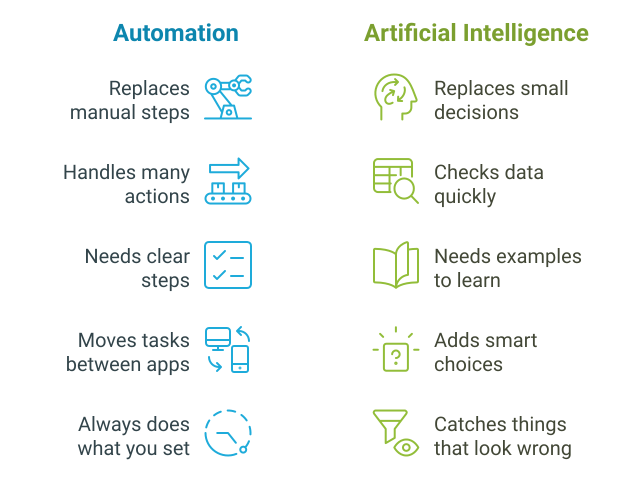
They sound alike, but are different too: Here is where they are not the same. The key point is: automation follows the rules you tell it. AI makes some choices by itself.
| Automation | Artificial Intelligence (AI) |
| Follows simple steps (if this, then that) | Tries to think like a human (understand, learn, decide) |
| Does one thing, again and again | Can solve new problems and improve with experience |
| Only changes if you rewrite the rule | Changes by learning from data |
| Example: Sends the same email to all new users | Example: Sends different emails based on what user likes |
So, automation gets jobs done alone, while AI tries to think and adapt. To make it simple: automation is the engine, and AI is the brain you can add.
AI and automation can work side by side. Automation moves things from step to step. AI decides how each step can be smarter.
Take customer support as an example.
This works better than either tool alone.

People are still needed. The goal with AI and automation is not to take away jobs. It’s to make human work more about thinking and less about repeating. You might:
Teams with a good mix of people and machines do the best work.
There is a new kind of AI now, called “agentic AI.” With this, you do not have to tell the AI every small step. Instead, you tell it your goal, and it tries to plan and finish the job itself.
For example, you can ask an agentic AI, “Help me plan a trip to Paris in June for under $1,000.” AI will check flights, look for hotels, and suggest what to see. It finds the best answers for you by doing the work step by step, using its own plan.

This shows how AI moves from just tools to helpers who act for us.
Bit Flows is your all-in-one workflow automation tool like Zapier and n8n. It gives you full control of your data, tasks, and processes in one place. Unlike other tools, it’s self-hosted, unlimited, and budget-friendly. With its exclusive lifetime deal, you’ll never have to worry about monthly fees again.
With over 210+ integrations, AI-powered actions, and an easy drag-and-drop builder, you can manage WordPress, WooCommerce, or SaaS workflows. Bit Flows helps you save time, cut costs, and grow smarter. Let’s see some AI automation use cases with Bit Flows:
Email marketing with AI: New product comes out? AI writes subject lines and email content. Automation tests different versions and sends the best one.
WooCommerce and AI upsells: After someone places an order, AI checks what the customer bought. It recommends other products. Automation adds those to a follow-up email.
Smart forms: Customer fills out a support form. AI summarizes the message and finds key points. Automation creates a ticket and sends it to the right person.
Social posts with AI help: New blog post? AI writes captions and suggests hashtags. Automation schedules posts on your accounts.
Want to make your WordPress site smarter? You do not need coding. Bit Flows can help.
Let’s create a workflow with Bit Flows to generate WooCommerce product descriptions on product status update.
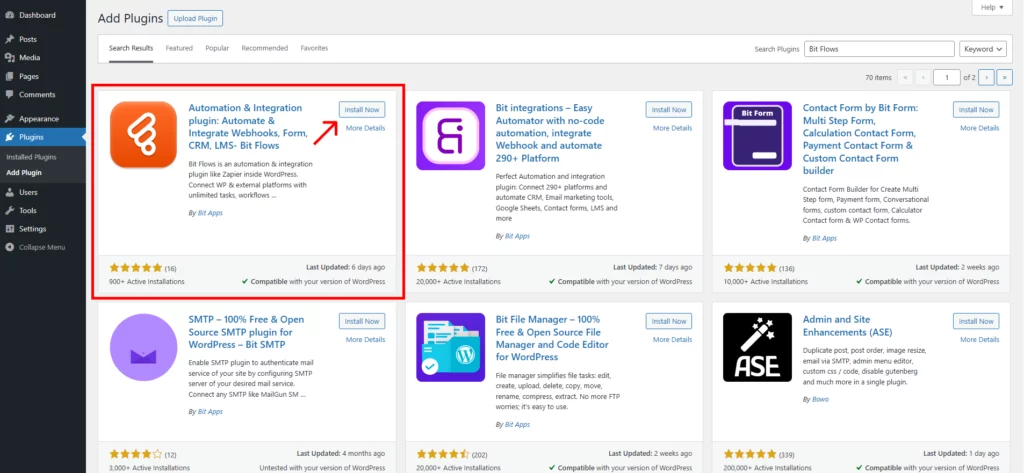
In your WordPress dashboard, go to Plugins → Add New, search for “Bit Flows,” then click Install and Activate.
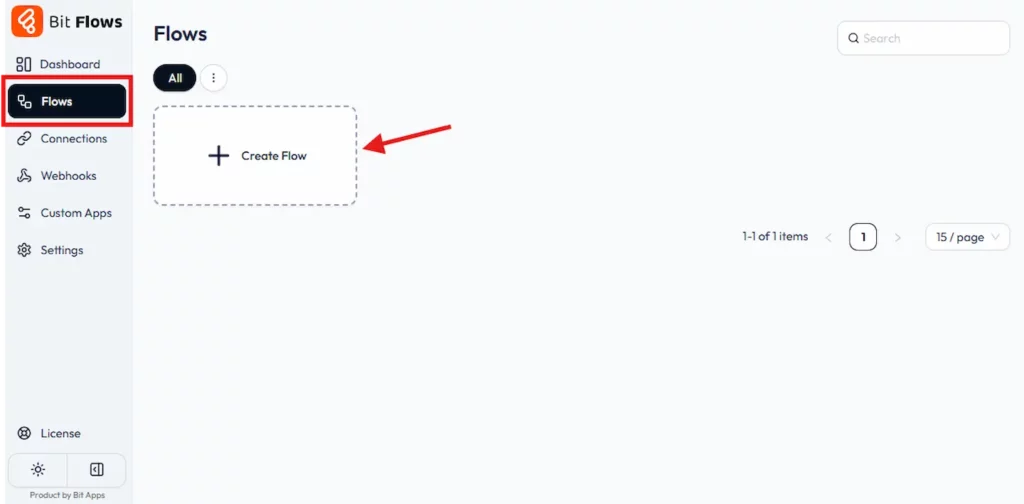
Go to Bit Flows → Add New Flow. Name it something clear, like “AI Product Description.”
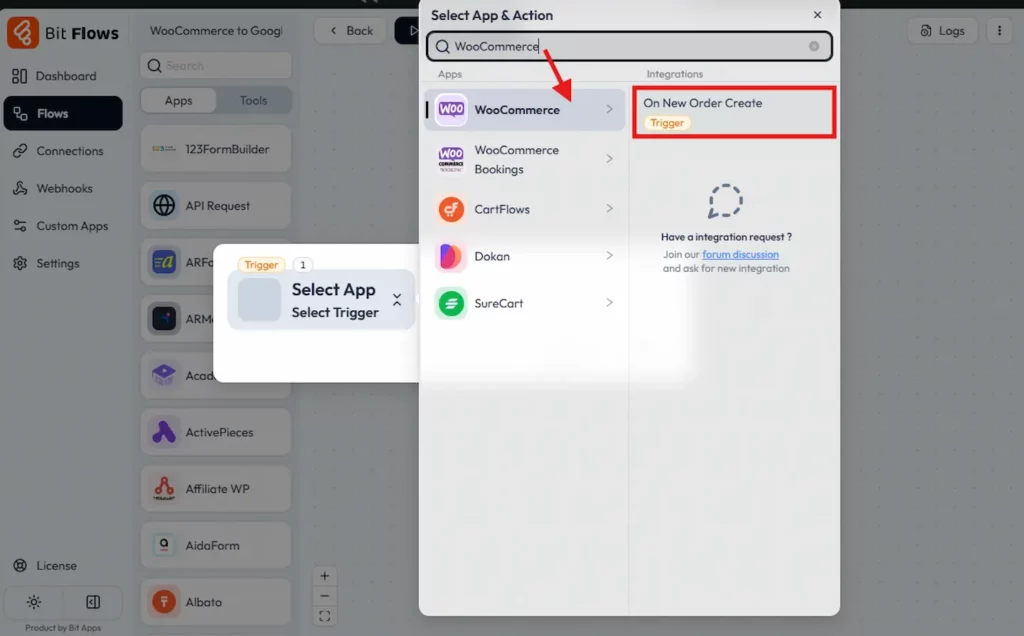
In the editor, add a trigger. Choose WooCommerce and select Product Updated as the event.
Add an action step, select OpenAI (ChatGPT), and connect it with the API key. Choose Create a Chat Completion. Use a prompt like:
“Write an SEO-friendly description for {{product_name}}”
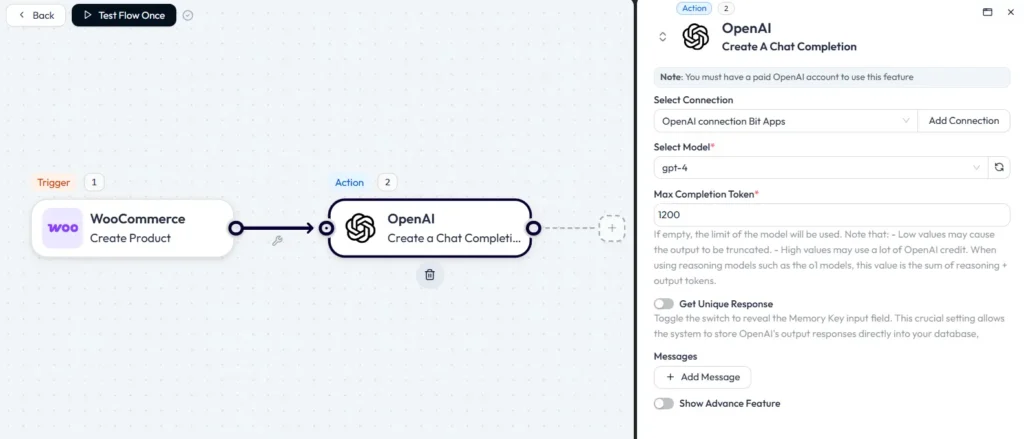
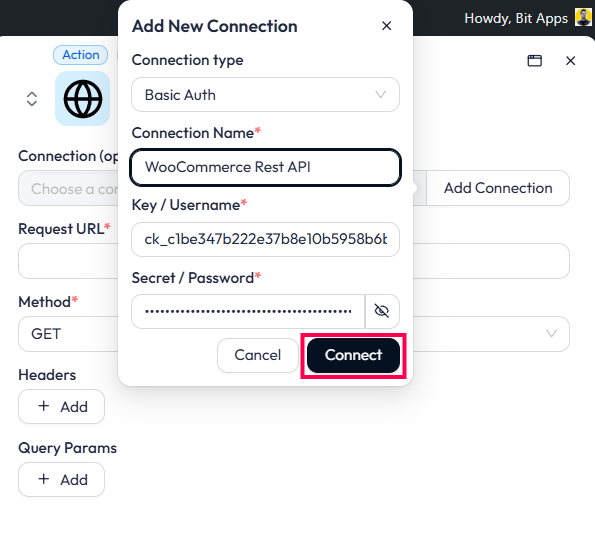
Add an API Request action to update the WooCommerce product description. Create a connection using Basic OAuth and generate WooCommerce API credentials by navigating to WooCommerce → Settings → Advanced → REST API.
Copy the Consumer Key and Secret, then paste them into Bit Flows to connect. This step links the workflow to your WooCommerce store.
Now, every time you update a product, Bit Flows will generate and apply an AI-written description automatically.
Configure the API Request to update the product description. Use the URL https://yoursite.com/wp-json/wc/v3/products/ (replace yoursite.com with your domain), set the method to PUT, and choose JSON as the content type.
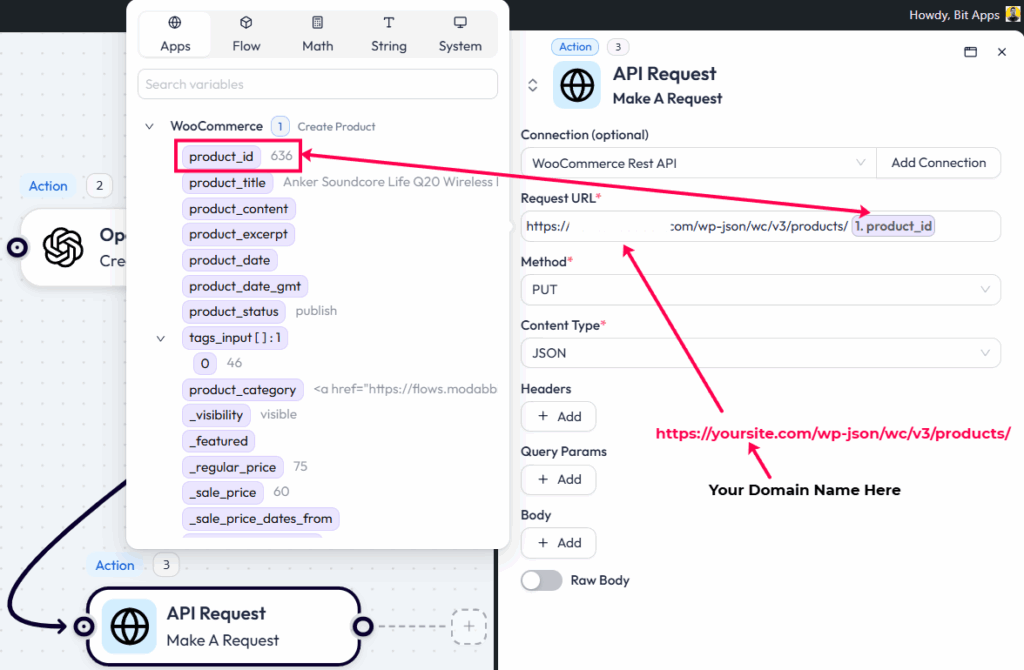
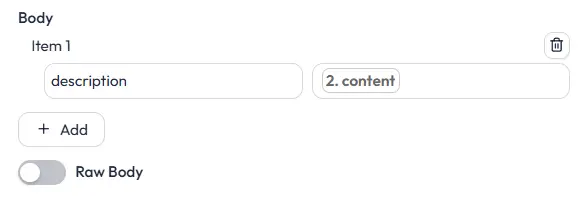
Add a key named “description” in the body and map the ChatGPT-generated description. Test the action to ensure the product description updates correctly.
You are done! Now run a full test of the workflow with a sample product to ensure all steps work seamlessly. Verify that the product ID comes from the trigger and the description is generated by ChatGPT.
Once everything is working, the workflow will automate SEO-friendly product descriptions for your WooCommerce store.
When you use both together, you can:
Things change fast in this space. Look out for:
Hyperautomation: This means automating everything you can, using AI and machines together. Even small businesses are trying this now.
No-code tools: Now, you can build workflows without writing code. Bit Flows is made for this, just drag, drop, and connect.
More personal experiences: AI will help automations talk to people in a way that feels unique.
Easier connections: As more tools open up, you can link more things together. Big and small companies can use these tools.
Agents and smart AI: AI that can plan, act, and react will become more normal.
Privacy: More people want control of their data. You need to keep things safe and follow new rules.
The future isn’t about choosing between automation and AI. It’s about using both together. When you combine them, you get systems that work better and smarter. Tools like Bit Flows make this possible. They bring automation and AI into one easy-to-use platform.
Together, they create something called hyperautomation. This is the next big thing in business. Whether you’re a business owner, a creator, or part of a team, automation and AI can help you stay ahead.
Don’t pick one over the other. Use both:
With tools like Bit Flows, even people without tech skills can start. The future isn’t about machines replacing people. It’s about people, automation, and AI working together. This is how we’ll work smarter and achieve more.
AI is getting smarter every day. But we need to use it responsibly. Always let people know when they are talking to a machine. It’s about being honest. Check your AI systems to make sure they don’t repeat unfair ideas or biases.
Mistakes can happen, so give people the power to pause or fix what the system does. Keep data safe. Use strong passwords and only collect what’s necessary. Follow the rules. And remember, automation doesn’t mean replacing workers. Teach your team how to work with these tools. It’s about helping, not taking over.
Automation and AI are very helpful for businesses now. One does the steps. The other adds thinking. When you join them, your team can do more, handle big jobs, and make better choices.
With Bit Flows, you can connect your apps, WordPress, and AI models. This lets you join simple steps and smart actions. Try starting now with one task. Add AI where it helps. Build your own flows. Watch how much easier your work becomes. Anyone can start, even those with little technical background.
No. Automation and AI are not fighting each other. Automation runs tasks. AI helps with smart decisions. They are better together.
Not always. Tools like Bit Flows have easy connectors and actions ready. Often, you just drag and drop steps. Test before using in real life.
You keep control of your data and spending. No big monthly bills per task. Your data stays with you, not on someone else’s server.
Automation follows set rules, doing the same steps each time. AI learns and makes decisions based on data.
Yes, you can. With tools like Bit Flows, just connect the steps you want. No need to code.
Many people use OpenAI, Gemini, or Claude. With Bit Flows, you can connect these to your site.
No. These tools help people do less boring work. Humans still make big choices and check the results.
You can use Bit Flows to link your WordPress site to ChatGPT. Make flows that send posts, comments, or questions to ChatGPT and bring the answers back.



 EN
EN  DE
DE  ES
ES  NL
NL  IT
IT