Google’s new Gemini AI is an advanced model that writes, summarizes, and structures content. It’s deeply integrated into Google’s tools and can reshape how you create content. Luckily, there’s an easy, no-code WordPress AI automation plugin called Bit Flows that lets you connect Google Gemini to WordPress without coding.
Using Bit Flows, you can automate tasks like writing meta descriptions, product descriptions, article summaries, or even structured data straight from your site. This means bloggers, marketers, and store owners can save hours on repetitive writing tasks and focus on other business work.
Google Gemini is Google’s latest AI chatbot and content engine. It’s a deeply integrated AI model built into Google Search and Workspace. Gemini can generate human-like text, summarize long articles, and even output data in structured formats like JSON. For example, in Google Docs, Gemini can draft paragraphs, intros, or rewrite content, which makes it a powerful writing assistant.
Because Gemini is integrated with Google’s ecosystem, it knows what content Google likes, giving it an edge in SEO tasks. Gemini can cut your writing time dramatically: it writes blog drafts, meta descriptions, or bullet-point summaries quickly, and it even shines in research and structured workflows. For WordPress users, this means better content faster, with fewer writer’s block moments.
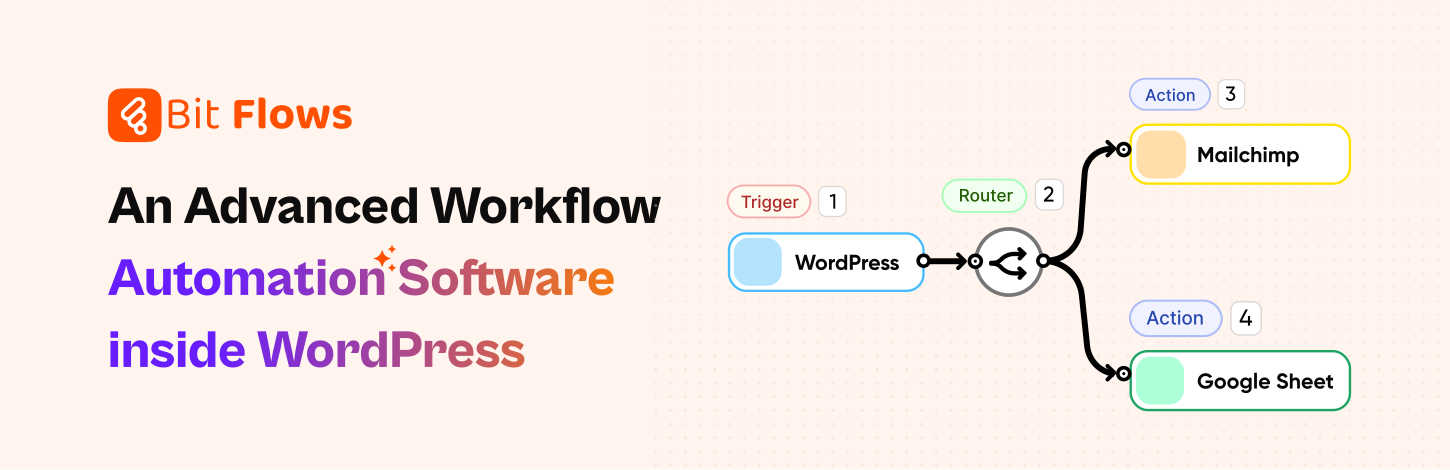
Bit Flows is a drag-and-drop automation plugin for WordPress. It lets you connect WordPress to hundreds of services without code. Bit Flows added native support for Google Gemini WordPress, offering two actions you can use: “Ask Gemini” and “Create a Completion”. This Bit Flows Gemini integration means any event on your site, like a post publish, can trigger a call to Gemini.
You simply pick a trigger, then add a Gemini WordPress action in the flow builder. Inside the Gemini action, you log in with your Google API key and choose a model. You map WordPress fields (like post title or content) into the Gemini prompt, and then map Gemini’s JSON response back into fields. Bit Flows even parses the JSON for you.
Bit Flows handles all the data mapping and dynamic prompts, so you don’t need any code. For marketers, bloggers, and store owners, this makes automating WordPress with Gemini super easy. You get a no-code WordPress AI plugin that handles everything from field mapping to error checking, logging, and test runs with a friendly drag-and-drop interface.
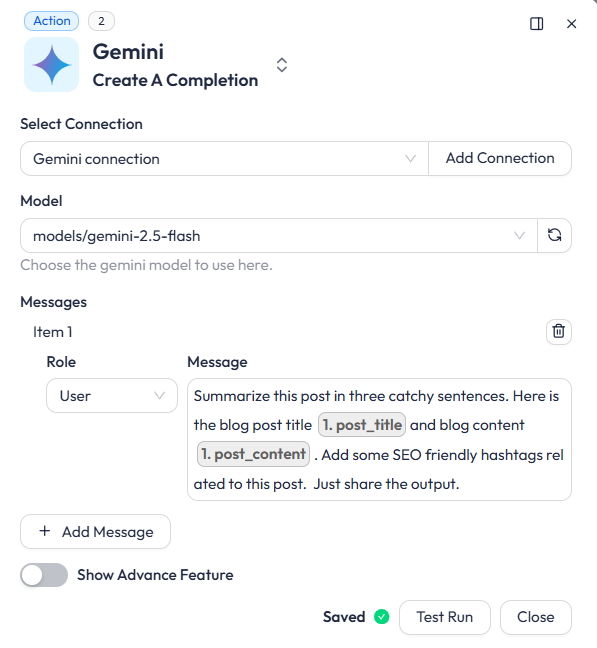
Imagine you just published a 1000-word blog post. Instead of writing a separate social media caption, create a Bit Flows workflow that sends the post text to Gemini with a prompt like “Summarize this post in three catchy sentences.” Gemini will quickly analyze the main point into a short, shareable line. Here is how you can add prompts in Bit Flows for Gemini.
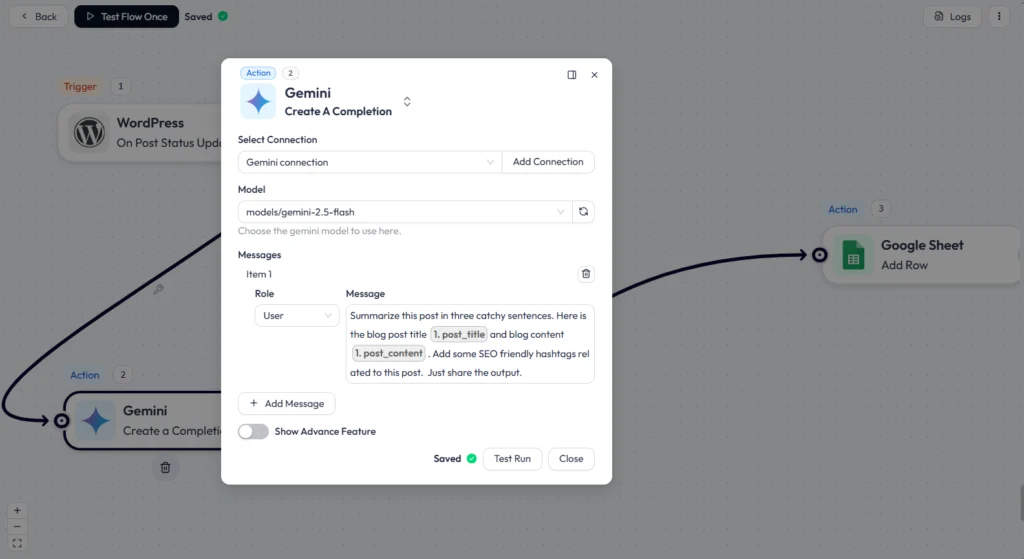
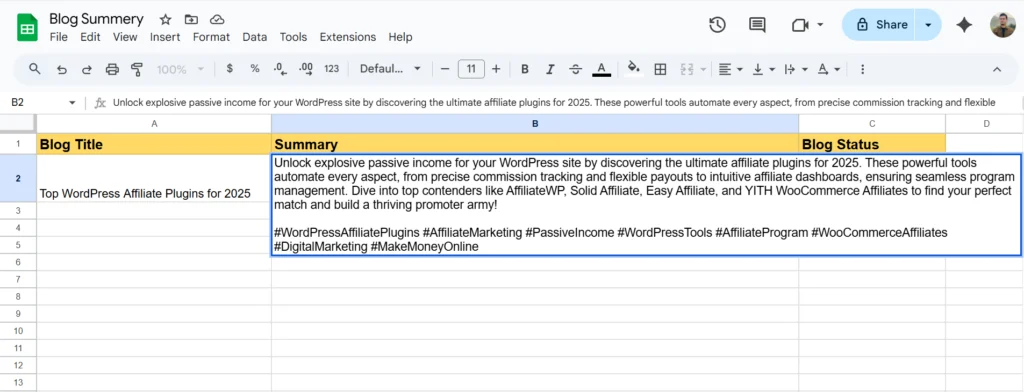
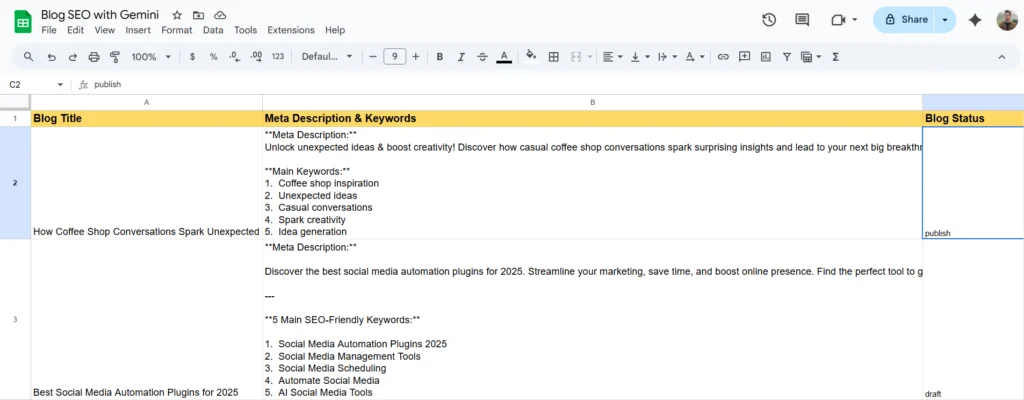
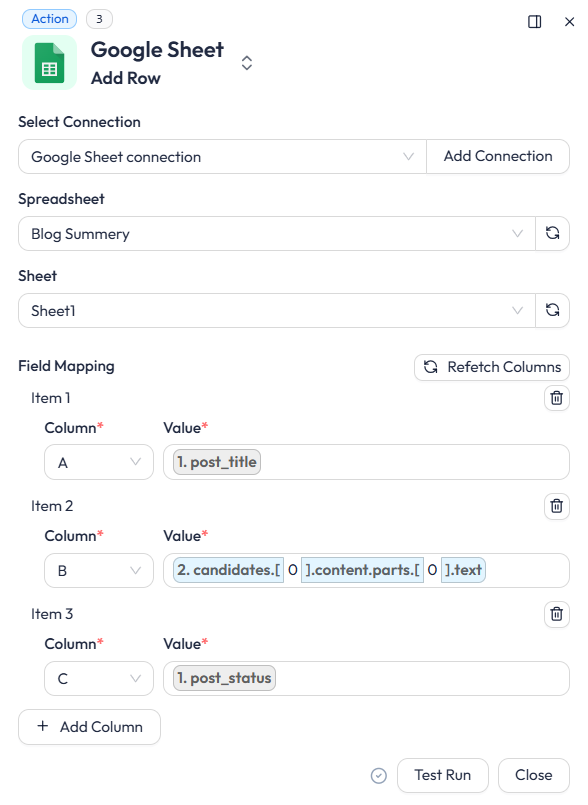
This short-line summary is perfect for Twitter, LinkedIn, or Instagram. So with Gemini, you get a ready-to-post caption in seconds. This increases engagement and saves you time. Gemini handles the hard work of reading and summarizing, and Bit Flows connects that summary to your social media and other tools. Here I have summarized blog posts and sent the data to Google Sheets.
Meta descriptions and keywords are important for SEO, but writing them can be time-consuming. With Bit Flows, you can automate this: set up a flow that triggers when a post is saved, then send the post title and content to Gemini. In the Gemini action, use a prompt like “Write a 150-character meta description and a list of keywords for this blog post.” Gemini will return an SEO-focused snippet plus keyword suggestions. Here is how you can add multiple prompts in Bit Flows:
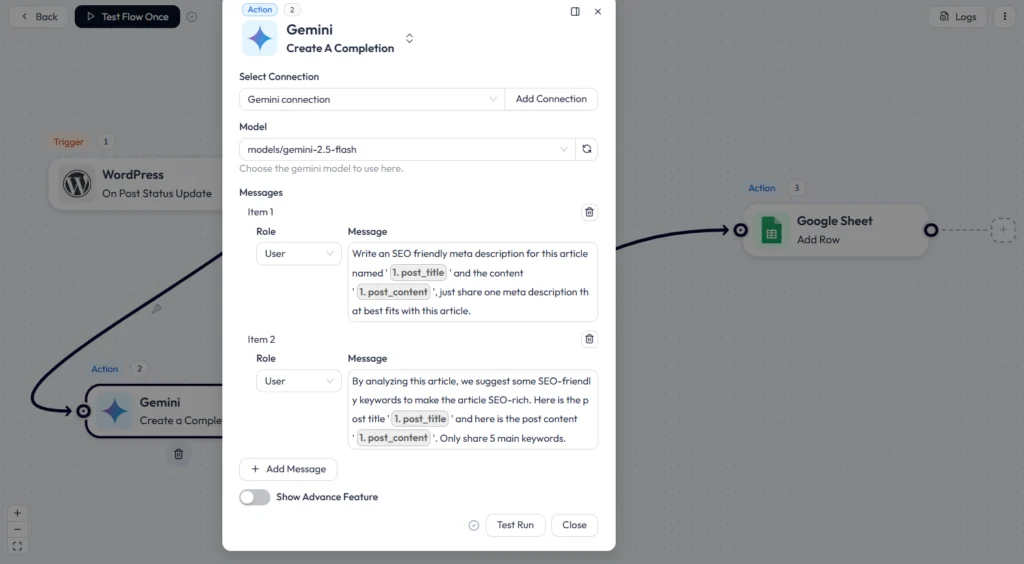
This automated SEO metadata (WordPress) approach ensures every post has optimized metatext without manual effort. The result is more consistent, keyword-rich metadata that can increase search rankings. Here is the output of the prompt.
If you run a WooCommerce store or any online shop, Gemini can write AI product descriptions WooCommerce. Give Bit Flows a trigger like “New Product Added or Updated Product,” then in the flow, send the product name and features to Gemini. Ask Gemini WooCommerce to “Write a product title and a brief description for this item.” Here is how you can map WooCommerce fields with Gemini to make a comprehensive prompt.
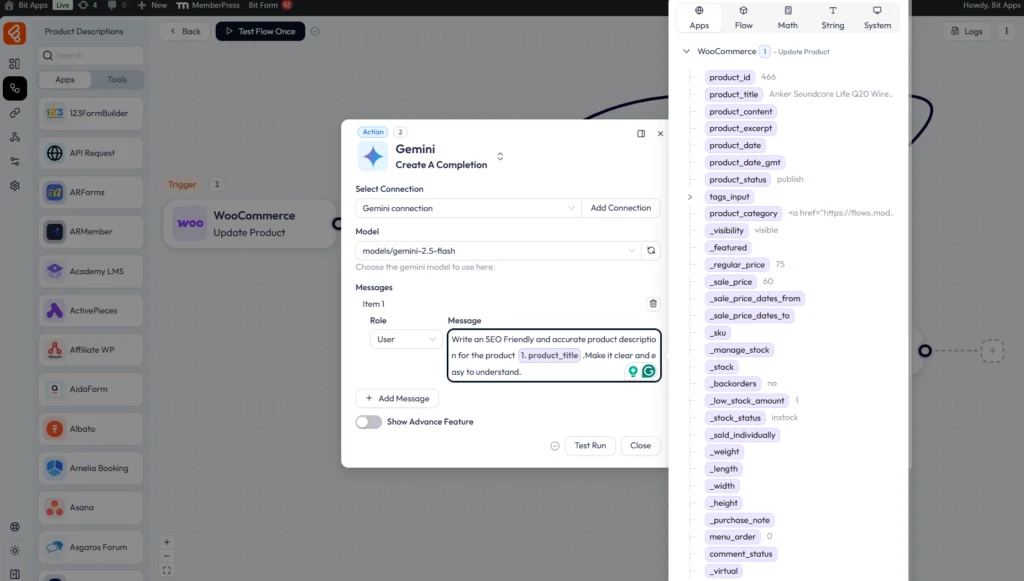
Gemini will write a polished description (short, medium, or long) in your brand’s tone. This is ideal for large catalogs. Google’s own developers showcased a Gemini-powered e-commerce tool that generates full product content, analyzes a product (even from an image), and creates titles, descriptions, meta titles, and keywords. Here is the output sent to Google Sheets.
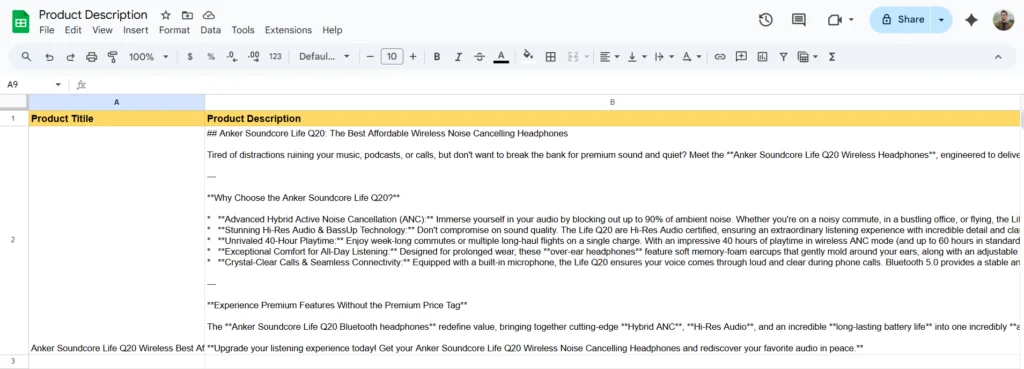
Using Bit Flows with Gemini does the same inside WordPress. For example, a plugin could send a product’s details to Gemini and get back a JSON with the title and AI product description WooCommerce. This means you can publish large batches of products with the professional copy in seconds.
Beyond writing tasks, Gemini can organize information. Suppose you have a long block of text or maybe a manual or set of product specifications. You can use Gemini to extract key points or format data. For example, map your content into Gemini with a prompt like “Convert this into bullet points” or “Output this product data as JSON with fields name, specs, and price.”
Use cases include turning technical specs into schema markup, summarizing research notes, or creating tables of data without manual formatting. Gemini shines on these structured data WordPress tasks. Using Bit Flows, you map your input text, let Gemini restructure it, and Bit Flows parses the JSON so you can save the results as metadata or custom fields. This optimized complex work, and you save hours by having Gemini handle the formatting.
Getting started is easy and requires no coding:
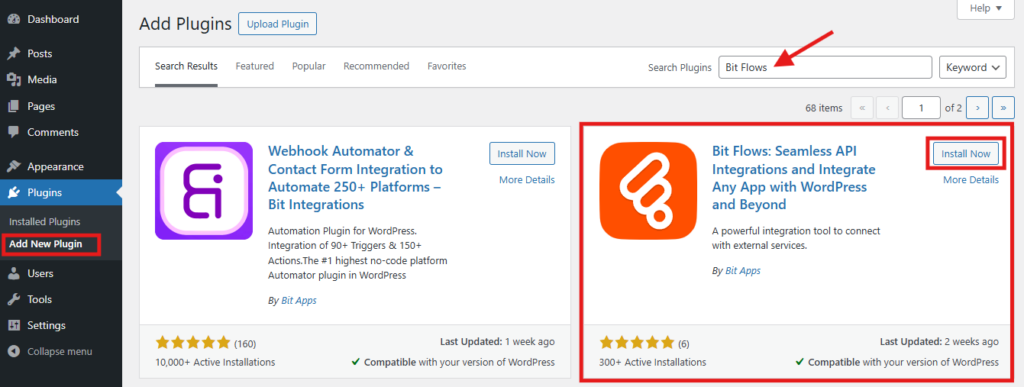
Install Bit Flows: In your WordPress dashboard, go to Plugins → Add New, search for “Bit Flows”, and install it. It’s quick and free. Then activate the plugin.
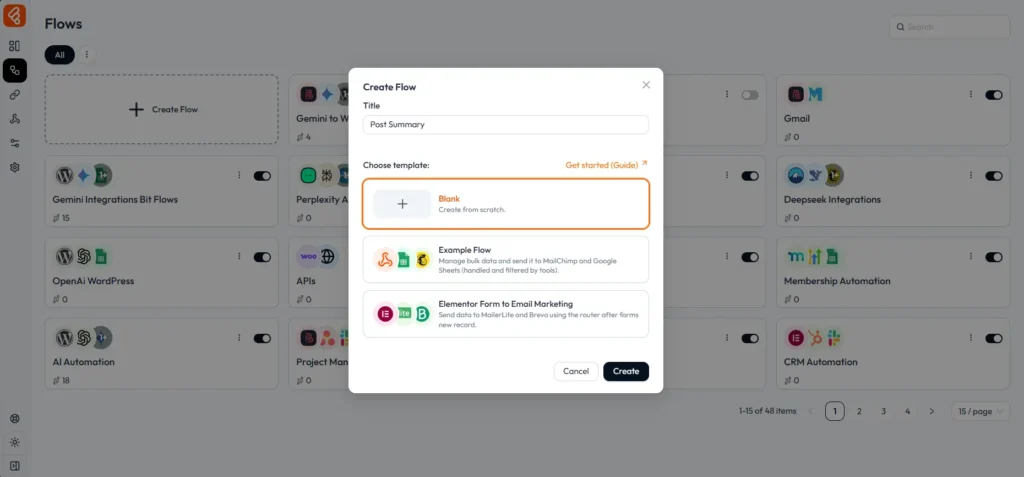
Create a Flow: In the Bit Flows menu, click to add a new Flow. Give it a name like “Post Summary.”
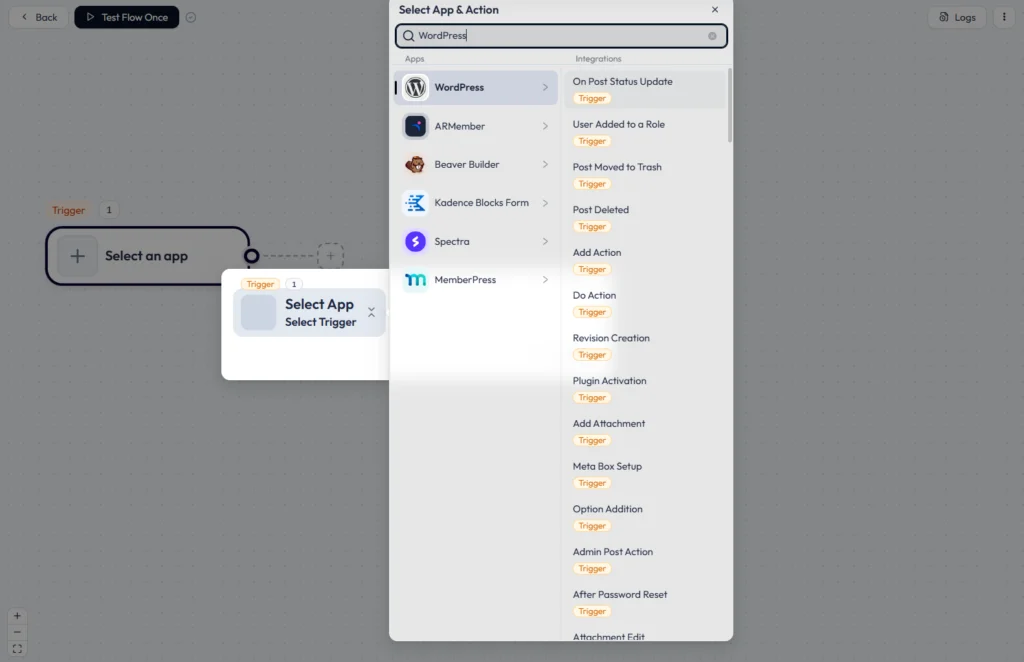
Add a Trigger: Choose a trigger event, such as “New Blog or On Post Status Update”. This tells Bit Flows when to run.
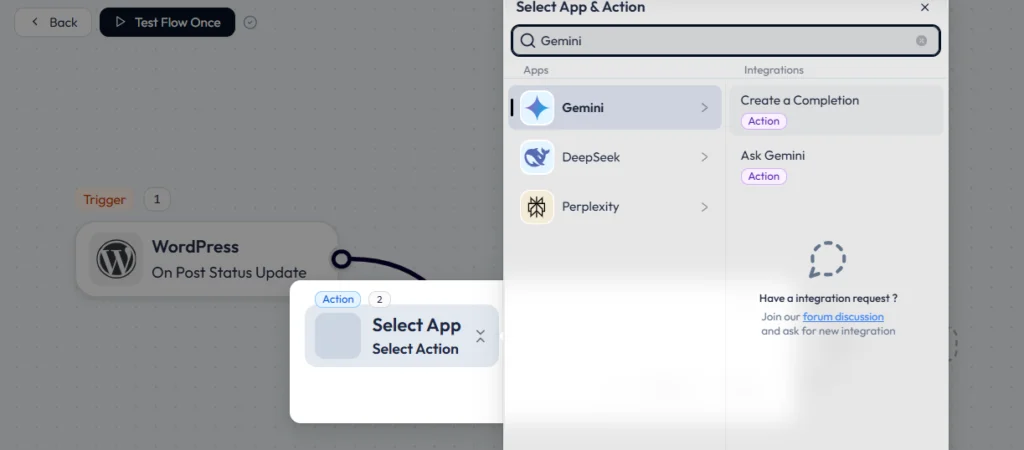
Add a Gemini Action: In the Flow Builder, add an Action node. Search for “Gemini” and select either “Ask Gemini” or “Create Completion”. You’ll be prompted to enter an API key for Gemini. This links Bit Flows with your Gemini API.
Map Fields & Write the Prompt: In the Gemini action settings, select the model (e.g., Gemini 2.5-flash). Then write the prompt template, using dropdowns to insert dynamic fields like {post_title} or {post_content}. For example: “Write a 20-word summary of the following article:” followed by {post_content}.
Map the Response: Under the action’s settings, choose where to store Gemini’s answer. You can map parts of the JSON response into custom fields, post content, post excerpts, etc. For example, take the “text” response and map it to the
Test the Workflow: Use Bit Flows’ Test Run feature to make sure it works. Bit Flows will show a log of inputs and outputs. From now on, every time the trigger fires, Gemini will run automatically. Bit Flows also keeps logs of each run so you can debug or refine prompts.
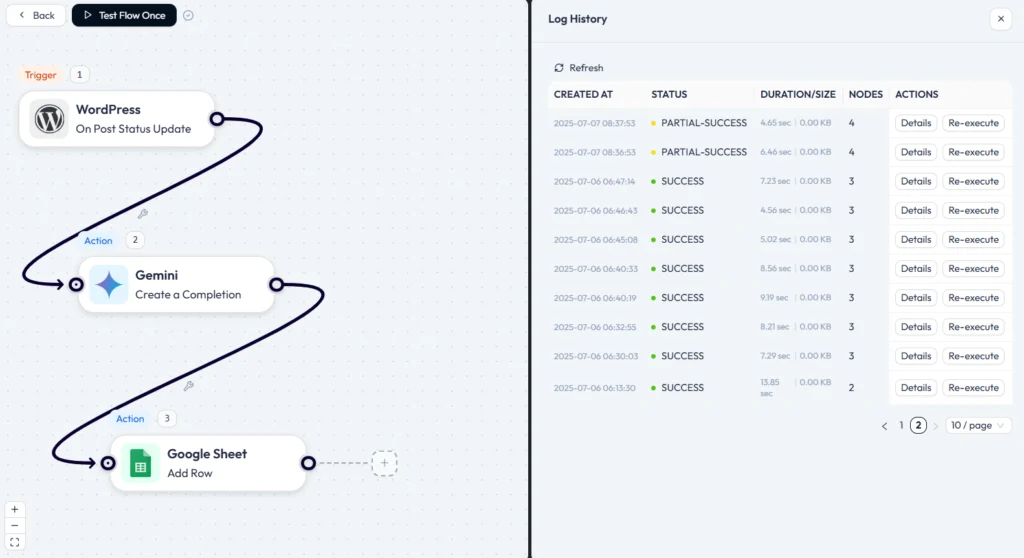
That’s it! The Bit Flows documentation has more examples and troubleshooting tips, but in general, this no-code setup connects your site to Gemini smoothly.
With just a few clicks and no coding, connecting Google Gemini with WordPress using Bit Flows transforms how you can do AI content automation. You can automate WordPress with Gemini to handle everything from catchy social summaries to SEO metadata, product copy, and structured data.
This workflow saves time and boosts productivity: routine writing tasks get done by AI, so you can focus on strategy and creativity. Content stays fresh and optimized, and your publishing process becomes much faster.
For any blogger, marketer, or online store owner, trying out this Bit Flows Gemini integration can be a game-changer. Get started today and see how AI-powered WordPress content automation can level up your WordPress site!
Bit Flows is a WordPress plugin that lets you connect Google Gemini to WordPress site. In Bit Flows, you’ll find Gemini actions available. By setting up a Bit Flows automation, you can send WordPress data to Gemini and get results back, all without any coding.
Use Bit Flows to send your post’s title and content to Gemini with a prompt like “Write a 150-character meta description”. Gemini will output a description and even suggest keywords.
In Bit Flows, map Gemini’s output to your SEO fields. This fully automates writing meta descriptions. As noted above, Gemini can indeed help with writing meta descriptions for blog posts.
Absolutely. Gemini is well-suited for e-commerce copy. Also, Gemini can automatically create product titles and descriptions from product images.
Using Bit Flows, you can do the same: send a new product’s details to Gemini and get back a ready-made description. This is perfect for keeping product copy consistent and saving time on large catalogs.






 EN
EN  DE
DE  ES
ES  NL
NL  IT
IT  PT
PT  JA
JA