
Running a WordPress website means handling many small, repetitive tasks. Sending emails, updating content, and organizing data. These jobs can steal your time and energy. They pull your focus away from growing your business.
Manual work holds you back. It stops you from innovating. It slows down your progress. Automation changes everything. With the right tools, you can set up systems that do the work for you.
Here’s how it works: something happens (a trigger), like a form is filled out. That sets off an action, such as sending an email or updating your list on Google Sheets. The process runs automatically. You save time and effort. Your website works, even when you’re not there.
In this article, I will show you how to automate your WordPress site with a cool automation tool. It’s a powerful automation tool, and it connects your site with hundreds of apps and services. No coding. No hassle. Just more productivity, every day.
You don’t need to be a tech guy to play with these tools. Just follow the process and do some automation magic for your business.
WordPress can be automated to save time and reduce manual work. WordPress automation means using Automation tools to optimize routine tasks within your site. For example, you can automatically send form data, update Google Sheets or CRM, or trigger actions when something happens on WordPress. By doing automation, developers and site owners can save effort, increase productivity, and reduce human error.
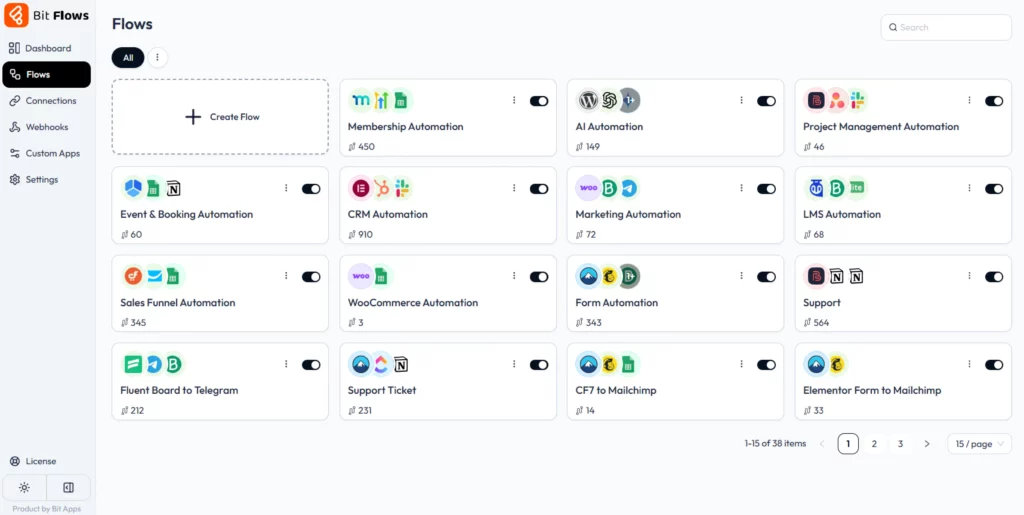
Using plugins like Bit Flows, you can connect almost every part of your WordPress site. For example, when a visitor submits a Contact Form 7 or Elementor form, an automation can instantly send that data to your CRM or email list. You can also automate team notification, content sharing, and project tasks. Any repetitive WordPress task, from user signups to sending notifications, can be automated with the right workflow tools.
Automating your WordPress site opens up countless possibilities. You can:
Connect forms to everything: When a user fills out an Elementor or Contact Form 7 form, automatically add the lead to a Google Sheet, send a welcome email, or create a new CRM contact.
Sync e-commerce data: As soon as an order is placed in WooCommerce, auto-update inventory spreadsheets and send order details to your sales team or accounting software.
Auto-manage memberships: When someone joins or cancels a MemberPress or Paid Memberships Pro plan, automatically tag them in your CRM or restrict content accordingly.
Drive marketing campaigns: New subscribers can be instantly added to Mailchimp or MailerLite lists, and triggered email sequences can run based on signup or purchase.
Optimize content sharing: Schedule new blog posts to automatically tweet or post on LinkedIn, or use Zapier-like integrations to post in forums or Slack.
Create support tickets: If a user posts on bbPress or submits a support form, Bit Flows can create a task in Asana/Notion so your team never misses it.
Manage bookings and events: When someone books an appointment via The Events Calendar or WooCommerce Bookings, Bit Flows can add events to Google Calendar or send a confirmation email.
Using AI tools: You can even integrate AI; for example, send new blog content to OpenAI or Gemini for analysis, or trigger DeepSeek to handle image recognition.
These automations turn actions into a full WordPress workflow automation. You could auto-enroll a form registrant in a LearnDash course and send them a series of email lessons. You could tag CRM contacts on purchases, add newsletter subscribers, or update a project management board without touching the admin dashboard.
In each case, Bit Flows enables the process by providing triggers like Form Submitted or New Order and actions like Add to CRM or Send Email that you can link together.
To see this in action, here are some examples for automating your WordPress site with some real use cases.
These real-world scenarios show how Bit Flows turns simple triggers into complete workflows. For example, a store owner might automate an abandoned cart campaign: if an order isn’t completed, Bit Flows can send a reminder email via Mailchimp or any other platform.
By connecting different systems (forms, shopping carts, CRMs, email tools), Bit Flows powers these automations without any custom coding.
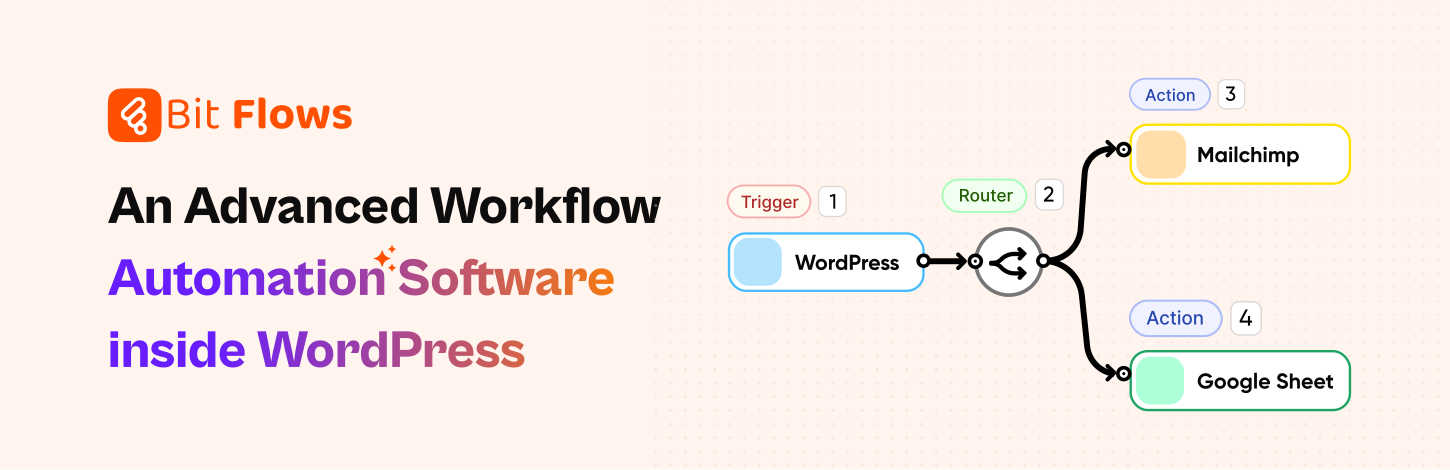
Bit Flows stands out as a top choice for WordPress automation. It is a drag-and-drop visual workflow builder that works like Zapier for WordPress. Bit Flows runs natively on your site, so you have full control and no monthly fees.
With Bit Flows, you get unlimited automations, unlimited workflows, and unlimited steps. So you can connect as many triggers and actions as you need without hitting any limits. Its visual builder makes it easy even for non-developers to set up flows between forms, WooCommerce, email marketing, CRMs, and more.
While there are many automation plugins, Bit Flows is often considered the best WordPress automation plugin for serious users because it’s self-hosted, fast, and feature-rich. This means you can automate WordPress tasks of all kinds, forms, e-commerce, LMS, memberships, and beyond, without relying on external services.
Bit Flows supports popular form plugins and treats each submission as a trigger. For example, when an Elementor form is submitted, Bit Flows can automatically send that data from the Elementor Form to MailChimp, your CRM (e.g., HubSpot), or start an email campaign. This turns a simple web form into a lead-generation engine.
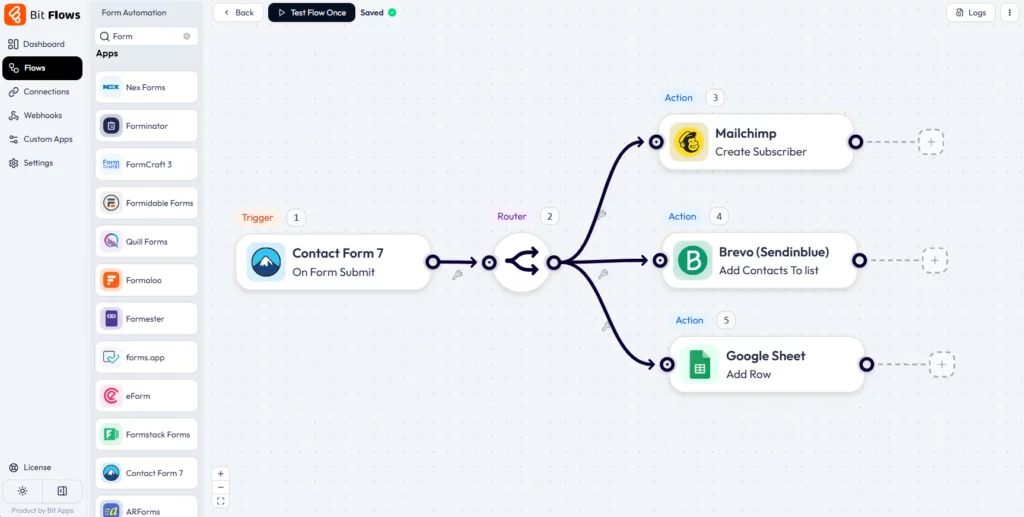
Use case: A marketing site uses CF7 to collect leads, and Bit Flows sends every new Contact Form 7 lead to the sales team’s CRM and adds them to a Mailchimp newsletter. The benefit is fast, error-free lead capture and instant follow-up without manual copy-pasting. Bit Flows makes it easy by providing pre-built integrations for forms; just map form fields to CRM or email fields in the flow builder.
Bit Flows has triggers for WooCommerce orders, Shopify sales, Dokan marketplace events, and more. So, when a new WooCommerce order comes in, you can use Bit Flows to update inventory in Google Sheets, add the customer as a contact in your CRM, and send an order confirmation or invoice email automatically.

Use case: An online retailer automates inventory management: every sale decrements stock counts in a shared Google Sheet and creates a follow-up task for shipping. The benefit is accurate inventory and faster order processing. Bit Flows enables this by providing an easy builder to connect WooCommerce or Shopify with any other app. Because Bit Flows is self-hosted, there are no limits on the number of order flows you create.
Bit Flows works with funnel-builder plugins like CartFlows and WP Funnels. For example, if a user checks out or completes a funnel step, you can use Bit Flows to organize their data by list and do many more automation.

Use case: After purchasing a product by using CartFlows funnel, this data can be sent to your email marketing platform and CRM, as well as Google Sheets. Bit Flows makes this happen by integrating directly with CartFlows; each funnel event becomes a trigger in your workflow.
Learning platforms are fully supported. For example, when a student enrolls in a Tutor course or completes a lesson, Bit Flows can automatically update their record in your CRM, add a row in Google Sheets for tracking, or trigger a certificate email.

Use case: An online course provider uses Tutor LMS. As soon as a student enrolls, Bit Flows adds them to an email campaign welcoming them to the course. When they finish a module, Bit Flows logs their progress and sends a reminder for the next lesson. The benefit is easy student management and improved engagement. Bit Flows enables this by offering LearnDash and Tutor LMS triggers and multi-step logic to handle quizzes and lessons.
Membership events can trigger automations, too. For example, when a user’s MemberPress subscription is activated or expires, Bit Flows can update their status in your CRM and send a personalized email.

Use case: A content site uses Paid Memberships Pro. When someone buys a new membership, you can add their email to the premium newsletter list. The benefit is automated membership management and consistent communication. Bit Flows supports MemberPress and similar plugins, so you just connect those triggers to the actions you want.
You can link WordPress events to project tools. For example, on each new form submission or order, Bit Flows can create a task or database item in Notion, Asana, or ClickUp.
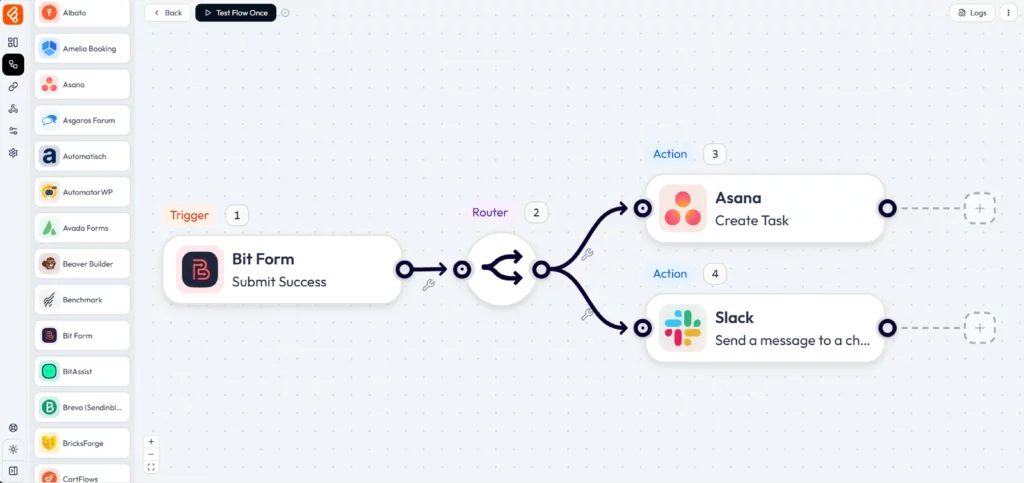
Use case: A service agency uses Asana to track client requests. When a “New Project” form is submitted on their site, Bit Flows instantly creates an Asana task with the project details. The benefit is that nothing gets forgotten, and team members get instant tasks without manual entry. Bit Flows offers native integrations for Asana and ClickUp, so you just set up an “Add Task” action in your flow.
Bit Flows now connects with AI platforms. For example, when new content is published, you could send it to OpenAI to generate a summary, or use DeepSeek to tag images automatically.

Use case: A blog owner publishes an article, and Bit Flows passes it to an AI tool to create social media captions. Another flow takes new image uploads and uses Gemini to suggest ALT text. The benefit is smart automation beyond WordPress itself. Bit Flows supports AI APIs via its Custom App feature, so you can plug in any API or OpenAI endpoint into your workflows.
Event registrations can trigger workflows. For example, when someone registers via The Events Calendar, Bit Flows can add them to a MailerLite list and create a Google Calendar event.

Use case: An event organizer uses Amelia Booking. Each new booking triggers Bit Flows to send confirmation to and update a shared spreadsheet, and add to your Notion page. The benefit is fully automated event management with real-time sync to your tools. Bit Flows has triggers for Eventin, Fluent Booking, WooCommerce Bookings, etc.
Email marketing platforms connect easily. New leads or customers can be added to Mailchimp or MailerLite lists automatically.

Use case: Whenever a WooCommerce customer checks out, Bit Flows adds them to Brevo and lists them based on the product they bought, and sends the lead info to your Telegram team group. The benefit is targeted campaigns without manual CSV imports. Bit Flows natively supports Mailchimp, MailerLite, Brevo, and others, so your marketing lists stay up to date.
Keep your CRM in sync. For example, Bit Flows can create or update contacts in HubSpot every time someone fills a form or makes a purchase.
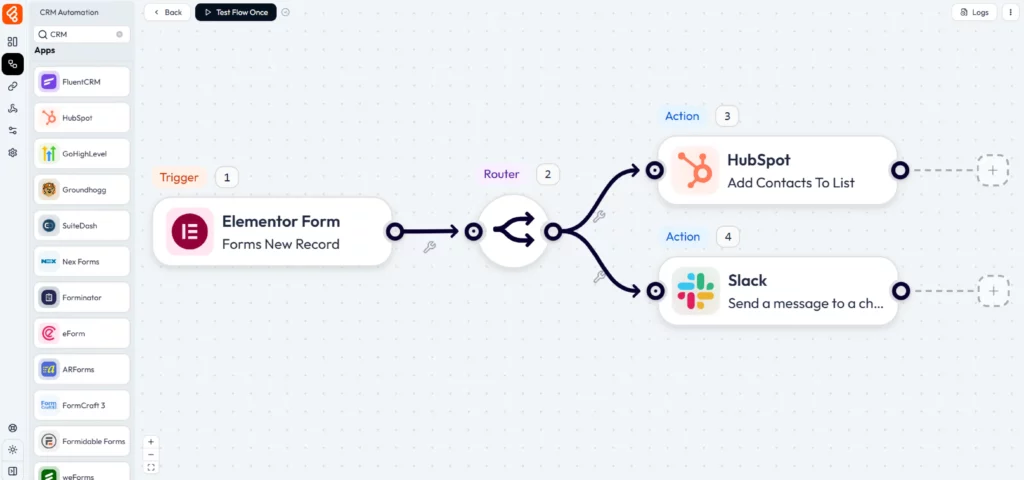
Use case: A business collects leads via Elementor forms. With Bit Flows, each submission creates a new HubSpot contact and adds a lead source tag. And also, you can send the lead details to your Slack channel. The benefit is no longer forgetting to import leads. Bit Flows integrates with HubSpot, Fluent CRM, and many more.
In all these cases, Bit Flows enables the connection: it has built-in triggers for the listed tools and easy actions for sending data to any tool. You simply choose a trigger like New Order and an action like Add Row to Google Sheets, and Bit Flows handles the rest, without custom code or extra plugins.
Following these practices ensures your automations run smoothly and remain maintainable. Always review the Bit Flows logs and use built-in notifications so that you catch any task failures immediately.
WordPress automation can transform how you run websites. By automating processes, from form leads to email campaigns, from e-commerce orders to membership management, you free up valuable time and reduce errors. Bit Flows is a powerful tool that makes WordPress workflow automation easy and limitless. It’s self-hosted, drag-and-drop, and connects to 150+ services (forms, CRM, email, AI, and beyond).
We encourage you to explore our resources (blog posts on Elementor and WooCommerce, Bit Flows docs, and automation workflows) to learn more. Use the strategies in this guide to start automating your own WordPress site. With the right automation setup, you’ll increase your WordPress productivity, spending less time on routine work and more on growing your business.
Try Bit Flows now and let the WordPress automation magic handle your repetitive tasks.
Install an automation plugin like Bit Flows. In WordPress, you set up a trigger, like form submitted or order placed, and one or more actions, like send email or add to CRM. This way, tasks run automatically without manual steps.
It’s creating automated sequences of tasks (workflows) within WordPress. For example, when a new user registers, send a personalized welcome email. This streamlines operations on your site.
WordPress Automation means connecting WordPress plugins or data with external tools like CRM, email, or AI services. Plugins like Bit Flows let you integrate WordPress with hundreds of apps by using APIs and webhooks without writing a single line of code.
Several plugins offer automation but Bit Flows is one of the best if you want unlimited workflows and self-hosting. It supports hundreds of integrations (CRM, email, forms, etc.) all in one place.
Automating removes manual, repetitive work. This means faster response times, fewer errors, and the team can focus on high-value tasks.
Yes, absolutely. Automation plugins are designed to work with your current WordPress setup. They integrate smoothly with popular themes, plugins, and services you are already using.



 EN
EN  DE
DE  ES
ES  NL
NL  IT
IT