AI agents are showing up everywhere, but not all of them work the same way. Some simply react to a rule. Others remember what happened before, work toward a goal, compare possible outcomes, or improve from feedback.
Understanding the different types of AI agents matters because the wrong approach can make a workflow more expensive, harder to debug, or unnecessarily complicated. A simple rule may be enough for one task, while another needs memory, reasoning, tools, or human approval.
This guide breaks down the five classic AI agent types in plain language, with real examples and practical workflow patterns. You will also see how those ideas translate into real automation using AI agents, memory, routing, scoring, tools, and Human in the Loop.
There are five classic types of AI agents in the Russell and Norvig agent-program classification. Simple reflex agents react to the current percept using condition-action rules. Model-based reflex agents maintain internal state. Goal-based agents consider desired outcomes.
Utility-based agents compare outcomes using a utility measure. Learning agents use feedback to improve future behaviour. In visual workflow builders, you can reproduce useful patterns inspired by the first four today; a true learning agent also needs a feedback-and-update loop.
In the Bit Flows examples in this guide, the practical shape is usually trigger → AI Agent → structured result or tool call → router/action. Memory and tools are optional and depend on the job.
An AI agent is a software system that receives information from its environment and selects actions to pursue an objective. Depending on the design, it may act autonomously within set boundaries or pause for human approval at important steps.
The part that matters is the decision. A script that copies form entries into a spreadsheet does not need to interpret the entry. It runs the same steps every time. An LLM-based agent can read the entry, work out what kind of request it is, and choose a tool or route based on the instructions and context it has.
In practice, an agent needs input from its environment, a way to select an action, and some way to affect what happens next. That action-selection logic can be as simple as condition-action rules in the classic agent taxonomy or as flexible as an LLM using tools. Not every agent needs memory, a chat model, or a router.
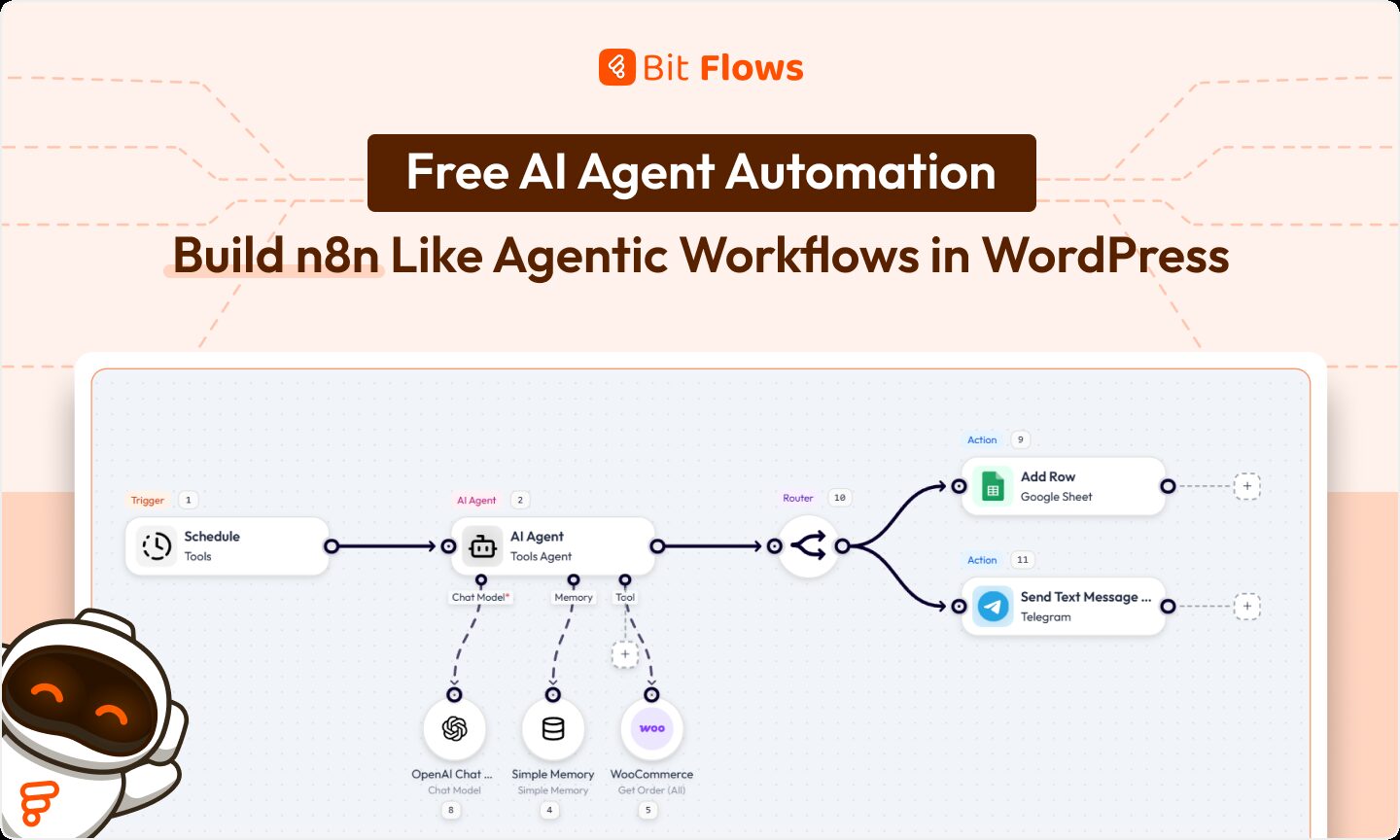
For the LLM-based workflows in this guide, four pieces show up repeatedly. A trigger wakes the workflow when a form gets submitted or a WooCommerce order comes in. The chat model interprets the prompt and input. Tools let the agent call connected actions. Memory is optional and carries useful context when the task depends on earlier interactions. The screenshot below shows those pieces working together inside a real Bit Flows workflow.
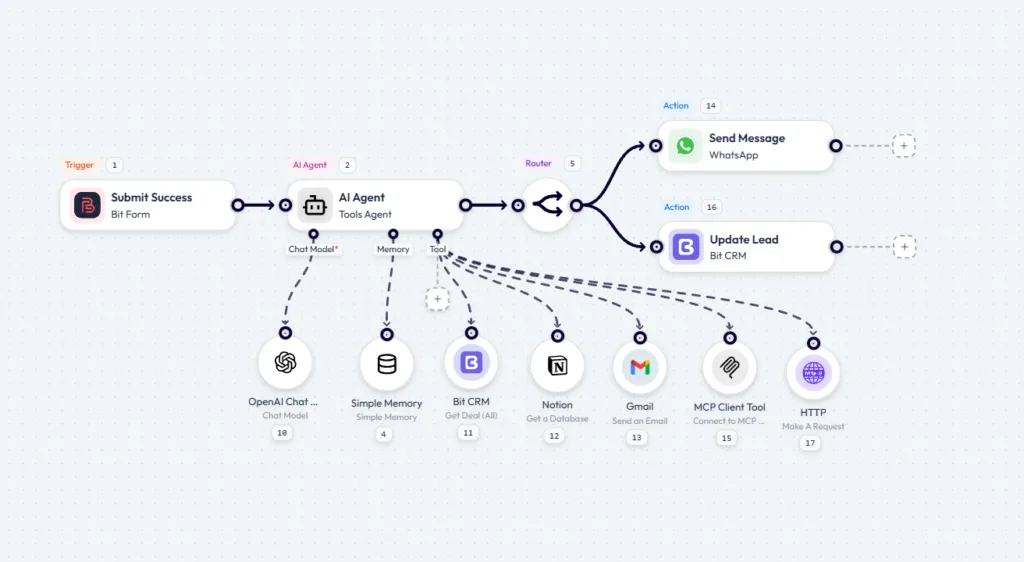
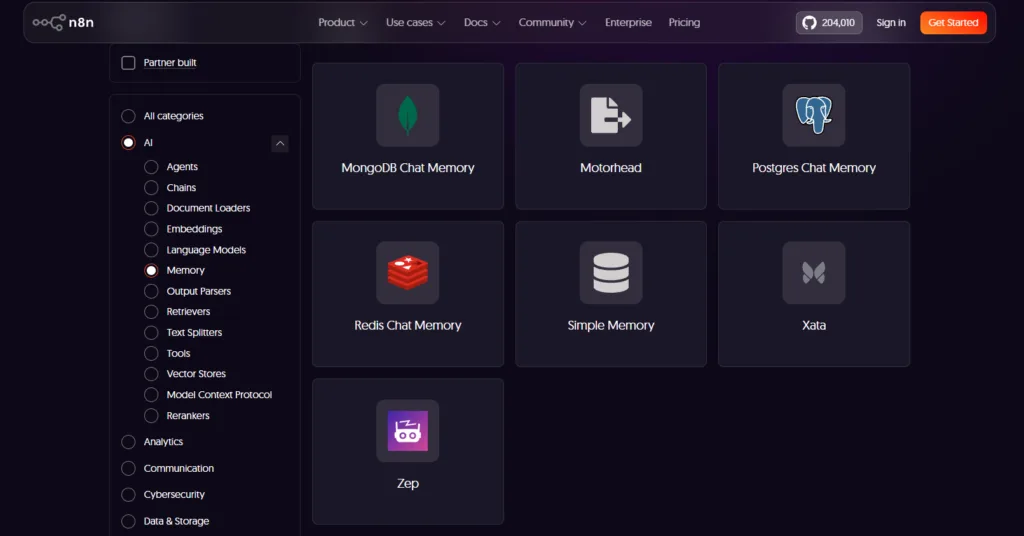
The tools are the actions you let the agent call, such as Gmail or Google Sheets. Memory lets an agent retain context when the workflow needs it. The Bit Flows AI Agent node takes a chat model, an optional memory node, and connected tool nodes as sub-nodes.
The AI Agent node in n8n uses a similar visual pattern with a chat model plus optional memory and tools.
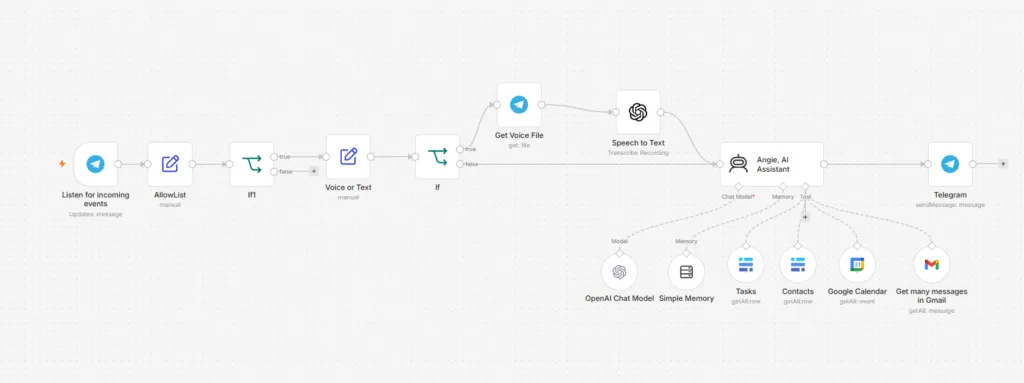
Recognise the pattern in one builder, and the other becomes easier to read. If you want the full node-by-node walkthrough, the guide to building your first AI agent for WordPress covers it step by step.
The five types of AI agents used in this guide come from the agent-program structures described in Russell and Norvig’s Artificial Intelligence: A Modern Approach, a widely used AI textbook. Its chapter on intelligent agents covers simple reflex, model-based reflex, goal-based, utility-based, and learning agents.
These agent types in AI differ by what information they use and how they choose actions. The progression roughly adds more state, planning, preference handling, or learning rather than representing a strict ladder where every later system is automatically better. The table below sets out the types of AI agents with examples you already recognise, and the workflow section later maps each one to a practical job.
| Agent type | What it uses to decide | Keeps state | Everyday example |
| Simple reflex | The current percept and condition-action rules | No | Thermostat-style controller, keyword rule |
| Model-based reflex | Current percept plus internal state | Yes | Robot vacuum tracking what it has already observed |
| Goal-based | Possible actions measured against a goal | Usually | Route planner choosing a path to a destination |
| Utility-based | Expected utility across possible outcomes | Usually | Planner balancing cost, time, and other preferences |
| Learning | Experience and feedback used to improve behaviour | Depends on design | System that adapts from evaluated outcomes |
Notice what those AI agent examples have in common. None of them has to be a chatbot. The type of an agent describes how it chooses actions, not whether it talks.
A simple reflex agent responds to the current percept using condition-action rules and does not rely on an internal history of what came before.
A common simplified example is a thermostat-style controller: temperature below 20, turn the heating on. There is no consideration of yesterday’s temperature or a model of what the room was doing five minutes ago.
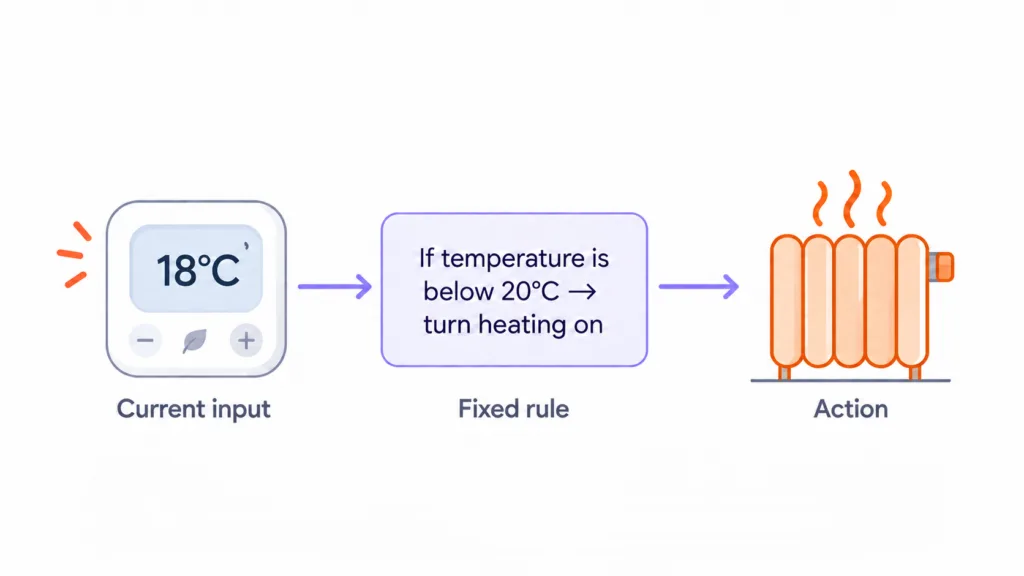
In a workflow builder, a condition node can reproduce the same simple reflex pattern without calling a language model. If the order total is over 500, send it to the manager. If the form field says refund, route it to billing.
That does not mean simple reflex agents sit outside the classic AI-agent taxonomy. They are one of its basic agent structures. The practical point for a no-code workflow is simpler: if your decision really fits in one reliable rule, a condition node is faster, cheaper, and easier to debug than adding an LLM just to make the same choice.
A model-based reflex agent maintains internal state so it can act when the current percept alone does not tell the whole story. It updates that state as new information arrives.
Conversation memory is a useful workflow analogy, although it is not identical to the textbook architecture. Ask an assistant about the weather in Paris, then ask “what about tomorrow?” The second question only makes sense if the system still has enough context from the first turn.
On a WordPress site, the same idea matters when a customer follows up later. Without stored context, the second message can arrive without the earlier exchange. With an appropriate memory node attached, the agent can read the retained conversation context and respond to what was actually asked.
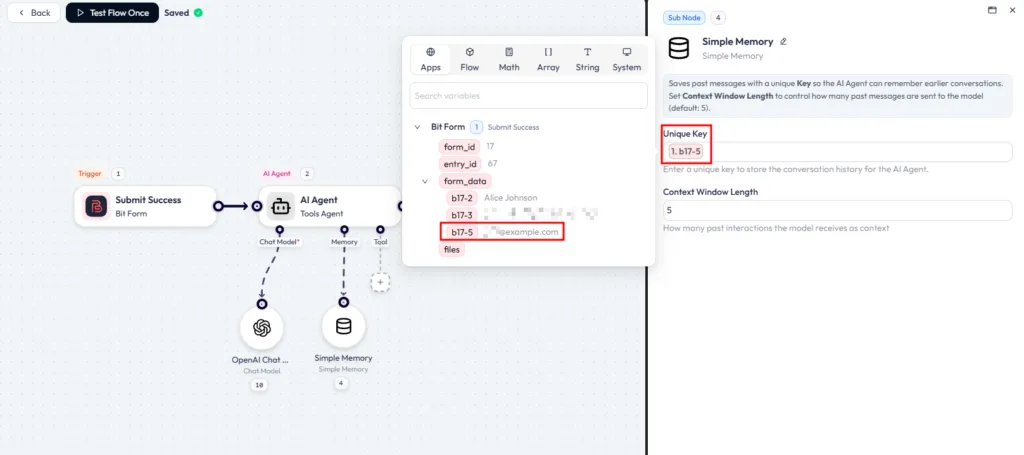
Two settings matter here: how much context you retain and the key used to separate one conversation from another. Map the unique key to a stable identifier such as the submitter’s email when appropriate, so one customer’s history is not mixed with another’s.
A goal-based agent uses information about a desired outcome when choosing what to do. Compared with a simple reflex rule, it considers whether an action helps move the system toward that goal.
This maps well to many business workflows because the target is clear even when the input is messy. A support triage agent, for example, can have one operational goal: every incoming message ends up with the right team and the right priority. The exact route depends on what the customer wrote.
In Bit Flows, one practical implementation is to make the AI Agent return structured fields, then let the Router handle the predictable branches that follow.
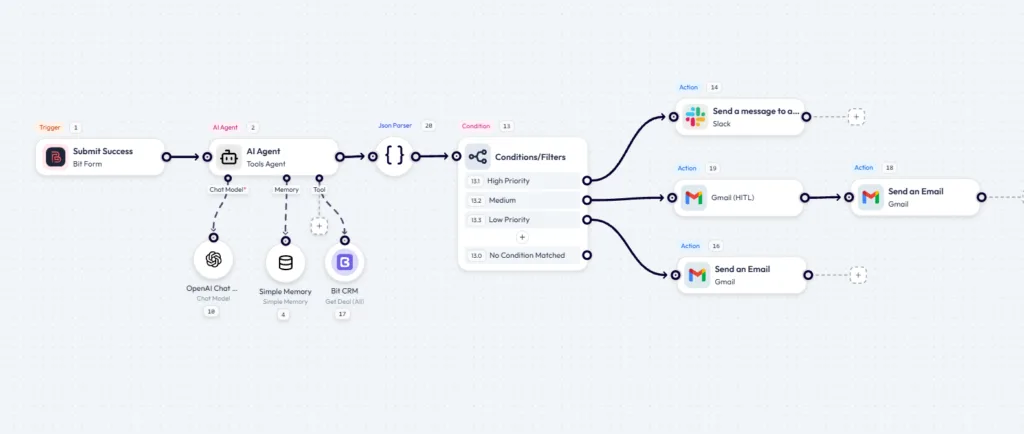
In this kind of workflow, structured output makes the agent’s decision easier to automate downstream. Instead of asking the model for a paragraph, require fields such as priority, reason, recommended action, and a draft reply. The workflow can then route those fields predictably. Structured output is an implementation technique here; the goal itself still comes from the instructions and desired outcome you give the agent.
A utility-based agent does more than ask whether an outcome reaches a goal. It uses a utility measure to compare possible outcomes and prefer one over another.
A route or travel-planning example makes the idea easy to see. Several options may reach the destination, but they trade off time, cost, stops, or other preferences. A utility function gives the agent a way to compare those outcomes instead of treating every successful option as equally good.
For a Bit Flows example, AI lead scoring turns the preferences you care about into a numeric result that the Router can compare against predictable thresholds.
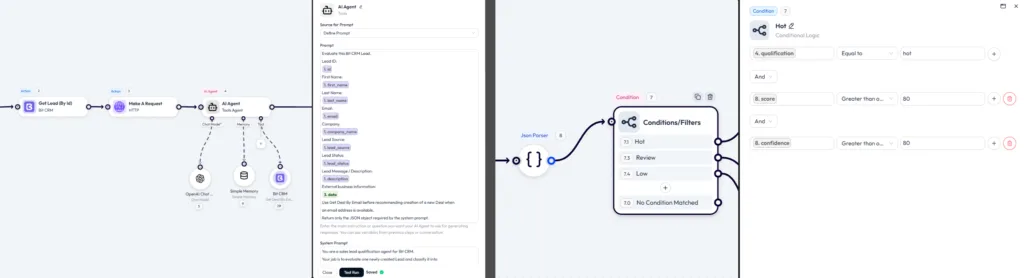
Lead scoring is a useful utility-style AI agent example for business workflows. Two enquiries can both be valid leads while having very different value to the sales team. One comes from a company matching your ideal customer and mentions a budget. The other is a student writing a dissertation. A score gives you a way to rank the records before routing them.
In a no-code workflow, you can ask the model to return a score from 0 to 100 alongside a short reason, then set router thresholds on that number. This is not automatically a textbook utility-based agent just because a number exists; it becomes closer to that pattern when the score represents the preferences or trade-offs you actually care about. The practical benefit is that thresholds are easy to tune without changing every downstream action.
A learning agent uses experience or feedback to improve its behaviour over time. The important part is not merely storing feedback; something in the system has to use that feedback to change future decisions.
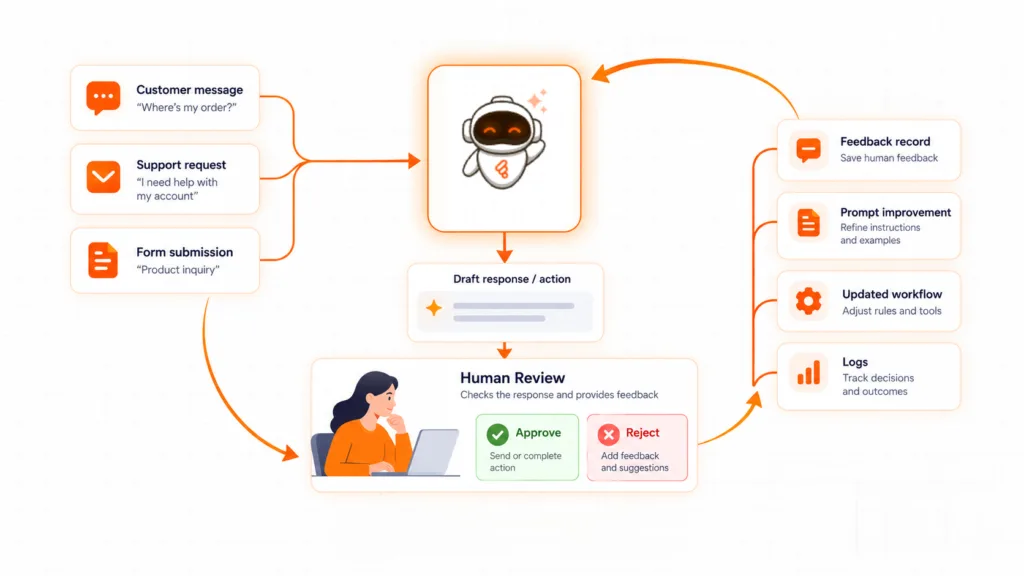
You see this pattern in systems that adapt from evaluated outcomes. Spam detection can improve when labelled examples are fed back into its training or rules. Recommendation systems can use interaction data to update what they predict you will prefer. The feedback does not have to change the model instantly; it has to influence future behaviour through some learning or update mechanism.
Russell and Norvig describe a learning-agent architecture with a performance element, a learning element, a critic that provides feedback, and a problem generator that can encourage useful exploration. For a practical workflow, the key idea is the feedback loop: the system acts, the result is evaluated, and that evaluation is used to improve what happens next time.
That is where many visual workflow setups stop short of being true learning agents. You can collect approvals, corrections, ratings, and logs, but the agent does not become a learning agent unless those signals are actually used to update prompts, policies, retrieval data, a model, or some other part of future decision-making. Memory alone is not learning.
Single-agent versus multi-agent is a different architecture question, not a sixth type in this classification. One agent can own the whole task, or several specialised agents can divide the work; the second approach adds coordination, cost, and debugging overhead as well as flexibility.
The five agent types describe how a system decides. Memory is a separate implementation choice, but it changes how much context an LLM-based agent can carry from one interaction to the next.
Memory is where many agent projects quietly fail. In practical LLM workflows, three categories are useful to separate, although they are not one universal textbook taxonomy of AI agent memory types.
Short-term memory is the context the agent keeps available during a current interaction or run. A customer asks about delivery times and a discount code in one message, and the agent needs both in view to answer properly.
Session memory carries useful context across related interactions. That same customer replies in the afternoon, and the agent can pick up where the thread left off instead of starting from a blank page.
Long-term knowledge or retrieval is different. The customer asks what your refund window is, and the answer sits in documentation rather than the conversation. The agent has to look that information up from a knowledge source.
That third category needs different plumbing. The first two are about retained context. Long-term retrieval usually needs a searchable knowledge store, database, vector store, or another retrieval tool rather than simply increasing the conversation-memory window.
For many support workflows, recent conversation context is enough. Reach for long-term retrieval only when the agent has to look up information that is not already in the current thread, and choose the storage or retrieval method based on the data you actually need.
Classification only earns its keep when you can point at a workflow. These AI agent applications come up often on WordPress and WooCommerce sites, and each one maps back to the decision patterns above. Treat them as practical AI agent examples rather than abstract categories.
Today someone checks every large or unusual order by hand, and the customer email goes out late or not at all.
With an agent in place, it can read the order status, payment method, total, and customer note, decide whether the order needs attention, and draft the customer email. Nothing reaches the customer until a person approves it.
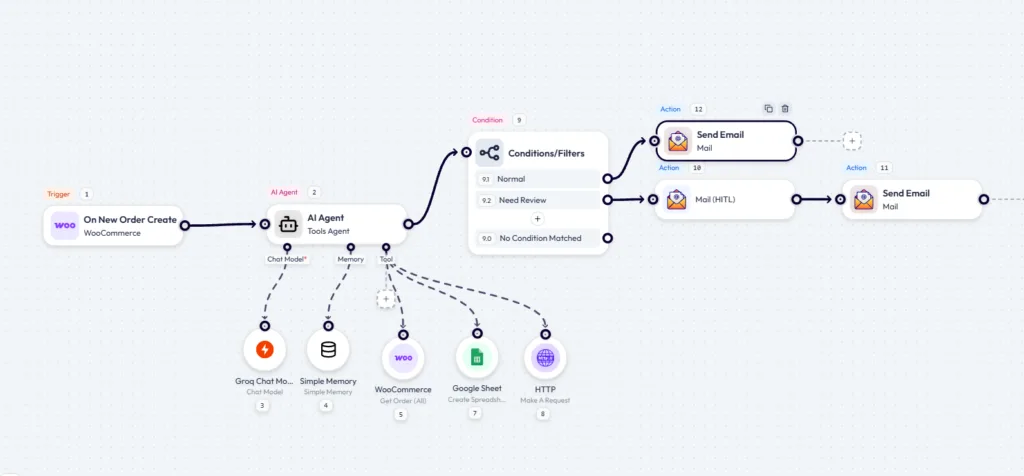
This pairs a goal-oriented agent workflow with a human approval step, which is a safer pattern for customer-facing actions because a person still controls the final send. The WooCommerce AI agent workflow builds that pattern end to end on a real store.
Today, replies get written from scratch, or a template goes out that does not quite answer what the customer asked.
With an agent in place, it can read the thread, draft a reply in context, and send that draft to a reviewer who approves or declines before anything is sent to the customer.
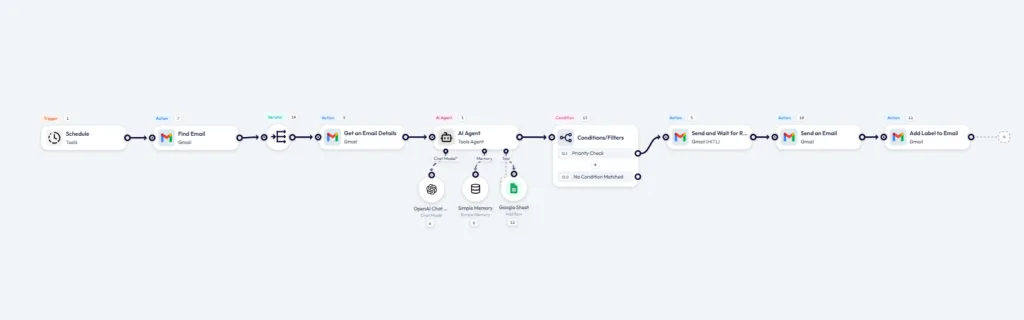
The approval step is what makes this pattern practical for sensitive customer communication. Bit Flows Human in the Loop pauses the workflow, sends the draft for review, and continues only after the reviewer responds. The Gmail AI agent with human approval guide covers the complete setup.
Rule-based automation decides the path at build time. You write the logic and the workflow follows it. An LLM-based AI agent can make runtime decisions from the instructions, tools, context, and model capabilities available to it.
| Factor | Traditional automation | LLM-based AI agent |
| Who picks the next step | You define the path when you build it | The model can choose among allowed actions at runtime |
| Unexpected input | Needs predefined handling or may fail/skip | Can interpret or classify new input, but can also be wrong |
| Conditions | Branches are explicitly defined | The model can classify ambiguous cases before downstream rules |
| Output | Highly predictable for the same input | Probabilistic within the constraints you set |
| Debugging | Inspect rules and input data | Inspect logs, prompts, model output, and tool calls |
| Cost per run | No model API call; normal infrastructure costs still apply | Usually one or more model/API calls plus normal infrastructure costs |
| Best for | Repeatable, well-defined tasks | Messy or ambiguous input that benefits from interpretation |
Neither one is automatically better. Predictability is a feature when you are moving order data into accounting software. You want the same result every time, and you want to point at the rule that caused it.
Judgement is useful when human-written input is ambiguous. Support messages, job applications, and contact form entries do not always arrive in a fixed shape. A rule that looks for the word urgent can miss the customer who wrote that their site has been down since Tuesday morning.
The practical answer is often both. Put the agent where interpretation is genuinely useful, then keep deterministic rules downstream wherever you need predictable routing, validation, or side effects.
Match the AI agent type to the job rather than reaching for the most capable pattern available.
| If your situation is | Useful pattern | What to build |
| The rule fits in one sentence | Simple reflex pattern | A condition node, no model required |
| The reply depends on earlier messages | Model/state-aware pattern | Agent plus appropriate conversation memory |
| Every item must reach the right place | Goal-oriented pattern | Agent with structured output plus deterministic routing |
| Items need ranking, not just sorting | Utility-style pattern | Agent returning a meaningful score plus threshold routing |
| A customer will receive the output | Goal-oriented pattern plus approval | Agent plus a Human in the Loop step |
| You want it to improve from feedback | Learning-agent pattern | Feedback collection plus a mechanism that updates future behaviour |
Start with the simplest pattern that solves the real problem. Add memory, scoring, tools, or learning only when the simpler version genuinely falls short.
The five types of AI agents give you a useful way to ask how much autonomy and state a job really needs. The answer is often less than it first looks, and plenty of workflows do not need an LLM at every decision point.
For many lead, order, and support workflows, a goal-oriented agent that produces a clear decision for a deterministic router is enough. One interpretation step, then rules that behave the same way every time.
The rest you pick up by building. The Bit Flows AI Agent node is available in the free plugin on WordPress.org, so you can attach a chat model, optional memory, and tools directly inside WordPress. Your connected model provider can still charge for API usage.
Build one small workflow, send it realistic test input, then open the log and read what the model returned and which tools ran. That hands-on loop will teach you more about how your agent behaves than adding another layer of theory.
Traditional automation follows paths and rules defined in advance. An LLM-based AI agent can interpret context and make runtime choices among the actions you allow. The two can also be combined, with the agent handling interpretation and deterministic automation handling the downstream steps.
No. A chatbot is an interface for conversation. An agent is defined by how it receives information, selects actions, and interacts with its environment. An agent can have no chat interface at all.
A goal-oriented agent pattern is useful when the workflow needs to classify a message and move it toward a clear outcome, such as the right team and priority. If the answer depends on earlier messages, add appropriate conversation memory as well.
A utility-style pattern can help when you want to rank leads using a meaningful score. The score should represent the preferences you actually care about, then deterministic thresholds can route high-, medium-, and low-priority records.
An AI agent can draft customer emails, but model output can be wrong or inappropriate. For sensitive or customer-facing messages, a Human in the Loop approval step reduces risk by letting a person review the draft before it is sent.
No. Many agents can complete a single-run task without memory. Add memory when the correct decision depends on earlier interactions, retained state, or information that is not present in the current input.
In practical LLM workflows, it is useful to distinguish current-run context, session or conversation memory, and longer-term knowledge retrieval. These are implementation categories rather than one universal textbook taxonomy, and long-term retrieval often uses a database, vector store, or another search tool.
A single-agent system gives one agent responsibility for the task. A multi-agent system divides work among multiple agents with different roles or tools. Multi-agent designs can improve separation of responsibilities, but they also add coordination, cost, and debugging complexity.
No. Visual workflow builders can connect a model, optional memory, and tools without custom code. More advanced integrations, custom APIs, structured schemas, or production safeguards can still require technical setup.
Check the AI Agent’s maximum-iterations setting, the prompt, and the tool result. Maximum iterations controls how many times the agent can continue processing a task, so a low value can stop a chain before additional tool calls are attempted.
The five classic agent-program types covered here are simple reflex agents, model-based reflex agents, goal-based agents, utility-based agents, and learning agents. They differ in the information and decision mechanisms they use to choose actions.





 EN
EN  DE
DE  ES
ES  NL
NL  IT
IT  PT
PT  JA
JA