
Your CRM knows a lead arrived. It does not know that the lead should also land in a spreadsheet, ping the sales rep on Telegram, and open a follow-up task three days later.
That gap is where small teams lose deals. The record exists, but nothing happens next until a person remembers to make it happen. So the enquiry sits in a list while everyone assumes someone else picked it up.
The usual fix is a cloud automation tool sitting between your site and your CRM, often billed per task. That is an odd trade when both the CRM and the automation engine can run inside the WordPress install you are already paying to host.
That is what this guide covers: WordPress CRM automation using Bit CRM and Bit Flows. Both have a free version, and the Bit CRM triggers and actions inside Bit Flows are free to use. You will see how the two connect, several workflows built on a real canvas, where each workflow helps, and where the free tier stops.
You can automate Bit CRM through Bit Flows without using Bit CRM Pro’s native workflow builder. Bit CRM can work as both a trigger and an action in Bit Flows, so CRM events can start broader WordPress automations and external WordPress events can create or update CRM records.
| Trigger → capture real data → apply Conditions if needed → run Bit CRM actions → test the complete flow → check Logs |
Start with one workflow that removes a manual step you already repeat. Once it runs reliably, add Router, Iterator, notifications, or approval logic only when the business process actually needs them.
Both plugins have a free version on WordPress.org. Bit CRM keeps its native workflow builder and several advanced CRM features in Pro, while Bit Flows keeps some integrations and advanced capabilities behind Pro. The Bit CRM integration itself is free in Bit Flows.
Connecting Bit CRM with Bit Flows is straightforward when both plugins are active on the same WordPress site. In a new flow, search for Bit CRM as either the trigger or action, choose the event or operation you need, and map data from the previous step into the matching CRM fields. The part that needs the most attention is field mapping and testing with real sample data.
Install Bit CRM and Bit Flows from the WordPress plugin directory and activate them on the same site. Bit CRM opens a short setup wizard on first launch for basic business details. After onboarding, set and verify the home currency under the CRM settings before adding live sales data; Bit CRM’s current documentation notes that the home currency can only be set once. The Bit Flows installation guide covers activation and updates on the automation side.
Every free WordPress CRM automation below was built on the Bit Flows canvas with free nodes. The goal is not to show every possible node. It is to show practical CRM automation patterns you can reuse.
If you use Bit Form, Bit CRM can receive form data through its native integration. If you use another supported WordPress form builder, Bit Flows can bridge the form with Bit CRM. For this hands-on example, the canvas uses Contact Form 7.
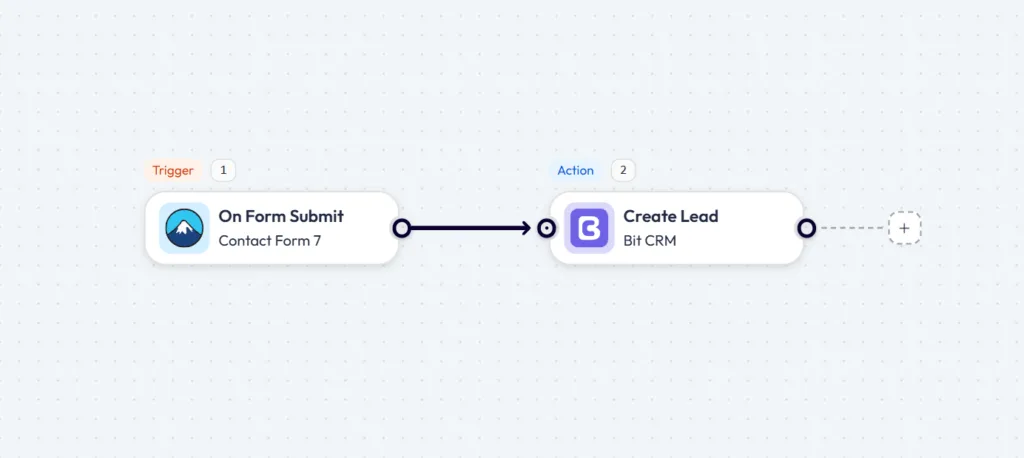
Whenever someone submits the form, the trigger passes the submitted data into Bit CRM → Create Lead. The same pattern works with other supported form triggers. WPForms and Elementor Form are currently listed among Bit Flows’ free triggers; other supported form integrations can have different free/Pro availability, so check the current trigger list before building around one. Bit Flows keeps separate trigger setup guides for supported integrations.
Bit CRM already includes native WooCommerce customer sync, so you do not need to rebuild that basic sync in Bit Flows. A custom WooCommerce CRM automation is useful when you want your own matching, routing, tagging, or update logic around an order.
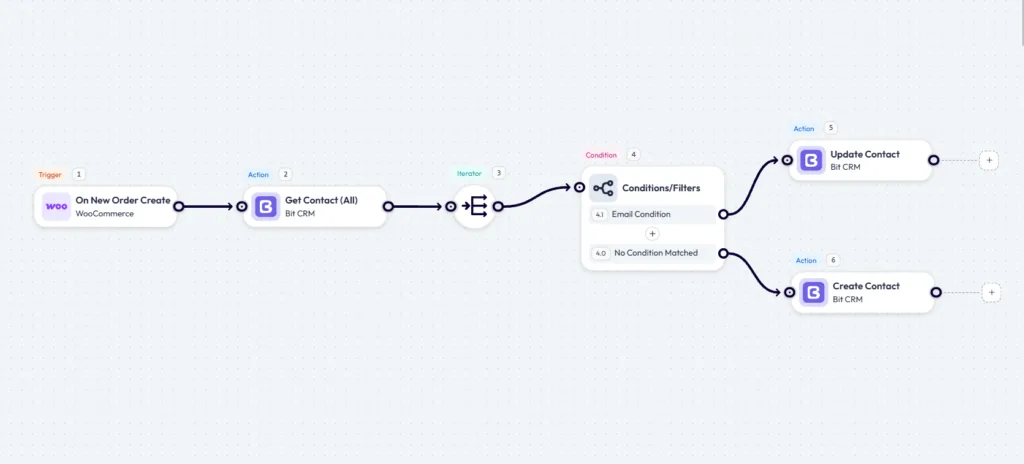
The canvas starts when a WooCommerce order is created. Get Contact (All) retrieves existing Bit CRM contacts, the Iterator processes the returned list, and the email Condition compares an existing contact email with the order billing email. A matching record can go to Update Contact so details such as name or phone stay current.
Important: a per-item No Condition Matched result inside an Iterator does not prove that the customer is absent from the whole CRM. Most existing contacts will naturally have a different email. If Create Contact runs immediately for every nonmatching item, you can create duplicates.
For a truly duplicate-safe flow, create the contact only after the returned contact set has been evaluated and no record matches the WooCommerce billing email. Do not place Create Contact directly on each per-item false branch. The screenshot is useful for showing the matching pattern, but that final no-match guard is the part to get right before using the workflow on live orders.
Not every WooCommerce order needs a salesperson involved. This workflow adds a high-value order Condition before the contact-matching steps, so only orders that meet your chosen value continue into the sales process.
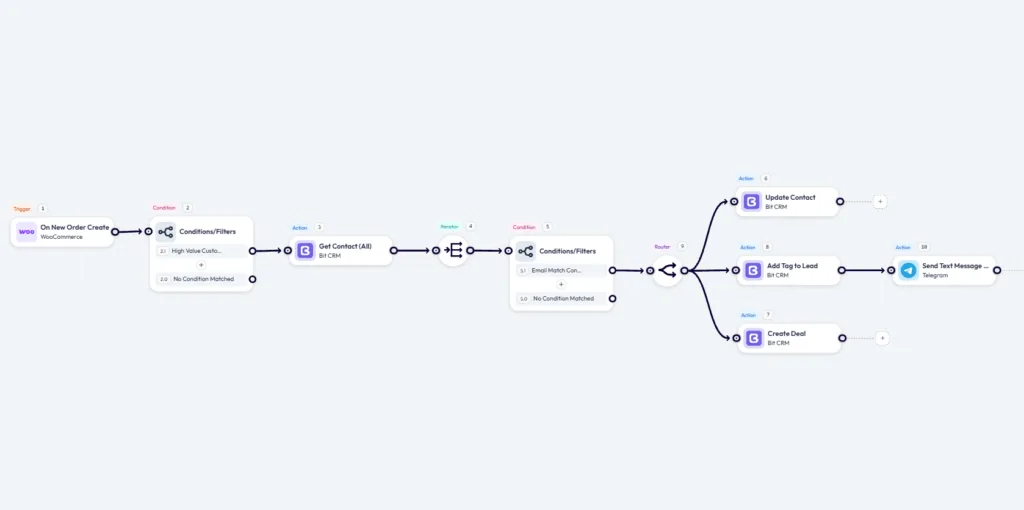
The Router does not decide which branch should run; it creates multiple paths so the same workflow data can be processed by different actions. If a branch should run only under another rule, put a Condition on that branch. For example, you could notify the team only when an order is both high-value and from a particular customer type without blocking the contact update or Deal creation.
For the sales alert, Telegram can send mapped order, customer, or Deal data to a configured group or channel. Bit Flows’ current Telegram documentation says the bot must be added there with administrative privileges before it can send messages. The Router documentation, Conditional Logic guide, and Telegram action guide cover those pieces.
This workflow starts inside Bit CRM rather than bringing data into the CRM from another WordPress plugin.
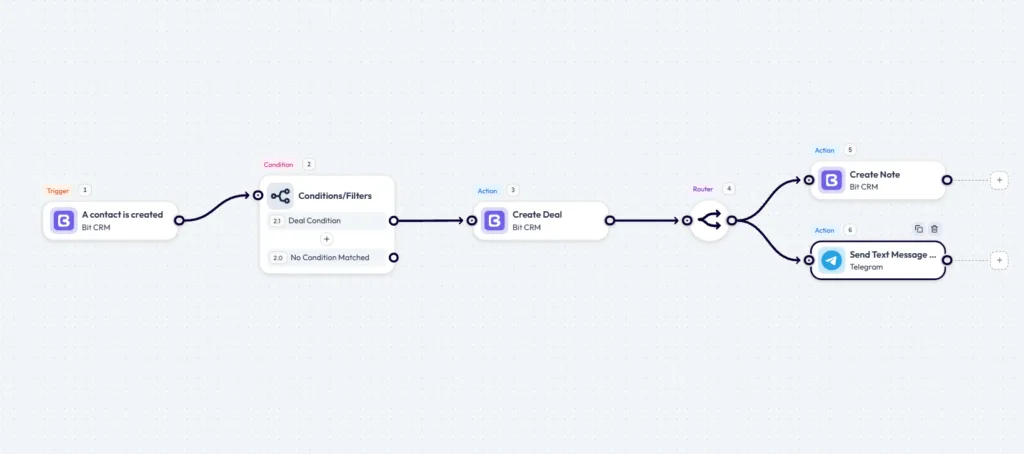
The note keeps context in the CRM, such as the source, qualification details, or why the Deal was created, while the Telegram branch gives the salesperson an immediate alert. Map CRM data such as the contact name, email, and Deal information into the message, then run a real test and confirm the notification reaches the correct Telegram destination.
Telegram, Router, and Conditions are available in the current free Bit Flows setup used for this example.
Once a deal moves to a billable stage in Bit CRM, the next steps can run without waiting for someone to check the pipeline manually.
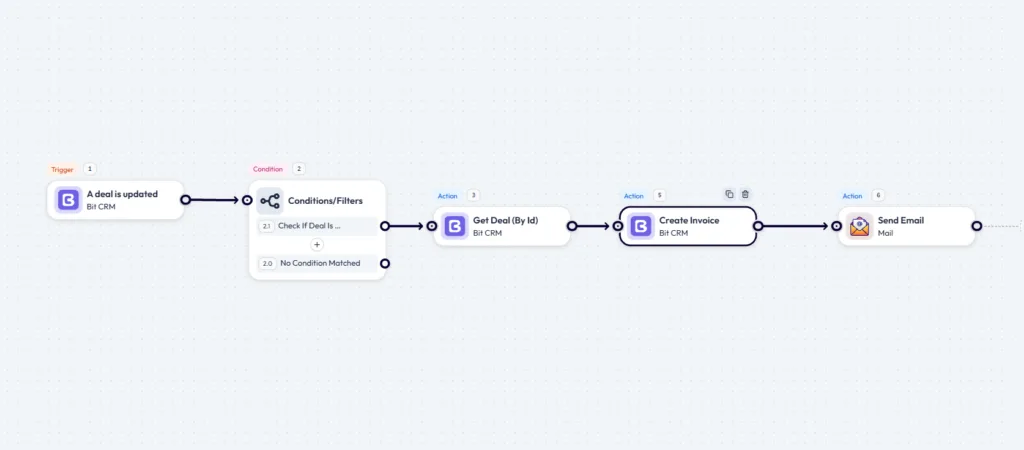
Get Deal (By Id) retrieves the latest version of the Deal before the workflow creates the invoice. That lookup is useful when later actions need current CRM fields beyond the update event itself. The Bit CRM and Bit Flows integration guide lists the current CRM triggers and actions.
Map the customer email and the invoice information you need, run the workflow with a test Deal first, and inspect both the Bit CRM invoice and the Bit Flows execution log before using it with live CRM data.
A deal stage change can require more than one follow-up. This example uses a Router so one CRM event can create several related follow-up actions.
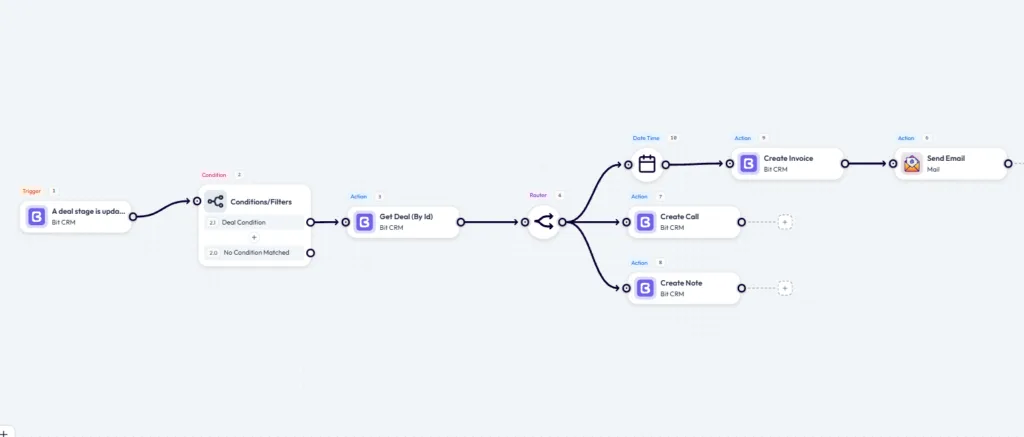
The billing branch uses the Date Time tool to prepare a due date before creating the invoice and emailing it to the customer. Date Time can format, parse, add, or subtract dates, so the due date can be calculated relative to the workflow run instead of hard-coded.
The second branch creates a call activity, so the follow-up remains visible in the CRM until someone handles it. The third writes a note recording the stage change. This is where the Router becomes useful: one Deal event can create the billing record, an accountable follow-up activity, and the history note without building three separate workflows.
Once the basic WordPress CRM integration is working, you can reuse the same trigger → data → condition → action pattern for more than lead capture and deal management.
Once you understand triggers, data mapping, Conditions, and Bit CRM actions, you can keep extending the same CRM automation foundation instead of learning a new system for every use case.
The examples above focus on free nodes and the free Bit CRM connector. The next ideas mix free tools with Pro-only capabilities or premium integrations, so check the current Bit Flows free-vs-Pro list before building around a specific feature or app.
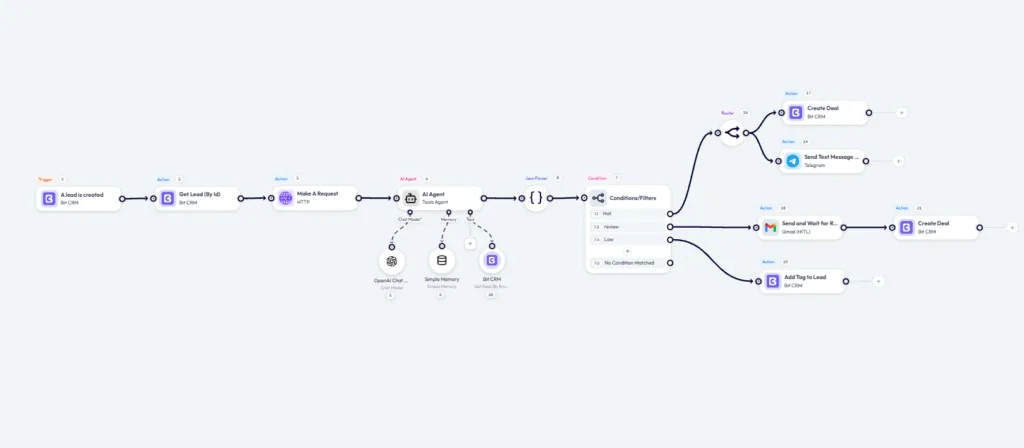
This workflow shows how far the same CRM automation pattern can go. The Agent can use a chat model, Simple Memory, and tools such as Bit CRM. A JSON Parser can turn the model response into structured fields, then Conditions can route the results differently. The AI Agent guide covers the model, memory, and tool setup, while the review path uses Human in the Loop.
The AI Agent itself is available in the free Bit Flows plugin, but the Review branch in this exact workflow uses Human in the Loop, which is a Pro feature. OpenAI, Anthropic, Google, or another connected model provider can also charge separately for API or model usage.
If your email marketing or sales stack lives outside WordPress, Bit Flows can connect Bit CRM to many SaaS tools. Some connections are free and others are premium, so check the current action list before you design the workflow around a particular app.
A weekly digest can pull pipeline data, summarize it, and email the result to the people who need it. For reliable scheduling on a quiet WordPress site, Bit Flows also offers a Cloud-based Cron Runner in Pro instead of depending only on traffic-driven WP-Cron.
Telegram and WhatsApp were moved into the free Bit Flows tier. Other messaging, calendar, and SaaS connectors can require Pro. If a workflow depends on a specific app, verify that connector’s current tier before you build the rest of the flow around it.
Before you decide what to automate next, it helps to separate Bit CRM workflows from Bit Flows workflows. The names are similar, but they solve different parts of the process.
Bit CRM Pro has its own workflow builder for CRM-focused automation, such as responding to lead, contact, company, or deal activity and running follow-up actions inside the CRM.
Bit Flows works as the broader WordPress CRM automation layer. It can take an event from Bit CRM and connect it with WooCommerce, WordPress forms, messaging apps, webhooks, APIs, and other supported services. It can also bring data from those sources back into Bit CRM.
So the choice is not really Bit CRM or Bit Flows. Bit CRM manages the customer data and sales process, while Bit Flows connects that CRM data with the rest of your WordPress automation stack. For someone using free Bit CRM, the free Bit CRM connector in Bit Flows is especially useful when the process needs to extend beyond the CRM itself.
Free WordPress CRM automation does not have to mean a one-step demo. The free Bit CRM connector can sit inside multi-step Bit Flows workflows with Conditions, Router, Iterator, Telegram, and other free tools. The examples above show the practical range: form leads, WooCommerce matching, filtered orders, routed Deals, invoices, activities, notes, and notifications.
Pro matters when the workflow needs premium integrations or advanced capabilities that are not in the free tier. Pay for those when the business process needs them, not before.
Start with one workflow. Contact Form 7 to Bit CRM Create Lead is enough. Build it, submit a real test form, inspect the mapped data, and read the log. Once you trust that flow, the more advanced examples are the same basic moves combined in different ways.
Yes. The free Bit CRM plugin includes leads, contacts, companies, deals, invoicing, tasks, meetings, calls, notes, tags, CSV import, WooCommerce sync, and other core CRM features. Workflow automation and several advanced modules are part of Bit CRM Pro.
Yes. Bit CRM triggers and actions are available free in Bit Flows, so you can build WordPress CRM automation without purchasing a separate Bit CRM connector.
Yes. Bit Flows can use Bit CRM as a trigger or action directly in WordPress, so forms, WooCommerce events, CRM changes, webhooks, APIs, and supported apps can start or continue workflows without relying on Zapier.
No. The integration uses a visual workflow builder with triggers, actions, field mapping, Conditions, Router, Iterator, and other automation tools. API-based workflows can require more technical setup, but the CRM connection itself does not require custom code.
Bit CRM Pro workflows focus on automation inside the CRM. Bit Flows connects Bit CRM events and actions with WordPress plugins, WooCommerce, messaging apps, APIs, webhooks, AI tools, and other supported services.
Compare a unique field such as email before creating a contact. If you loop through a full contact list, do not create a new contact merely because one Iterator item does not match. Create only after the complete lookup confirms that no matching record exists.
Bit Flows currently lists unlimited workflows and task executions in its free feature comparison. Your practical workload still depends on the hosting resources available to the WordPress site.







 EN
EN  DE
DE  ES
ES  NL
NL  IT
IT  PT
PT  JA
JA