
Customer support automation lets your team handle your business-related questions and issues faster. It increases customer satisfaction and revenue. Companies that respond quickly to customer needs see better loyalty. Attentive support is not only good for customers but also good for business.
Modern customers expect fast answers, and businesses know it. Nowadays, Automation is a must to meet support expectations. By automating routine support tasks, you can easily free up your team’s time and resources. This will allow you to focus on your business growth.
We’ll look at how automating customer service can save time, improve satisfaction, and help build a strong, repeated customer base.
Suppose you have a business where you sell products or services. You want to run a campaign on social media. So definitely you will get more engagement and your website will get more purchases. Also, a lot of people will reach out to your support. But if your website doesn’t have any automation features, you can’t handle all the orders and support. It’s not easy to respond to the customers without proper automation.
So, Customer support automation means using workflow automation tools to handle support tasks with minimal human intervention. It’s about setting up systems like chatbots, automated emails, or workflows that answer questions or create tickets automatically.
For example, imagine a customer submits an online inquiry form. A support automation workflow immediately does three things:
The customer gets a response instantly, and your team sees the ticket without any manual work. This is customer support automation in action.

Automation tools can handle everything from simple replies like auto-responders. With the automation routine, interactions, customer inquiries, ticket creation, order status updates, etc., can be done automatically.
This ensures customers get quick, consistent answers, and support agents can concentrate on questions that truly need a human touch. Studies show that as businesses scale, automation tools will be important for keeping up with increased customer-support needs.
Great customer support builds loyalty, trust, maximizes revenue, and increases your brand value. Customers who get fast, helpful service are more likely to buy again and scale the business. For example, as per Zendesk customer support statistics:
In short, outstanding support is a growth engine. It keeps customers engaged and increases sales. Bad support sends customers elsewhere. By investing in efficient, automated support, your business can build stronger customer relationships and higher lifetime value.
Automating support gives your business many advantages. It lets you do more with less work while improving service. Here are some notable benefits you will get by automating your customer service:
Save time and respond faster: Automated workflows can handle common tasks instantly and automatically. For example, auto-responders and ticket generators mean customers get quick replies without waiting in a queue. Companies using automation resolve issues 52% faster than those that don’t. Faster response times lead to happier customers and stronger loyalty.
Reduce manual errors: By automating data entry and support ticket creation, you can easily eliminate typos and human mistakes. This will need less work to fix mistakes and ensure every ticket is handled on time.
Improve team productivity: Your support team can focus on hard cases and human needs. A study found that 78% of support professionals say automation makes them more efficient. Ultimately, your staff can assist more customers in the same time.
Happier customers and higher satisfaction: Customers love fast and personalized help. Automation provides quick and reliable service without any delay. Tools like chatbots and automated emails ensure people get instant assistance at any time. Quick resolutions raise satisfaction. For example, companies with automation let customers help themselves 24/7 and see fewer complaints.
Handle more queries with fewer resources: As your business grows, customer support and issues grow too. Automation lets you scale without hiring a massive team. By optimizing workflows, you can serve a bigger customer base at a lower cost. Automating support saves money by reducing staff costs.

So, automated customer support is highly efficient and cost-effective. It speeds up service, reduces errors, and lets teams work smarter. Excellent support builds trust and drives more revenue.
Bit Flows is a no-code workflow automation tool that simplifies complex workflows and automates customer support tasks. It has a visual drag-and-drop builder, so you can create custom support workflows without any coding.
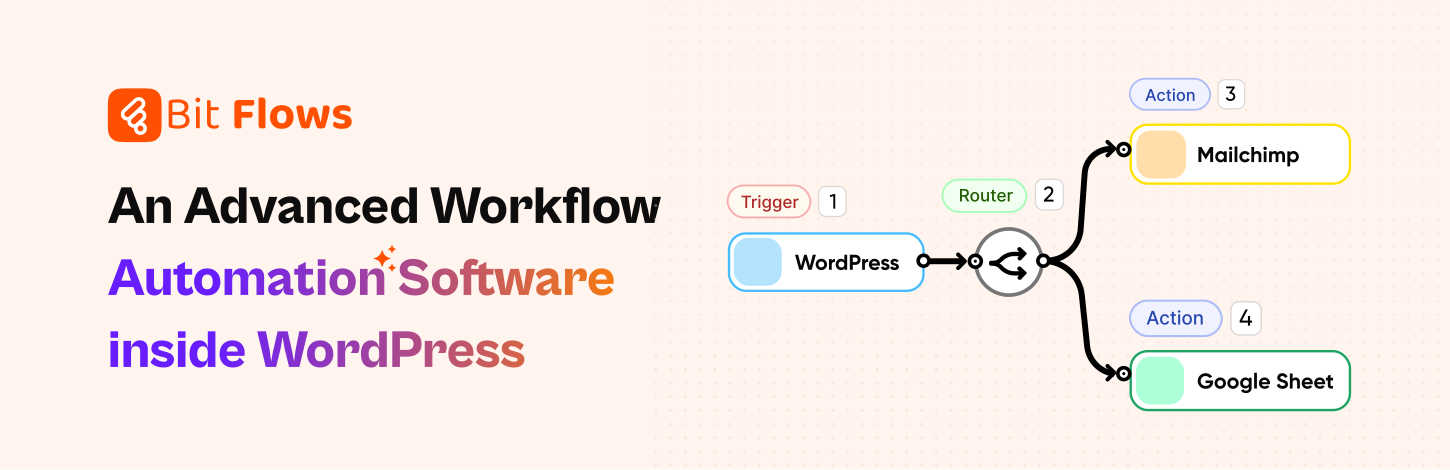
With Bit Flows, you connect apps and define triggers/actions in a few clicks, it feels like having Zapier inside WordPress. For example, after a form submission, Bit Flows can process the data and send it to your CRM, helpdesk, and email marketing tool instantly.
Notable Features of Bit Flows include:
These features make Bit Flows a great tool for small businesses and support teams that want power without complexity. You don’t have to learn code or pay for a complicated SaaS. Bit Flows lets you optimize support right from your WordPress dashboard. And save your time and monthly costs.
Here are some practical examples of support automations you can build:
Auto-create support tickets from form submissions: When a customer fills out your contact or support request form, Bit Flows creates a task in your helpdesk, like ClickUp, and can create a database on Notion.

Send instant confirmation emails: As soon as a request comes in, you can send the customer a “thank you” or “we got your message” email by using MailChimp or any other email marketing platform. Also, you can organize the data on Google Sheets for data analysis.

Notify your team instantly: Bit Flows can notify your support team via email or Telegram (or any chat app via webhook) whenever a new ticket is created. Also, you can send the support leads to any CRM platform like Brevo.

Route inquiries by department: Use conditional logic to send tickets to the right queue. For example, if a question mentions “billing,” go to finance; if it mentions “technical,” go to tech support.

Collect customer feedback: After closing a ticket, Bit Flows can email or message the customer with a feedback survey. The responses can be automatically logged in your CRM or spreadsheet.
These are just a few ideas. The beauty of Bit Flows is that you can mix and match triggers and actions. Need to integrate a new tool or handle a specific workflow? The drag-and-drop builder and conditional steps let you customize every detail of the workflow.
Automating your customer support is one of the smartest ways to save time and grow your business. By setting up automated replies, ticketing, and workflows, you enable your team to work more efficiently and serve customers better. Quick responses, fewer errors, and 24/7 availability all lead to happier customers and more revenue.
With Bit Flows, you can implement these automations easily, even on a small or WordPress-based business. Bit Flows’ no-code builder, unlimited workflows, and useful integrations make it simple to connect forms, CRMs, email, and support systems into one single workflow. This means less busywork and more time for your team to solve real problems and build relationships.
Start automating your customer service today with Bit Flows and free up your time for what needs a human hand.
Customer support automation uses tools to handle customer questions automatically. It includes automated workflows and the ability to create support tickets instantly.
It saves time, reduces mistakes, increases customer satisfaction, and increase sales by giving fast responses. Tools like Bit Flows make it easy to set up.
Benefits include quicker replies, fewer errors, improved team productivity, happier customers, and handling more tasks.
Use a no-code tool like Bit Flows. It has a drag-and-drop builder to easily automate your customer support workflows within WordPress.
Yes, automation provides quick and reliable responses. Fast answers make customers happy, building trust and loyalty.
With Bit Flows, automate tasks like creating tickets from forms, sending auto-confirmation emails, alerting support teams, and collecting feedback.
Bit Flows is user-friendly, affordable, and integrates easily into WordPress. Small businesses can automate support tasks without technical skills.
Automation helps you handle more customer requests quickly with fewer employees, lowering overall business expenses.
No, automation handles common, repetitive tasks. Your team can focus on complex issues needing human care, making support more effective.
Bit Flows lets you set up automation fast. It has a simple drag-and-drop builder that enables you to launch automated workflows in just minutes.





 EN
EN  DE
DE  ES
ES  NL
NL  IT
IT  PT
PT  JA
JA