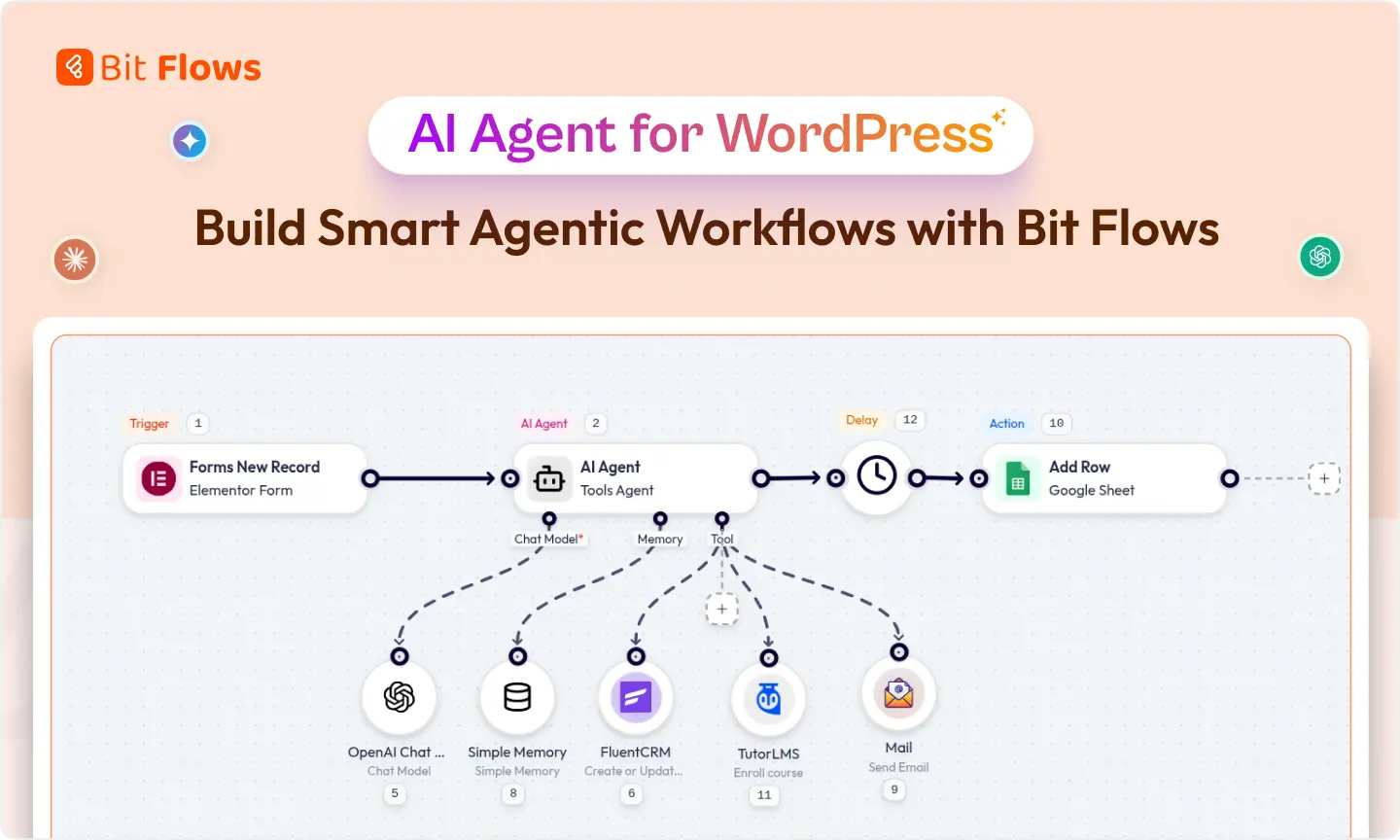
What if your WordPress site could think, decide, and act on its own?
AI agents are everywhere right now. Every automation seeker is looking for agents to simplify workflows, reduce manual work, and let systems make decisions on their behalf.
Agentic workflows are quickly becoming the new standard. But for the first time, Bit Flows is introducing a true AI Agent natively inside WordPress.
With this AI agent, you can build free agentic workflows that handle support, analyze data, content, leads, and more. No more manual tasks or playing with multiple tools with fixed rules. Everything happens automatically and intelligently.
This is more than a plugin. It turns your WordPress site into a smart engine. It can analyze form submissions, generate responses, route tasks, and run multi-step workflows. Your site can now work faster and smarter.
Whether you are a store owner, marketer, developer, or business owner, the AI Agent helps you get things done automatically. Your WordPress site can now be intelligent, proactive, and efficient. Read further and build your first AI agent for WordPress for free.
An AI agent is like a super-smart helper that doesn’t just follow fixed rules, but can understand context, make decisions, and take actions on your behalf. In the world of WordPress, traditional AI actions or automations are usually rigid: they follow predefined rules or prompt-and-response flows.
AI agent can reason about goals, use memory, and invoke tools dynamically. You give it an objective, and it figures out how to do it step by step.
In technical terms, an AI agent uses large language models (LLMs) plus extra components like memory and tools. It builds an LLM chain of prompts, can recall past conversations or site data, and even call external APIs when needed.
This is what’s often called an agentic workflow, multiple AI-driven steps working together intelligently. It means your site can have a built-in brain that watches for events (triggers), reasons about them, and then takes appropriate actions without you writing any code.
To put it simply: whereas a normal AI action is like a single chatbot response or content generator, an AI agent is like an assistant embedded in your workflow. It understands context and goals, and it can adapt if things change.
In Bit Flows, the AI Agent for WordPress is built as real intelligence for workflows. Instead of following fixed steps, the AI Agent will understand context and make decisions inside a flow. Think of it as a smart assistant built directly into WordPress that helps your automations run themselves.
WordPress powers over 40% of all websites, but until now, it relied on two types of automation: simple automation plugins or heavy custom code. Those tools can handle one trigger → one action scenarios, but they break down as soon as you need complex logic, multi-step flows, or intelligent decision-making.
For example, imagine a support form on your site. A basic automation might email someone, but with an AI Agent for WordPress, you could automatically analyze the support message, detect urgent issues, write a personalized reply, or send it, all without your intervention.
These are not repetitive, simple tasks; they require interpretation and judgement. Traditional automation is great at repetitive tasks in structured environments, but struggles with dynamic situations. By contrast, the Bit Flows AI agent can learn and adapt to your context.
Moreover, many website owners dislike sending their data to external SaaS tools. With a self-hosted AI Agent plugin, everything runs on your own server, so you keep full control and privacy of your data. You also avoid scary per-action fees.
Bit Flows gives you unlimited workflows and steps for a one-time license fee. WordPress needed an AI Agent to break free of the limits of simple plugins and SaaS automations, to bring truly intelligent, flexible automation right into the WordPress dashboard.
Bit Flows has been a powerful WordPress automation tool, and now it’s added an AI Agent feature. This means you can build no-code agentic workflows with drag-and-drop ease, directly in your site’s admin panel. The agent acts as a special node in your workflow canvas. You set a trigger like “new support message” or “new order” and then insert an AI Agent node that will handle the thinking part.
Under the hood, Bit Flows’ AI Agent uses advanced AI models and combines them with logic nodes and memory. The result is that your workflows can do much more than fixed sequences: they can branch on complex conditions, ask clarifying questions, call other actions as needed, and even save information for later. It’s like having a mini team of virtual assistants inside your site.
Because this agent is native to WordPress, it feels smooth. Bit Flows runs everything within your WordPress installation. So when we talk about the first native AI Agent in WordPress, we mean: no external SaaS needed, unlimited workflows and steps, and AI-powered logic all running on your own site. It’s a leap forward in WordPress automation.
It’s worth emphasizing how different this is from a simple AI action. Traditional AI automations are often rule-based and static: you might say, “send this text to ChatGPT and save the reply”. The AI action will do exactly that and stop. If something unexpected happens, it can’t adapt.
In contrast, an AI agent in Bit Flows is dynamic and goal-driven. AI automation handles specific, repetitive tasks with fixed logic, whereas AI agents achieve goals by making intelligent decisions. In practical terms:
Think of a normal AI action as executing a single scripted command, while an agent is like a team of AI steps with reasoning and memory. The agent can even chain multiple AI calls and other actions to achieve a higher-level objective.
At a high level, a Bit Flows AI agent workflow looks like this:
You assemble this visually: drag in a trigger, connect to an AI Agent node, configure the LLM chain and memory, and then chain any needed actions. The agent’s “brain” (LLM + memory + decision logic) figures out what to do step by step. This is all asynchronous, so it won’t slow down your site – Bit Flows runs automations in the background.
Keep in mind, the AI Agent sits on top of Bit Flows’ already-powerful automation engine. These underlying features supercharge the agent:
Together, these mean the AI Agent isn’t stuck in a silo; it works smoothly with all your favorite WordPress plugins and external tools.
Let’s walk through a simple example: creating an AI Support Triage Agent inside Bit Flows. Follow these steps in your WordPress dashboard after installing Bit Flows:
After activating Bit Flows, navigate to WordPress dashboard>Bit Flows>Flows>Create Flows. Give your flow a meaningful name.
Start with a trigger for incoming support requests. This could be a Form Submission trigger, or a Custom Webhook if your contact form can call a webhook, or even a WooCommerce new order. Configure it to fire whenever a form is submitted or an order is placed.
In my case, I have added Bit Form as the trigger and selected my preferred form from the list. Then, I need to do a test form submission by clicking on the Listen Response button. This will capture the form data for the next step of the automation.
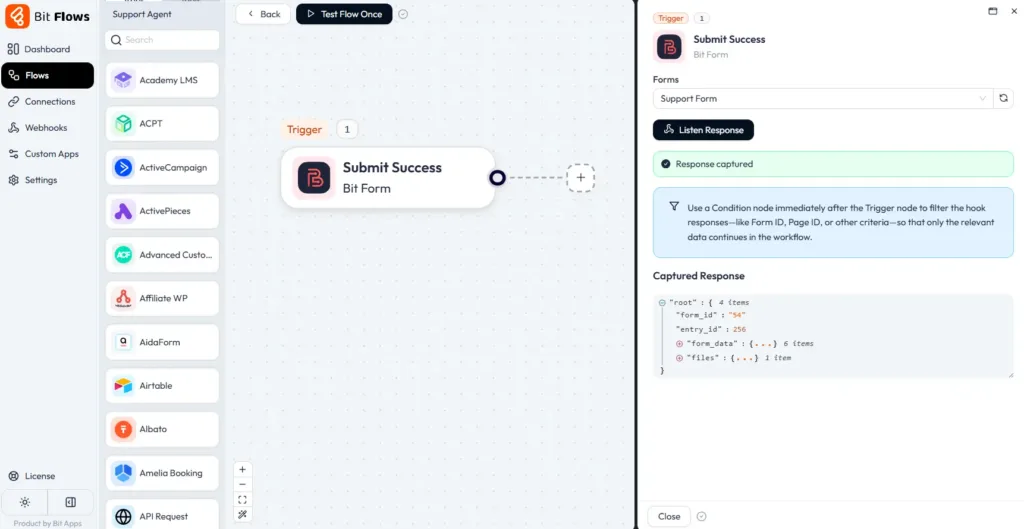
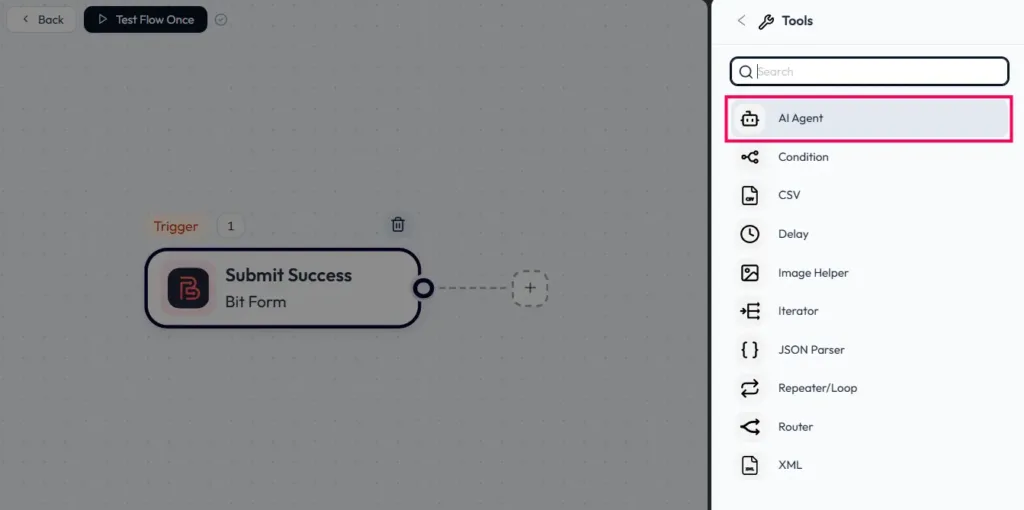
Now, click on the (+) icon and navigate to tools. From here, drag the AI Agent to your workflow. You will also get the AI Agent from the Bit Flows Tools tab.
After adding the AI Agent to your flow, you will get the AI Agent interface, where you can tell the AI agent what to do. Here, you need to add the prompts and max iterations time.
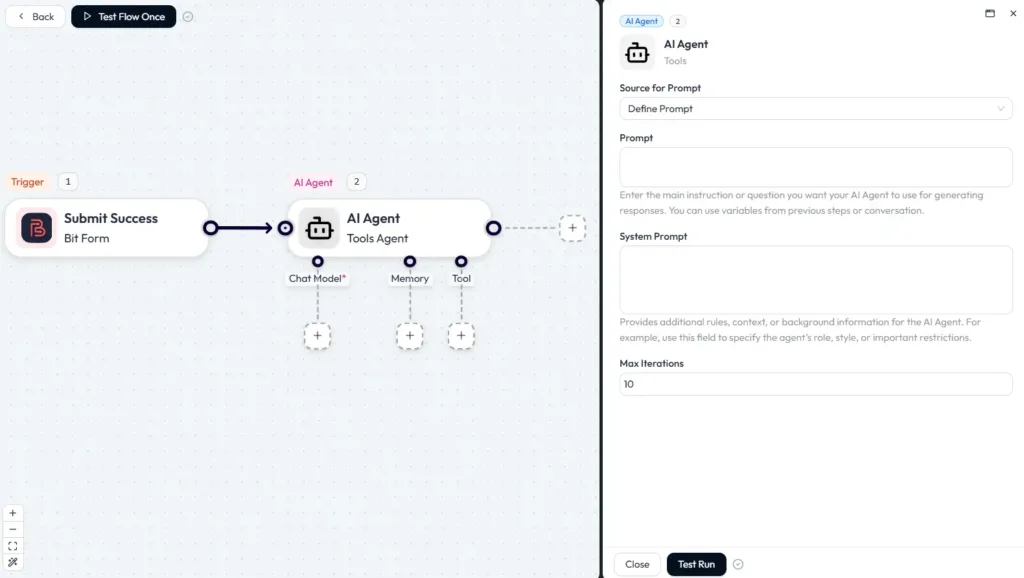
Click on the AI Agent block and add a Chat Model like OpenAI or DeepSeek. And connect it with your API key. And then select your preferred model.
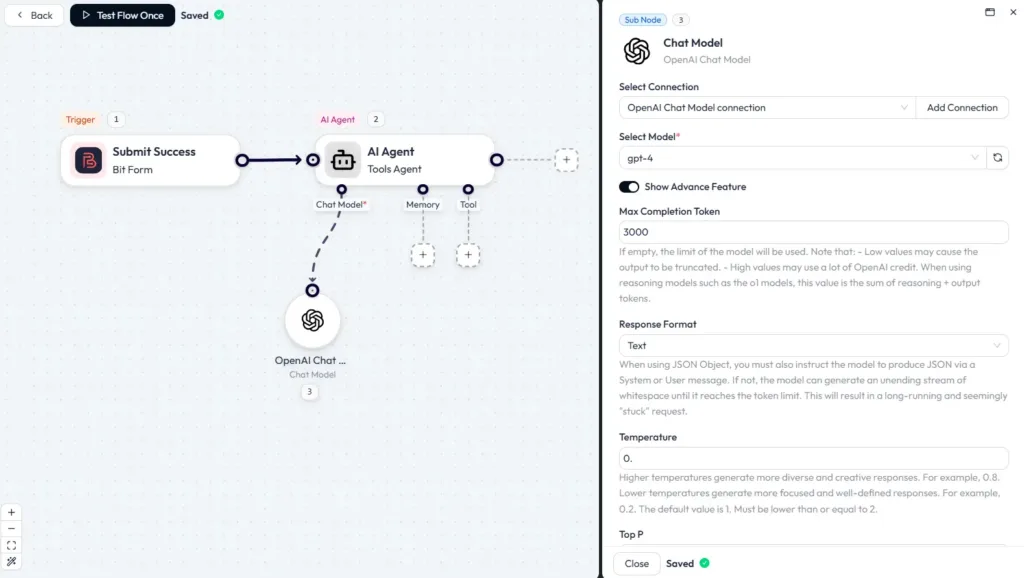
Here, you can also enable the Show Advanced Features to add token limits, temperature, and more.
If you want the agent to remember something like the customer’s name from a previous step, enable a Simple Memory node. You might save variables like {customer_name} or a ticket number. That memory can then be referenced in later prompts or actions.

Under the tools of the AI Agent node, you can use all the Bit Flows actions. In my case, I will route my data to three different platforms. First, the AI Agent will analyze the form data to understand the intent and sentiment of the user, then it will act as per my prompt.
Here, I have added all of my tools and selected the preferred event type.
You need to connect external tools like Telegram and WhatsApp using your credentials. For a practical setup example, see our WhatsApp automation for WordPress guide. Follow the Bit Flows documentation for further guidelines.
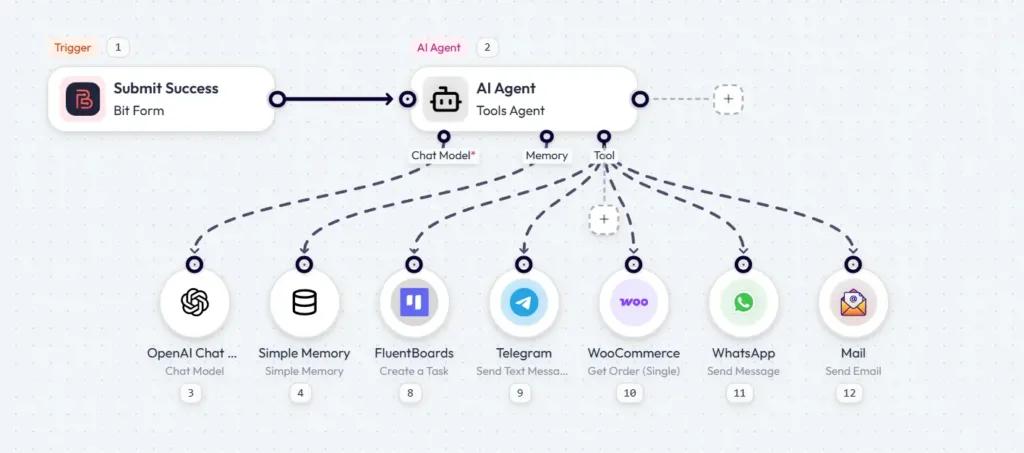
Now it’s time to tell the agent what to do by adding a prompt. Click on the AI Agent node in Bit Flows, add your preferred prompts, and set the max iteration limits. After adding the prompt, do a test run by clicking on the Test Run button.

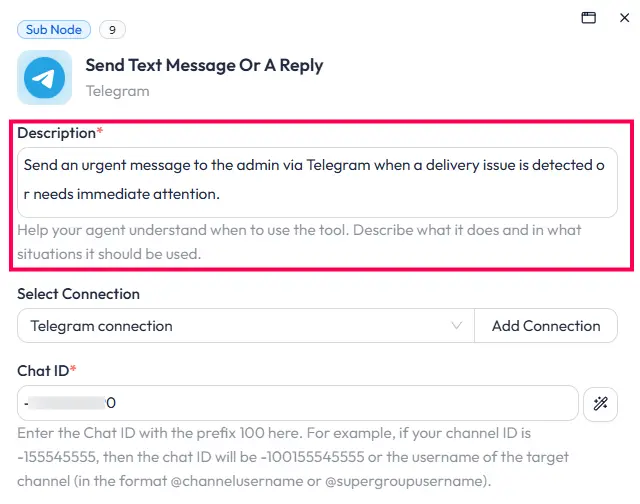
Under each tool, you can also add a short description. For example, I have added the short details to the Telegram tool.
Now, the awesome part is here: mapping the fields with the AI Agent-defined results, not just manual field mapping. Simply click on the AI Define icon beside the field, and Bit Flows AI Agent will automatically decide what to send in this field.
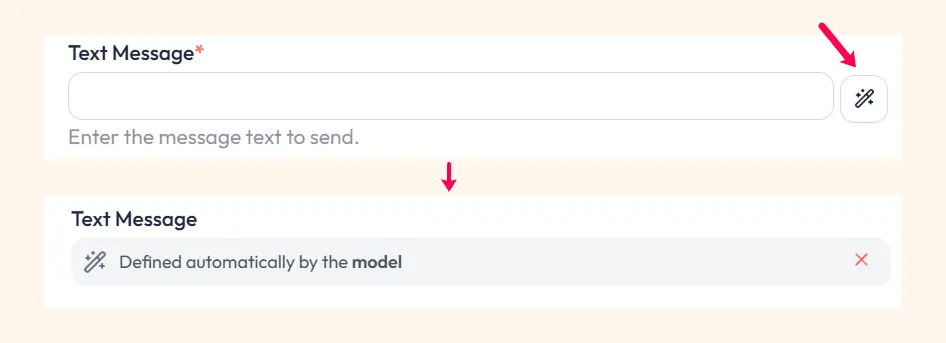
Define every field with AI Agent responses as per your prompt and needs.
You can also add actions after the Bit Flows AI Agent node. For example, I have added the Google Sheet for tracking each form submission. Here is my final workflow.
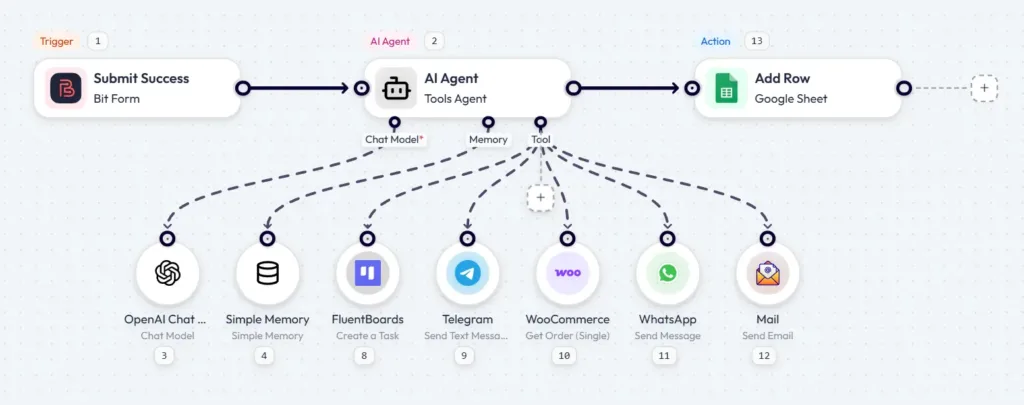
Now, every time after a form submission, the Bit Flows AI Agent will analyze the information, intent, and sentiment, then decide on its own what to do next.
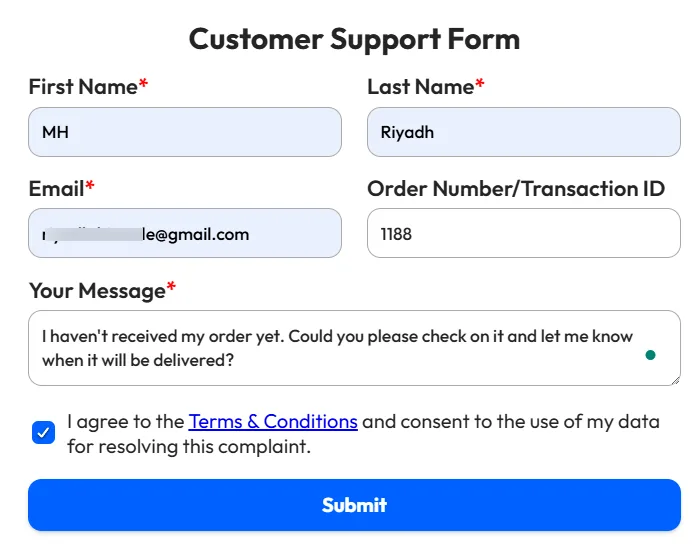
Let’s do a test. Here I have submitted a test form with the following information.
Here are the execution logs of the flow. Bit Flows shows each step, including what the AI agent prompt was and how it replied. Adjust prompts, memory, and routing as needed.
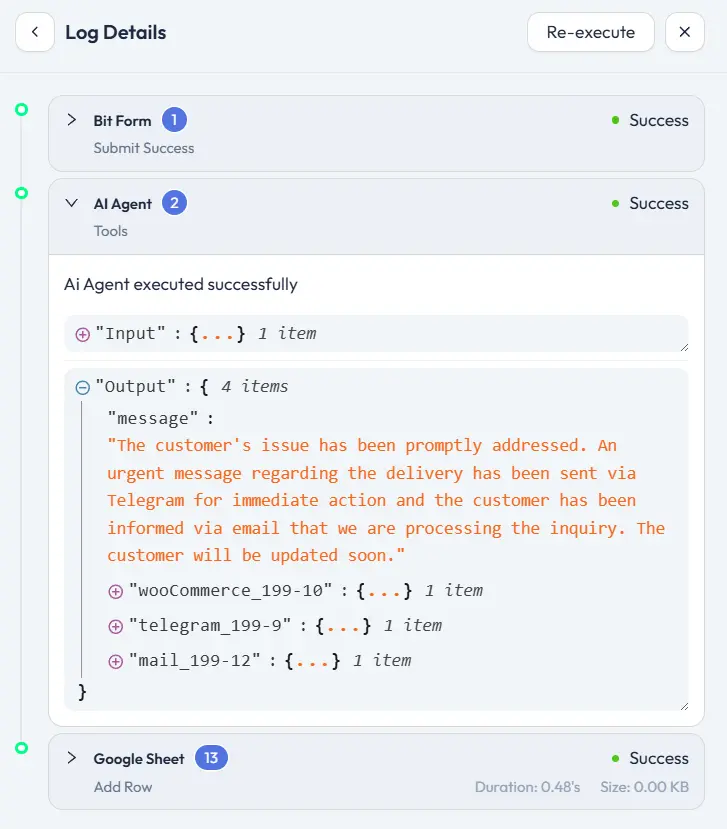
In this log, you can see how the AI Agent made the decision. First, the Agent analyzes the message, then calls the WooCommerce tool to check the order status. After that, it sends a message to Telegram and provides a quick reply to the customer’s email.
Here is the output done by the Bit Flows AI Agent.
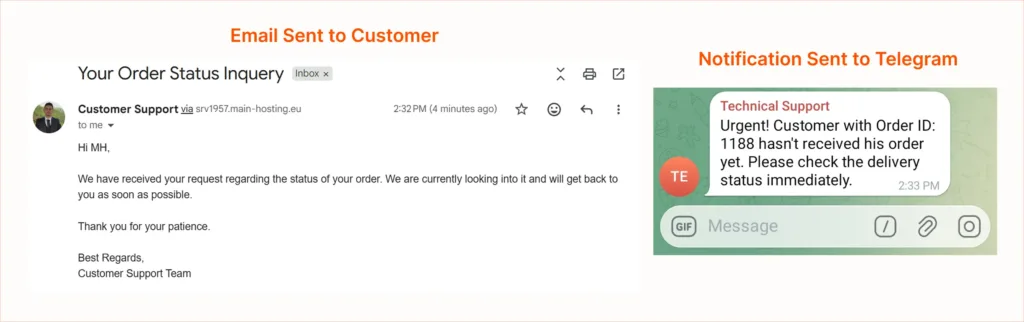
Now, every incoming support request will go through your AI Agent triage. And you and the customer will be notified immediately.
This is just a very simple example. The use cases for any agent flow are similar: pick a trigger, insert the AI Agent node, design the LLM/memory, add prompts, then chain tool calls for real actions.
We’re only scratching the surface of what AI agents can do inside WordPress. Bit Flows continues to expand its AI automation capabilities beyond the AI Agent itself. Bit Flows can now also work as an MCP Server, allowing compatible AI clients such as ChatGPT, Claude, and Cursor to interact with Bit Flows and build or run workflows through MCP.
We expect to see a flood of creative uses: think AI Agent on your site that can actually update content, AI that audits your site and suggests SEO improvements, or even automated content moderation agents. The trend is clear: agentic AI is becoming the norm.
Try Bit Flows today and see what flows you can build. Experiment with a simple AI Agent workflow automation and be amazed at the time it saves. Join the growing number of WordPress users who are turning their websites into intelligent automation engines. The future is agentic, and it starts on your WordPress site.
It’s a new feature of the Bit Flows plugin for WordPress. It lets you create AI-powered workflows that think and decide, not just do fixed actions. It uses large language models (like GPT) along with memory and tool integration to automate tasks smartly.
AI action usually follows a set prompt or rule. An AI Agent can adapt and use multiple steps. It remembers context and can call other tools. In AI terms, traditional automation is rule-based and static, while an agent is autonomous and adaptive.
No. Bit Flows is a no-code tool. You build flows with a drag-and-drop interface. Setting up an AI Agent involves typing prompts or choosing options, but no programming. The platform handles the AI calls for you.
Simple Memory lets the agent save certain variables during a flow run. For example, the agent could remember a customer’s name or previous answer. Later steps can access this memory. This helps keep the conversation coherent.
Absolutely. Each workflow can use one or more AI Agent nodes. You could have separate agents for chatbots, content, and marketing automations. Each runs independently with its own configuration.
Yes. The Bit Flows AI Agent is free to use inside WordPress. You can create unlimited agentic workflows without paying for the agent itself.
This is just the beginning. Future updates will add features like better conversation history, more AI integrations, and performance improvements.
You need to add your own API key for AI models like OpenAI, Gemini, or Deepseek. Any AI usage cost depends on your provider and how often your workflows run.
Yes. The AI Agent works with a no-code, drag-and-drop builder. You don’t need to write code to build agentic workflows.





 EN
EN  DE
DE  ES
ES  NL
NL  IT
IT  PT
PT  JA
JA