Running a WooCommerce store can feel like doing a lot of work. You need to write product descriptions, manage orders, update content, and stay on top of marketing. These jobs often repeat every day.
WooCommerce Automation gives you tools and plugins to handle these tasks. You and your team get to focus on growing the business instead. Letting software handle jobs like writing product descriptions, SEO tweaks, or syncing orders will save you time. It also helps you cut down on mistakes. And you will notice more sales.
In this article, you will find answers to key questions about WooCommerce automation. You’ll also discover the best WooCommerce automation plugins for your store. For each plugin, you’ll see what makes it special and how it helps. A list of key features comes with every review.
Let’s talk about WooCommerce automation. In simple words, it uses tools or plugins to take over store tasks for you. You no longer update product pages or send emails by hand. Automation plugins can do that job.
Automations work using “triggers” and “actions.” A trigger is an event, like a new order. An action is the response, like updating a Google Sheet or sending a message. These workflows run in the background. Your store works more smoothly, and you do less repetitive work. That also helps stop human mistakes.
You may wonder why automation matters. The main reason is that it saves time. It makes your work more accurate and even helps you save on costs. Automated tools handle orders, sync data, and talk to customers right away. For example, sending order data to a Google Sheet or CRM becomes automatic. No more copying and pasting.
Automation keeps your store records correct. Inventory, prices, and order status are always updated. People who use automation say it can help grow sales and make your team more efficient.
Good marketing becomes easier. Customers get follow-ups, and you have space to focus on bigger plans. Email sequences and quicker order processes keep people coming back. All of this happens without extra hands-on work.
Stores everywhere use automation now. Here are a few ways it makes a difference:
One shop set up a rule. Each order logs to a Google Sheet, and at the same time, the team gets a Slack alert. Another owner runs automatic emails for customers who leave items in their carts. The system sends them reminders and sometimes a discount.
A marketplace owner uses the Dokan Multivendor plugin. This automates vendor data and processes with no manual steps. Some stores rely on tools like Bit Flows to write WooCommerce product descriptions. You just add a product, and Bit Flows uses AI to fill in details and update the site for you. These stories show real ways automation takes over boring jobs.
Let’s explore the best WooCommerce automation plugins that can save you time and reduce manual work. Each tool offers different features to help your store run smoothly. Here’s a quick look at what they can do for you.
| Plugin | Automation Focus | Key Benefit / Use Case |
| Bit Flows | AI Workflow Automation | Helps run advanced workflows and create product details using AI, linking with over 150+ services. |
| Rank Math | SEO Automation | Handles SEO for products, including meta tags and sitemaps, and offers AI keyword help. |
| Bit Integrations | Data & App Integration | Moves WooCommerce data to Google Sheets, CRM, and 300+ apps, email, CRM, marketing, and more. There’s no limit on the number of automations you set. |
| Dokan Multivendor | Marketplace Management | Automates onboarding, commissions, and payments for vendor marketplaces. |
| Bit Social | Social Media Auto Poster & Scheduling | Shares WooCommerce products on social platforms as you want. |
| WooCommerce Subscriptions | Recurring Billing | Runs all parts of subscription sales, renewals, and recurring billing. |
| Bit Assist | Customer Support Chat | Handles customer support with a widget that covers FAQs, products, and more. |
| WooCommerce Bookings | Appointment Scheduling | Let’s customers book appointments or rent items with calendar sync and reminders. |
| Affiliate for WooCommerce | Affiliate Marketing | Tracks referrals, calculates commissions, and pays affiliates automatically. |
Now that you’ve seen how each plugin stacks up, let’s take a closer look at them one by one. We’ll explore what each tool can do, how it helps your store, and the key features that make it stand out. This will give you a clearer idea of which plugins fit your needs best.
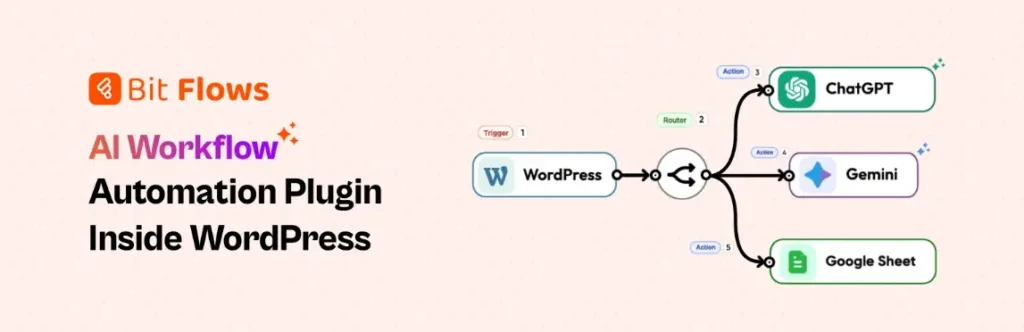
Bit Flows brings strong automation right into your WordPress dashboard. It comes with a drag-and-drop workflow builder. This lets you set up WooCommerce triggers for almost any action.
Bit Flows can run several steps in a row, such as loops and if-this-then-that choices. The plugin also has AI features. For example, new product titles can go to ChatGPT, which writes a description.
Bit Flows links with more than 150+ platforms, like email, CRM, marketing, and more. There’s no limit on the number of automations you set up. You can also automate many things with Bit Flows, like you can automatically creating coupons based on order total.

Rank Math is a full SEO tool for WooCommerce. It automates things like adding SEO fields, titles, descriptions, and schema. The plugin can add details like product codes and brands.
It sets up social tags and sitemaps so your products are easy to find. The setup wizard gets you started in just a few steps. With help from Content AI and a keyword tool, you get tips to make your product descriptions better. Less manual work means you keep up with search rankings.
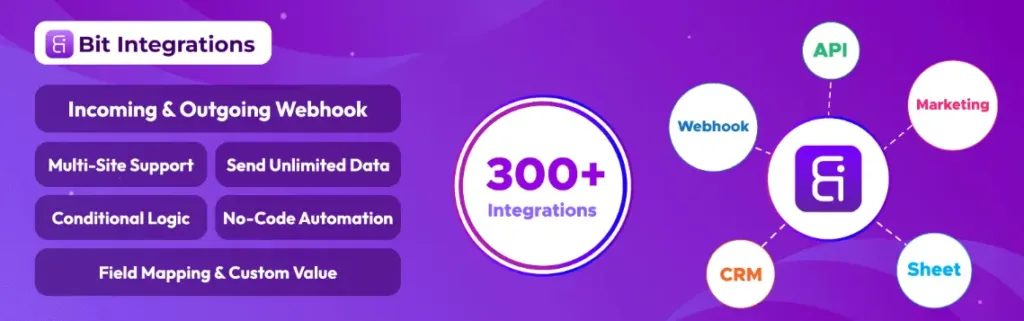
Bit Integrations helps WooCommerce connect with over 300+ other platforms. You can set up syncs with Google Sheets, CRM, and email tools. Use simple triggers and actions to pass WooCommerce data out to another place or pull it back in.
Bit Integrations has a visual setup and strong data mapping. Conditions control how data moves. Syncs run in real time, so your records stay current. It logs every task and has webhooks for extra automation.

Dokan helps you create a store where many vendors sell goods, like a marketplace. It handles key steps for you. Vendors get their own dashboards to add products and fill orders. You set rules for commissionsemail, CRM, marketing, and more.
Dokan takes care of the splits and collects fees. Customer payments are routed quickly. Vendors can run their own coupons, check reviews, and do their own store setup. Dokan Pro offers data and analytics. There’s even a new AI tool to help vendors write product listings and touch up images.
💡You can add more power to the Dokan multivendor by using the Bit Flows Dokan multivendor automation triggers.
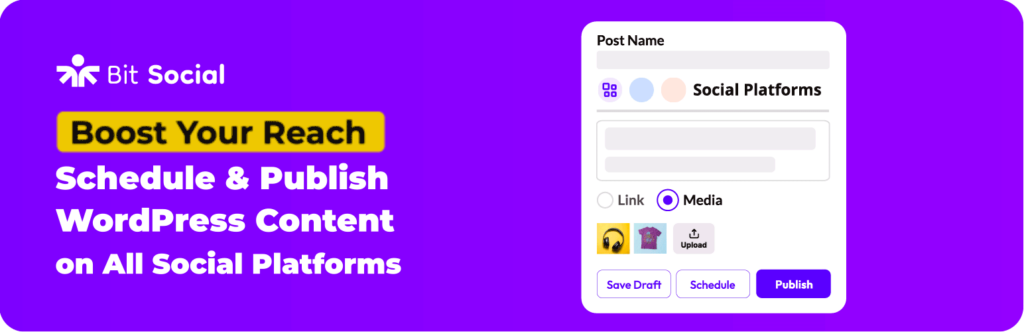
Bit Social posts your content to social media. It shares your new products and posts with many networksemail, CRM, marketing, and more. There’s no limit on the number of automations you set up. Facebook, Twitter, LinkedIn, and more.
You can plan a schedule for every platform, or post right away. Bit Social gives options to recycle old posts for freshness. The plugin also has tools just for WooCommerce products.

WooCommerce Subscriptions helps you sell products that customers pay for over time. You control how often customers get billedemail, CRM, marketing, and more. There’s no limit on the number of automations you set up. weekly, monthly, yearly, or at custom intervals.
This tool works with over 25 payment gateways. If a payment fails, it can try again without you doing anything. Customers can make changes or cancel their plans on their own. Subscription plugins send email reminders and invoices as needed. You also get detailed reports so you can see how your subscriptions are doing.

Bit Assist is a widget for your site. It lets customers reach you by chat or message, no matter which platform they useemail, CRM, marketing, and more. There’s no limit on the number of automations you set up.WhatsApp, Messenger, or others.
The widget ties 30+ channels together. Bit Assist links with live chat tools like Tidio. It has a built-in contact form and a section for FAQs or knowledge base articles. Customers can look up their order status right in the widget. There’s also a site search feature, so people can find products fast. This cuts down on support work and brings all help options to one spot.

WooCommerce Bookings lets people book appointments or rentals from your site. You pick fixed time slots, or let customers pick their own. Use it for individual slots or for group bookingsemail, CRM, marketing, and more.
Set up special pricing for big groups, early bookings, or busy times. Bookings automatically block off taken times, so you never double-book. You also get email reminders ahead of time to help cut down on no-shows. Bookings even connects with Google Calendar.

Affiliate for WooCommerce helps you run a referral program. You bring in affiliates or even turn customers into affiliates. Pick any commission rule you want. You can make unlimited commission plans, or even pay for all future sales (“lifetime” commission).
Track every sale, link, and top affiliate in real time. Affiliates can get paid automatically through PayPal, Stripe, or store credit. You set up once, and the plugin takes care of tagging and paying every referral.
Choosing a plugin can be tricky. Start by looking for easy setup and clear controls. No-code, drag-and-drop options are best for beginners. Make sure the plugin supports triggers and actions that work for WooCommerce. These might be events like product updates or new customer orders.
Integration is key. Look for plugins that work with services you already use. That could mean Google Sheets, CRM tools, email services, or even AI like ChatGPT. Other good features are conditional logic (if-this-then-that rules), webhooks for custom integrations, and detailed logs to help if something goes wrong.
Pick a plugin that gets updates and has good support. You may also need special things like SEO tools or a way to post on social media.
Picking the right plugin depends on your store’s needs. First, list out the jobs you want to automate. Maybe you want help with SEO, order flow, or email follow-ups. Once you know that, look for plugins that match those jobs.
Read user reviews and the plugin help docs to be sure it works with your version of WooCommerce. Check if it is easy for your team to use, even if they’re not tech experts. Compare prices. Some paid plugins can take the place of several small tools, which can save money.
Always test a plugin on a copy of your site first. This keeps your live store safe. Find plugins that have a good support team and a strong community. In short, look for something that fits your shop, is simple to use, and pays you back in value.
Getting started with automation isn’t hard. Here’s how it usually goes:
First, install and turn on the plugin on your site. Next, go to the settings. You may connect services like ChatGPT, CRM, or email with an API key if you choose a workflow automation plugin like Bit Flows.
Now you build your workflow. You decide on triggers, like “when a new product is added.” Then you pick actions, like “write a product description.” The plugin usually lets you set this up with clicks, not code. Always run a test using some sample data. If it needs changes, tweak the settings or add rules.
Keep checking your automatons to make sure all works as planned. Most plugins give tutorials or ready-made workflows to help you start. Take it slow and build up your automations step by step.
Some mistakes can cause problems with automation. Don’t set up automations without double-checking them. Always have a way to handle errors or stop things if they go wrong. Start small and always test on new orders or products.
Don’t overload your staff or customers with alerts and emails. Too many notifications turn into noise. Set your conditions carefully. For example, only send a certain email if the order amount is above a set number. Keep every plugin up to date. Old versions can break and pose security risks. Always back up your website before adding or changing automation.
Take care with user roles. Some plugins only work for admins, so set permissions right. Regularly review your automations. Remove old ones you don’t use and make small updates as your business grows.
Using automation for your WooCommerce store helps you work smarter. Each plugin listed here solves a different problem. Some focus on SEO. Others take care of tasks or help your customers. The right tools can make your daily work simpler and your store run without as much effort.
Tools like Bit Flows can create content for you, while Rank Math looks after your SEO. Integrations mean your spreadsheets and CRMs update themselves.
With a social plugin like Bit Social, more people see your products. Vendor and affiliate plugins handle commissions behind the scenes. I’ve seen e-commerce shops become smoother and more successful after adding automation.
You can start with just one plugin, solve your biggest problem, and add more as you go. Automation is not coming in the futureemail, CRM, marketing, and more. There’s no limit on the number of automations you set up. It’s already here.
These plugins connect your store events, like new orders, with automatic responses. For example, they can send information to other apps or post on social media. You set a rule, and the plugin does the rest.
Yes, it can. Automated emails catch people who leave their carts. Promotions get sent at the right time. SEO tasks mean more people find your shop. These things help you make more sales.
No. Most plugins use no-code or drag-and-drop options. You might have to enter information, like an API key, to connect them, but you won’t need to write code.
Some have free core versions, like Bit Flows. Others ask for payment for more features. Think about what you need, and see if it saves you time or replaces other tools.
Choose popular plugins from trusted sources. Keep them updated, and check for reviews. When you connect to outside services, use their official settings for security.
Yes. Start with one small task, like sending new orders to Google Sheets. As you get used to it, add more automations. Most store owners grow their setup step by step.





 EN
EN  DE
DE  ES
ES  NL
NL  IT
IT