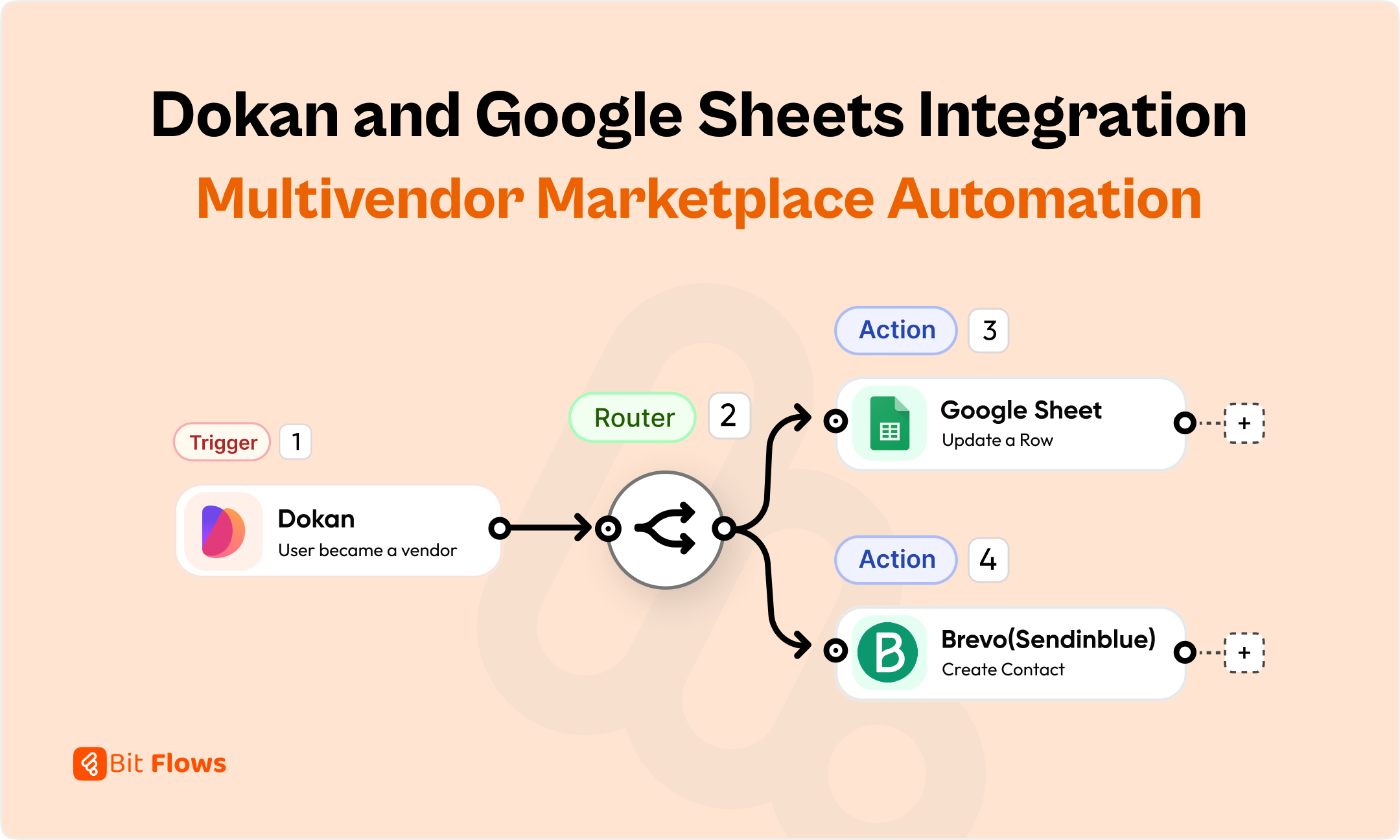
It is like juggling many things to manage a successful marketplace with many sellers. Dokan is a top WordPress multi-vendor plugin. It simplifies your work in building and operating your marketplace.
But if you need to sort and keep track of vendor details, manual work can still slow you down. Imagine if new seller registrations, withdrawal requests, or refund notifications could be automatically recorded in a Google Sheet. That would be great, wouldn’t it? That is where Bit Flows steps in and keeps your marketplace organized.
Using Bit Flows, you can automatically send vendor data to Google Sheets. Also, you can send your WooCommerce order data to Google Sheets. This is a time saver for getting your marketplace business in order and running smoothly.
Let us discuss how this integration works, why it is useful to use, and how to automate important workflows easily.
Integrating Dokan and Google Sheets with Bit Flows is highly beneficial for marketplace owners:
Stay Organized: Vendor data like new seller sign-ups, seller information updates, refund requests, and withdrawals will be automatically sent to Google Sheets. This means you can easily see what’s happening in your marketplace.
Save Time: No manual typing of data anymore! Use Bit Flows to automate workflows so that you can spend time on other important things.
Reduce Errors: Automation takes away the risk of errors that happen when you copy data manually.
Track Vendor Performance: Google Sheets allows you to make charts or use filters so that you can see at a glance what vendors are doing and their trends.
Real-Time Updates: Get up-to-date information about your vendors right away, so you always know.
Bit Flows is the best tool to automate WordPress operations. Here’s why it is the perfect choice for connecting Dokan and Google Sheets:
Direct Dokan Integration: Bit Flows has direct Dokan integration. So you can connect to many Dokan events, such as new vendor sign-ups, withdrawals, and refund requests.
Visual Canvas Builder: Design automation flows easily with a drag-and-drop feature.
Advanced Features: 130+ apps supported, error handling, and in-depth reporting.
Secure and Self-Hosted: Your data remains with you. Which gives you maximum privacy and control.
Affordable Lifetime Deal: Compared to competitors like Zapier or Make, Bit Flows offers a budget-friendly lifetime deal.
You can create powerful automation using Bit Flows that helps organizing your business processes at an affordable cost.
Before setting up the automation, make sure you have the following:
Once you have these prerequisites ready, you’re all set to connect your multivendor store with Google Sheets.
To maximize your Dokan and Google Sheets integration, we are going to use one spreadsheet but three separate sheets. One for new vendors, another for role change (when the user becomes a vendor), and one for withdrawal requests.
💡Bit Flows supports connecting these specific sheets directly from the same spreadsheet. So no need to have separate spreadsheets for each event. Let’s create the three sheets and connect the Google Sheets with Bit Flows.
Let’s create a spreadsheet and add three sheets to the spreadsheet. Here is my spreadsheet name is “Dokan to Google Sheets” and the three sheets are, New Vendor Added, Vendor Information Updated, and Vendor Withdrawal Request.

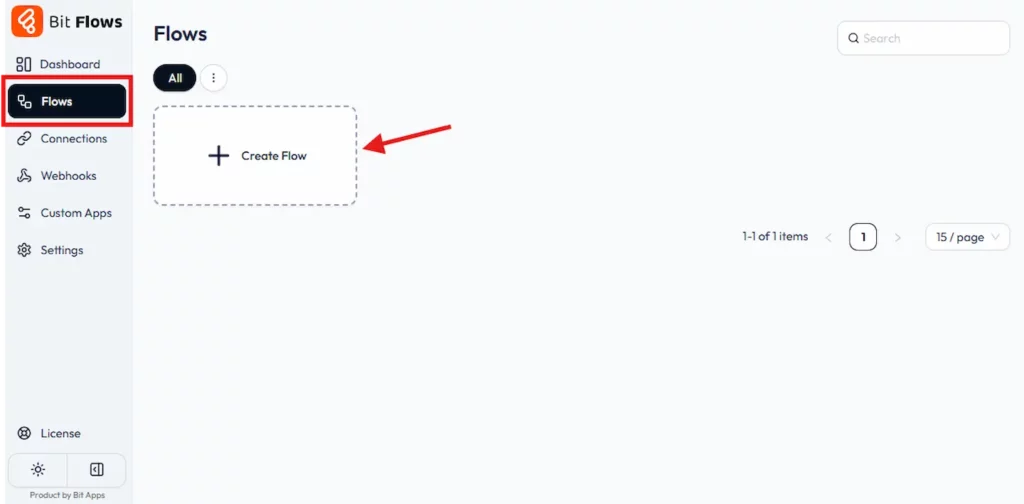
To create workflow install and activate Bit Flows on your WordPress site. You will need the Bit Flows Pro to integrate Dokan with Google Sheets. After activating Bit Flows navigate to Bit Flows dashboard> Flows> Create Flow.
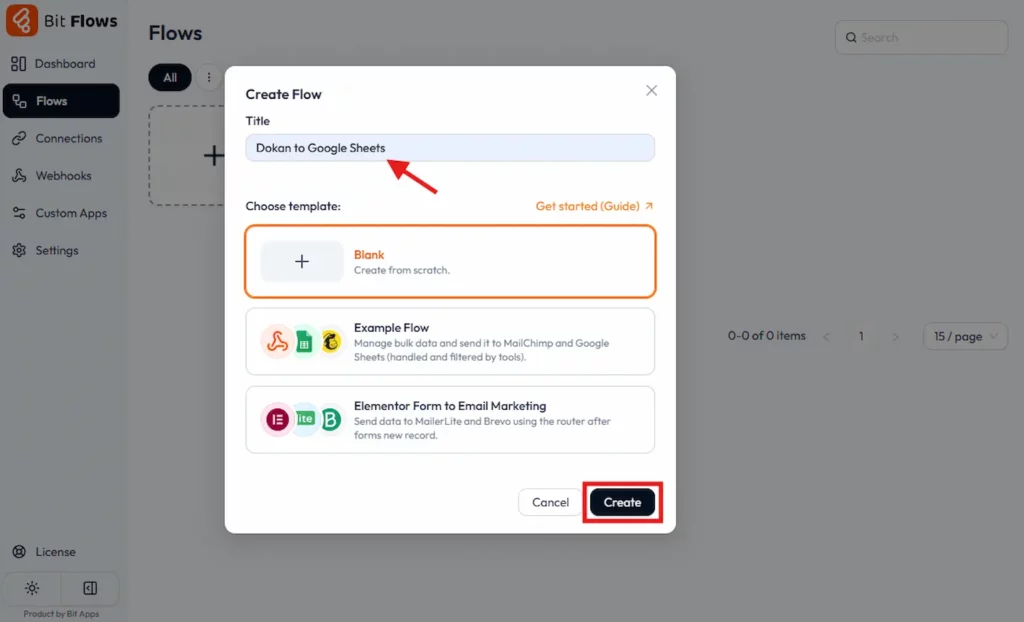
You can choose a template or select Blank. Name your workflow as per your event. Here I am going to name it “Dokan to Google Sheets”. And then click on the Create button.
Now you will able to see the awesome Bit Flows dashboard. Isn’t it impressive? Now let’s do some automation magic.
At first, we will add Dokan as a Trigger. Click on the Trigger Node and search for Dokan. Now you have to select your event from the integrations list.
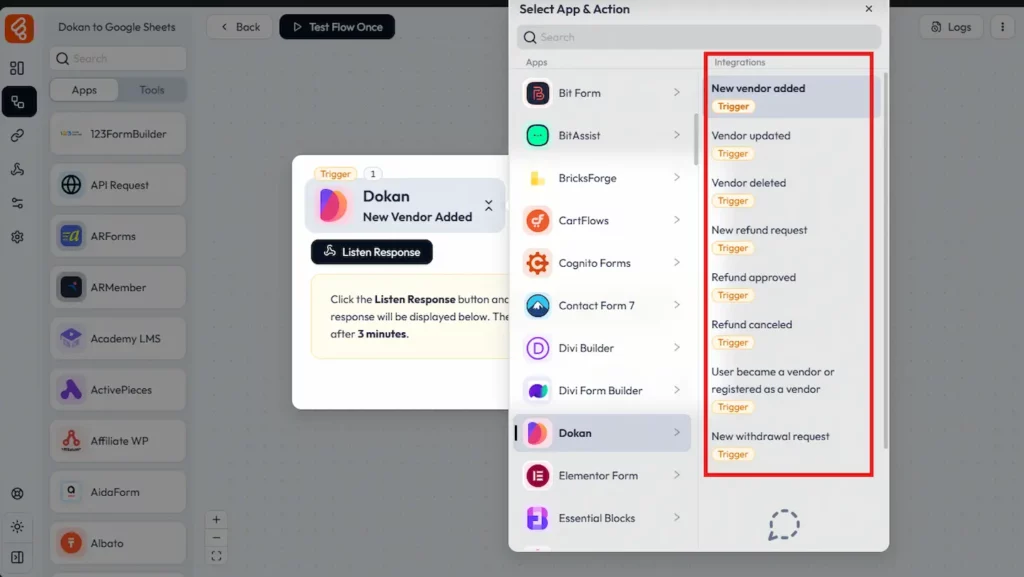
For the first workflow, I will select “User became a vendor or registered as a vendor” as a trigger. This will allow us to get new registered vendor data. Then we will add a router to connect Google Sheets and Bravo (Email Marketing & CRM Platform).
ℹ️ Note: On the Bit Flows Dokan trigger, you will see two triggers one is “User became a vendor or registered as a vendor” which is used for getting seller data if the seller registered by using the vendor registration form. Another one is “New Vendor Added”, this one is for getting seller data if you add the vendor from your Dokan or WordPress dashboard.
After selecting the event you need to click on the Listen Response button and create a vendor account on your site (By using the vendor registration form). This will listen to your responses and get all the required data to send to your other app.

This is how Bit Flows capture responses. Now you can send all these captured data to your app.

Now we need to add a router (To add multiple add). And we will connect Google Sheets and Bravo. To add the router and the app just drag and drop them from the tools/app tab to your Bit Flow builder. You have to configure Google Sheets and Brevo with your credentials.
📌 Check out this guide to configure your Google Sheets with your Bit Flows.
You can connect the flow like this. Also, you can add more apps/tools if needed. Bit Flows has no limit on adding tools/apps! so you can add as many as you need!
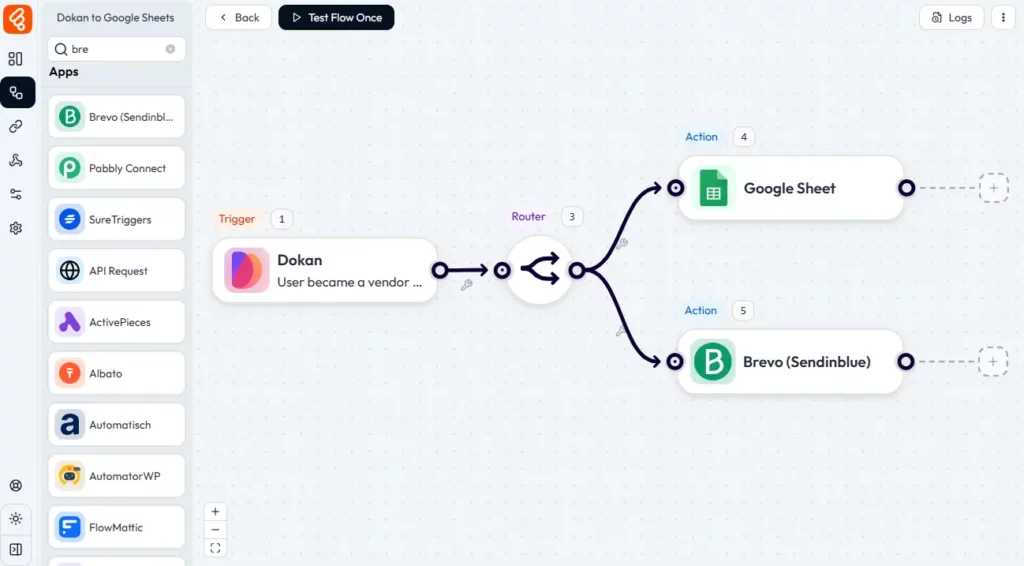
On Google Sheets, we will use Add a Row as the event. This will add new vendor data by creating a new row on the Sheet.
After completing the configuration, select your specific Spreadsheet and Sheet from the dropdown. Click on the refresh icon if you don’t get your preferred sheet.

Now we have to map the field as per the Google Sheets columns. We will send Vendor ID, Store Name, Store Phone, and Store URL to Google Sheets. So let’s map this field. On the column field select the Sheet column and select the value that you want to send to it.
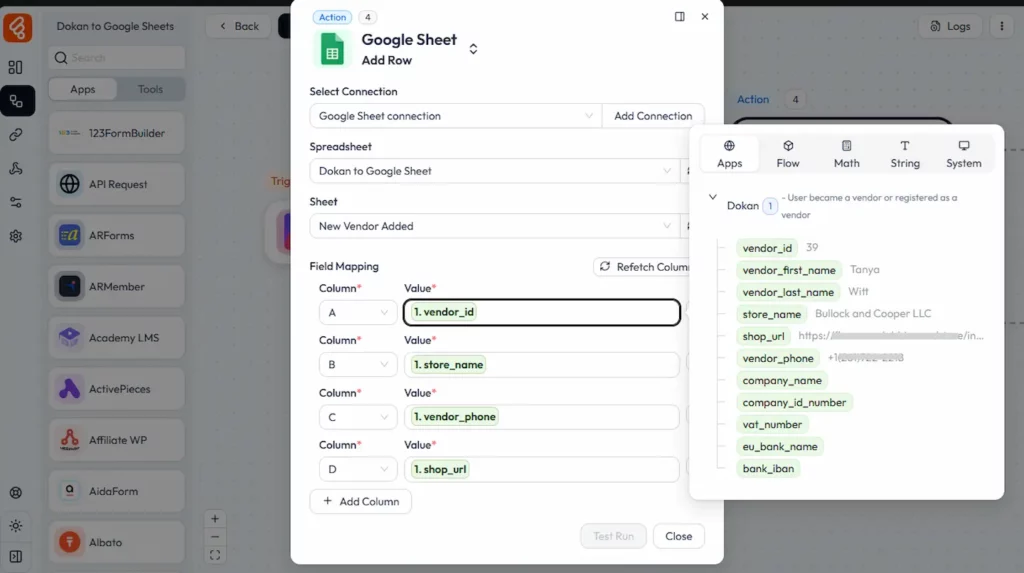
Once you are done, click on the Test Flow Once, then create a vendor account, and check your Sheet. These will send the data to the Sheet.
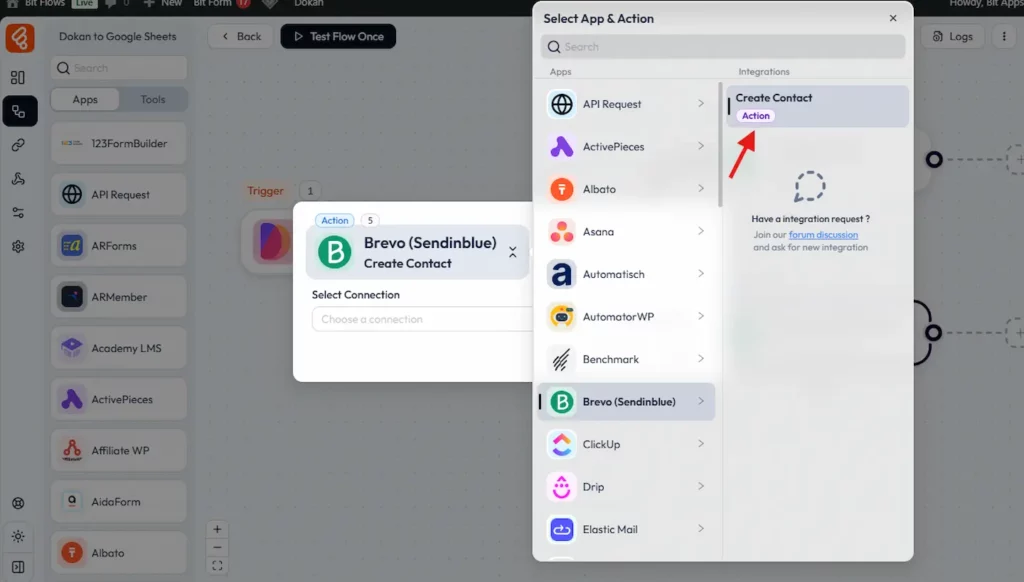
Now let’s connect Brevo (Sendinblue) to send the vendor data for email marketing. This will help you to send promotional or business emails to your vendor. To configure Brevo, select the Create Contact event as the Action.
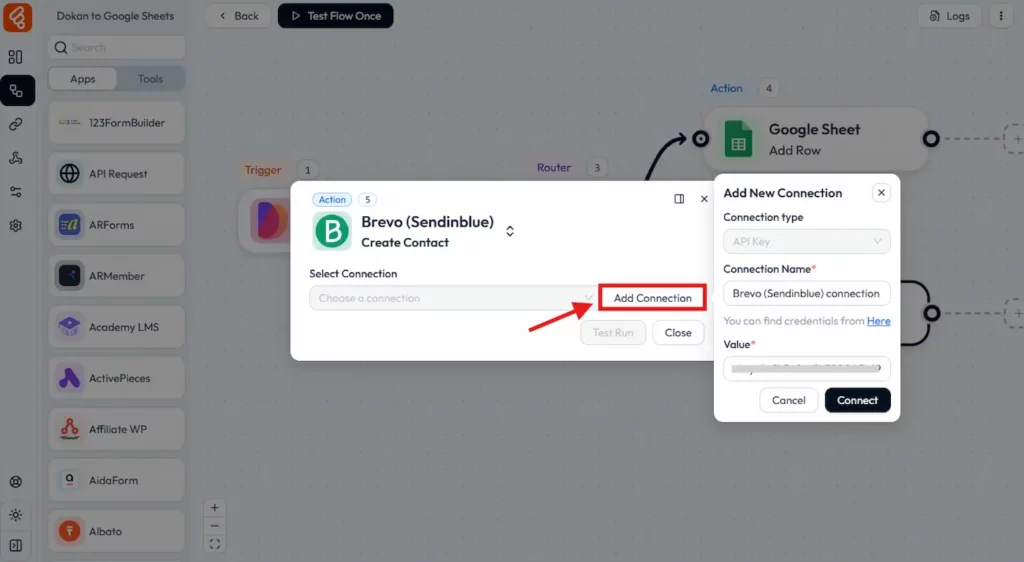
Then click on the Add Connection button. A pop-up will appear, here you have to add the Brevo API. Enter your API on the Value field and click on the Connect button.
Now select your contact list and map the field that you need to send on Brevo. Here I need to send the Vendor’s first name, last name, and phone number. So here is my field mapping:
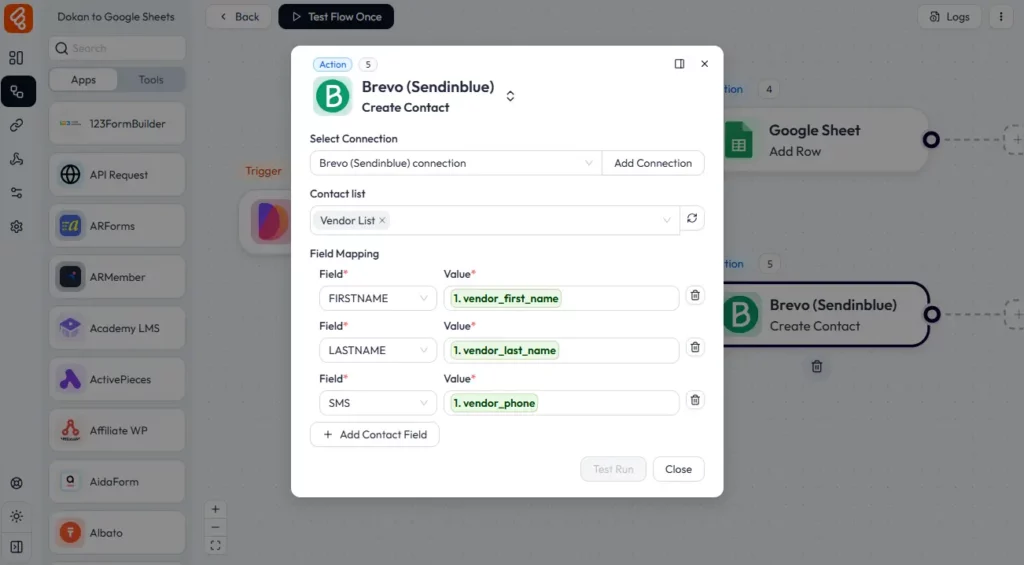
That’s all! you have configured the automation successfully. Now If a new vendor registers on the site you will get the vendor information on Google Sheets and also you will get it on your Brevo account.
Let’s do some tests and check the Sheet and Brevo. You can check the execution history from Bit Flows logs. Here is my log details for the flow that we have created.

Similarly, you can create workflows for other events. Bit Flows has integrations with the following Dokan events:
Also, you can add new events by using Bit Flow’s powerful APIs and Custom app.
Following are some simple examples of using Bit Flows to automate Dokan vendor data:
Track New Vendors: When a vendor registers on your site, you will get vendor information on the Google Sheet or on your other app like WhatsApp or Slack.
Vendor Updates: If any vendor changes any information such as store information or payment details you will get automatically notified.
Withdrawal Requests: If any vendor requests a payment withdrawal, you will instantly notify all organized withdrawal requests.
Refund Management: For your finances, you must the refund data so that you can improve the product or services. By sending the refund request on Google Sheets you can easily filter out the most refund cases.
Vendor Role Changes: Dokan allow other user to become a vendor. If a customer converted to a seller you will be notified.
Dokan integration with Google Sheets using Bit Flows is a big help for marketplace owners. It optimizes operations and helps you keep your data organized. So that you can focus on growing your business instead of being stuck by admin tasks.
Are you prepared to optimize and simplify your multi-vendor marketplace? Start utilizing Bit Flows today and discover how simple automation can be. With Dokan integration, advanced workflow building tools, and budget-friendly lifetime pricing, Bit Flows is the ideal choice for operating your multivendor marketplace. Don’t wait, simplify your workflow and keep your business running smoothly with Bit Flows!
Bit Flows offers direct Dokan integration. With the easy drag-and-drop canvas flow builder, and support for multiple events like vendor registrations, withdrawals, and refunds, all without needing code.
Integrating Dokan with Google Sheets helps marketplace owners automatically track and organize vendor data, saving time, reducing errors, and keeping operations efficient.
Yes! With Bit Flows, you can create one spreadsheet and multiple sheets for each event to keep your data organized without needing separate spreadsheets.
Bit Flows is the best and most affordable tool to automate your multivendor store. This tool has direct integration with the most popular multivendor plugins like Dokan. You can also use Webhooks, APIs, and custom apps for custom automation.



 EN
EN  DE
DE  ES
ES  NL
NL  IT
IT