At Bit Apps, our goal has always been to simplify the way you handle data. We created Bit Flows to give you a professional-grade automation platform that lives exactly where your business lives: inside WordPress.
By moving your workflows away from expensive, external SaaS platforms and bringing them “in-house,” you gain more control, better privacy, and significantly lower costs.
However, because Bit Flows runs natively on your site, its performance is closely tied to your WordPress environment. While we’ve engineered Bit Flows to be extremely lightweight and efficient, it is still recommended to have a stable foundation to perform its best, especially when you start building complex AI-driven workflows.
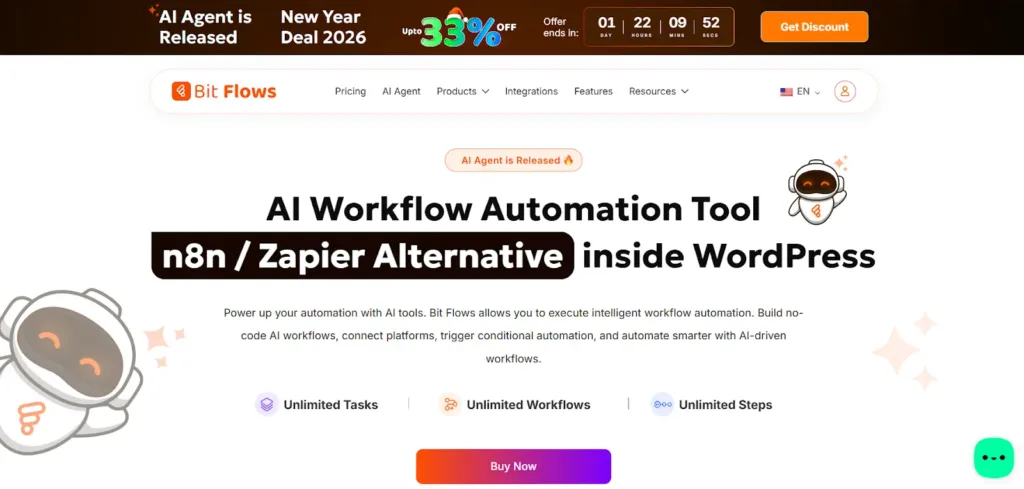
One of the most frequent questions our support team receives is how to ensure that automations run 100% of the time without “silent failures.” The answer almost always comes down to the quality of the hosting environment.
After extensive testing across various platforms, we have found that an optimized hosting provider like HostWP.io offers the specific technical architecture that allows Bit Flows to thrive.
In this guide, we will walk you through why hosting matters for automation and how to tune your settings to ensure your “digital workforce” never misses a beat.
Most WordPress hosting providers are designed for “reading” data, meaning, when a visitor lands on your page, the server shows them an image and some text.
However, Bit Flows is an “active” tool. It is constantly “doing” things in the background: catching webhooks, talking to the OpenAI API, updating your CRM, and syncing Google Sheets.
Even though Bit Flows is highly optimized, these background tasks are often treated differently by standard hosting providers. They use aggressive “resource capping” to save money. Cheaper hosting looks for any background process that stays active for more than a few seconds and automatically shuts it down.
If you are running a simple flow that sends an email, you might never notice a problem. But as soon as you step into the world of AI Agents or high-volume data processing, those server-side “safety nets” can become “automation killers.”
This is why choosing a performance-first hosting like HostWP to host your WordPress sites is so important; they understand that modern WordPress sites are more than just static pages, they are functional applications.

One of the most popular ways to use Bit Flows is by integrating AI Agents. You might have a flow where a customer submits a support ticket, and Bit Flows sends that text to an AI to categorize it or suggest a response.
AI is powerful, but it isn’t always instant. Depending on the length of the prompt, a model like GPT-4 might take 15, 30, or even 45 seconds to generate a high-quality response.
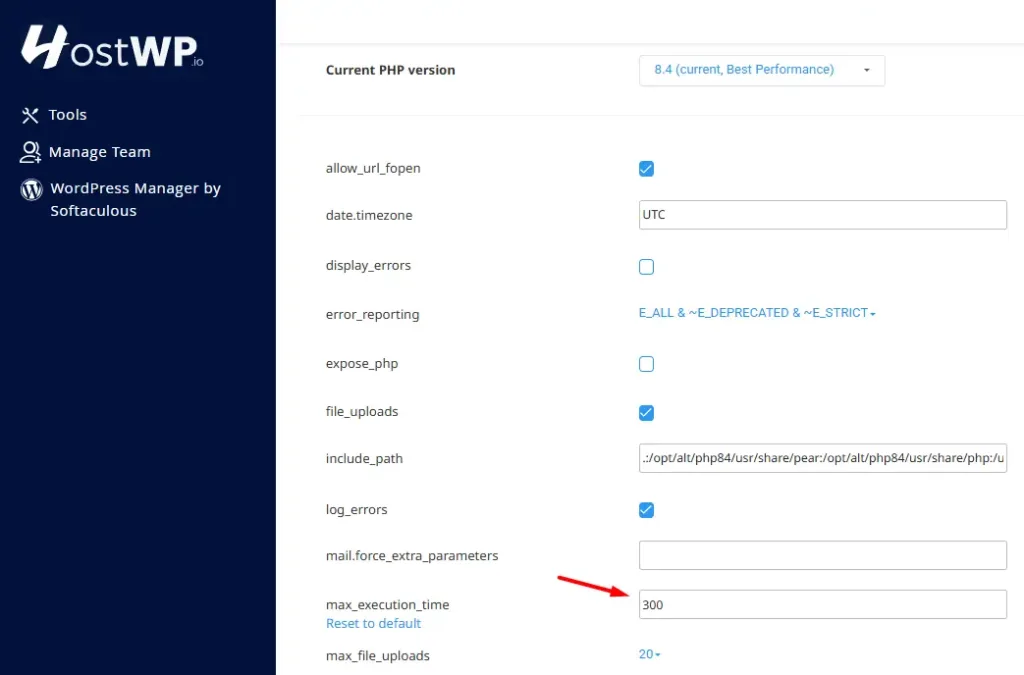
The “Timeout” Problem: Most hosting accounts have a setting called max_execution_time. Usually, this is set to 30 seconds. If your Bit Flows node is waiting for the AI to reply and that 30-second limit is hit, the server stops the script immediately.
To you, it looks like Bit Flows didn’t work. In reality, Bit Flows was ready and waiting, but the server “pulled the plug” too early.
Solution: We recommend increasing your execution time to 300 seconds. HostWP makes this incredibly easy to change in their control panel. By giving your server more time to complete these background conversations with external APIs, you ensure that even the most complex AI tasks finish successfully every time.
Every time Bit Flows runs a workflow, it uses a small amount of your server’s RAM (Memory) to hold and transform your data.
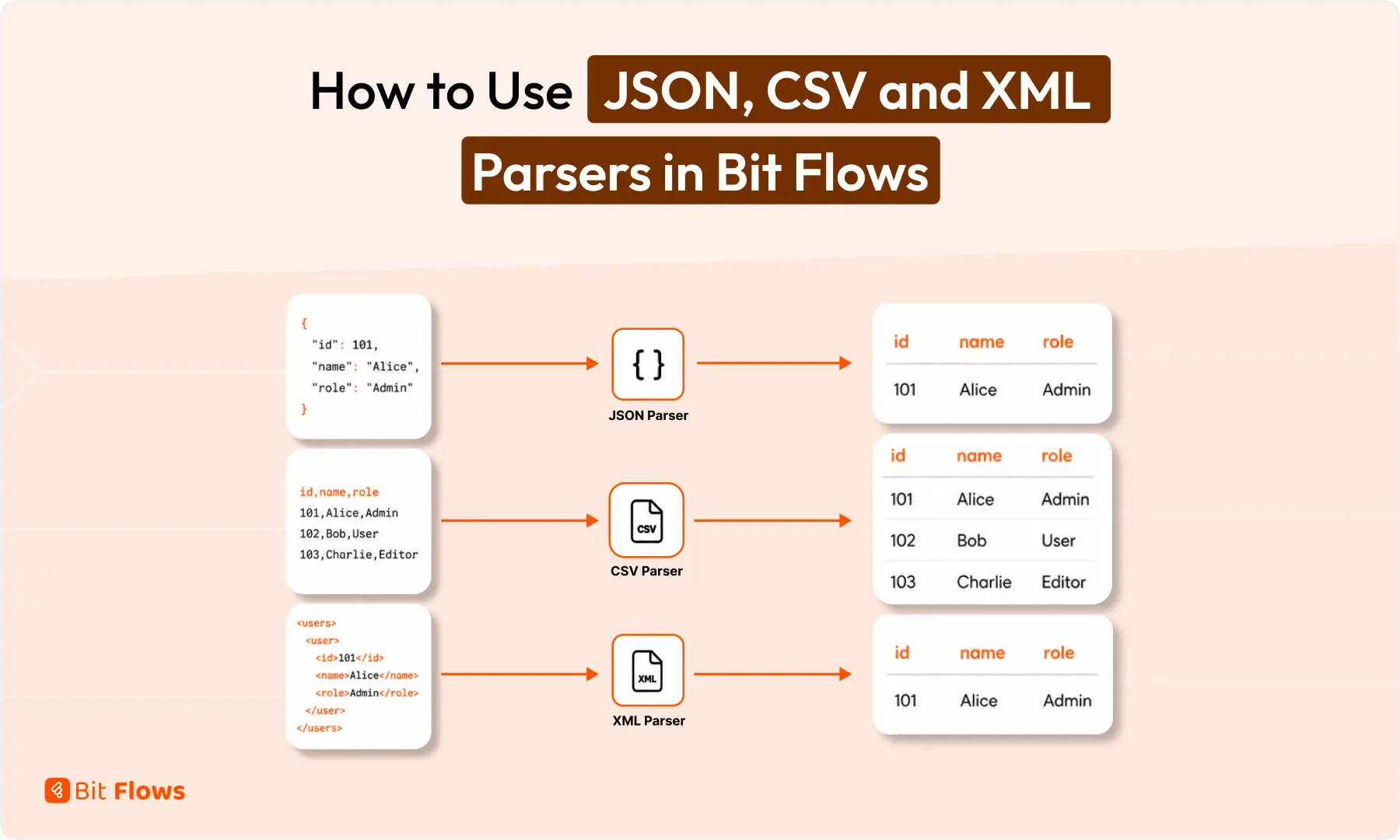
For example, if you are taking a large list of customers from a CSV file and mapping them into your CRM, Bit Flows needs a “workspace” to organize that information.
While Bit Flows is very smart about how it uses memory, your WordPress hosting server is also running your theme, your database, and all your other plugins at the same time.
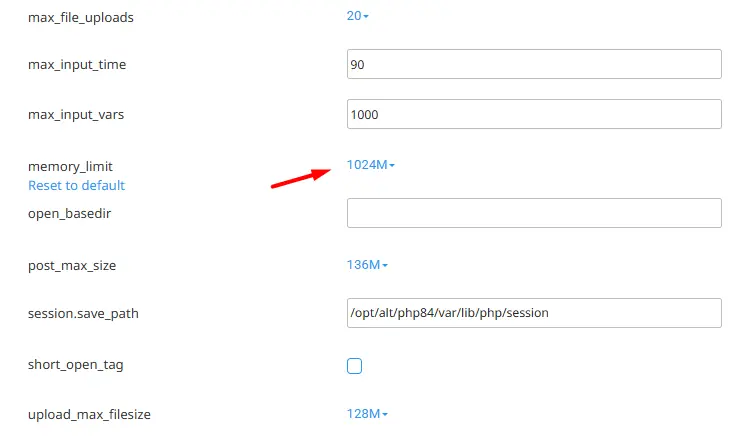
If your memory limit is too low, your server will eventually run out of space to process the data, leading to a “Fatal Error.”
Most hosts give you 128MB or 256MB. For a basic blog, that’s fine. But for a business running smart workflows, we suggestat least 512MB.
On a high-performance platform like HostWP, this extra memory acts as a buffer. It ensures that even if you have a sudden spike in traffic or a massive automation task, Bit Flows has all the room it needs to operate without slowing down the rest of your website.
A common frustration for users is when a “Scheduled” or “Delayed” automation doesn’t run on time. You might set a Bit Flows node to “Wait 2 Hours” before sending a follow-up email, but the email doesn’t go out until 5 hours later.
Understanding WP-Cron: By default, WordPress uses “WP-Cron” to handle scheduled tasks. The catch? WP-Cron only checks for tasks when someone visits your website.
If you have a low-traffic site and nobody visits between 2:00 PM and 5:00 PM, your “2:00 PM” automation will just sit there waiting for a visitor to “wake it up.”
The Professional Solution: System Cron: To make your automations truly reliable, you need a “System Cron.” This is a setting at the server level that tells WordPress to check for tasks every minute, regardless of whether you have visitors or not.
Hosting providers like HostWP provide an easy way to set this up in seconds. It turns your WordPress site into a 24/7 automation machine that never misses a deadline.

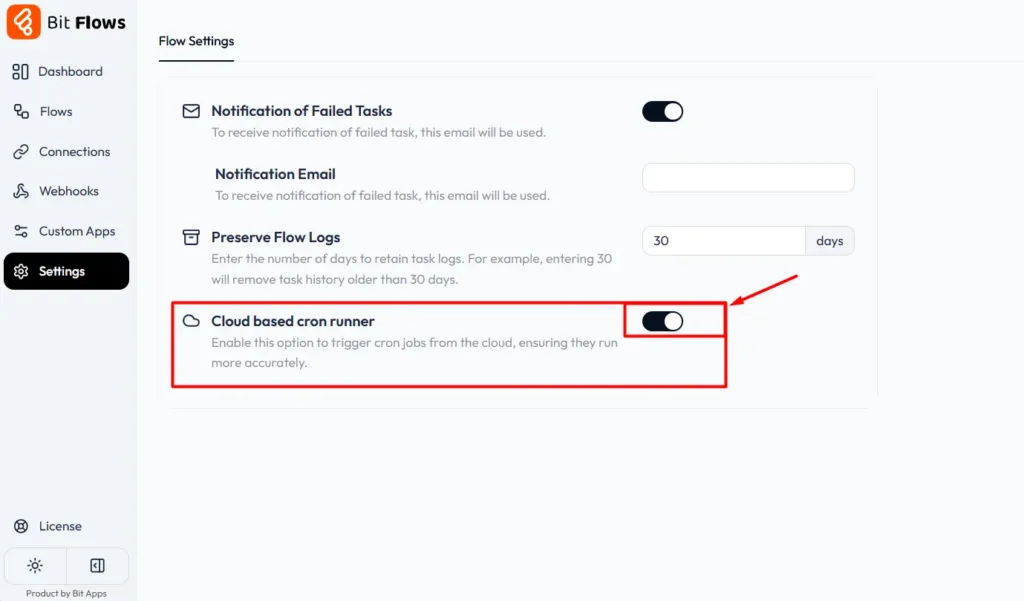
Alternatively, Bit Flows has the perfect solution; you can easily enable Cloud-Based Cron Runner inside Bit Flows in just one click. This will make your workflow execution reliable.
If you use Bit Flows to receive data from other apps (like Stripe payments or Shopify orders), your site needs to be ready to handle “Webhooks.” When a sale happens, Stripe sends a tiny “ping” to your site. Bit Flows catches that ping and starts the workflow.
If you are running a successful promotion, you might get 50 or 100 pings in a single minute. A standard server might get overwhelmed, causing some of those pings to “bounce” or fail.
HostWP uses LiteSpeed Enterprise technology. LiteSpeed is designed to handle a high volume of simultaneous connections much better than older server software.

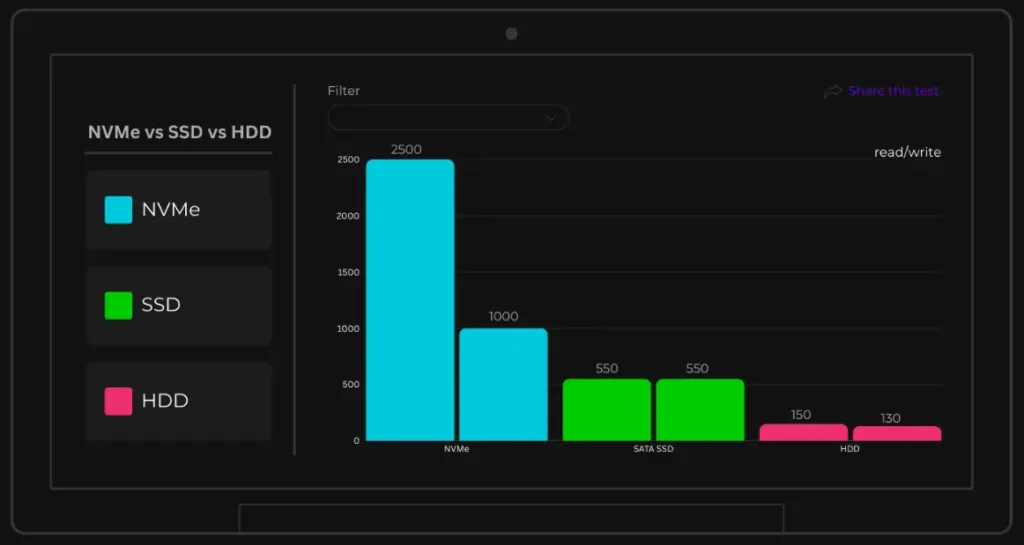
This means Bit Flows can catch every single webhook, even during your busiest hours, without any lag. When combined with NVMe storage (which is much faster than traditional SSDs), the “logging” of these flows happens instantly, keeping your database clean and fast.
As you build more workflows, Bit Flows stores information about your tasks in the WordPress database. If you are running thousands of flows a day, your database can become very “busy” answering requests.
This is where Object Caching (Redis) comes in. HostWP includes Redis, which acts as a high-speed “short-term memory” for your server. Instead of Bit Flows having to ask the database for information every single time, it can grab it from Redis in a fraction of a second.
This reduces the load on your server and keeps the “Admin Dashboard” feeling fast and responsive, no matter how many automations you have running in the background.

Bit Flows often needs to connect to external services like Slack, Google, or Mailchimp. To do this securely, your server must have the latest security protocols (like TLS 1.3) and updated “libraries” (the software the server uses to talk to other servers).
Traditional hosts often run outdated software to save on maintenance costs. This can lead to “Connection Refused” errors when Bit Flows tries to talk to a modern API like OpenAI.
HostWP keeps its stack updated to the latest industry standards, ensuring that your “Integration” icons stay green and your data remains secure as it travels across the web.
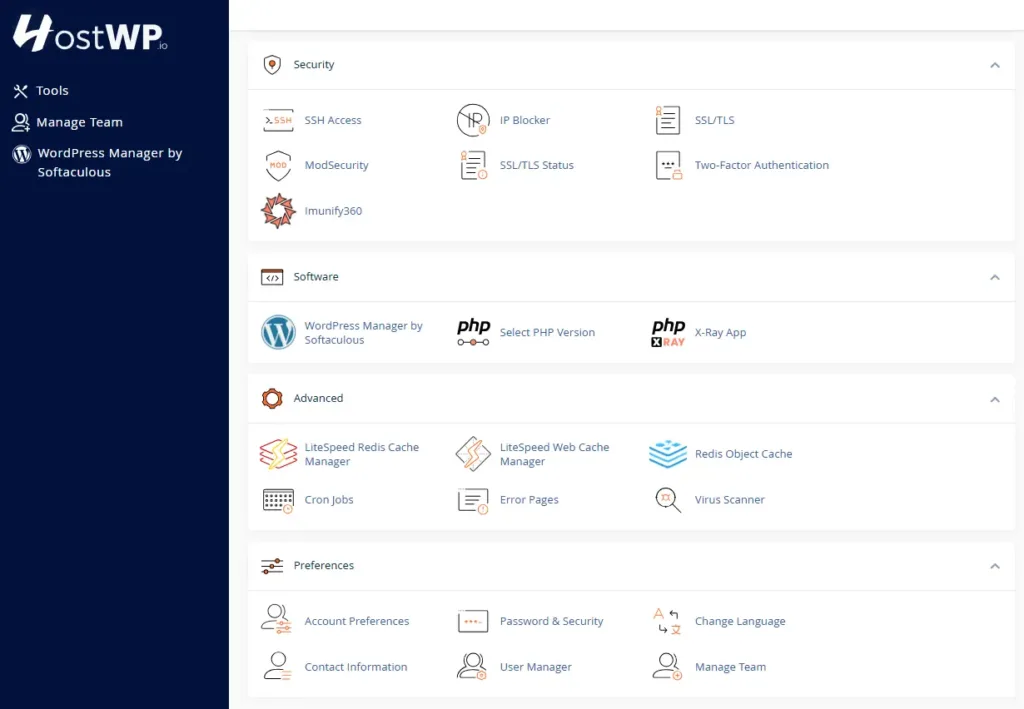
If you want the most reliable Bit Flows experience, we recommend checking your WordPress hosting dashboard and ensuring your settings match this checklist:
Let’s look at how these settings work together in a real scenario. Imagine you’ve built a flow where:
On an unoptimized host: The AI might take 40 seconds to summarize and search. The server kills the script at 30 seconds. The Slack message never arrives. You lose a support lead.
On HostWP with optimized settings: The server waits patiently for the 40-second AI task to finish. The 512MB memory limit ensures the search through your documentation is fast.
The Slack notification arrives instantly because the LiteSpeed server handles the outgoing webhook perfectly. This is how you build a professional, automated business.
Bit Flows is designed to be the “brain” of your WordPress site. It’s a tool that can save you hours of manual work every single day. But like any smart tool, it needs a stable environment to perform at its peak.
By pairing the lightweight efficiency of Bit Flows with the high-performance infrastructure of HostWP, you are taking the guesswork out of automation. You don’t have to worry about missing triggers, timed-out AI agents, or slow dashboards.
You can simply focus on what matters: building the workflows that grow your business.
If you haven’t already, we highly recommend checking out the specialized hosting plans at HostWP. They have been built from the ground up to support the next generation of WordPress applications—and Bit Flows is a perfect fit for that future.
Not at all. Bit Flows is engineered to be extremely lightweight. It processes workflows asynchronously in the background, meaning your visitors will never feel the “weight” of your automations.
However, to keep the backend fast while running many flows, we recommend a high-performance environment like HostWP that uses NVMe storage for lightning-fast database writes.
This is almost always due to a PHP Timeout. AI models can take 30+ seconds to respond. If your host has a strict 30-second limit, it kills the process before the AI can finish.
We recommend increasing your max_execution_time to 300 seconds, giving your AI agents the time they need to work.
If you rely on the default WordPress Cron (WP-Cron), your schedules might be delayed because they only trigger when someone visits your site.
To solve this, we recommend setting up a System Cron in your hosting dashboard. This ensures Bit Flows pings your site every minute, regardless of traffic, so your “Delay” and “Schedule” nodes are always on time. Also, you can use Bit Flows Cloud Cron feature for reliable automation.
Yes. Bit Flows is highly optimized for shared environments.
However, because automation can be memory-intensive when processing large amounts of data, we suggest a PHP memory limit of 512MB or more, in addition to the LiteSpeed Enterprise & NVMe stack, which is specifically designed to handle these types of concurrent tasks much better than traditional hosting.
No. One of the reasons we recommend HostWP is its user-friendly control panel. Changing your PHP version or memory limit takes just a few clicks.
If you ever get stuck, their support team understands exactly how Bit Flows works, so you won’t have to explain your technical needs from scratch.





 EN
EN  DE
DE  ES
ES  NL
NL  IT
IT