
Let’s talk about workflow automation tools. These tools are making work so much easier for everyone. They take care of repeated tasks, let your favorite apps work together, and save you a lot of time. When exploring workflow automation, one major question comes up: Cloud vs. Self-Hosted: which setup fits your business best?
When you start comparing Cloud vs. Self-Hosted automation tools, you’ll see two main options. Some are hosted on your own server, while others live in the cloud. Which one should you choose? It depends on what you want, how much you like control, and how much you want to spend. Picking the right type can save your money, protect your information, and cut back on headaches.
In this guide, we’ll go step by step. I’ll explain both options simply. I’ll also introduce you to Bit Flows. It’s a self-hosted tool that works inside WordPress. It’s packed with features. Let’s compare cloud vs. self-hosted workflow automation and find out together which style works best for you.
Cloud-based tools are everywhere. You might see names like Zapier, Make, or Pabbly Connect. With these, you go to their site, make an account, and build your automations without your own hosting server.
Why do people use cloud tools? Here are a few reasons:
But cloud tools also have some downsides:
Self-hosted workflow automation tools let you take control of where your automations live. You put the software on your own website or server. n8n and Bit Flows are two good examples. If you use WordPress, setting up Bit Flows is especially easy.
Why think about self-hosting? Take a look:
But it’s not always perfect:
Let’s get specific. Bit Flows is great if you don’t want to mess with tech stuff. You just add it as a WordPress plugin. There’s no command line or tricky setup.
If you choose n8n, you’ll need to know your way around tech. You’ll be working with Docker and managing your own server. The interface is made for people who code or like to dig deeper.
Why Bit Flows?
Why n8n?
| Feature | Bit Flows | n8n Self-hosted |
|---|---|---|
| Setup Ease | One-click WordPress install | Needs Docker and server setup |
| Technical Knowledge Needed | Low | Medium to High |
| Free Plan | Unlimited tasks and flows | Some limits, more setup needed |
| AI Integrations | Quick integrations with an API keys | Quick integrations with API keys |
| WordPress Integration | Updates itself (If auto updates are enabled) | API and webhooks only |
| Maintenance | Quick integrations with API keys | You must update manually |
| Apps & Webhooks | Visual builder, no code needed | Often requires coding or a complex process |
Not everyone loves software setup. Bit Flows is made for you if you feel nervous about technology.
Did you know? Bit Flows helps you do almost everything n8n Cloud can, without spending any money. It bridges the gap in the Cloud vs. Self-Hosted debate, offering the flexibility of both worlds.
With Custom Apps, you can create personalized automations. It’s just as flexible as what you get in cloud tools, but it keeps your info on your server.
Here’s what’s inside Bit Flows:
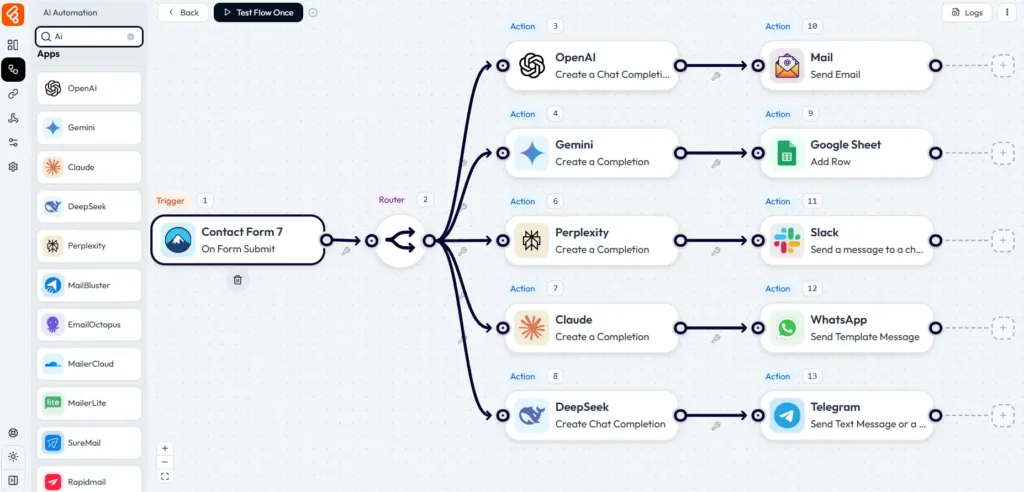
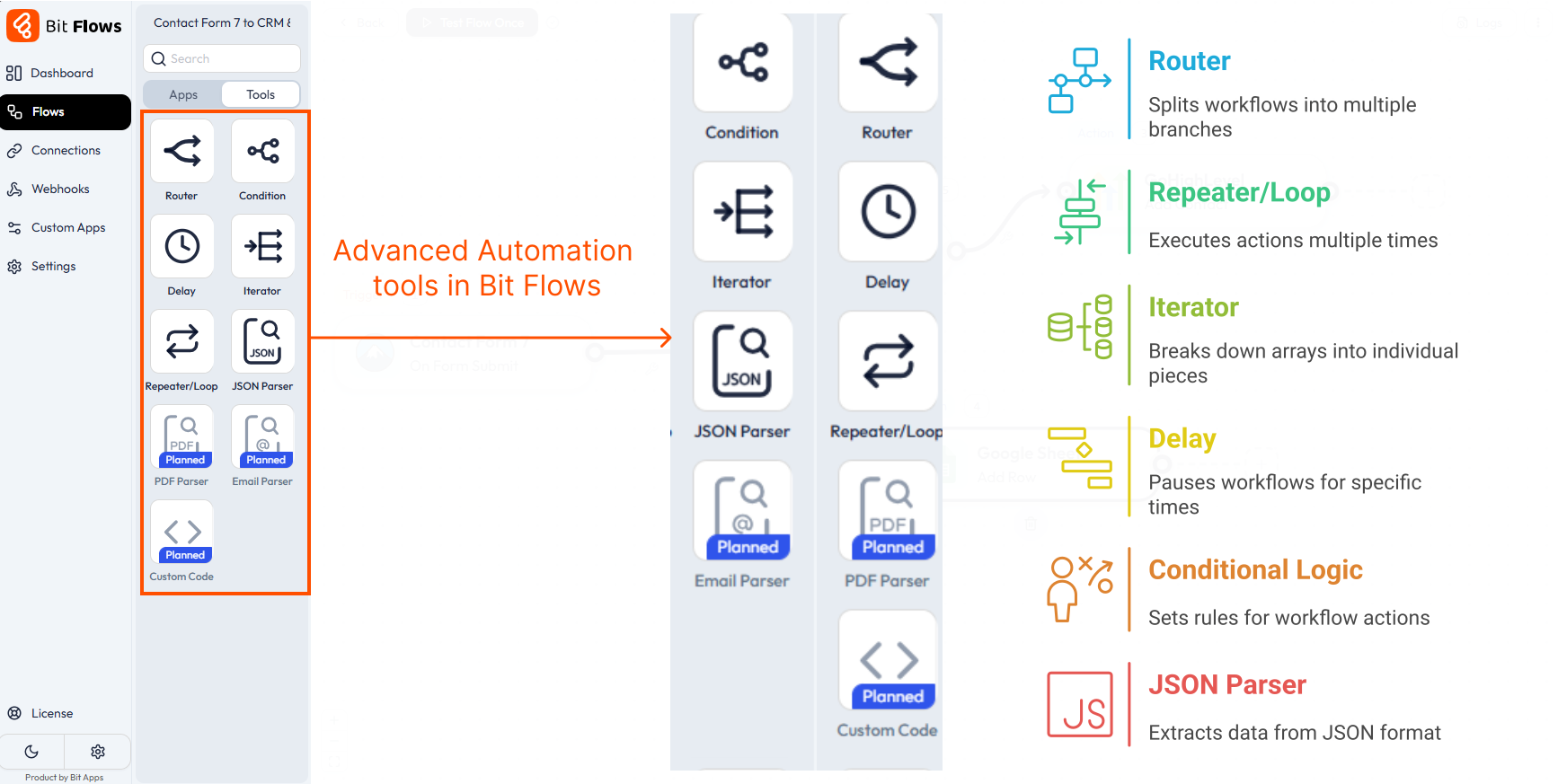
Even if you’re not technical, you can build advanced automations and use AI. No need to worry about paid plans just to get the features you want. Bit Flows gives you the power and keeps everything simple and on your terms.
The Cloud vs. Self-Hosted discussion isn’t about which is “better” overall. It’s about which fits your workflow, budget, and comfort level.
Cloud tools might still suit you best in some cases:
Here’s what you should think about:
Security is important. With a cloud tool, the company keeps things updated and follows rules for privacy and safety. You need to trust them. With self-hosted, you’re the one in charge.
That can sound scary, but WordPress automation plugins like Bit Flows auto-update and make some security tasks easy. Always look for plugins that are updated often. Use strong passwords, keep backups, and be careful with what you connect.
You want your automation tool to connect with your favorite apps. Bit Flows integrations cover lots of those already. Plus, you can use custom APIs and webhooks. It means if you love a tool that isn’t officially supported, you can probably still connect it.
n8n is famous for deep integrations, but often needs coding. Cloud tools sometimes have more integrations, but may have more complex setup processes.
Want to move from Zapier or Make to Bit Flows? Follow these steps:
Take it slow, and you’ll avoid big problems.
Automation changes how people work. It helps you get more done, lowers mistakes, and gives you back your time. You can pick tools that work in the cloud or on your own server. Cloud is quicker to start, but the costs add up, and you own less. Self-hosting gives better privacy, more control, and your costs stay low.
Bit Flows is special because it’s easy to use, powerful, and built especially for WordPress. You can start for free and don’t need to know code.
Want to give it a try? Check out Bit Flows. See for yourself how automation can work for you.
Self-hosted tools like Bit Flows get installed on your server, giving you control and more options for customization.
Cloud-based tools are managed by another company and run on their servers. Often, cloud tools have usage limits and cost more as you scale.
Self-hosted usually means you get full data control, no recurring fees, and unlimited automations. With Bit Flows, you can use advanced features even if you’re not a tech expert.
Bit Flows installs like any other WordPress plugin, super simple, no coding. n8n self-hosted means learning Docker or running your own server, so it’s more technical.
Yes. Bit Flows’ free version gives you AI actions, WordPress triggers, custom apps, webhooks, APIs, and powerful utility tools. You get lots of automation power without paying.
No. Most people can install and use Bit Flows without any coding or server know-how.
Zapier can get expensive and limit you to a certain number of tasks. Bit Flows offers free unlimited workflows, AI features, and all data stays on your own site. For a small business, it’s often the smarter choice.
Yes. Bit Flows gives you many WordPress triggers and actions. You can set up automations for posts, forms, emails, and more.
Yes. Your data never leaves your server. Just remember, security also depends on your hosting and keeping things updated.
Bit Flows is better for non-technical users or quick AI setups. n8n is powerful but needs more technical work.
Self-hosted stays on your server, so you keep control. Cloud-based lives on someone else’s, with extra costs.
Yes, it’s built so anyone used to WordPress can pick it up fast.
n8n is better for those with experience running servers and working with code.
Usually, self-hosted tools like Bit Flows, because there are no per-task bills.
Yes. Write out your automations, check for support in Bit Flows, and rebuild them in WordPress.




 EN
EN  DE
DE  ES
ES  NL
NL  IT
IT