Tired of spending hours on handwritten content? Discover Auto Blogging with ChatGPT and create SEO-optimized blog posts in minutes to save your time, boost your traffic in a jiffy.
As you know, blogging has evolved significantly over the years. With automation and AI, tasks that once required hours can now be completed in minutes. Manually writing, formatting, and posting blog content can drain time and energy, especially for those managing multiple blogs or aiming for daily posts. This is where a combination of tools like ChatGPT and Bit Flows can be a lifesaver.
Together, ChatGPT and Bit Flows create an end-to-end workflow for generating, formatting, and publishing SEO-friendly posts on Blogger. Using these tools, you can speed up production, maintain consistency, and focus more on strategy rather than repetitive tasks.
Here’s everything you need to know to automate your blogging process smoothly.
AI-powered tools like ChatGPT are changing how content is created. They allow you to generate well-structured and optimized content for your niche. But generating content is only the first step. Formatting it, adding structured metadata, and publishing it requires additional effort. This is where Bit Flows helps to improve productivity, taking care of the formatting and automated publishing.
Instead of spending time on repetitive tasks like post formatting, you can redirect your efforts to creating strategies, researching new topics, or refining content.
By connecting ChatGPT with Blogger through Bit Flows’ Custom App, you can build a no-code solution for content automation. Even without a direct Blogger integration, this approach ensures smooth, fast, and scalable workflows. Now, let’s break down what this system does and how to set it up.
Here’s how the overall solution works:
This setup creates a repeatable process, eliminates manual effort, and increases efficiency. You don’t need coding skills or advanced technical knowledge to make this happen.
Now starting auto blogging with ChatGPT is just like a matter of cocking noodles. The first thing you need to do is activate the Bit Flows automation tool and follow the steps we outlined below. That’s it, you will be able to auto-generate blog posts using a simple automation tool.
Step-by-step guide and generate dozens or hundreds of blog posts within a minute.
However, this is not the end, you can explore this AI automation tool to automate any business just by creating simple to complex workflows using Bit Flows.
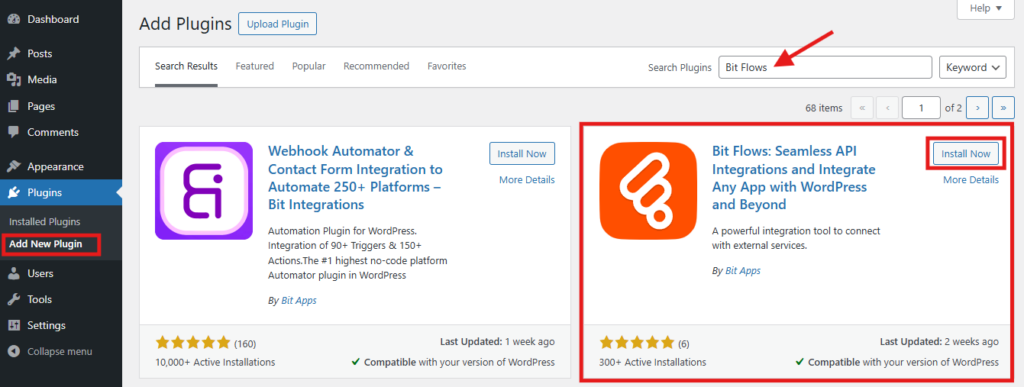
Install and activate the Bit Flows plugin on your WordPress site. Make sure it’s updated to the latest version for full support and stability.
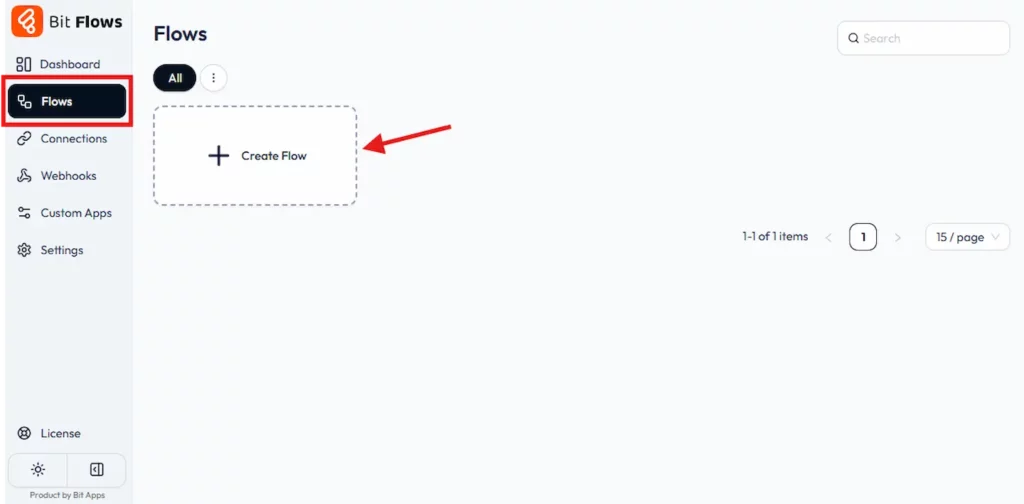
In the Bit Flows dashboard, go to the workflows section. Click to Create Flow. Give your workflow a name. This will show up the Bit Flows builder, where you can connect apps and tools by drag and drop.
As we are going to make the blog posting automated, we will use a scheduling tool to schedule it after a certain time. We can do it with a WP Cron plugin by adding the Bit Flows webhook.
Add a Webhook as the trigger for your workflow. Just select the Webhook as the trigger. Bit Flows will provide you with a unique webhook URL. Copy this URL, as it will be needed in the next step.

Install and activate the WP Control plugin on your WordPress site. In the WP Control plugin, create a scheduled event. Paste the Bit Flows webhook URL into the event’s setup. Choose how often you want this event to fire daily, weekly, or at any interval. This ensures Bit Flows will automatically receive a request and run the workflow based on your schedule.

In your Bit Flows workflow, add a ChatGPT (OpenAI Create a Chat Completion) action. Connect your OpenAI account if you haven’t already. Select the right model, such as GPT-5, for the best results. Set the Max Completion Token to control the length of the output. 3000 is a good starting point for detailed titles or short text.

If you want to make sure each output is unique and saved to your database, toggle “Get Unique Response” and enter a Memory Key, like “Blog Post Title.” Adjust the Context Length if you need ChatGPT to remember previous responses in the workflow. Then set up the prompt so ChatGPT generates a unique, SEO-targeted blog title using your supplied keywords.

Add another ChatGPT action in the same way. Configure it to generate the full blog post, using the blog title from the previous step as part of the prompt. Adjust your model, token limits, and Memory Key accordingly.
Ensure your prompt guides ChatGPT to create a post that’s well-structured and optimized for SEO. Use this one to generate the full blog post, drawing on the title produced from the previous step. Define prompts to make sure the post is well-structured, engaging, and optimized for SEO.

After generating your content, add a Blogger action in Bit Flows. Map the blog title and body content fields to the outputs from the ChatGPT actions. Optionally, set up extra fields like labels and meta information for better categorization and search performance.
Bit Flows currently doesn’t have direct integrations with Blogger, but you can connect Blogger with a custom app.

Run a manual test if needed to check that each part connects and publishes smoothly. Here are some blog posts written by ChatGPT.

Now, whenever the WP Cron event triggers, your Bit Flows workflow will run from generating a title and a complete post with ChatGPT to directly publishing it on Blogger. Adjust prompts and the schedule any time to fit your needs.
Bloggers can create any type of auto blog in any niche by using ChatGPT along with an automation plugin. Here are some examples where this workflow shines:
Travel blogs: Automatically post daily or weekly travel tips. ChatGPT can write short “Top 5” destination guides, and Bit Flows publishes them.
Food and recipes: Let AI generate recipe posts or cooking tips. For example, “5 easy recipes with chicken” can be created and posted automatically.
Local business updates: A local store or restaurant could auto-post specials or news. For instance, generate a “weekly event recap” and push it live.
Tech news roundup: ChatGPT can summarize the latest tech news or gadget reviews. Bit Flows then publishes a daily or weekly news digest.
Personal finance tips: AI can draft blog posts about budgeting or market trends. The process ensures fresh content without writing each post by hand.
These use cases save time. Instead of writing each article, you give ChatGPT a prompt, and Bit Flows takes it from there. The result is an automated system of relevant content for your niche.
By writing perfect prompts and adding your expertise, you get the best of automation and authenticity.
Integrating ChatGPT with Bit Flows offers a powerful way to save time and automate blogging tasks. By connecting these tools to Blogger, you can dramatically reduce manual work and maintain a consistent publishing schedule, and keep your audience engaged.
With the step-by-step guide provided, you now have everything you need to create your first automated workflow today. Experience how an automated system can make blogging simpler, more efficient, and far more productive, allowing you to focus on strategy and growth instead of repetitive chores.
Install Bit Flows and try your own workflow on this free demo site!
Use Bit Flows’ Custom Apps feature with Blogger’s API to connect and manage blog posts.
Yes, ChatGPT generates content that Bit Flows automates for publication.
No. The workflow is designed to be no-code, making it user-friendly for non-technical users.
AI tools like ChatGPT generate keyword-rich content, improving SEO when used and reviewed properly.
Yes, you need the Bit Flows Pro to connect Blogger with ChatGPT.






 EN
EN  DE
DE  ES
ES  NL
NL  IT
IT  PT
PT  JA
JA