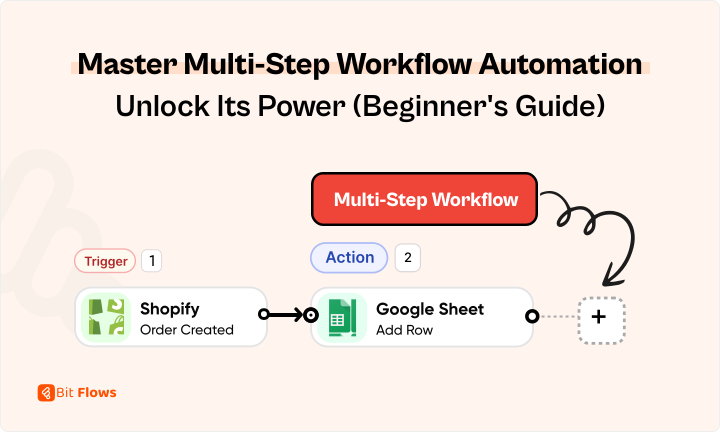
New to multi-step workflow automation? Curious how it works? This beginner’s guide with real-time examples makes automation easy to understand!
Did you know about 29% of organizations are making up their mind to implement low-code workflow automation, while 24% of the organizations have already started implementing and are already reaping the benefits?
So with that said, as industries are shifting towards automation like there’s no turning back, this makes it evident that workflow automation is no longer optional–it’s a necessity.
Moving on, we know simple workflows, like updating spreadsheets, are comparatively easy to automate. But have you thought about what’ll happen when you need to automate your entire operation system, this will involve multiple actions and conditions! Exactly, that’s when multi-step workflow automation comes into play.
But what are these multi-step workflows? If you’re a beginner and new to workflow automation and feeling overburdened with complex tasks, this guide is for you! It’ll give you a detailed understanding of multi-step workflows and how they can revolutionize your business processes, keep reading…
Multi-step workflows refer to a process that involves a structured series of interconnected actions triggered by specific events, designed to complete complex processes. Mostly these workflows are executed sequentially. Multi-step workflows are followed to accomplish bigger operations like:
Multi-Step Workflow Scenario: A new employee is joining the team
Like this, many complex workflows are handled by a multi-step workflow automation tool. Therefore, when you automate such complicated workflows, you’ll feel like you’ve uncovered a new treasure hunt.
Whether you’re running a small business, managing a team, or organizing personal projects, automating these multi-step workflows through an advanced automation tool can truly transform the way you work and increase the productivity of your business.
Let’s get a little knowledge of what is multistep workflow automation and how it works. How it will make us benefit. We will try to get some real-time examples of multi-step workflow automation so that you can understand its use cases and relate them to your own scenario. Let’s go.
 Note
Note
If you want to know more about the basic concept of workflow automation, you can check out our latest blog on it.
Above you’ve seen an example of multi-step workflow, now the question is will your team do these tasks all by themselves manually? The answer is absolutely no.
The reason is quite reasonable: it will require a large workforce, significant resources, and a huge amount of time. So the smarter option is to use multi-step workflow automation.
With multi-step workflow automation, you can simplify your complex processes by automating sequences of actions. To make that happen, you’ll need automation tools like Bit Flows, Zapier, or Make. Today I’ll be using Bit Flows to show how you can automate workflows.
Bit Flows is a powerful automation and integration tool. Though it is a WordPress plugin, it can be used easily outside WordPress on a subdomain, making it a perfect Zapier alternative. It offers top-notch facilities at a budget-friendly price.
To get started you just need to install and activate Bit Flows from the WordPress directory. For a smoother setup, you can visit our user guide. Once the setup is done, you can start designing workflows as per your business needs.
Let me show you an example:
For example, you’re an e-commerce store owner and you want to transfer customer order details to the marketing team > inventory management team > to CRM > notify the customer automatically
Using Bit Flows you can do it in one click:
All these steps occurs sequentially and automatically without manual intervention. Bit Flows, being a low code, no code automation software inside WordPress, makes it suitable for anyone, even non-tech users. Therefore allowing you to automate your whole business without writing a single line of code.
Amazing, right?
Now, it’s time to learn about the key components of any complex multi-step workflow.
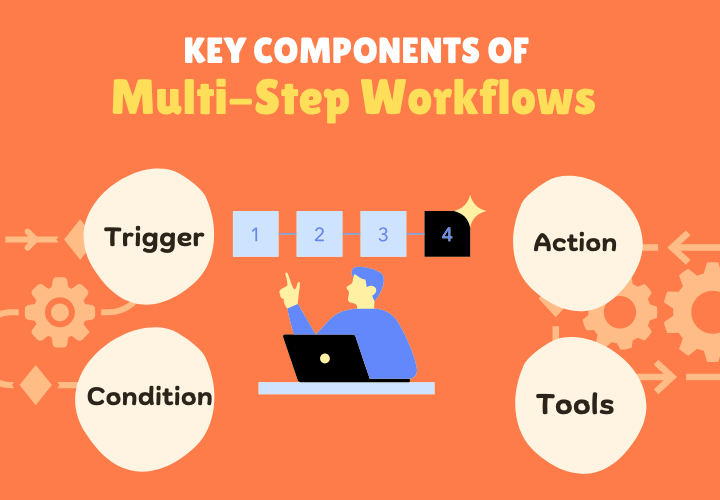
In workflows, the event that initiates the workflow is known as a Trigger. It can be a form submission, or subscribing to a newsletter.
Actions are the after steps of a trigger event. More specifically, it is the event that occurs in response to the trigger. It is more like If-then logic, where “if” represents trigger and “then” represents actions.
For example, sending an email when a customer buys a Netflix subscription by filling out a form. Or, updating the stock record of the inventory system whenever the customer buys the product.
Each step is completed automatically, step-by-step followed by the trigger event.
In advanced workflows, you can incorporate conditional logic to make the process more customizable. Setting conditions means when these particular conditions are fulfilled only then, the next action will be executed. For example:
For example, while signing up for a subscription service, if the customer selects the “Premium Plan” only then sends an email with special offer details. So like that you can filter data using a condition logic.
Almost all automation tools have advanced tools like delay, router, repeater, etc to handle complex multi-step workflow automation.
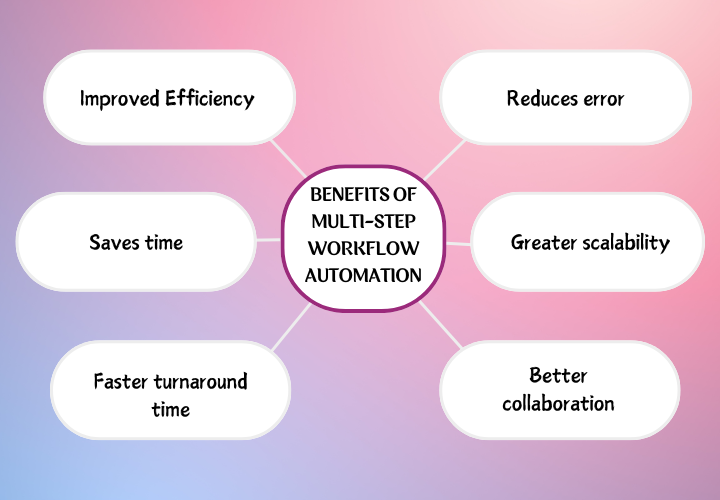
What happens if you need to update all data manually in your CRM, Google Sheets, or any platform? I know, this is too boring, time-consuming, and will hamper your productivity. You will get dozens of benefits by automating these monotonous activities. Be smart and let the matters be handled automatically. Well, let’s see what benefits you will get.
Now, let’s discuss some of the real-world scenarios of workflow automation

Workflow automation is used across various industries to improve the efficiency of the business, to simplify complex tasks, and to boost productivity. Now, I’ll showcase some of the use cases of multi-step workflows in different areas:
Workflow automation is even more crucial for Individuals running online stores.
Do you know why?
This is because customers here are very sensitive to inefficiency. Like, if customers are not getting replies to their queries or can’t find a real-time update of their order, this frustrates them a lot. This eventually leads to a negative review. Here even one negative review is enough to tarnish the reputation of the brand.
In that case, using workflow automation can automate every step of online shopping eventually improving the experience of customers. By ensuring a smooth transition from scrolling to buying, and shipping.
Let’s see some areas where eCommerce businesses might use multi-step workflow automation.
With workflow automation, if you connect your eCommerce store site to your CRM system, marketing channels, and accounts software, can easily track these sales without any effort.
Just like eCommerce stores, HR Departments have many repetitive and tedious tasks that need to be automated. The purpose of using workflow automation is to improve the accuracy and effectiveness of these processes. Also, it sets the team members free from all the hassle of manual entry.
For example, the HR department has to generate performance reports, keep track of employees onboarding, and offboarding, manage leave requests, and many more.
Now, let’s check out a few of the time-consuming tasks of an HR team that can be automated:
When a new employee joins or leaves, the HR team has to deal with
some basic activities. Those activities manually input their joining/resigning date, salary, designation, department, etc. Honestly, manually entering all this information into the system is way too tiring and time-killing.
Therefore, a smart solution is to use workflow automation. This can speed up the process with little manual effort.
Often we see handling leave request emails manually clutter inboxes, causing delays in decisions. Moreover, it also creates unnecessary miscommunication. So to avoid all this fuss, why not make the process easier by designing an automated leave request system?
Interesting right?
Let me show you an example:
Therefore, with a workflow automation system, leave requests can be processed more efficiently. Plus, requests will be approved sooner and the team will stay more organized and informed ensuring work runs without disturbance.
Normally, when an employee spends for office needs, they send the expense report to the manager. The manager further forwards it to the finance team, then they manually enter the information from the report into the payroll system. Later it gets added to the employee’s next paycheck.
I know the route is long, not to forget the risk of human error:/
However, multi-step workflow automation can manage expense reimbursement like Tony Stark.
Perhaps, no other department of a company will be more beneficial than customer service with workflow automation. How? See, what are the common, repetitive tasks of a customer care team– To manage ticket routing, issue solving, data entry, and customer follow-ups.
Automating these mundane tasks will act like raising the bar of your customer service. It’ll reduce human error, improve response time, and ensure more satisfied and happier customers.
For example, an automated ticket routing system will be able to classify and sort customer queries. And forward them to suitable departments automatically for better assistance. This will result in faster problem-solving and improved customer experience.
Sales is the most stressful department of a business, it holds a huge responsibility for the company’s financial condition. They’re responsible for the conversion of visitors to potential customers.
Sales pipeline workflow typically includes processes like follow-ups, scheduling meetings, quota setting, lead tracking, updating CRMs, and maintaining communication to keep the team in sync.
Most of the time sales reps spend their valuable time on these repetitive activities rather than on actual selling. Plus, managing the entire sales pipeline manually makes them feel like juggling too many balls at once.
Fortunately, automating the sales pipeline workflow will make this confusing process simplified and organized. For example, when a deal gets sealed, an automation system will automatically update the pipeline. And inform the team members via a notification on the channel to celebrate the milestone.
So an automated sales pipeline system will ensure better accuracy, save time, and give employees time to focus more on selling.
Workflow automation in marketing saves them a huge time, enabling them to focus on their core activities– bringing innovation, strengthening collaboration, and designing strategic roadmaps.
Let’s see in which aspect of marketing operations, workflow automation can be beneficial:
Therefore, here automation can help by auto-classifying customers based on their behavioral traits, for meaningful connections.
In a business, the project management team is responsible for keeping projects on track. And not to forget keeping projects on track and delivering them on time is no simple task. Whether encouraging team members or ensuring everything is within budget, project managers are holding them all.
Project managers can use workflow automation in the following areas:
Social media managers are the storytellers of your brand. They create engaging, informative content, share it across multiple platforms, and build strong relationships with followers.
With workflow automation, social managers can simplify content creation, analyze customer behavior, and stay updated with the latest trends without extra effort.
Next, have a look at some areas where social media managers can use workflow automation to increase effectiveness:
I believe, after reading so far, you now must have a solid understanding of what a multi-step workflow is and how you can automate these complex tasks. Now, you know multi-step workflow automation is no longer a buzzword, they’re like an everyday phenomenon in our lives.
Whether you’re in e-commerce, HR, finance, marketing, or sales departments, automating your processes can improve efficiency, reduce human errors, and ultimately boost team productivity.
With that said, using an advanced workflow automation tool like Bit Flows can be a win-win deal. Bit Flows ensures your tasks are executed automatically on time, without any mistakes. By streamlining these repeatable operations you can not only spare your team free time to focus on more creative and strategic tasks but it will help you to satisfy your customers.
So, go for multi-step workflow automation today and see the difference yourself.







 EN
EN  DE
DE  ES
ES  NL
NL  IT
IT  PT
PT  JA
JA 