Are you thinking this will be a ranked listicle of online form builders? Then you should probably search elsewhere. This is not that type of listicle where we’ll crown one tool “winner”.
Every small-to-medium-to-enterprise business uses forms, but no one can guarantee they use them for the same purpose. Also, not all form builders are built to solve the same problem.
Some are built for developers running complex workflows on WordPress. Others are good for basic surveys at zero cost, some come with a huge template directory, and others are good at creating conversational-style lead forms.
That’s the point of view of today’s listicle.
This is not a typical comparison article. It is a list of 8 best online form builders of 2026, where every tool on this list does something specific better than the rest.
They are not ranked against each other on one scale. Because every tool was built around a different use case, this guide will discuss what each builder does, what is their USP, drawbacks, and where it isn’t the right fit. Here you’ll find both WordPress and Saas form builders.
You’ll see most “best form builder” articles just repeat the same feature tables. Here’s something they usually skip, which is very important for users, for example: Contact Form 7, the plugin powering more WordPress sites than any other form tool, is no longer getting new features.
Its creator announced at WordCamp Asia 2026 that version 6.2 is the final feature release, and the plugin is now in feature freeze. That single fact changes how you should read this whole list, so we’re addressing it head-on instead of burying it in a footnote.
We also included PaymentForm.io, which isn’t really a general-purpose form builder. It’s a form-based checkout tool. It’s on this list because a lot of people searching for “online form builder” actually want to sell something or collect money, and a simple form builder is the wrong tool for that job. We’ll explain exactly where it fits and where it doesn’t.
| Tool | Type | Best For | Free Plan | Starting Price |
|---|---|---|---|---|
| Bit Form | WordPress plugin | Easy drag-and-drop builder to create any type of WordPress form. | Yes | Starts at $25/yr |
| Contact Form 7 | WordPress plugin | Simple free contact forms | Yes | Free. Offers add-ons |
| Ninja Forms | WordPress plugin | Pay-per-feature, budget-conscious sites | Yes | Depends on add-ons |
| Formidable Forms | WordPress plugin | Turing form data into directories, listings, or apps | Yes | $39.50/year (normally $79) |
| PaymentForm.io | SaaS checkout tool | Selling or collecting money with no website | Yes | Free (0% platform fee) |
| Google Forms | SaaS (Google) | Quick surveys and Google Workspace teams | Yes | Free. Offers add-ons |
| JotForm | SaaS | Diverse templates, HIPAA-compliant intake forms | Yes | $19.50/month, billed annually |
| Typeform | SaaS | Conversational, brand-forward lead forms | Yes | $39/month |
Well, it depends on how you want to manage your form data. Both work differently. Before deciding what to consider when choosing a form builder, understand how each type of tool works.
A WordPress plugin lives inside your site. For example, here, Bit Form, Contact Form 7, Ninja Forms, and Formidable Forms are all self-hosted tools. They can be installed on your WordPress dashboard. Your form data stays in your own database. You’re not paying per submission, and you’re not locked into someone else’s platform. However, with WordPress plugins, in the first place you need a WordPress site, and you’re responsible for hosting, backups, and keeping the plugin updated.
A SaaS tool lives on the platform’s servers. Google Forms, PaymentForm.io, Jotform, and Typeform all work without a website. They are cloud-based, hosted tools. You sign up, build the form, and share a link, embed code, or QR code. This type of builder is perfect if you’re selling on social media or don’t have a site yet.
With that clear distinction, let’s move on to how today’s eight form builder software actually compare.
We compared each tool using its official pricing and documentation as of July 14, 2026. For WordPress plugins, we also reviewed active installation figures, recent updates, and public WordPress.org feedback. The tools were evaluated by use-case fit, free-plan limits, paid pricing, integrations, form-building experience, data handling, and major limitations. They were not ranked using one overall score.
A few of the form builders may share similar functionality on paper, sure. But none of them is trying to be perfect for every use case. And that’s exactly why picking “the best” one means matching the tool to what you’re actually trying to do.
Bit Form is a lightweight WordPress form builder plugin built for both beginners and advanced users. Its intuitive drag-and-drop interface makes it user-friendly for beginners. Also, it comes with an advanced style editor, 50+ form field types, including signature, address, file upload, repeater, and rating, which allows you to create various forms, such as multi-step forms, logic-driven forms, and calculator forms, for your business.
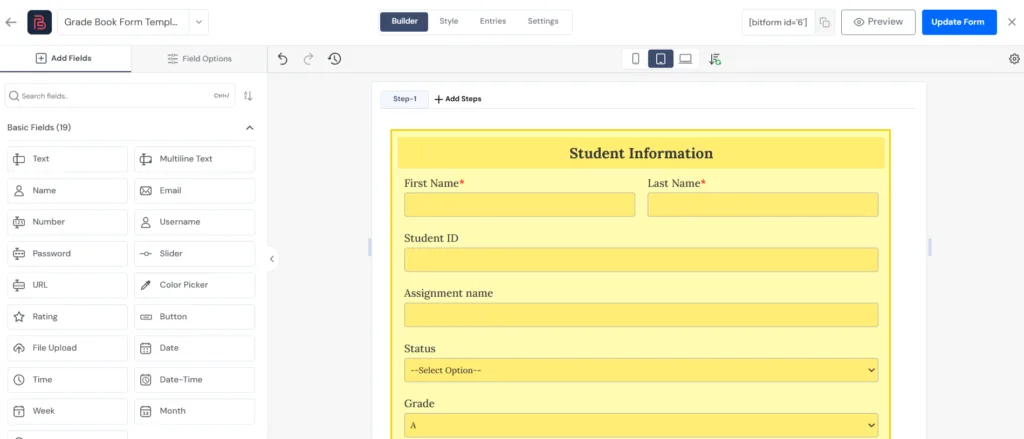
You can even send customized emails to recipients after submission. You can route the form data across 50+ third-party platforms. Since Bit Form natively integrates with popular payment gateways, you can also accept payments in your forms.
There’s also built-in spam protection (Google reCAPTCHA, Cloudflare Turnstile, etc), and form abandonment features that save partial entries if users leave mid-form. In short, Bit Form is a hassle-free plugin that gives a full-featured form-building experience without slowing down your site with extra add-ons.
Popular Features
What to keep in mind
Pricing
It’s a freemium plugin. The free version is quite generous, and you can enjoy all the premium features at $25/year (starting price).
What users say
“I’ve been using Bit Form for a while now, and it’s excellent. The plugin is very lightweight—it doesn’t slow down my site at all. Most importantly, it just works flawlessly; I’ve had zero issues with form submissions or functionality. The free version is powerful on its own, but after testing it, I found the Pro version to be absolutely worth the upgrade for the conditional logic, multi-step forms, and integrations. A final big plus: their support is fantastic. They respond quickly and resolve issues efficiently. Highly recommended!” — elsonsgx (collected from WordPress.org)
Best for: Performance-conscious WordPress sites where fast loading is important. If you need high-end features (calculations, multi-step, payments) but still want a lightweight and affordable plugin, Bit Form is a strong option. Its intuitive UI and all-in-one approach make it great for both beginners and developers who want an “all-in-one” solution without extra extensions.
Contact Form 7 (CF7) is the classic free form plugin, very simple and widely used by WordPress users since 2007. Unlike any visual builders, it lets you create basic forms using HTML shortcodes. CF7’s core is entirely free and open source, maintained for over a decade.
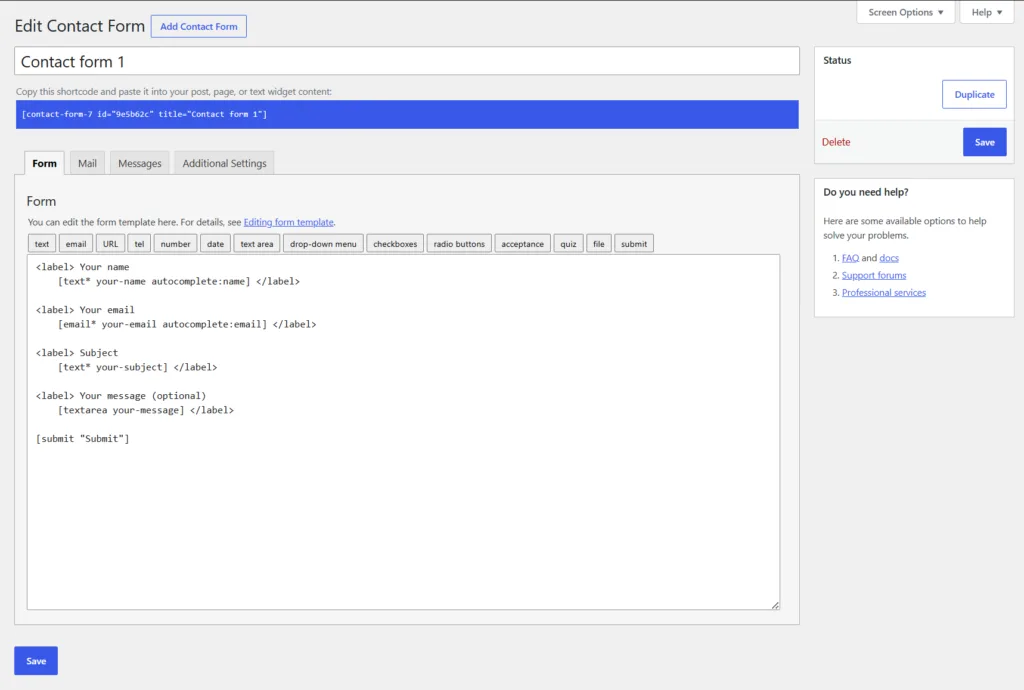
It provides every basic form needs for advanced functionalities like storing submissions in the dashboard, adding CRM integrations, or collecting payments come with third-party add-ons built by the community.
People love it because it costs nothing, is lightweight, and is developer-friendly, which gets a working contact form live in minutes. If you just want to collect name, email, and message, then CF7 is for you.
Popular Features
What to keep in mind
Pricing
It’s free. There are some paid add-ons for extra features.
What users say
“Tnx for making it free! It helped me get msgs from users fast. But the setup is a bit confusing cz there’s no drag & drop. Good enough if u know basic code, otherwise kinda tricky. “– longcrocker (collected from WordPress.org)
Best for: Very simple contact form or basic forms on WordPress sites. It’s ideal for blogs or small businesses that just need a form for email inquiries. It’s also a solid choice if you want maximum control (since it’s just HTML) or can’t spend money on a form plugin – CF7 has been reliably used in nearly 10+ million sites.
Ninja Forms is another straightforward WordPress form plugin which follows a modular approach. The core plugin is free. The unique thing about this plugin is its approach: you can add extra functionality through individual add-ons as your business grows. Say, for example, you need only Stripe integrations, so you can buy that add-on only. If you need multiple add-ons at once, you can go for a bundle.
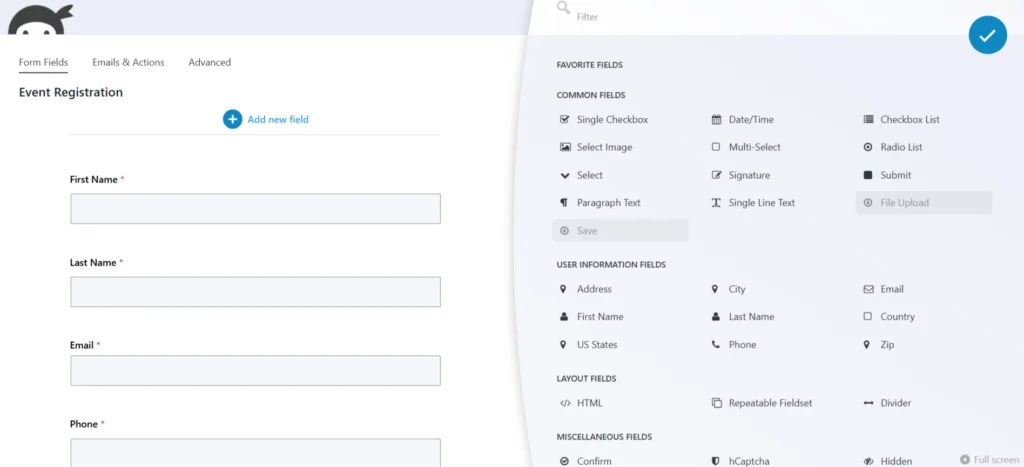
It is also a drag-and-drop builder with features like multi-page forms, conditional logic, 28+ fields, unlimited submissions, data calculations, spam protection, and more. Ninja Forms handles multi-page forms with progress indicators and a genuinely useful save-and-resume feature well.
Popular Features
What to keep in mind
Pricing
The core plugin is free. Add-on price starts at $29, and the bundle price starts at $59.40/year with 16 add-ons.
What users say
“Great plugin, I’ve been using it with great satisfaction for several years now. The support is fantastic; they respond quickly, reliably, and are very competent. Thanks and keep up the good work!” – Fred (collected from WordPress.org)
Best for: Sites that want a free core tool now and may grow into a more complex form solution later. Ninja Forms is great if you want to start with a simple contact form (free) and later add, say, Stripe payments or CRM integrations without replacing the form builder. It’s popular with agencies and small businesses who want a mix-and-match approach to features.
Formidable Forms is more than a typical WordPress form builder and more like a no-code application builder. While you can create contact forms, surveys, and registration forms with its drag-and-drop builder, its real strength lies in building dynamic, data-driven applications. Many businesses use it to create calculators, quote generators, directories, job boards, event listings, and front-end content submission forms without writing custom code.
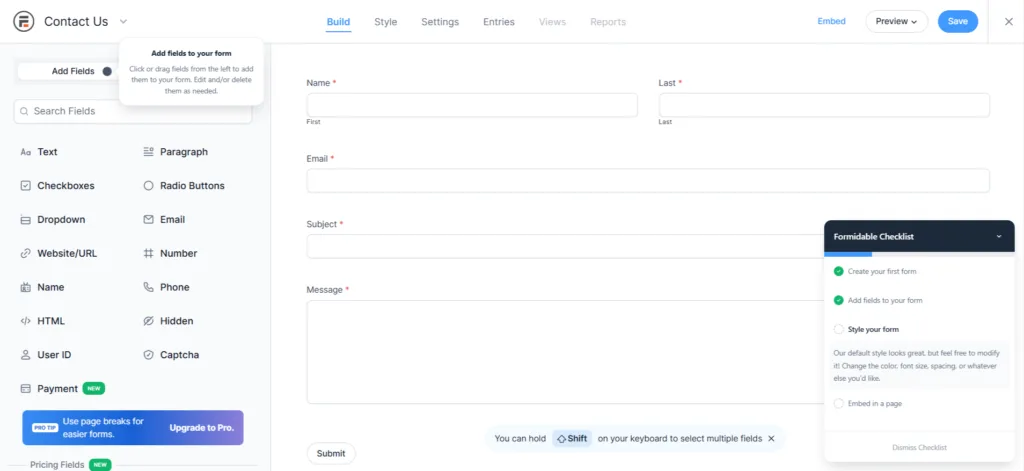
You can turn form entries into searchable directories, property listings, event calendars, employee databases, or interactive calculators.
If you expect your forms to collect, display, and process data beyond simple submissions, Formidable Forms offers one of the most comprehensive feature sets available for WordPress.
Popular Features
What to keep in mind
Pricing
The free version is available on WordPress.org. The pro plan starts at $39.50/year (basic plan).
What users say
“Formidable is the most streamlined yet feature-rich WordPress plugin on the market. I have tried all of the form builders, and Formidable Forms is truly the only one that provides the level of customization I need for complicated forms, while also keeping the workflow simple enough to make simple form building quick. I also love how most niche features are not bundled with the main plugin, and are enabled via add-ons instead. The templates are a great starting point for most of the forms I create.” — Ben Bishop (collected from WordPress.org)
Best For: Formidable Forms is best for businesses that need advanced forms, calculators, directories, and data-driven WordPress applications.
Paymentform.io is a form-based checkout tool designed to simplify the checkout process. It is not a regular form builder; it is a dedicated tool to solve online payment collection hassles.
This is a module-based form builder software. It includes separate modules for collecting donations, selling products, running fundraising campaigns, selling event tickets, and collecting membership payments, all without building a website. Also, you don’t have to purchase each module individually. They come as a package.
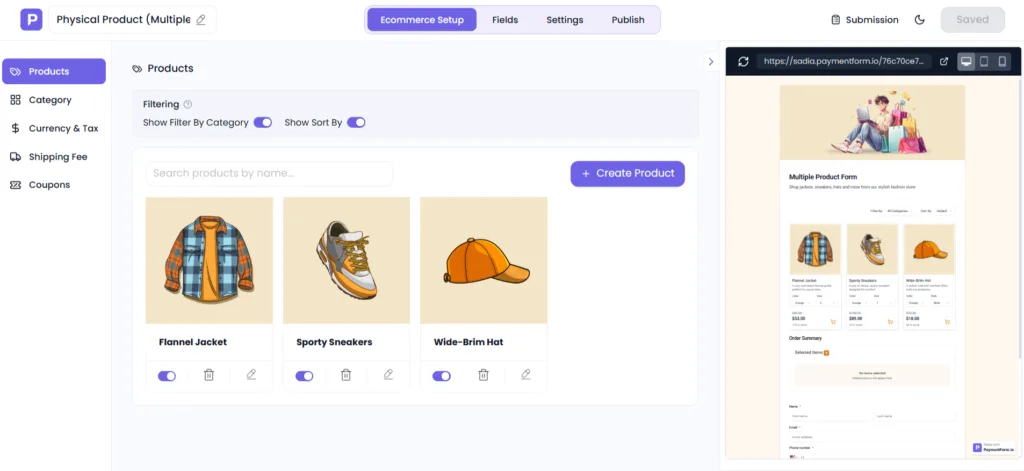
To create payment forms with Paymentform.io, just pick a module, customize the fields and form design, connect your payment gateway such as Stripe, PayPal, or Razorpay, then share the form as a link, embed code, QR code, or social post. Payments go straight to your own gateway account. PaymentForm.io does not hold your money and charges no platform fee.
Popular Features
What to keep in mind
Pricing
Free right now. The free version offers unlimited transactions, forms, and core features. Its paid plan starts at $5/month.
What users say
I’ve been testing PaymentForm.io while it’s still in its beta stage, and I’m genuinely impressed with what Mohammad and his team have built so far.
As someone interested in headless SaaS solutions, I found the platform intuitive and flexible. I was able to create a demo product and get it ready for sale without much difficulty. While I did run into a few minor issues along the way, Mohammad and his team responded incredibly fast and had everything resolved within minutes.
That level of support speaks volumes about their commitment to both the product and their users. Even in its current beta state, PaymentForm.io shows a lot of promise and already offers solid functionality for anyone looking for a modern payment and product management solution.
I’m excited to see how the platform evolves as it continues to mature. Great job, Mohammad and team—keep up the excellent work!
— Scot B. (collected from Trustpilot)
Best for: Anyone who needs a simple checkout system to start collecting payments online without building a whole site. Nonprofits collecting donations, social sellers taking orders via social media, or event organizers selling tickets can benefit. It’s great for sellers who only need a form to start selling quickly.
Here, I’m talking about a form builder that we’ve all used at some point. Yes, that is Google Forms. It is free, included with a Google account. It’s a cloud-based form builder that anyone can use instantly. With Google Forms, it is easy to handle surveys, quizzes, and simple data collection with unlimited forms and unlimited responses.
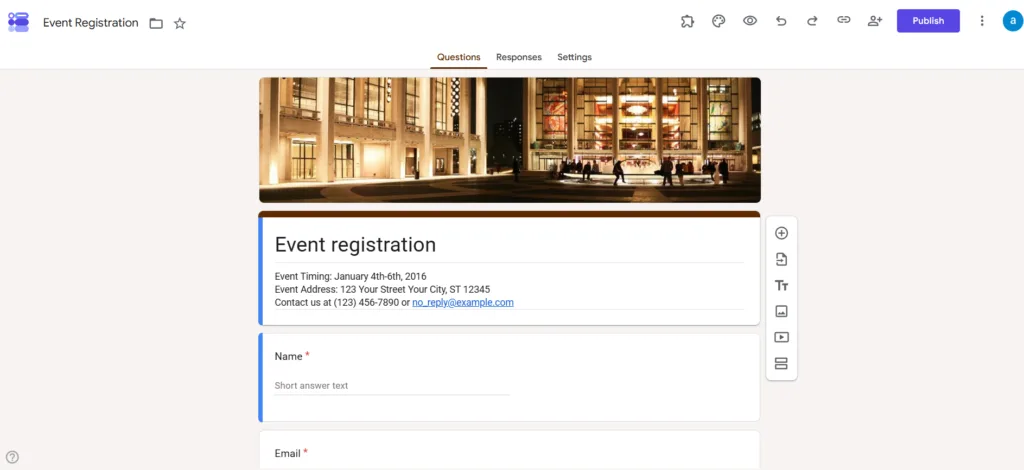
Also, its interface is quite straightforward. You just need a click to add questions, and it all syncs to Google Sheets for data. Responses generate automatic graphs and summaries in real-time, making it convenient for feedback and data gathering.
Popular Features
What to keep in mind
Pricing
Though it is a free form builder, you can extend its capabilities with add-ons. Some of them are free, and some are paid.
What users say
“It’s a reliable and practical tool that simplifies data collection and communication across multiple schools. While it lacks some design flexibility, its functionality, ease of use, and scalability across a large system make it an essential tool for day-to-day operations.”– By Bree B. (collected from Capterra)
Best for: Quick surveys, quizzes, polls, and basic forms by educators, or teams. If you need a fast way to gather data (e.g. an event registration, feedback form, or knowledge quiz) and don’t care about heavy branding or payment, Google Forms is the go-to option.
Jotform is an all-in-one cloud-based online form builder, widely known for its large template library and rich set of features. This set includes a slick drag-and-drop builder, 20000+ premade templates, PDF generation, offline mobile data collection, native payment integrations with Stripe, PayPal, and other integrations, spam protection, HIPAA-compliant forms, and many more advanced features.
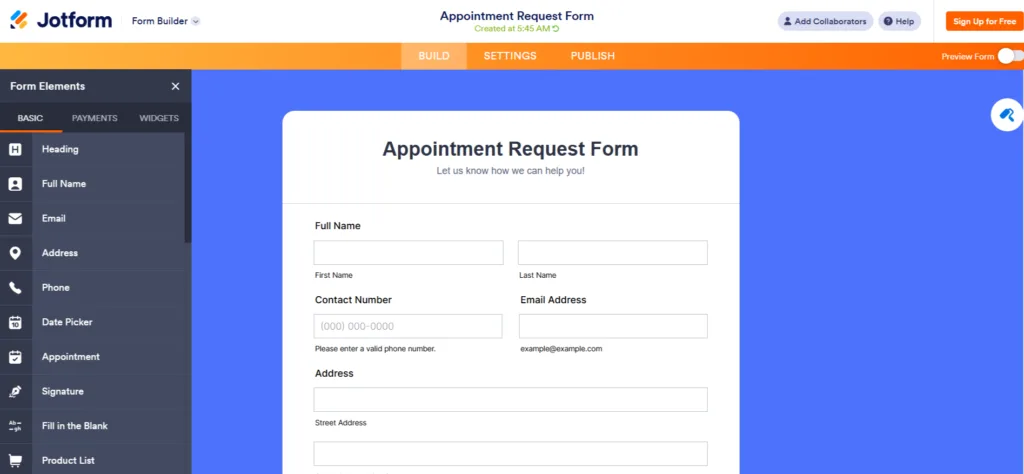
Not only payment gateways, but this software also allows you to connect your forms to the apps you already use. Jotform integrates with hundreds of platforms so you can automatically send form submissions to them, just like Bit Form does.
Additionally, with Jotform’s form styling features, you can customize the theme, background, add custom CSS, and make your online forms look exactly how you want them to. It’s built for teams that want one tool to cover a wide range of use cases rather than switching between specialized apps.
Popular Features
What to keep in mind
Pricing
It has a free version with 5 forms and 100 monthly submissions. And four paid tiers which start at $19.50/month.
What users say
“Jotform is the simplest form-building tool I’ve used. The layout is intuitive, the design is easy to navigate, and the features included on the free plan are more than enough for most people. I also like how easy it is to customise the look and feel – so your forms can actually look polished instead of the plain black-and-white style you get with a lot of free providers. Overall, I’d rate it close to 5/5. The only real drawback is the cap on how many forms you can create and how many submissions you can collect each month. That said, there are solid ways to increase those limits without paying. “– By James (collected from Trustpilot)
Best for: People who need an easy online form builder with lots of bells and whistles. Jotform is ideal for large businesses that have no budget issues and need complex forms like surveys, order forms, registrations, and more all from one account. It’s especially good if you want advanced widgets (like file converters, image uploads, appointment schedulers). In short, if you’re okay with a hosted form and want lots of integrations out-of-the-box, Jotform is a top choice.
If you want to give your users a conversational style form-filling experience, then consider Typeform. It is popular for its one-question-at-a-time format that feels more like a conversation than a form. This design helps reduce visual clutter and can make surveys, feedback forms, lead generation forms, and quizzes feel more engaging for respondents.
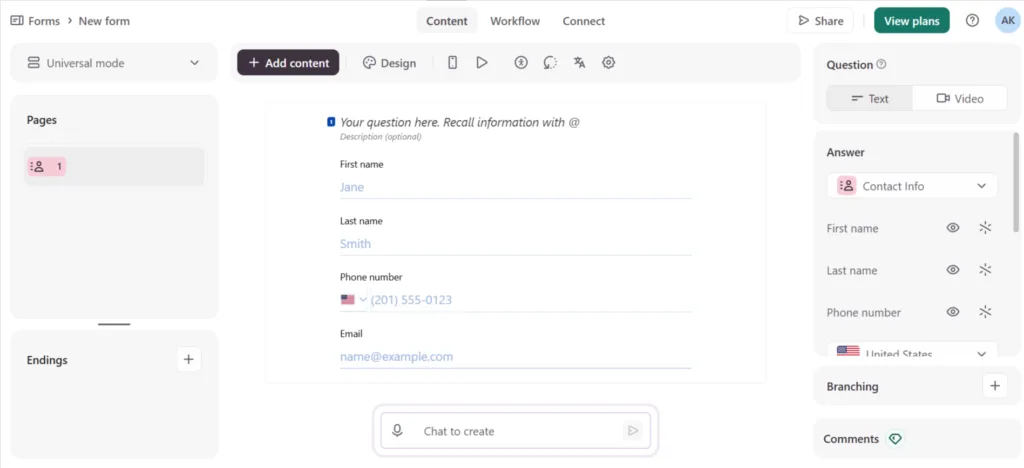
According to TinnyCommand’s Conversational Forms vs Traditional Forms report, this type of form has an above-50 % higher completion rate compared to normal forms. Beyond its clean interface, Typeform offers powerful customization, conditional logic, AI-assisted form creation, and integrations with hundreds of popular business tools. It’s a strong choice for businesses that care about both user experience and brand presentation.
Popular Features
What to keep in mind
Pricing
Free plan available (10 responses/month). Paid plans start at $39/month (Basic).
What users say
“Security and reliability are good, especially for handling business or educational data. While pricing and occasional technical issues can be drawbacks, the ease of use and quality of features make Typeform a strong choice for surveys, feedback forms, registrations, and customer interactions” — By Sonu P (Collected from Capterra)
Best For: Typeform is built for brands who want conversational forms, surveys, quizzes, and lead generation forms that prioritize user experience and completion rate. Also who don’t have a tight budget.
To make the selection easy for you, I’ve collected some real use cases and mentioned suitable tools for that particular use case.
| If this sounds like you… | Start with | Why |
| You already run WordPress and just need a simple WordPress contact form, zero budget | Bit Form’s free tier or Ninja Form | Free, fast to set up, no submission caps |
| Agency client sites that need to display submitted data as directories, listings, or booking systems | Formidable Forms | Good at turning form data into directories, listings, or booking systems |
| You want an affordable, beginner-friendly form builder with advanced features | Bit Form | Affordable and beginner-friendly |
| You need to sell something or collect donations and don’t have a website | PaymentForm.io | Built specifically for checkout without a site |
| You want quick internal survey and your team already lives in Google Workspace | Google Forms | Free forever, no submission limit |
| You want templates for almost anything, fast | JotForm | 20,000+ templates, generous mid tiers |
| You care most about a polished, conversational feel and higher completion rate than price | Typeform | Best for one-question-at-a-time design |
| You’re on WordPress and want to pay only for the add-ons you use | Ninja Forms | Separate add-on pricing instead of one bundle |
There isn’t a single best online form builder for everyone, and that’s exactly why this list includes tools that are popular for different use cases instead of ranking them from best to worst.
Some builders focus on creating simple contact forms. Others are designed for advanced WordPress workflows, conversational surveys, payment collection, or team collaboration. The right choice depends on what you need your forms to do, where they’ll be used, and how much flexibility you expect as your requirements grow.
If you’re still deciding, start by answering a few practical questions:
Once you know your priorities, choosing a form builder becomes much easier.
The tools featured in this guide have all earned their place for different reasons. Some stand out for their simplicity, others for customization, performance, user experience, or specialized payment capabilities. Instead of following popularity alone, choose the one that fits your workflow today and can continue to support it as your needs evolve.
An online form builder is a tool that lets you create digital forms without writing code. You can use it to build contact forms, surveys, registration forms, order forms, payment forms, and more. Nowadays, most online form builders include drag-and-drop editors, ready-made templates, and options to share forms through a link or embed them on a website.
For WordPress sites, Contact Form 7 and Bit Form (fremium) are both genuinely free and functional form plugins. If you’re looking for a cloud-based form builder, Google Forms is free with no submission limit. And it is good for basic form needs. However, if your main concern is collecting payments, you can try Paymentform.io.
Bit Form’s drag-and-drop builder and visual style editor make it suitable for absolute beginners compared to other WordPress plugins in this list.
A self-hosted form builder is software that you install on your own website, usually as a WordPress plugin. Your forms, submissions, and settings are stored on your hosting account, giving you more control over your data, customization, and integrations. Bit Form, Contact Form 7, Ninja Forms, and Formidable Forms are examples of self-hosted form builders.
A hosted form builder is a cloud-based software where the provider hosts your forms for you. You simply create a form, share its link, or embed it on your website without managing hosting, software updates, or any maintenance. Google Forms, Jotform, Typeform, and PaymentForm.io are examples of hosted form builders.
Yes, almost all form builders on this list offer built-in integration with multiple payment gateways, except Google Forms, Contact Form 7 (needs add-ons), and Ninja Forms(needs add-ons).
For internal surveys, quick feedback, or simple data collection, yes. For anything like a branded-looking form, payment collection, or advanced conditional logic, Google Forms is not the right fit.
A WordPress plugin lives on your own site and database, with a one-time or annual license instead of per-submission pricing. A SaaS tool like Jotform or PaymentForm.io lives on the provider’s servers, works without you owning a website, but usually comes with submission caps and monthly billing.
Yes. PaymentForm.io is built for exactly this. You create a form-based checkout page, connect a payment gateway like Stripe or PayPal, and share it as a link, QR code, or embed, without needing a domain or hosting.




 EN
EN  DE
DE  ES
ES  NL
NL  IT
IT  PT
PT  JA
JA