
Are you ready to transform your static WordPress site into an interactive and powerful website?
I remember struggling myself, I had a basic, static site that required constant manual updates. But when I discovered dynamic sites and automation plugins, everything changed!
With the right plugins, you can create a dynamic WordPress website that shows content based on user interactions. This also increases engagement and automates your workflow.
For example, if you own an e-commerce site, a dynamic website can display the best-selling or discounted products in your marketplace. Similarly, if you run a blog, it can showcase recent posts or the most viewed articles.
You can also collect user responses in an organized way using a WordPress form. Additionally, you can automate your WordPress site to integrate with other tools, making it even more dynamic and functional.
In this guide, I will show you how to build a fully dynamic WordPress website with advanced automation features. You don’t need to be a tech expert to create a dynamic WordPress site, just follow along!
A dynamic website is a website that changes or updates itself automatically. Based on how the user interacts with it. Like data inputs or live feeds. This is opposed to a static website, which will only change if a developer explicitly updates it. Dynamic websites can present varying information to different individuals based on their interests, location, or other criteria.
For example, an e-commerce site such as Amazon shows different products to different customers based on what they browsed and what they prefer. Online news websites or blogs typically show new posts and articles separately without anyone having to do so.
Dynamic websites have many advantages over static websites:
User Engagement: Dynamic websites provide users with a personalized experience. This increases the rate of engagement and conversion.
Content Updates: You can update content automatically. it will save time and need less effort.
E-commerce Ready: A dynamic website can accommodate online shops and allow real-time transactions.
Automation: A dynamic website allows you to connect other tools to your website and automate everything!
Scalability: As your site grows, you might need more features, pages, or other forms of content. Dynamic sites handle these expansions more easily than static sites.
Better Management of Data: Dynamic websites can collect and save user input (like forms, comments, and reviews) in an organized way, hence making it simpler to analyze and process.
Affordable for Long-Term: As you do not need to update every page separately, updating and maintaining dynamic sites is less expensive in the long run, especially for big sites.
Security: Both static and dynamic websites are secure, but dynamic websites can have more robust security measures like user log in, encryption, and secure payment processing.
SEO Benefits: Google loves new, fresh content, and active websites can deliver that effortlessly.
Yes, WordPress is a great tool for developing dynamic websites. WordPress started out as a blogging platform, but it has since developed into a full content management system (CMS). This makes it easy to develop dynamic websites even without any coding knowledge.
You can add dynamic content like blogs, user comments, product catalogs, and contact forms, animations, and even automate workflows without having to write code. Additionally, it has a large library of themes, plugins, and integrations that make features easy to add quickly.
To build a dynamic WordPress website, you need some advanced plugins like page builder, form plugin, automation plugin, SEO plugin, and more to make your website dynamic and fully functional. Here is the list of types of plugins you may need:
| Plugin Types | Popular Plugins | Purpose |
| Page Builders | Elementor, Bricks, or Breakdance | For easy drag-and-drop website design |
| Form Plugins | Bit Form, Contact Form 7 | For creating contact and lead generation forms |
| Ecommerce Plugins | WooCommerce, SureCart | To build an e-commerce store |
| Automation Plugins | Bit Flows, Bit Integrations | For workflow automation & connecting apps |
| Email Marketing Tools | MailChimp | for collecting emails and sending campaigns |
| SEO Plugins | Yoast, Rank Math | for optimizing your site for search engines |
| Social Media Automation | Bit Social | for auto-posting and scheduling |
| Analytics Plugins | Google Analytics, MonsterInsights | for tracking visitor data and insights |
Using the right combination of themes and plugins will help you create a professional and dynamic WordPress website. Now let’s explore some features of top plugins that help you create a dynamic website.
Now that you understand what a dynamic website is and why WordPress is the best platform for it. Now let’s explore some of the best plugins to make your WordPress website dynamic and more functional.

Elementor is a well-known WordPress page builder that allows the user to create functional websites without coding. It has a drag-and-drop feature, making it easy to build custom pages with simple changes and a variety of different widgets. You can build a fully dynamic website by using these widgets.

Elementor offers design features like fonts, animations, and device responsiveness. This helps to make a professional look everywhere. It is also compatible with lots of WordPress themes and plugins.
You can design templates for different types of posts (like blog posts, pages, and archives) and show dynamic content using the help of widgets like Post Title, Post Content, and ACF (Advanced Custom Fields) data. You can use custom post types to handle numerous types of content (like portfolios, events, and testimonials).
You can design custom templates for these post types with Elementor Pro. Like you can create a Simple Product Page, popup, header, footer, product archive, and whatever you need.

Elementor enables you to create a very interactive website by drawing in different types of content from WordPress and elsewhere. However, if you want to have access to all the dynamic functionality, including custom post types and fields, you’ll require Elementor Pro (which provides more advanced features than its free version).

WooCommerce is a very flexible and useful WordPress plugin to build an online store. There are numerous free and paid themes that support WooCommerce. There are a number of themes that are eCommerce-specific, so you can choose a theme that best fits the style and brand of your store.
WooCommerce allows you to add physical products, downloadable products, and variations (like size or color). You can set prices, images, descriptions, quantities, and more for each product.

You are able to create product pages that will vary based on what the user chooses. And you can display similar products based on what the user does. A clever feature is that you can install additional WooCommerce plugins, such as WooCommerce Product Recommendations, to add personalized recommendations to your site.
With WooCommerce, users can create accounts and log in to view orders, save shopping carts, and receive personalized content. It will make your site more dynamic and your customer can easily get their own dashboard where they can manage orders, payments, personal information, and related settings.

Using WooCommerce Dynamic Pricing & Discounts, you are able to assign various rules for pricing depending upon conditions such as quantity, user role, and more. Like here I have created a Coupon for new customers. You can assign Usage restrictions and Usage Limits as per your needs. This makes an online store more dynamic and inspires users to purchase more.

WooCommerce is very flexible for building a dynamic eCommerce site with everything you need to sell products online. It allows you to build a user-friendly and feature-rich online store through the use of plugins and themes, which consequently offers an easier shopping experience to your clients.

Bit Form helps create dynamic websites by offering customizable forms. It allows real-time data collection and interaction. With Bit Form you can make your websites more engaging and responsive. You can build any type of form like a contact form, multi-step form, signup form, registration form, payment form, and more.
You can create dynamic forms with Bit Form by using its 40+ advanced fields. These fields help you to cover all of your form needs. Fields like repeater, signature, image select, and payment fields will make your site highly dynamic.

You can easily collect and analyze your leads and any type of data by using Bit Form. Bit Form will show you the responses in the graph. You can filter every field and see what’s going on your users’ end.

In Bit Form, the conditional logic allows you to create a dynamic form to make your website more functional. You can assign conditions based on the user’s input. Suppose you can show or hide a field based on user input. Here I have added a condition to show a field named “Urgency of the Complaint”, the field only shows if the user selects the Complaint type as “Billing”. Otherwise, the field will remain hidden.

Dynamic websites must have automation functionalities. Bit Form has 47+ integrations to send your form data to different platforms. For example, you can send your form data to Google Sheets or MailChimp easily.

With Bit Form, WordPress site owners can create more interactive, and user-friendly websites. Bit Form helps to gather information, automate workflows, and offer users a more functional experience. Surely Bit Form will make your site dynamic and more engaging.

Mailchimp can help build a dynamic WordPress website by integrating email marketing, automation, and content management features into your site. You can build a strong audience list based on users’ integrations and run campaigns as per users’ interests.
By using a form, you can grow your email list. Mailchimp helps you add pop-ups and sign-up forms to your site.

Although MailChimp is a SaaS platform, you can connect it with WordPress by using tools like Bit Flows. You can add different types of forms to capture email addresses. Mailchimp allows automatic emails after actions on your site. You can send welcome emails or follow-up emails.
Also, you can segment your list for more relevant content. Mailchimp syncs with WooCommerce for personalized email campaigns. It also tracks customer actions like purchases and cart activity.
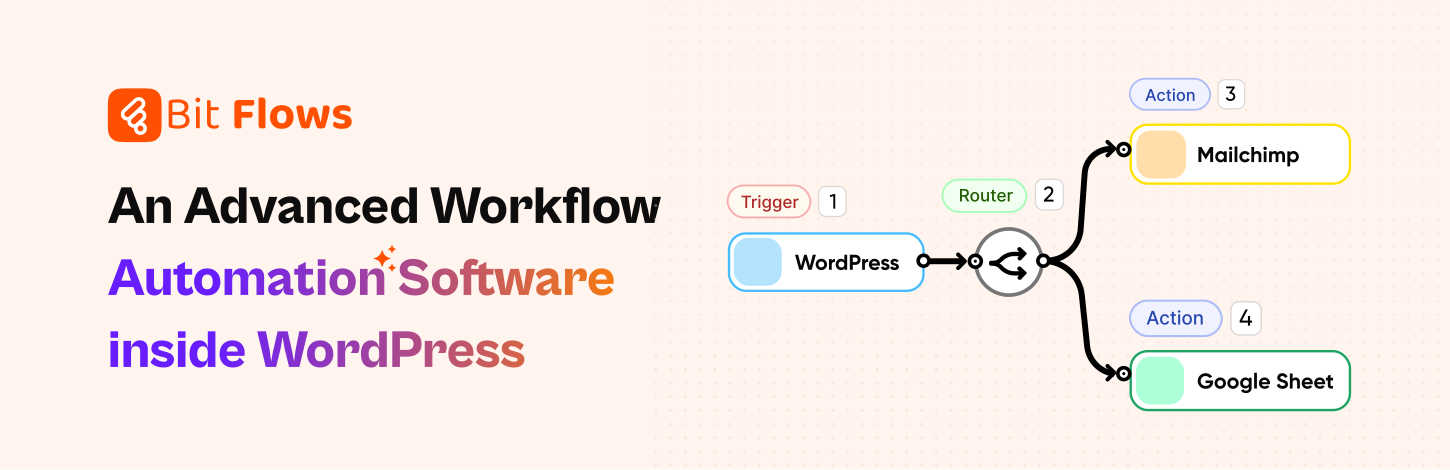
To create a dynamic website, automation is a must. Bit Flows is a powerful workflow automation tool that helps you build a dynamic WordPress website by automating workflows, integrating applications, and optimizing processes.
By using Bit Flows, you can connect multiple platforms using an advanced router tool and automate workflows like sending WooCommerce data to Google Sheets and form submissions to CRM, MailChimp and more. This will make your website dynamic and updated with user interactions.
Bit Flows offers a visual canvas flow builder. It’s dynamic and highly advanced. The best thing is you don’t need to be a tech expert to automate your workflow! There is no limit on Bit Flows! You can run unlimited tasks and create unlimited workflows without any extra costs!

Bit Flows makes field mapping easier and more organized. You just need to connect your app and just map the fields. You can use the custom app feature to create your own integrations module to fulfill your own requirement and also connect any apps or services with Webhooks and API. So no limit on integrations; connect as many as you need.
As a self-hosted tool, Bit Flows is fully secure and keeps your data on your own server. Bit Flows comes with advanced custom app features. With the custom app, you can create custom connections with triggers and hooks.

Undoubtedly, Bit Flows will make your WordPress site on autopilot and make it more dynamic. Check out this guide to get started with Bit Flows.

Rank Math helps to create dynamic websites by optimizing content, improving search rankings, and automating SEO tasks. It makes WordPress sites more interactive, search-friendly, and easy to manage. With Rank Math, you can optimize posts, pages, products, and custom post types for better visibility.

Rank Math offers real-time SEO suggestions to improve your content. It analyzes readability, keyword usage, and metadata to ensure higher search rankings.

Rank Math helps you track keyword rankings, analyze search performance, and optimize content for better visibility. It also improves local SEO by optimizing location data, making businesses easier to find. For online stores, WooCommerce SEO boosts rankings and attracts more customers. With instant indexing, Rank Math ensures your new content appears on search engines faster.

Also, you can add structured data like FAQs, reviews, recipes, and more using Rank Math. This helps search engines display enhanced results, attracting more clicks.

Bit Social is a powerful social media auto poster plugin that helps make your website more dynamic and engaging. It allows you to schedule posts from WordPress to social platforms like Facebook, Twitter, Instagram, LinkedIn, Google Business, Pinterest, Discord, and Tumblr. With Bit Social, you can connect unlimited accounts and schedule unlimited posts. This dynamic plugin helps you grow your audience.

With the Bit Social auto post features, you can automatically share your WordPress posts/products/pages to your social media. This will reduce manual work and keep you engaged with your audience.

Also, you can schedule products for a specific time. You can use Smart Tags to make your posts dynamic. With the Smart Tags, you can create templates for regular uses. Which makes the process easier and more efficient.

The plugin is highly customizable and has advanced features. It is also optimized and well-coded, which ensures better performance without slowing down your site. Features like schedule posts, share now, templates, and WP auto posts will make your social sharing more dynamic and efficient.
By following this guide and using the right tools, you can create a website that is not only functional but also attractive, engaging, and capable of growing with your needs. These tools will help you to build a powerful dynamic site with dynamic content.
Remember to focus on automating your processes, using the right plugins like Bit Flows, and continuously optimizing your site for better user engagement and search engine ranking.
Good luck with your dynamic WordPress website, and feel free to check your resources to make your website more functional!
A dynamic WordPress website automatically changes content based on user actions, such as clicking links or entering information. It can show different things to different visitors.
Static websites have fixed content that only changes when manually updated. Dynamic websites automatically update or change content based on user actions, providing a more interactive experience.
Dynamic websites keep visitors interested by showing fresh content automatically. Which saves you time and improves user experience.
No, many WordPress plugins offer user-friendly interfaces that allow you to add dynamic features without coding knowledge.
You can automate tasks using the Bit Flows plugin, which automatically performs actions like sending emails, updating spreadsheets, or connecting apps without manual effort.




 EN
EN  DE
DE  ES
ES  NL
NL  IT
IT  PT
PT  JA
JA