From sending emails and scheduling social posts to syncing customer data and adding leads, automation software handles repetitive tasks. Global spending on marketing automation tools is increasing day by day. If you’re a small business owner or an agency marketer, the right marketing automation tools can maximize efficiency, deliver personalized campaigns, and improve ROI.
In this guide, I am going to introduce you to a powerful marketing automation tool. And you also explore why marketing automation matters, and how to avoid common mistakes. I will also explore essential features of modern automation software, future trends, and the power of personalization in marketing automation. Ready to maximize your marketing? Let’s get started!
Marketing automation means using software to perform marketing tasks without constant human intervention. It covers everything from email campaigns and social media posting to lead scoring and audience segmentation. Essentially, when you set up marketing automation, your tools can send out emails, update CRM records, and more. All triggered by specific events or schedules.
For example, a new user signing up on your website can automatically trigger a welcome email, a Slack notification to your sales team, or an entry in a Google Sheet. These flows turn manual tasks into smooth, scalable processes.
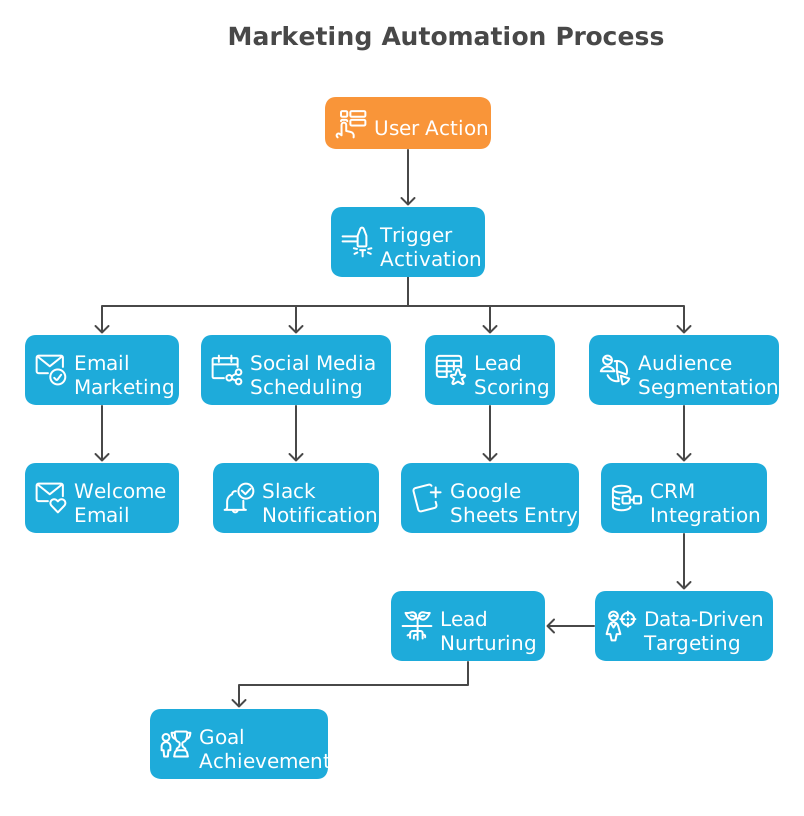
Marketing automation often works smoothly with a CRM system. Together, they collect data about your customers. The automation software uses that data to send targeted messages at the right time. If a visitor fills out a form on your site, the system can automatically add the lead to a nurturing email series. This way, businesses reach customers with automated messages across various channels, such as websites, social media, emails, and text messages.
Increased efficiency is the most obvious benefit. Automating follow-ups or data entry cuts manual workload, reduces errors, and ensures no leads are missed. For example, instead of a sales rep spending hours copying new leads into the CRM, an automation workflow can do it instantly. This time savings enables more consistent marketing and faster sales cycles.
Another key benefit is better customer relationships through personalization. Automation tools use data to deliver the right message to the right person at the right time. By segmenting your audience and content. Automated email sequences can nurture leads throughout their journey and address their needs.

Research shows that personalized welcome emails enjoy high open rates, and abandoned cart emails often recover a notable percentage of lost sales. A single abandoned cart email can recoup around 10-20% of revenue that would be lost. By automating such campaigns, you consistently convert casual visitors into engaged customers without manual outreach.
Modern marketing automation platforms are packed with features designed to simplify complex campaigns. Some of the key capabilities to look for include:
Visual Workflow Builder. Top tools offer drag-and-drop editors where you map out flows. You can define triggers and chain together actions. For example, after a lead fills out a form, the system could “split” (router) the data, send one branch to your CRM, another to a spreadsheet, then loop over items to send personalized follow-ups.
Email Marketing & Drip Campaigns. At the heart of most platforms is email automation. Features include automated email series, personalized templates, dynamic content, and scheduling. You should be able to tag emails to actions and set up triggers based on opens or clicks.
Lead & Contact Management. A good platform helps you capture and score leads. Look for contact segmentation and lead-nurturing workflows. Lead scoring assigns points to contacts based on their actions, such as visits, downloads, and purchases. After a contact reaches a score threshold, it could automatically alert sales to follow up.
Multi-Channel Automation. Beyond email, many tools automate posts and messages across channels. Social media scheduling, SMS/text messaging, Telegram notifications, and even direct mail integration can be part of automation workflows. You might schedule a series of social posts triggered by a new blog publish, or send Email reminders for an event sign-up.
Integrations and APIs. Your marketing automation platform should play nicely with the rest of your tech stack. Common integrations include CRMs, e-commerce, webinar tools, and others. Webhooks and open APIs are key for connecting with custom systems or niche tools. Essentially, look for marketing automation software that can connect to hundreds of third-party apps and services.
💡 Check out the Bit Flows integrations list to find out the perfect match as per your needs. Not getting your preferred tools on the list? Don’t worry! Use Bit Flow’s powerful custom app to build your own integrations.
Personalization & Dynamic Content. This goes hand-in-hand with segmentation. Advanced tools use data to automatically insert personal details (name, company), recommend products, or change content based on profile data.
Compliance and Data Security. Ensure the platform helps with GDPR compliance. Features like double opt-in and secure data handling give peace of mind. For example, self-hosted solutions can offer extra data security since the data stays on your servers.
When spending on marketing automation, list the features you truly need. If you primarily do email marketing, a tool with strong email and CRM integration is a must. The right feature set depends on your strategy, but core capabilities include multi-step workflows, personalization, and easy integrations.
There are plenty of marketing automation tools out there. Some are great, some are too complex or expensive for most users. In this post, I am going to introduce you to Bit Flows, a tool that I personally find simple, powerful, and budget-friendly.
Bit Flows lets you build unlimited automated workflows to handle your marketing tasks, like sending emails, updating CRMs, or connecting apps, without writing any code. It offers unlimited executions. So your workflows run without restrictions, which is a rare find at this price point.
If you’re looking for an affordable way to automate your marketing and save time, Bit Flows is definitely worth checking out. Let’s explore what Bit Flows offers and how it can help you with marketing automations!
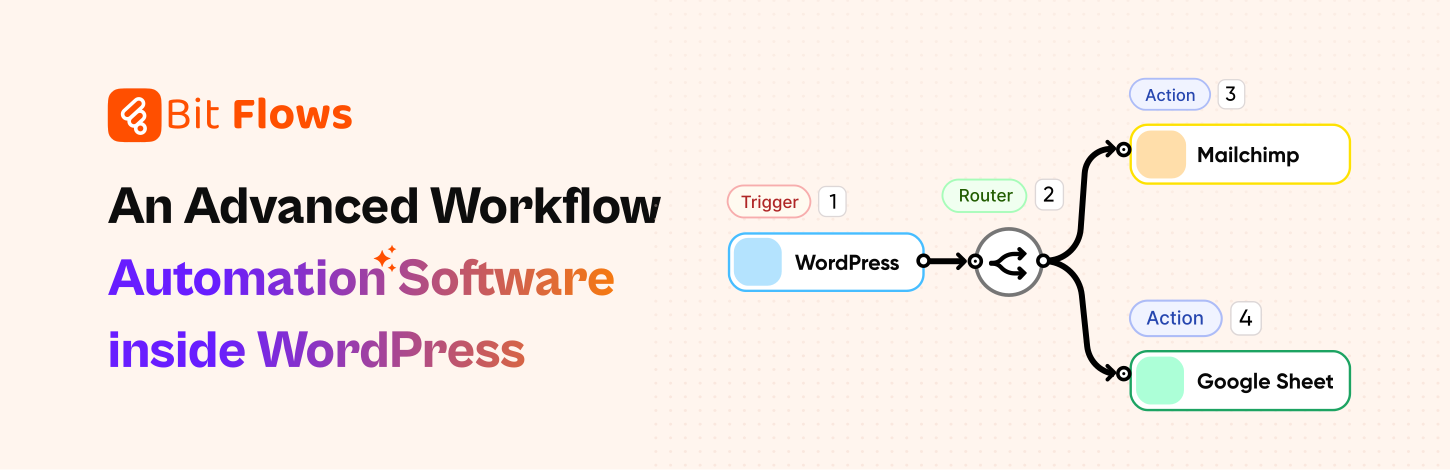
If you use WordPress for your website or marketing, Bit Flows is worth a close look. It’s an advanced, super-fast workflow automation plugin that brings Zapier-like power right into your WordPress dashboard. You can connect events to a huge range of actions without leaving your site. It also handles events that happen outside WordPress by using the webhook and custom app features.
Bit Flows stands out for its intuitive visual builder. You drag triggers and actions onto a canvas and connect them. There’s no coding needed. The interface feels familiar even to beginners. You can build multi-step workflows with routers and repeaters. For example, one workflow can split a form entry into two branches: one to add the lead to Google Sheets and another to add them to a Mailchimp list, then send a follow-up email. This flexibility means your team can implement complex automations without developers.
🚀 Explore how Bit Flows helps you to simplify complex workflows with its visual canvas builder and no limit model.
Key features and integrations: Bit Flows comes loaded with advanced tools:
Triggers for WordPress and third-party events: It supports 170+ WordPress triggers and hundreds of popular form and plugin triggers like Fluent Forms, Gravity Forms, TutorLMS, etc. You can update WordPress data or send information to over 150 external platforms.

Multi-step workflows: Bit Flows has no limit on steps or workflows. You get unlimited flows, tasks, and executions even in the free core version.
Routers, Loops, Conditions: Bit Flows includes routers, repeaters/loops, conditional logic, and delays. You could set “Delay 1 day” after a welcome email before sending a second one. Conditional steps let you say “only send this branch if X is true.” These powerful features mean you can automate really sophisticated campaigns all within WordPress.

Custom App Builder and Webhooks: If you need a connection not built-in, Bit Flows lets you create custom API actions or use incoming/outgoing webhooks. This means you can integrate virtually any service by building a powerful custom app.
Self-hosted & Secure: Because Bit Flows runs on your own WordPress site, your data stays private. There are no hidden cloud fees or limits, you handle everything under your roof. This appeals to agencies and enterprises concerned about data control.
Bit Flows combines the key needs of any automation tool in one place:
Bit Flows handles everything from e-commerce and LMS enrollments to support requests and social messaging. Essentially, Bit Flows is like having a team of virtual assistants that never sleep.
WordPress users & agencies: If you run a WP site with forms, courses, or shops, Bit Flows easily ties everything together. Agencies managing multiple client sites love that they can automate client workflows. So agencies can build custom solutions customized for any client. The Bit Flows team regularly adds new triggers/actions, so the tool grows with you.
Marketers & Small Businesses: You don’t need to be a developer to automate marketing. Bit Flows enables small teams to grow smarter, You can automatically route leads from a contact form to an email marketing list or Google Sheet. Its unlimited workflows mean you can set up entire drip campaigns without worrying about usage caps.
To inspire your own strategy, here are examples of common, high-impact marketing automation workflows:
Welcome/Onboarding Series: When someone subscribes or signs up, automatically send a series of friendly welcome emails. You can thank them for joining, share tutorials or tips, and gradually introduce your products or services. A good welcome series sets the tone and engagement early.
Lead Nurturing Drip Campaigns: For potential customers not ready to buy yet, drip sequences slowly warm them up. This keeps leads engaged and moves them down the funnel without manual follow-up. Each message is triggered by either time or specific actions. With Bit Flows you can send your data to CRM or email marketing tool to run campaing like this.
Abandoned Cart or Form Follow-up: If a visitor adds items to a shopping cart but doesn’t check out within a few hours, you can trigger an email reminding them of the items (sometimes including a discount coupon).
Birthday/Anniversary Campaigns: Automate personal touches. For example, if you have customers’ birthdays or anniversaries, schedule an automated greeting or special offer email on that date each year. This is easy to set up if your CRM records birthdates. Such campaigns increase customer loyalty and feel thoughtful.
Post-Purchase Follow-Ups: After a customer buys, trigger a thank-you email immediately, then schedule a follow-up a week later asking for feedback or reviews. You could also set reminders to suggest related products or service renewals.
Re-Engagement/Win-Back: For contacts who have gone cold (no opens or website visits in a while), automate a “We Miss You” campaign. If a customer hasn’t interacted in 3 months, send an email asking if they need help or offering a special deal to come back.
Event/Webinar Follow-Up: When someone registers for a webinar or attends an event, use automation to send confirmation emails, reminder emails (e.g. 1 day before event), and thank-you emails afterward. You can also tag attendees as leads and trigger future marketing sequences based on their attendance.
Social/Ad Campaign Coordination: Automations can connect ads to CRM. For example, a Facebook Lead Ad that collects emails can instantly trigger an automation that adds the lead to a nurture list and sends them a welcome discount code.
These workflows show the flexibility of marketing automation. The key is to identify your routine processes and turn them into automated flows. When done well, these campaigns run in the background and consistently engage prospects and customers at exactly the right moments.
While marketing automation offers many advantages, it’s easy to make mistakes if you jump in without a strategy. Here are some common mistakes to avoid:

Lack of Clear Strategy or Goals: One of the biggest mistakes is diving into automation without defining what you want to achieve. For example, without clear goals, you might send generic emails to everyone instead of targeting the right audience. Always begin by outlining a content plan and key metrics so your automated campaigns serve a purpose.
Using Automation Only as an Email Blast Tool: Marketing automation is far more powerful than just scheduling emails. It’s like buying a Ferrari and only using it to go to the grocery store one block away. So you have to explore the full potential of these marketing automation tools. Beyond email marketing, discover the whole automation process to make your workflow more efficient.
Neglecting Personalization and Segmentation: Sending identical messages to every contact is a missed opportunity. Modern customers expect relevant, personalized content. A common mistake is failing to segment leads. For example, don’t put all your contacts into one list and send them the same email. Segment by interests, purchase history, location, etc., and customize each campaign.
Overloading with Emails: Even with automation, quality over quantity matters. A frequent error is sending too many emails just because you can. Ensure each automated email adds value rather than filling their inbox.
Neglecting Data Hygiene and Integrations: Marketing automation thrives on data, so poor data management harms it. Avoid letting outdated or duplicated contacts from your system. Integrate your automation platform with your CRM, website, and other databases so that information is synced and accurate. With clean, unified data, you can personalize and measure campaigns properly.
Set It and Forget It: Automation doesn’t mean you should leave things on autopilot forever. Campaigns need monitoring and optimization. If you never tweak your workflows or test new content, you’re making mistakes. Automation gives you a strong start, but ongoing optimization keeps it effective.
By keeping these common marketing mistakes in mind, you’ll get the most out of automation. Personalize messages, integrate data sources, and continually optimize, then your automated workflows will run smoothly and deliver real value.
Marketing automation is now essential for any organization that wants to work smarter, not harder. The most successful marketers will be those who utilize automation to optimize tasks, personalize interactions at scale, and continuously monitor their campaigns. From understanding your leads’ behavior to delivering the perfect follow-up email, automation tools do the work and free up time so your team can focus on strategy and creativity.
If you’re using WordPress or handle multiple tools in your business, give Bit Flows a try. It puts the power of Zapier-style workflows right into your WordPress site, no extra subscriptions needed. With Bit Flows, you get unlimited automations, an easy visual builder, and 170+ integrations. Whether you’re a small business owner who wants to send leads to your CRM automatically or an agency building complex client workflows, Bit Flows can simplify it all.
Improve your marketing automation as an essential part of your strategy. Automate the boring stuff, delight your customers with personalization, and watch your efficiency and conversions grow. Happy automating, and don’t forget to check out Bit Flows to supercharge your workflows today!
It’s software that automates repetitive marketing tasks like email campaigns, social posts, and lead management. So you can engage customers automatically based on triggers. It helps teams save time and scale campaigns without manual effort.
Automation frees up time by handling routine tasks, improves accuracy, and enables personalized campaigns. You get better lead nurturing, higher conversion rates, and more consistent customer communication. For example, automated welcome series and follow-ups mean new leads are contacted promptly, which boosts engagement and sales.
Look for a visual workflow builder with triggers and actions, advanced workflow tools, audience segmentation, and integrations with your CRM or website. Make sure it matches your goals. If you need complex automations and unlimited workflows, choose a platform (like Bit Flows) that offers those features.
Yes! Bit Flows has built-in triggers/actions for many WP plugins. It connects with form plugins, WooCommerce, LMS plugins like TutorLMS and LearnDash, and more. I can send data to external services such as CRMs, email platforms, Slack, Google Sheets, etc. You can even create custom API connections if needed.
Absolutely. It’s designed with a drag-and-drop interface, so no coding is required. Even non-technical users can build workflows by simply selecting triggers and actions and linking them.
Start by defining your goals and workflows, then pick a platform that fits those needs. Consider ease of use, integrations (especially if you use WordPress or specific CRMs), and pricing. For WordPress-based businesses, an all-in-one plugin like Bit Flows could be perfect.
Also, take advantage of demos: try setting up a simple campaign to see how the tool feels. The right tool will save you time and grow with your business.





 EN
EN  DE
DE  ES
ES  NL
NL  IT
IT  PT
PT  JA
JA