メール送信、ソーシャル投稿のスケジュール設定、顧客データの同期、リードの追加まで, 自動化ソフトウェアは、繰り返し作業を処理します。. マーケティングオートメーションツールの世界的な支出は日々増加しています。中小企業のオーナーや代理店のマーケターにとって、適切なマーケティングオートメーションツールは、効率を最大化し、パーソナライズされたキャンペーンを提供し、ROIを向上させることができます。.
このガイドでは、~をご紹介します 強力なマーケティングオートメーションツール。. また、マーケティングオートメーションがなぜ重要なのか、そしてよくある間違いを避ける方法についても解説します。さらに、最新のオートメーションソフトウェアの必須機能、将来のトレンド、そしてその力を探求します。 マーケティングオートメーションにおけるパーソナライゼーション. マーケティングを最大限に活用する準備はできましたか?始めましょう!
マーケティングオートメーション マーケティングオートメーションとは、人間が常に介入することなく、ソフトウェアを使用してマーケティングタスクを実行することです。メールキャンペーンやソーシャルメディアへの投稿から、リードスコアリング、オーディエンスセグメンテーションまで、すべてを網羅しています。基本的に、マーケティングオートメーションを設定すると、ツールが特定のイベントやスケジュールをトリガーにして、メールを送信したり、CRMレコードを更新したりできるようになります。.
例えば、ウェブサイトに新規ユーザーが登録すると、自動的にウェルカムメールが送信されたり、営業チームにSlack通知が送られたり、Googleスプレッドシートに記録されたりします。これらのフローは、手作業のタスクをスムーズで拡張性の高いプロセスに変えます。.
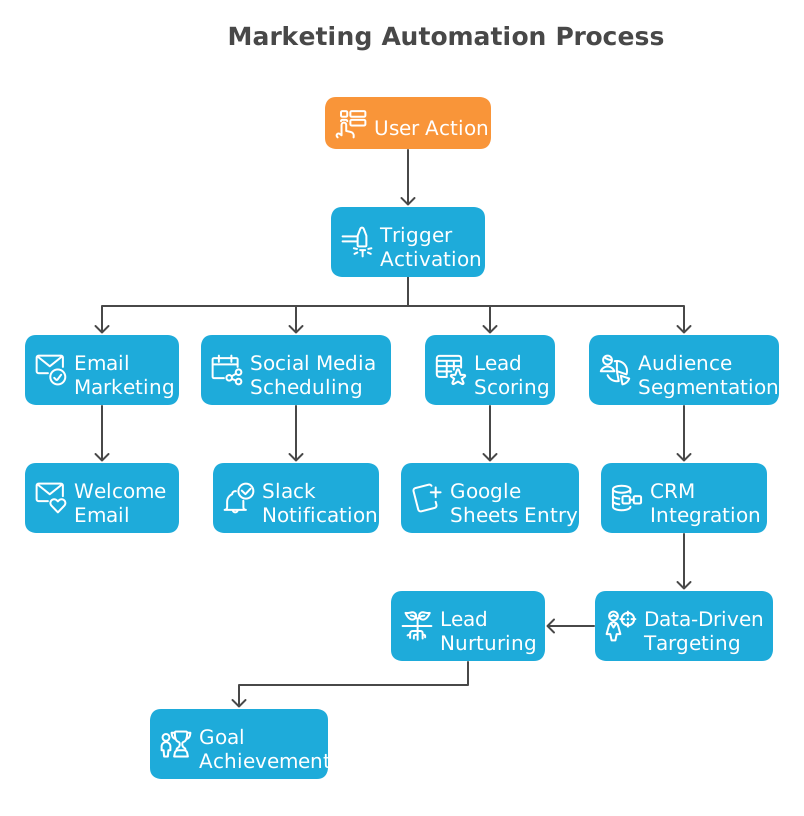
マーケティングオートメーションは、CRMシステムと連携してスムーズに機能することがよくあります。両者を組み合わせることで、顧客に関するデータを収集します。オートメーションソフトウェアはこのデータを使用して、適切なタイミングでターゲットを絞ったメッセージを送信します。訪問者がサイトのフォームに入力すると、システムは自動的にリードを育成メールシリーズに追加できます。このように、企業はウェブサイト、ソーシャルメディア、メール、テキストメッセージなどのさまざまなチャネルを通じて、自動化されたメッセージで顧客にリーチします。.
効率の向上 が最も明白なメリットです。フォローアップやデータ入力を自動化することで、手作業の労力が削減され、エラーが減り、見込み客を逃すことがなくなります。例えば、営業担当者が新しい見込み客をCRMにコピーするのに何時間も費やす代わりに、自動化ワークフローなら瞬時に完了できます。これにより時間の節約ができ、より一貫性のあるマーケティングとより速い販売サイクルが可能になります。.
もう一つの主な利点は パーソナライズによる顧客関係の向上. 自動化ツールは、データを活用して、適切な人に適切なタイミングで適切なメッセージを届けます。オーディエンスとコンテンツをセグメント化することによって。自動化されたメールシーケンスは、リードがジャーニー全体を通じて育成し、ニーズに対応することができます。.

調査によると、パーソナライズされたウェルカムメールは開封率が高く、カート放棄通知メールは失われた売上のかなりの割合を取り戻すことが多いことがわかっています。1通のカート放棄通知メールだけで、失われるはずだった売上の約10~20%を挽回できる可能性があります。こうしたキャンペーンを自動化することで、手動でのアプローチを行うことなく、カジュアルな訪問者を継続的に熱心な顧客へと転換させることができます。.
現代のマーケティングオートメーションプラットフォームには、複雑なキャンペーンを簡素化するために設計された機能が満載されています。注目すべき主な機能には、以下のようなものがあります。
ビジュアルワークフロービルダー. トップツールは、フローをマッピングできるドラッグ&ドロップエディターを提供しています。定義できます トリガー そして、連鎖する 行動. 例えば、リードがフォームに入力した後、システムはデータを「分岐」(ルーティング)させ、一部をCRMに、別の一部をスプレッドシートに送信し、その後アイテムをループさせてパーソナライズされたフォローアップを送信することができます。.
Eメールマーケティング&ステップメール. ほとんどのプラットフォームの中心には、メール自動化があります。機能には、自動メールシリーズ、パーソナライズされたテンプレート、動的コンテンツ、スケジュール設定が含まれます。メールをアクションにタグ付けし、開封またはクリックに基づいたトリガーを設定できる必要があります。.
リード&コンタクト管理. 優れたプラットフォームは、リードの獲得とスコアリングを支援します。連絡先のセグメンテーションとリード育成ワークフローに注目しましょう。リードスコアリングは、訪問、ダウンロード、購入などの行動に基づいて連絡先にポイントを割り当てます。連絡先がスコアのしきい値に達すると、営業担当者に自動的にフォローアップを促すアラートを出すことができます。.
マルチチャネル自動化. メール以外にも、多くのツールがチャネルを横断した投稿やメッセージの自動化を行います。ソーシャルメディアのスケジュール設定、SMS/テキストメッセージ、Telegram通知、さらにはダイレクトメールの統合なども、自動化ワークフローの一部となり得ます。新しいブログ記事の公開をトリガーとして一連のソーシャル投稿をスケジュールしたり、イベントへの登録リマインダーをメールで送信したりすることも考えられます。.
統合とAPI. マーケティングオートメーションプラットフォームは、他のテクノロジースタックとうまく連携できる必要があります。一般的な連携先としては、CRM、Eコマース、ウェビナーツールなどがあります。WebhookやオープンAPIは、カスタムシステムやニッチなツールとの接続に不可欠です。基本的に、何百ものサードパーティ製アプリケーションやサービスに接続できるマーケティングオートメーションソフトウェアを探しましょう。.
💡 チェックしてみてください Bit Flowsの統合リスト あなたのニーズに合った最適なマッチを見つけることができます。リストにお探しのツールが見つかりませんか?ご心配なく! Bit Flow の強力なカスタムアプリ 独自のインテグレーションを構築するために。.
パーソナライゼーションとダイナミックコンテンツ. これはセグメンテーションと密接に関連しています。高度なツールは、データを使用して個人情報(名前、会社名)を自動挿入したり、商品を推薦したり、プロファイルデータに基づいてコンテンツを変更したりします。.
コンプライアンスとデータセキュリティ. プラットフォームがGDPR(一般データ保護規則)への準拠を支援することを確認してください。ダブルオプトインや安全なデータ処理などの機能により、安心感が得られます。例えば、セルフホスト型ソリューションは、データがご自身のサーバーに留まるため、追加のデータセキュリティを提供できます。.
マーケティングオートメーションに投資する際には、本当に必要な機能をリストアップしましょう。主にEメールマーケティングを行っている場合は、強力なEメール機能とCRM連携を備えたツールが必須です。適切な機能セットは戦略によって異なりますが、コア機能にはマルチステップワークフロー、パーソナライゼーション、簡単な連携機能が含まれます。.
マーケティングオートメーションツールはたくさんありますが、その中でも優れたものもあれば、ほとんどのユーザーには複雑すぎたり高価すぎたりするものもあります。この記事では、皆様に〜をご紹介します。 Bit Flows, 私が個人的にシンプルでパワフル、そして手頃な価格だと感じるツール。.
Bit Flowsを使えば、次のようなものを作成できます 無制限の自動化ワークフロー コーディングなしで、メール送信、CRMの更新、アプリの連携などのマーケティングタスクを処理できるようにします。これは、 無制限の実行. So your workflows run without restrictions, which is a rare find at this price point.
If you’re looking for an affordable way to automate your marketing and save time, Bit Flows is definitely worth checking out. Let’s explore what Bit Flows offers and how it can help you with marketing automations!
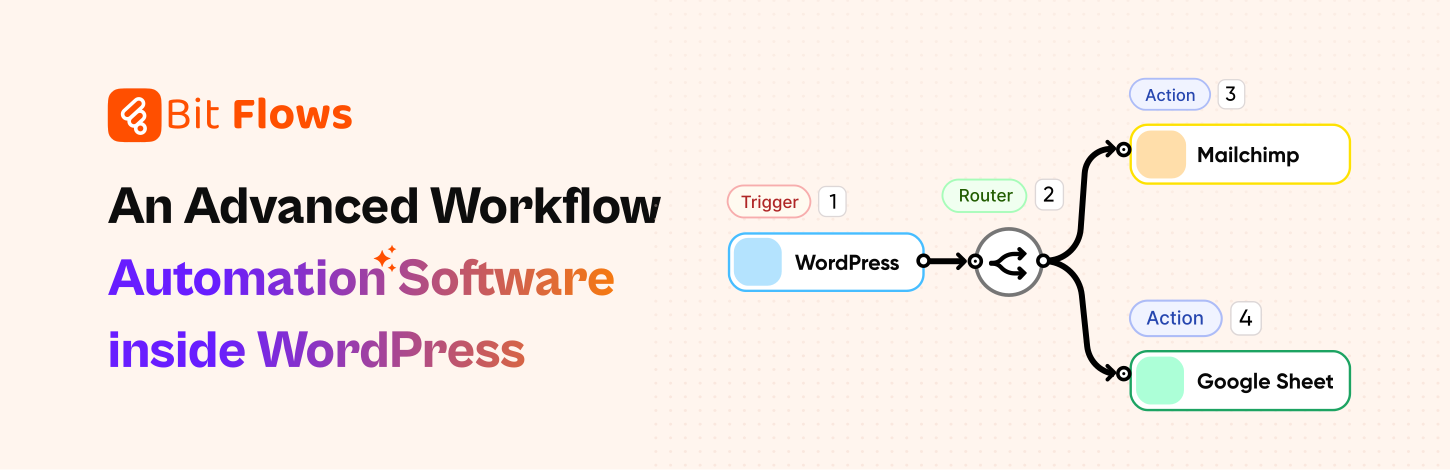
If you use WordPress for your website or marketing, Bit Flows is worth a close look. It’s an advanced, super-fast workflow automation plugin that brings Zapier-like power right into your WordPress dashboard. You can connect events to a huge range of actions without leaving your site. It also handles events that happen outside WordPress by using the webhook and custom app features.
Bit Flows stands out for its intuitive visual builder. You drag triggers and actions onto a canvas and connect them. There’s no coding needed. The interface feels familiar even to beginners. You can build multi-step workflows with routers and repeaters. For example, one workflow can split a form entry into two branches: one to add the lead to Google Sheets and another to add them to a Mailchimp list, then send a follow-up email. This flexibility means your team can implement complex automations without developers.
🚀 Explore how Bit Flows helps you to simplify complex workflows with its visual canvas builder and no limit model.
Key features and integrations: Bit Flows comes loaded with advanced tools:
Triggers for WordPress and third-party events: It supports 170+ WordPress triggers and hundreds of popular form and plugin triggers like Fluent Forms, Gravity Forms, TutorLMS, etc. You can update WordPress data or send information to over 150 external platforms.

Multi-step workflows: Bit Flowsには no limit on steps or workflows. You get unlimited flows, tasks, and executions even in the free core version.
Routers, Loops, Conditions: Bit Flows includes routers, repeaters/loops, conditional logic, and delays. You could set “Delay 1 day” after a welcome email before sending a second one. Conditional steps let you say “only send this branch if X is true.” These powerful features mean you can automate really sophisticated campaigns all within WordPress.

Custom App Builder and Webhooks: If you need a connection not built-in, Bit Flows lets you create custom API actions or use incoming/outgoing webhooks. This means you can integrate virtually any service by building a powerful custom app.
Self-hosted & Secure: Because Bit Flows runs on your own WordPress site, your data stays private. There are no hidden cloud fees or limits, you handle everything under your roof. This appeals to agencies and enterprises concerned about data control.
Bit Flows combines the key needs of any automation tool in one place:
Bit Flows handles everything from e-commerce and LMS enrollments to support requests and social messaging. Essentially, Bit Flows is like having a team of virtual assistants that never sleep.
WordPress users & agencies: If you run a WP site with forms, courses, or shops, Bit Flows easily ties everything together. Agencies managing multiple client sites love that they can automate client workflows. So agencies can build custom solutions customized for any client. The Bit Flows team regularly adds new triggers/actions, so the tool grows with you.
Marketers & Small Businesses: You don’t need to be a developer to automate marketing. Bit Flows enables small teams to grow smarter, You can automatically route leads from a contact form to an email marketing list or Google Sheet. Its 無制限 workflows mean you can set up entire drip campaigns without worrying about usage caps.
To inspire your own strategy, here are examples of common, high-impact marketing automation workflows:
Welcome/Onboarding Series: When someone subscribes or signs up, automatically send a series of friendly welcome emails. You can thank them for joining, share tutorials or tips, and gradually introduce your products or services. A good welcome series sets the tone and engagement early.
Lead Nurturing Drip Campaigns: For potential customers not ready to buy yet, drip sequences slowly warm them up. This keeps leads engaged and moves them down the funnel without manual follow-up. Each message is triggered by either time or specific actions. With Bit Flows you can send your data to CRM or email marketing tool to run campaing like this.
Abandoned Cart or Form Follow-up: If a visitor adds items to a shopping cart but doesn’t check out within a few hours, you can trigger an email reminding them of the items (sometimes including a discount coupon).
Birthday/Anniversary Campaigns: Automate personal touches. For example, if you have customers’ birthdays or anniversaries, schedule an automated greeting or special offer email on that date each year. This is easy to set up if your CRM records birthdates. Such campaigns increase customer loyalty and feel thoughtful.
Post-Purchase Follow-Ups: After a customer buys, trigger a thank-you email immediately, then schedule a follow-up a week later asking for feedback or reviews. You could also set reminders to suggest related products or service renewals.
Re-Engagement/Win-Back: For contacts who have gone cold (no opens or website visits in a while), automate a “We Miss You” campaign. If a customer hasn’t interacted in 3 months, send an email asking if they need help or offering a special deal to come back.
Event/Webinar Follow-Up: When someone registers for a webinar or attends an event, use automation to send confirmation emails, reminder emails (e.g. 1 day before event), and thank-you emails afterward. You can also tag attendees as leads and trigger future marketing sequences based on their attendance.
Social/Ad Campaign Coordination: Automations can connect ads to CRM. For example, a Facebook Lead Ad that collects emails can instantly trigger an automation that adds the lead to a nurture list and sends them a welcome discount code.
These workflows show the flexibility of marketing automation. The key is to identify your routine processes and turn them into automated flows. When done well, these campaigns run in the background and consistently engage prospects and customers at exactly the right moments.
While marketing automation offers many advantages, it’s easy to make mistakes if you jump in without a strategy. Here are some common mistakes to avoid:

Lack of Clear Strategy or Goals: One of the biggest mistakes is diving into automation without defining what you want to achieve. For example, without clear goals, you might send generic emails to everyone instead of targeting the right audience. Always begin by outlining a content plan and key metrics so your automated campaigns serve a purpose.
Using Automation Only as an Email Blast Tool: Marketing automation is far more powerful than just scheduling emails. It’s like buying a Ferrari and only using it to go to the grocery store one block away. So you have to explore the full potential of these marketing automation tools. Beyond email marketing, discover the whole automation process to make your workflow more efficient.
Neglecting Personalization and Segmentation: Sending identical messages to every contact is a missed opportunity. Modern customers expect relevant, personalized content. A common mistake is failing to segment leads. For example, don’t put all your contacts into one list and send them the same email. Segment by interests, purchase history, location, etc., and customize each campaign.
Overloading with Emails: Even with automation, quality over quantity matters. A frequent error is sending too many emails just because you can. Ensure each automated email adds value rather than filling their inbox.
Neglecting Data Hygiene and Integrations: Marketing automation thrives on data, so poor data management harms it. Avoid letting outdated or duplicated contacts from your system. Integrate your automation platform with your CRM, website, and other databases so that information is synced and accurate. With clean, unified data, you can personalize and measure campaigns properly.
Set It and Forget It: Automation doesn’t mean you should leave things on autopilot forever. Campaigns need monitoring and optimization. If you never tweak your workflows or test new content, you’re making mistakes. Automation gives you a strong start, but ongoing optimization keeps it effective.
By keeping these common marketing mistakes in mind, you’ll get the most out of automation. Personalize messages, integrate data sources, and continually optimize, then your automated workflows will run smoothly and deliver real value.
Marketing automation is now essential for any organization that wants to work smarter, not harder. The most successful marketers will be those who utilize automation to optimize tasks, personalize interactions at scale, and continuously monitor their campaigns. From understanding your leads’ behavior to delivering the perfect follow-up email, automation tools do the work and free up time so your team can focus on strategy and creativity.
If you’re using WordPress or handle multiple tools in your business, give Bit Flows a try. It puts the power of Zapier-style workflows right into your WordPress site, no extra subscriptions needed. With Bit Flows, you get unlimited automations, an easy visual builder, and 170+ integrations. Whether you’re a small business owner who wants to send leads to your CRM automatically or an agency building complex client workflows, Bit Flows can simplify it all.
Improve your marketing automation as an essential part of your strategy. Automate the boring stuff, delight your customers with personalization, and watch your efficiency and conversions grow. Happy automating, and don’t forget to check out Bit Flows to supercharge your workflows today!
これは、Eメールキャンペーン、ソーシャル投稿、リード管理などの定型的なマーケティングタスクを自動化するソフトウェアです。トリガーに基づいて顧客エンゲージメントを自動化できます。これにより、チームは手作業なしで時間を節約し、キャンペーンを拡大できます。.
自動化は、定型業務を処理することで時間を節約し、精度を向上させ、パーソナライズされたキャンペーンを可能にします。リードの育成が改善され、コンバージョン率が向上し、顧客との一貫したコミュニケーションが促進されます。例えば、自動化されたウェルカムシリーズやフォローアップにより、新しいリードには迅速に連絡が取られ、エンゲージメントと売上が向上します。.
トリガーやアクションを備えたビジュアルワークフロービルダー、高度なワークフローツール、オーディエンスのセグメンテーション、CRMやウェブサイトとの連携機能を備えたツールを探しましょう。それが自社の目標に合致しているかを確認してください。複雑な自動化や無制限のワークフローが必要な場合は、それらの機能を提供するプラットフォーム(Bit Flowsなど)を選択してください。.
はい!Bit Flowsには、多くのWordPressプラグインに対応したトリガー/アクションが組み込まれています。フォームプラグインやWooCommerce、TutorLMSやLearnDashなどのLMSプラグインなど、さまざまなプラグインと連携可能です。 CRM、メール配信プラットフォーム、Slack、Google スプレッドシートなどの外部サービスへデータを送信できます。必要に応じて、カスタム API 接続を作成することも可能です。.
はい、承知いたしました。ドラッグ&ドロップインターフェースで設計されているため、コーディングは一切不要です。技術者でないユーザーでも、トリガーとアクションを選択し、それらをリンクするだけでワークフローを構築できます。.
まずは目標とワークフローを明確にし、そのニーズに合ったプラットフォームを選びましょう。使いやすさ、連携機能(特にWordPressや特定のCRMを利用している場合は)、そして価格を考慮してください。WordPressを基盤とするビジネスであれば、Bit Flowsのようなオールインワンプラグインが最適かもしれません。.
また、デモを活用しましょう。簡単なキャンペーンを設定して、ツールの使い心地を試してみてください。適切なツールは時間を節約し、ビジネスの成長とともに進化します。.




 JA
JA  EN
EN  DE
DE  ES
ES  NL
NL  IT
IT  PT
PT