Automation can feel like a big, technical change, but for small businesses, it often means simple fixes that save hours. You don’t need to be an engineer to get started. In fact, 10 high-ROI small business automation ideas like emailing customers, posting social updates, or syncing inventory can start paying off this week.
These quick automation wins free up time and cut errors, letting owners focus on real growth. We’ll cover tasks like follow-ups, lead capture, scheduling, and more, plus tools including Bit Flows plugins that make them easy. You’ll see how automating routine tasks can boost your cash flow, customer happiness, and productivity without any coding.
Not every task needs a robot. A high-ROI task is one that saves a lot of time or money for the effort required. Usually, these tasks are repetitive, frequent, and easy to measure. For example, entering data by hand dozens of times a day is a prime candidate.
Different use cases represent how different automated tasks can fit together to drive efficiency. High-ROI automation often comes from high-volume, repeatable processes that produce measurable outcomes. Think of anything that happens over and over: posting content every week, sending invoices, or responding to common customer questions.
When you automate your workflow, say, back-and-forth scheduling, invoice reminders, or customer follow-ups, you remove friction and speed up the whole system. The payoff shows up as saved hours, fewer mistakes, and better cash flow or sales, measured against the small cost of the tool or plugin you use.
Every busy store or site has spots where things slow down. Maybe your team is constantly doing the same small task, or deadlines slip because someone forgot to hit “send” on an email. Watch for these warning signs:
So, owners often find that manual data entry between tools, back-and-forth scheduling, invoice chasing, or triaging repetitive support requests are common leaks in the system. Spot these patterns by asking your team where they wait or rework, and you’ll pinpoint your automation needs.
Let’s explore some small business automation ideas you can start today. These simple shifts can save you hours each week and free you to focus on real growth. Think of them as small tweaks with big long-term impact.
After a sale or inquiry, customers appreciate a quick note. Manually sending thank-you emails or reminders eats up time and can slip through the cracks. Automation can help:
These small gestures keep people engaged and coming back. In fact, consistent automated follow-ups have been shown to improve customer retention and repeat sales. Tools like Bit Flows can tie together your order system and email platform, so every new purchase triggers a follow-up email without lifting a finger.
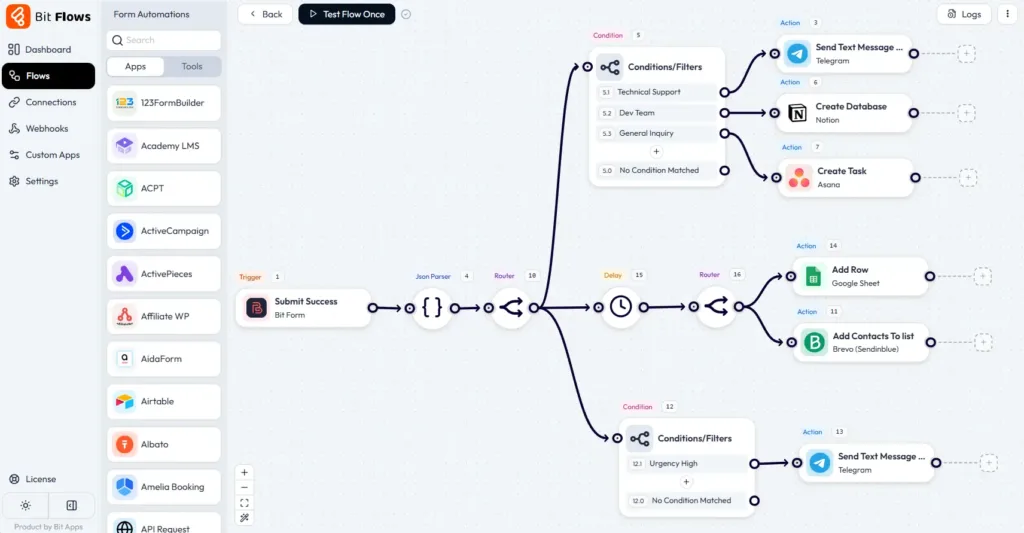
For example, Bit Flows could watch for new e-commerce orders and then send a personalized email via your mail system. This means no human oversight is needed, and no happy customer gets forgotten.
Leads are the fuel that drives your sales engine. But if a customer fills out a form and you don’t answer fast, they’ll go elsewhere. Automation can turn every lead into a quick touchpoint:
This kind of speed-to-lead tactic dramatically improves conversions. Even basic tweaks like auto-responding to form submissions can boost conversion rates by 10–25%. Instead of waiting to manually read forms, let automation work.
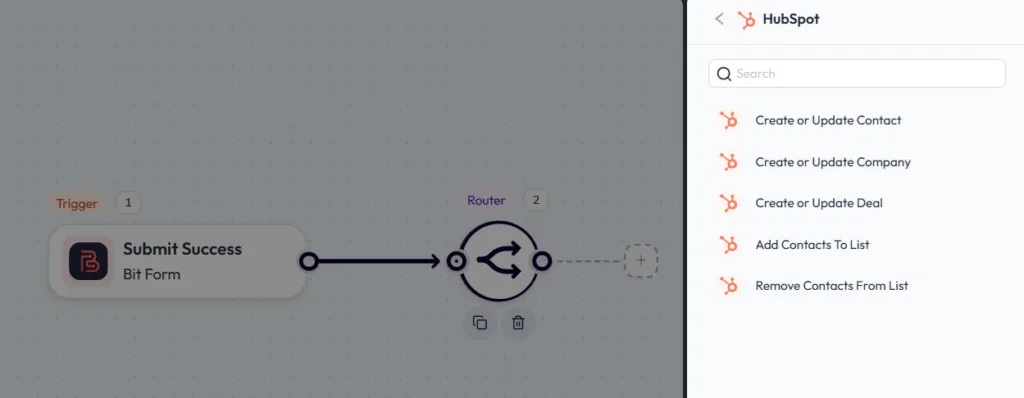
For example, Bit Flows can take data from Bit Form or WooCommerce signup and push it into your CRM (like HubSpot) with tags. The system can even remove duplicates and tag buyers vs. browsers automatically. The result is faster follow-up and higher win rates because every inquiry is instantly acknowledged.
Keeping up a social media presence is crucial for visibility, but posting each update by hand is tedious. Scheduling and automating social media can free hours each week:
This means your profiles stay active without daily effort. According to automation experts, starting with one high-impact use case like “automating social media posting” can build confidence and momentum.
For example, Bit Social for WordPress can take every new blog post and automatically share it to your social feeds. You get a steady stream of content without manual shares. Over time, this consistent presence grows your audience and drives steady traffic back to your store or site, all on autopilot.
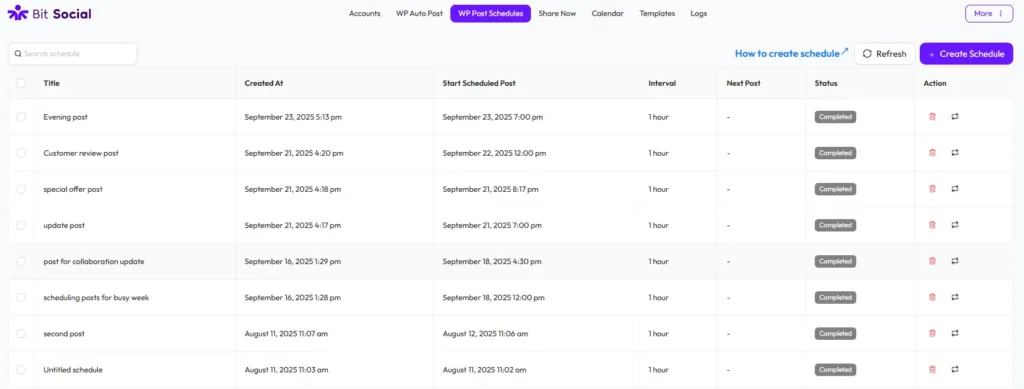
Use tools (like a tablet or planner) to organize and automate your posting schedule. Automated social scheduling tools let you plan content weeks in advance.
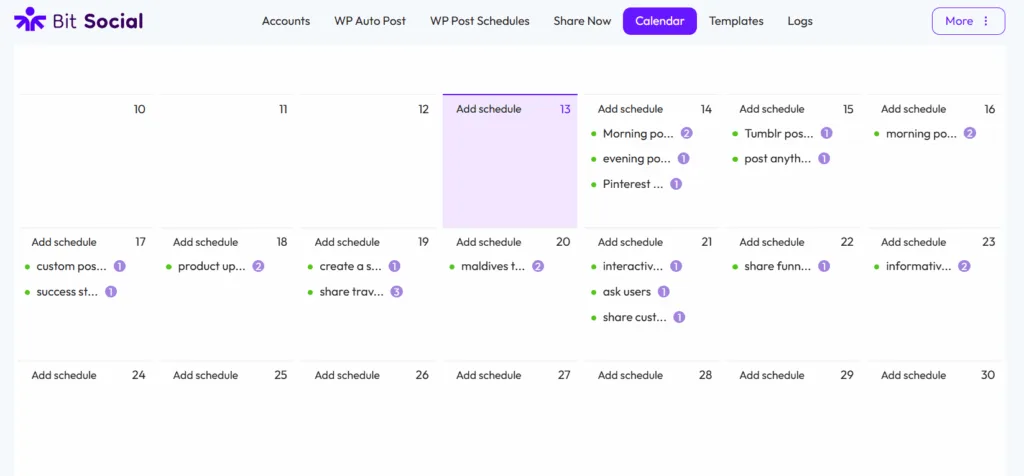
This keeps your brand active online without daily work. You could write a batch of posts at once, schedule them to release at the best times, and then focus on business instead.
Email is one of the highest-ROI channels for small businesses, but it only pays off if done consistently. Automation takes the guesswork and grunt work out of email marketing:
All this means more engagement for less work. Automating email campaigns frees up time for strategy and delivers measurable uplift in open and click rates. In plain terms: you sit back and let data-driven rules handle emailing.
For instance, Bit Flows can connect your e-commerce plugin to Mailchimp or ActiveCampaign so that when someone buys a product, it triggers a tailored thank-you email or future upsell sequence. The day-to-day running of the campaign is hands-off, and your customers get timely, relevant emails every time.
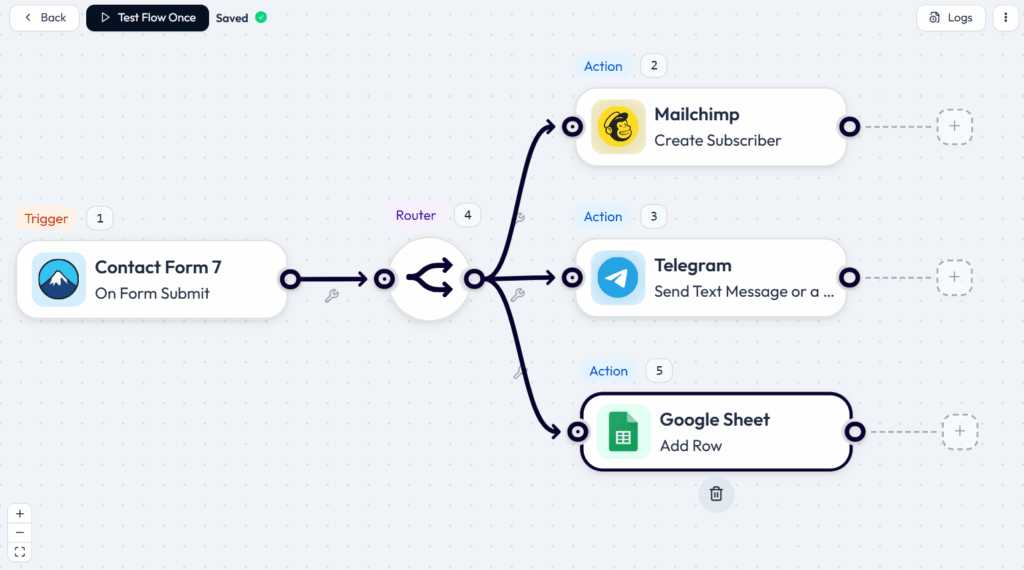
Strategic email automation in action. A well-chosen email platform or plugin (like Bit Flows connected to MailerLite or Sendinblue) can send and segment campaigns automatically. Once set up, these campaigns nurture leads and customers on their own.
If you book meetings or demos, fighting with email to find a time can be a huge time sink. Scheduling tools solve that:
This saves calendar ping-pong and cuts no-shows. For example, companies routinely cut no-shows by 30–50% just by using automated reminders and easy rescheduling. Imagine instead of back-and-forth emails, a lead clicks a calendar link, books a call, and then gets a reminder text the day before.
The meeting happens, or if not, the system can immediately reopen that slot. Bit Flows can help too: it can hook into Google Calendar or your booking plugin so that when a contact schedules or cancels, you automatically update systems (like removing a hold on a service slot, or triggering an email reminder). The bottom line: fewer empty slots and more time spent on real conversations.
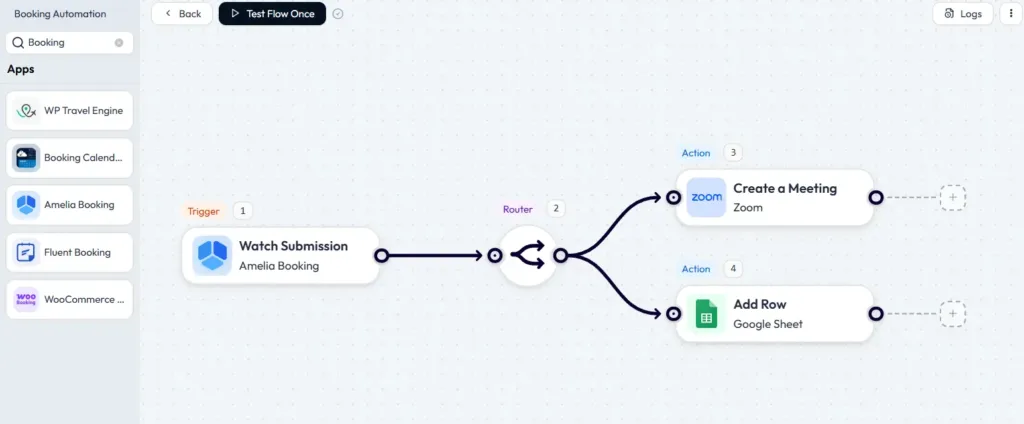
Automated scheduling frees you from back-and-forth emails. Tools that sync calendars and send reminders (for example, using a scheduling app and Bit Flows) keep appointments on track, cutting out most no-shows and confusion.
Invoice chasing and billing can really slow cash flow if done by hand. Automation here speeds up payment and cuts errors:
This means money comes in faster, and you waste less time copying numbers. Small business priorities found that many owners consider automating invoicing the single most impactful step because it saves time, reduces errors, and ensures faster payments.
Also, you can create invoices by using form submission data or any other triggers. For example, in Bit Flows, you can easily create invoices by using Stripe.
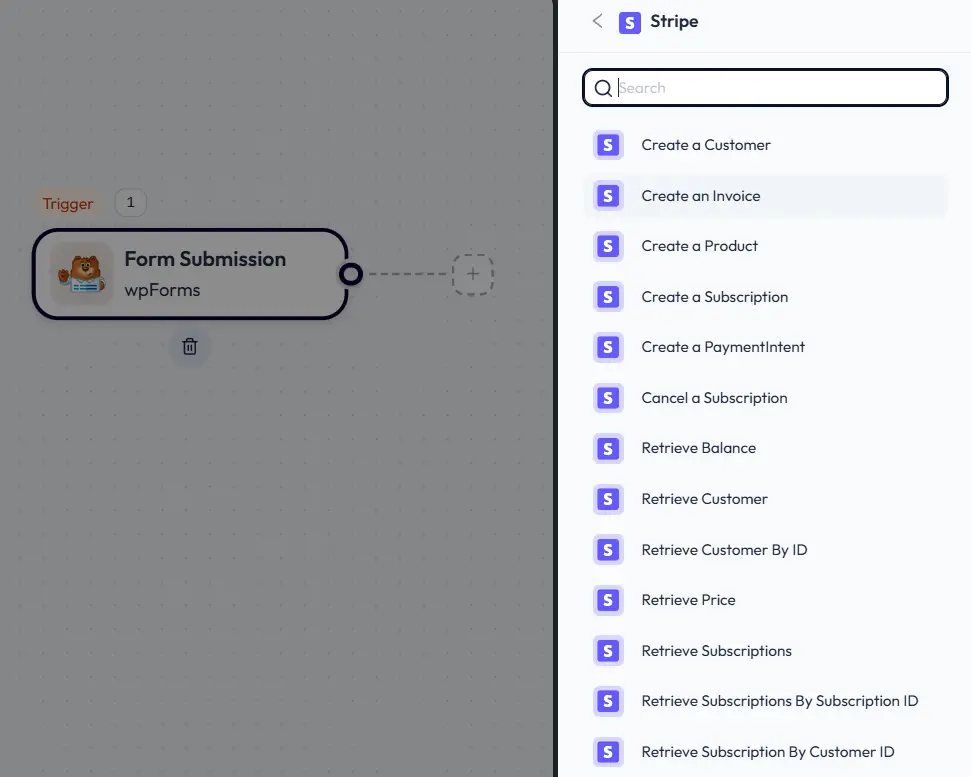
For example, Bit Flows can detect a new paid order on your WooCommerce store and automatically create an invoice in your accounting tool, or send a PDF receipt to the customer. If a payment fails, it can trigger an email. The net effect: fewer forgotten invoices, no manual data entry, and a steadier cash flow.
Every question that lands in your inbox or chat widget takes human time, even simple FAQs. Automation can handle a lot of customer support with minimal human oversight:
This cuts down the load on your team. Triage systems see that many basic issues can be solved with standard answers. In fact, experts suggest automating responses for frequent problems and only escalating real exceptions to humans.
For example, Bit Flows can integrate with a helpdesk like FluentSupport or even a Google Sheet of canned responses: when a new customer message arrives, it could trigger a check for certain keywords and then send a matching reply template or open the right category in your ticketing system. Customers get quick answers, and your team can focus on new or tricky questions.
If you sell products, keeping your stock counts accurate is key. Manual inventory often leads to overselling or stockouts. Here’s how to automate it:
Good inventory automation prevents lost sales and rush shipping fees from stockouts. For example, Bit Flows can connect WooCommerce to an inventory system or Google Sheet: when stock changes, it can update other channels or send alerts.
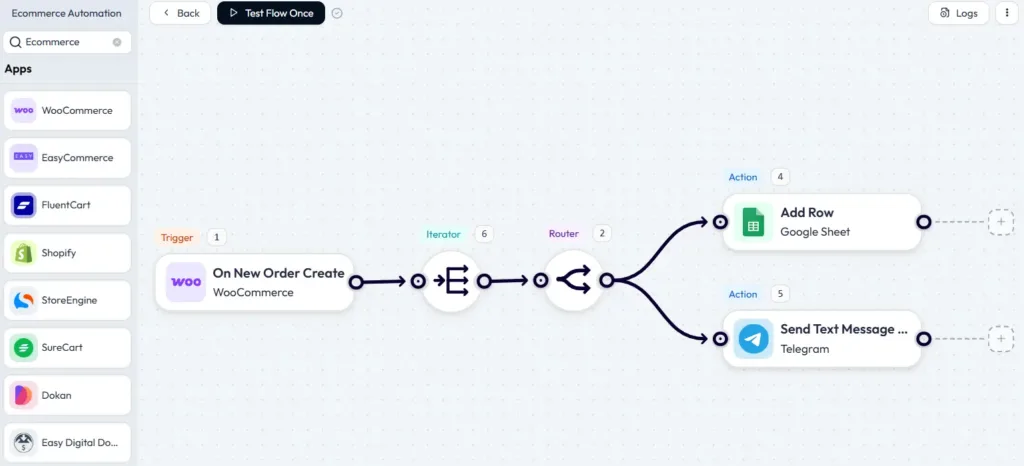
With Bit Flows, Automate order management, inventory syncing, and customer notifications with Bit Flows. Say goodbye to manual tasks. Your store always reflects reality, and no one manually has to mark items as sold out.
With lots of possible automations, how do you pick? Follow these simple steps:
The key is a targeted approach. Instead of automating everything at once, pick one or two processes that meet your criteria (high frequency, measurable impact, pain for staff). Tools like Bit Flows let you test automations in a few hours. Once you see even 10% time savings, that’s a quick automation win that compounds across every week.
You don’t need a developer to start. Plenty of user-friendly tools help with small business automation:
Automation tools don’t require specialized knowledge, often using drag-and-drop interfaces. The key is picking the tool that fits your stack and budget. Look for solutions that have a free tier or trial so you can set up a test flow today. When you do, you’ll be echoing a common theme: automation frees up hours and boosts consistency.
| Task | Automation Example | Key Benefit (ROI) |
|---|---|---|
| Customer follow-ups | Auto emails/SMS via CRM or using Bit Flows | Faster repeat sales, fewer lost leads |
| Lead capture & qualification | Smart forms + auto-response (Bit Form + Bit Flows) | Higher conversion; leads don’t go cold |
| Social media posting | Scheduled posts (Bit Social) | Consistent audience engagement without daily work |
| Appointment scheduling | Online booking + reminders (Calendly, Bit Flows) | Quicker replies, 24/7 answers, and less manual ticketing |
| Invoice & billing | Auto-invoices & reminders (Stripe, QuickBooks) | Faster payments, better cash flow, fewer errors |
| Customer support | Chatbots & ticket routing (FluentSupport + Bit Flows) | Quicker replies, 24/7 answers, less manual ticketing |
| Inventory updates | Auto sync (WooCommerce + Bit Flows) | Avoid overselling, maintain stock accuracy |
This table highlights how each automation works and the payoff. Even implementing one or two of these can be a quick automation win; small time savings on each transaction add up to big gains over a month or quarter.
Online Store: Imagine a boutique online shop using these ideas. When a customer buys a sweater, the system immediately sends a shipping confirmation (and later a feedback request). Their e-commerce platform auto-updates inventory.
Behind the scenes, an automated email sequence upsells matching socks after 3 days. The owner has also scheduled all her social media content for the month via Bit Social, so promotional posts go out automatically. She no longer spends evenings sending tracking numbers or reminders to pay; the automation does it.
Learning Platform: Consider an educator selling online courses. When someone signs up, an automation tags them in the email system and begins a welcome series. If they don’t log in for a week, a friendly reminder is sent.
The instructor uses automated grading emails (like “Congrats on completing Lesson 2!”) and automatically grants certificates upon course completion. Social updates about new courses are scheduled automatically. By automating these tasks, the teacher focuses on creating content, not chasing tiny tasks.
These scenarios aren’t sci-fi; tools like Bit Flows, Bit Form, and Bit Social make them very achievable. Even adding one automated email or a posted social message can compound into real results over time.
These insights reinforce that the best automations are high-frequency, measurable tasks, and that automation really is about adding intelligence and consistency to everyday work.
Automation isn’t just for big companies; it’s a smart, affordable strategy for any small business. By implementing a few high-ROI small business automation ideas, you can eliminate wasted time, reduce errors, and boost customer satisfaction.
Even basic automations like email follow-ups, social scheduling, and invoicing reminders deliver big returns. Automation frees up hours while improving customer experience, turning routine work into a real growth engine.
Start small: pick one area, lead emails, for example, set up an automation using tools like Bit Flows or Bit Social, and watch the time savings add up. Then tackle the next task. Over time, these quick wins compound into a dramatically more efficient operation.
Your small business becomes more scalable, your team less stressed, and your customers happier, all from a handful of smart workflows.
Focus on repetitive, time-consuming tasks that happen often. Common high-ROI tasks include emailing customers (follow-ups, campaigns), posting social content, scheduling appointments, invoicing, and basic customer support replies. Essentially, any process you find yourself or your team repeating daily or weekly is a good candidate for automation.
Look at volume and impact. Start with tasks you do most frequently or that block revenue. For example, if you lose sales because leads wait too long for a reply, automate lead capture and response. Or if staff spend hours on invoicing, automate that next. Try small pilots and measure time saved or revenue uplift to guide you.
No, the goal is to free your team from drudgery, not replace them. By automating routine tasks, people can focus on creative, strategic, or personal-service work that bots can’t do. For instance, an automated chatbot can answer FAQs so your support team can spend time solving complex issues or improving products.
Not at all. Many tools have free tiers (Bit Flows, Bit Social, Bit Form, Zapier, etc.) and no-code interfaces. You don’t need coding skills, just define triggers (like “new order placed”) and actions (“send email”). Most small business owners find that the ROI far outweighs the low cost of these tools.
Often very quickly. A simple automation can start saving time immediately, for example, an auto-email that contacts every new lead. Within weeks, you’ll notice fewer mistakes and tasks done faster. As more tasks get automated, you might shave hours each day off your to-do list, which means hours available for growth and strategy.




 EN
EN  DE
DE  ES
ES  NL
NL  IT
IT