Bit Flows is a powerful automation tool that makes websites and apps work together. It uses a super drag-and-drop builder to connect apps and services to hundreds of other platforms (SaaS apps, CRMs, Shopify, Google Sheets, and more) without coding.
Because Bit Flows is handling important tasks for your business, reliability is key. Bit Flows keeps a close eye on every task. It logs each step in detail and will even send you an email alert if something goes wrong. This way, you can fix problems right away and keep your automations running smoothly.
Faster fixes: An instant email means you’ll know about a failed task right away. You can fix the issue before it causes bigger problems, which keeps your workflow on track.
Less data loss: If an important step (like saving a lead or processing an order) fails, an alert lets you correct it quickly. That way, you minimize any missed or lost data.
Peace of mind: You don’t have to stare at the logs or worry all day. Knowing that Bit Flows will alert you automatically lets you focus on other work until an issue really needs you.
Better control: Together with the detailed logs, email alerts give you a complete picture. You get the context of the failure (from the logs) and the instant notification (via email) that helps you manage workflows more smoothly.
Bit Flows includes detailed logging and error handling. Every action in a workflow is recorded in real time, and any failure is clearly marked. For example, if a form submission is supposed to add a contact to a CRM but that step fails, the error (like a failed API call) is shown in the log with the exact cause. To get the Logs History, navigate to Bit Flows and open your flow. Click on the Logs option on the top right side.

Here you will see a Logs option on the top right bar. Click on it, and it will show you the Log History.

In the Bit Flows dashboard, you can open a run’s Details view, which breaks down the flow step-by-step. You will see each node (step) listed with its status, how long it took, and any data it processed. This advanced diagnostic view shows you exactly where and why a step failed.
Here’s what you’ll see in the logs:

With this information, you can quickly spot the problem and correct it. In short, Bit Flows’ logs give you full visibility into your automations, so nothing stays hidden when something breaks.
Bit Flows can email you instantly when a task fails. To turn this on:
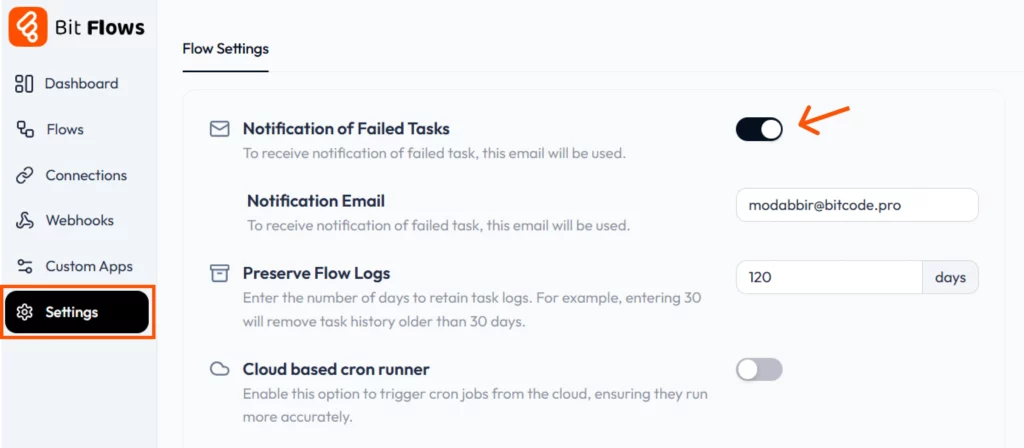
Once this is set up, Bit Flows will watch each workflow run, and if any step fails, it sends an alert to your inbox right away. This means you don’t have to keep checking the dashboard all day. The email will let you know if something needs attention. Here is what the failed task email notification looks like:

When you get an alert, you can jump into the Bit Flows logs (as described above) to see what went wrong. For example, Bit Flows logs make it easy to see exactly where and why a step failed, so with the email notification, you won’t miss those log details. This feature helps you act quickly: you see the failure, diagnose it from the logs, and re-execute the flow.

Bit Flows also gives you flexibility in handling errors right in the flow builder. In any flow, click the three-dot menu and choose Flow Settings. There, you can set the error behavior for your entire flow:
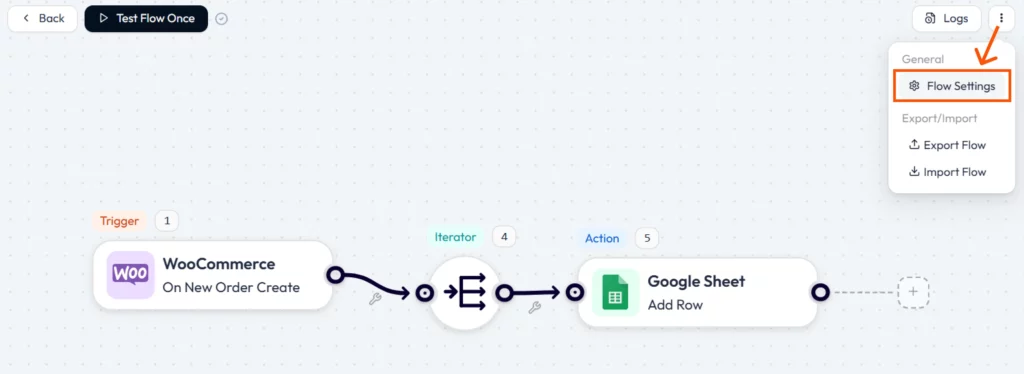

These options let you decide what makes sense for each workflow. You’re in control of whether failures are critical or can be skipped, giving your automations extra flexibility.
Bit Flows isn’t just about building automated tasks, it’s about making sure they run reliably. With detailed logs and immediate email alerts for failures, you stay fully informed. When something breaks, you’ll see it in the log with the error details and get a notice in your inbox.
You can then fix the issue and even re-run the task in one click. This level of monitoring and control means less downtime and fewer mistakes for your business. In the end, Bit Flows helps you save time, cut errors, and keep your workflows running smoothly.
Bit Flowsは、WordPressやSaaSアプリを連携させ、制限なくタスクを自動化できるビジュアル自動化ツールです。シンプルなドラッグ&ドロップ式のビジュアルキャンバスビルダーを使って操作します。.
Bit Flowsでは、タスクが失敗した際に即座にメール通知を受け取ることができます。設定でこの機能を有効にし、メールアドレスを入力するだけで利用できます。.
これにより、迅速な対応、ダウンタイムの削減、データや売上の損失回避が可能になります。何かが壊れた瞬間に検知できるため、すぐに修正できます。.
WordPressダッシュボードに移動し、開いてください Bit Flows > 設定、, 有効にする “「失敗したタスクの通知」” アラートを送信するメールアドレスも追加してください。.
はい!Bit Flowsでは、各ステップごとの詳細なログが提供されます。どのステップで失敗したか、その原因、そして各ステップにどれくらいの時間がかかったかを確認できます。.
You can choose what happens in the flow settings: either stop the workflow or continue with the next steps. This gives you flexibility based on the task.






 JA
JA  EN
EN  DE
DE  ES
ES  NL
NL  IT
IT  PT
PT