限定 割引セール
最大50%オフ
キャンペーン終了まで:
00

00

時間 時間

00

ミン みん

00

シー

お得なオファーを手に入れよう

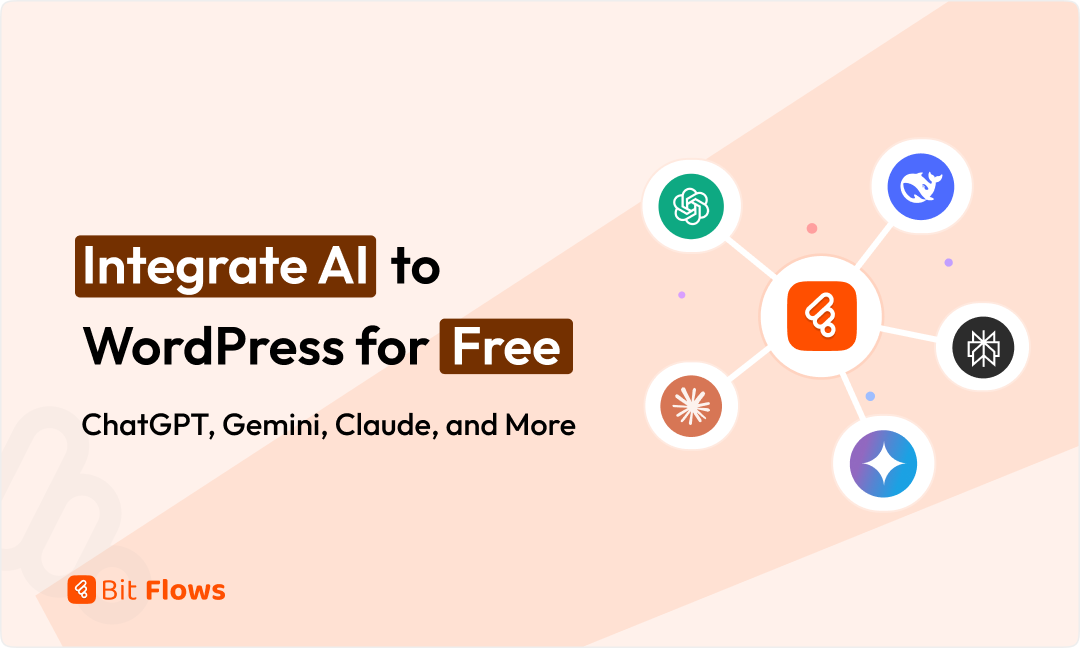
WordPressへのAI統合を無料で行う:ChatGPT、Geminiなど

ブログ筆者ロゴ
モダビール・ホッセン・リヤド
2026年1月5日
読むのにかかる時間: 6 ミン
Integrate AI to WordPress for Free

Powering your WordPress site with AI has never been easier. Better yet, you can do it for free. Bit Flows is a WordPress automation plugin that connects tools like ChatGPT, Google Gemini, Claude, DeepSeek, and Perplexity to WordPress. No per-task fees. No coding skills needed.

This guide walks you through everything. We cover which AI tools work with WordPress, why Bit Flows beats other free options, real workflow examples you can build today, detailed setup steps, and tips to optimize your results.

Want to auto-generate blog posts? Need fresh product descriptions? Looking to create instant customer responses? Bit Flows handles it all on your own server at no cost.

Many people ask the same question. “Can I integrate AI to WordPress for free?” The answer is yes. Bit Flows offers a free version with optional Pro upgrades. We’ll explain the features, security considerations, and everything in between.

WordPressに無料で連携できるAIツールは何ですか

Bit Flows supports many popular AI services natively at no extra cost, aside from API keys.

  • OpenAI (ChatGPT) gives you access to GPT-4 and newer models. Generate text, draft blog posts, write meta descriptions, or create images through DALL·E.
  • Google Gemini excels at text generation, summarization, and structured outputs. Use “Ask Gemini” actions to generate SEO metadata, write content, or summarize posts instantly.
  • Anthropic Claude provides conversational AI known for safe dialogue. Perfect for polite Q&A responses or content rewrites.
  • ディープシーク is an open-source LLM ideal for internal knowledge searches or brainstorming content ideas.
  • パープレキシティAI works as an AI-powered search engine, returning direct answers with sources. Great for fetching current data or generating FAQ content.

The OpenAI integration supports chat completions, text completions, image generation, moderation, and data structuring. You can automate entire content workflows in one go. The Gemini integration sends WordPress content to Gemini and captures responses through a simple drag-and-drop interface.

Bit Flowsが最高の無料AI自動化プラグインである理由

  • Free AI Tools and Self-Hosted: no usage fees or per-task charges. Download it from WordPress.org and host it on your server for full control over data and performance.
  • 無制限のワークフローとタスク: No limits on the workflows or tasks you can run. Automate dozens of actions daily without hitting caps.
  • Powerful Free Features: Include a drag-and-drop builder, conditional logic, routers, and built-in AI actions. Trigger automations from any WordPress event and route data to any supported service.
  • No Coding Required: Makes it accessible to everyone. Pick a trigger, add an AI action, type a prompt, and map outputs to WordPress fields. Simple as that.
  • Data Control and Privacy: Your data stays on your server. Bit Flows encrypts transfers with TLS and uses OAuth2, JWT, and API keys for security.

These strengths make Bit Flows the best free option for AI automation on WordPress. You get a Zapier-like platform inside WordPress at no cost.

今日から作成できる無料AIワークフローのトップ事例

1️⃣ Auto-Generate Blog Posts using a schedule trigger. Set “every Monday,” add a ChatGPT action to write an article, then publish it automatically. Many bloggers save hours weekly with this setup.

2️⃣ Catchy Titles and SEO Meta get created when posts are drafted. Send content to ChatGPT or Gemini to generate optimized metadata and map it back to post fields automatically.

3️⃣ Social Media Snippets appear after publishing. Send full posts to Gemini to create 2-3 catchy summary sentences, perfect for Twitter or LinkedIn.

4️⃣ Product Descriptions for e-commerce get automated. When products are added, send titles and attributes to AI for persuasive descriptions that update automatically.

5️⃣ Customer Support Responses use ChatGPT or Claude. Connect contact forms to flows where questions get AI-powered replies sent via email instantly.

6️⃣ Content Repurposing happens by asking AI to rewrite articles in different styles or languages, saving editing time.

7️⃣ Image Generation creates custom featured images using DALL·E based on post titles or content.

8️⃣ Data Processing uses AI for tasks like extracting insights from survey data or fetching current market stats through Perplexity.

Real users report saving “hours of writing time” with these AI-powered workflows. Tasks that took minutes manually become instant.

WordPressへのAI統合を無料で行う:ChatGPT、Geminiなど

Getting ChatGPT and WordPress working together is straightforward. Here’s how to set up automatic blog posts.

Step 1: Install Bit Flows

Navigate to the WordPress dashboard. Go to Plugins, then Add New. Search “Bit Flows,” click Install, then Activate.

Step 2: Create a New Flow

After activating the plugin, navigate to the Bit Flows menu, then Flows. Click “Create Flow” and give it a title. Then click on the Create button.

Step 3: Add a Trigger

Now you will see the cool Bit Flows builder, where you can play with tools and integrations. At first, we need to add a trigger. Here I will use Bit Form to provide the blog title and some extra information. I have made a form to capture data. You can use any form builder.

To add Bit Form as the trigger, click on the plus Icon of the trigger node and search for Bit Form or any form that you want to connect. Then choose the specific form.

Now you need to click on the “Listen Response” button and submit the form. This will capture your form data for the next step mapping. Here is the captured data in my use case.

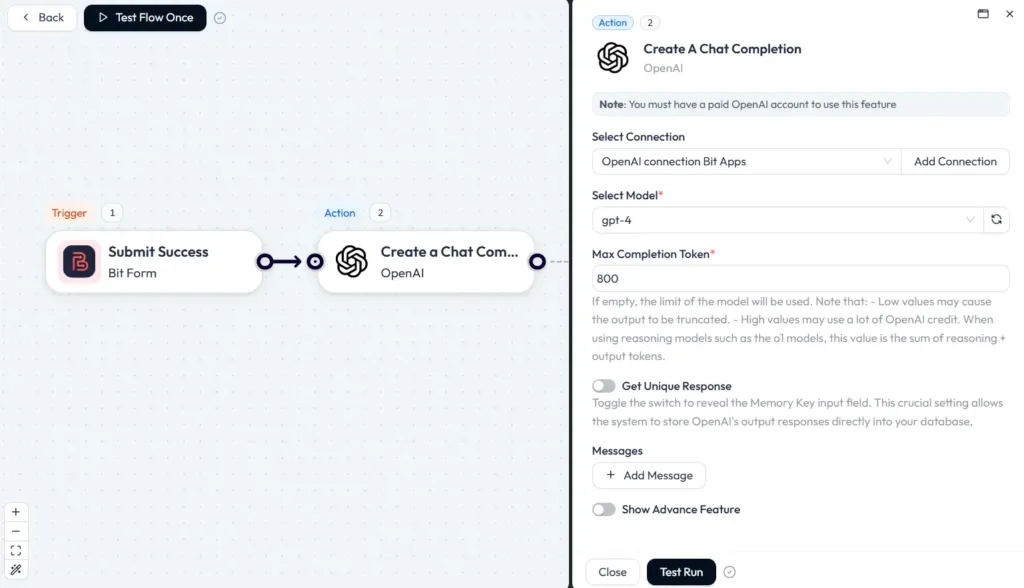
Step 5: Generate Content

Drag in the OpenAI (ChatGPT) action. Select “Create a Chat Completion” as the event. And then connect your OpenAI account with your API key. Then select your preferred model and token.

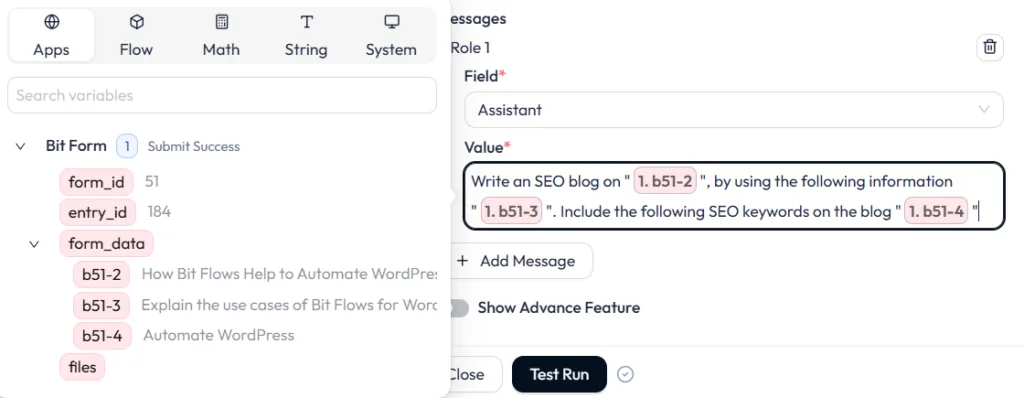
Now we need to add the prompt. To add a prompt, click on the “+ Add Message” button. On the field, select Assistant and add your prompt to the Value.

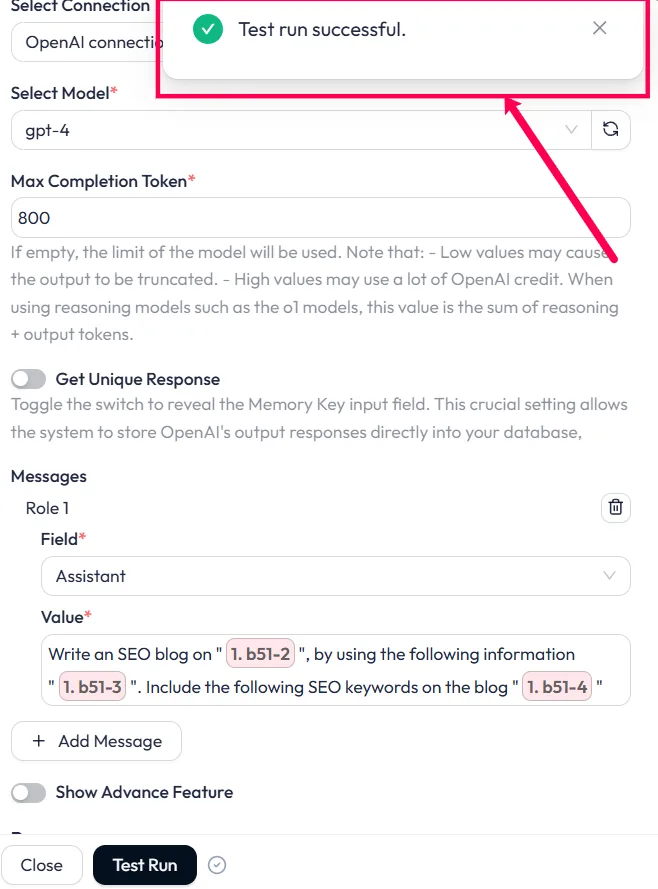
今、クリックしてください “Test Run” button. Wait for some time and you will see the test run successful message.

Step 6: Publish to WordPress

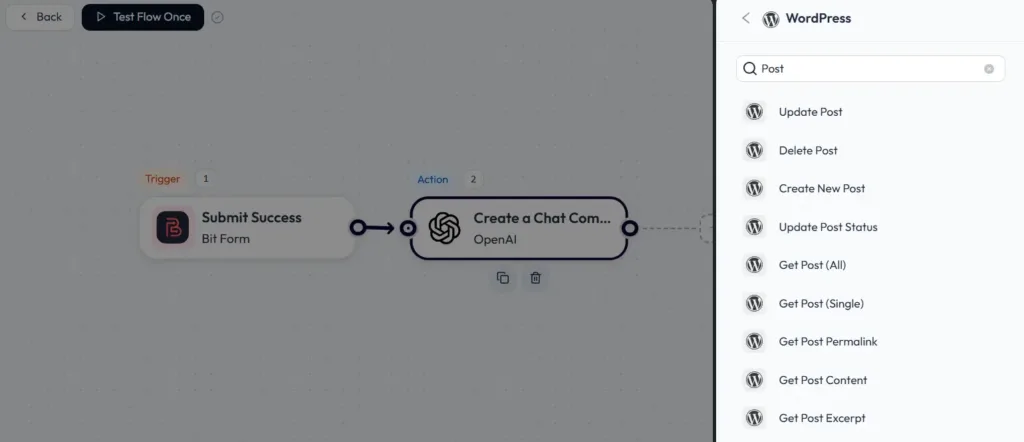
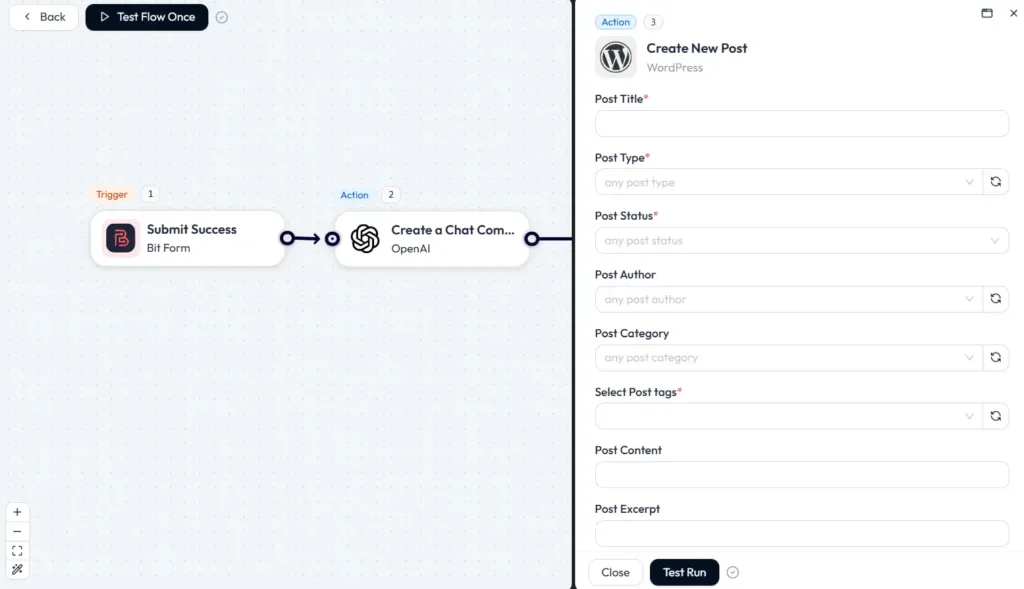
As we got the test run successful message, that means ChatGPT generated the blog as per our given information. Now we need to post it to WordPress. To do that, we have to add WordPress as the action and need to select the Create New Post event.

After selecting the event, you will see many post options to map.

We just need to map the content here from the previous steps. From the first step (Bit Form), we will map the title, and from the second step (OpenAI), we will map the content generated by AI. Select Post Type as post and post status publish or draft. Also, you can add categories, tags, and more post-related things if you need. You can also add featured images for your post.

💡Post Title, Post Type, and Post Status fields are mandatory.

Once you are done with the mapping, click on the “Test Run” button. This will directly post your content to WordPress.

That’s it! You have successfully connected your WordPress site with ChatGPT. Now test with a form submit.

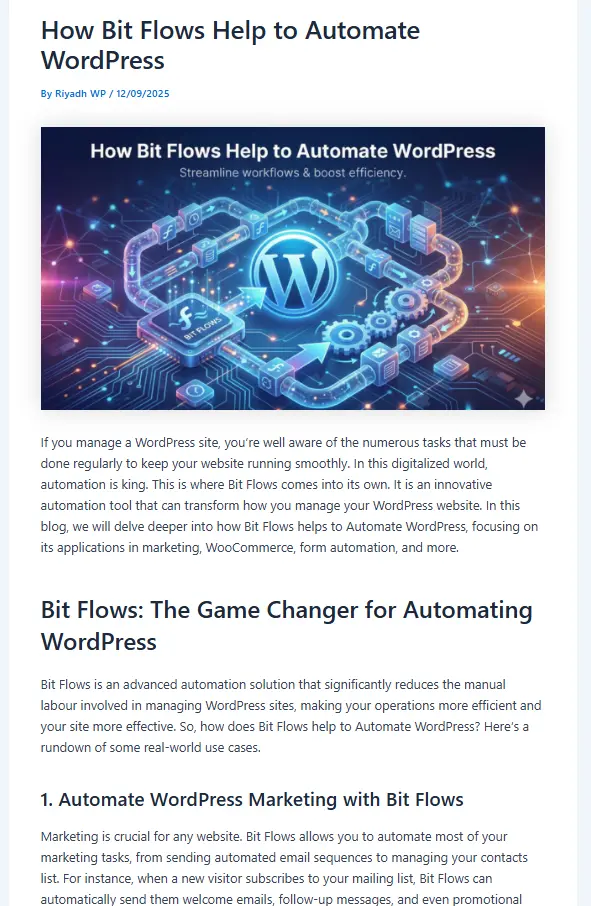
Here is the generated blog written by OpenAI using Bit Flows. This blog is directly posted to WordPress. The image is generated by using Bit Flows Gemini integrations (Nano Banana).

generated blog

Always give hand touch to your AI-generated blog. Make your prompt clear and relatable.

WordPressにGemini、Claude、DeepSeek、Perplexityを無料で接続

Bit Flows also integrates other powerful AIs.

ジェミニ 統合 expand your automation possibilities with advanced capabilities in content generation and contextual analysis. You can use it to generate creative content, analyze user inputs, or enhance your existing workflows with more intelligent outputs. Simply select “Ask Gemini,” enter your API key, and customize your prompt.

クロード offers chat or text completion actions. Use it to rewrite content in a friendly tone or create polite help responses. Choose “Ask Claude,” add your API key, and map your prompt.

ディープシーク provides actions to generate text or answer questions. Build AI knowledge bases where queries get answered from your own documents. Works like ChatGPT with simple prompt mapping.

パープレキシティAI fetches factual answers and current data. Set up flows asking “list the latest smartphone market share” and have results emailed or added to sheets. Ideal for keeping content accurate.

Each integration uses the same intuitive process. Pick the AI action, enter credentials, write prompts with dynamic fields, and map outputs. Bit Flows handles JSON parsing automatically.

📝 Check out the pricing of each AI tool’s free API access limit. Most of the AI tools offer free API access.

1️⃣ Craft Clear Prompts with specific instructions and examples. Instead of “Write about social media,” try “Write a 800-word blog post titled ‘5 Social Media Marketing Tips for 2026’ with subheadings and a friendly tone.”

2️⃣ Use Dynamic Fields to personalize outputs. Insert tokens like {post_title} into prompts so each AI response stays on-topic.

3️⃣ Set the Right Parameters by choosing capable models like GPT-4 for substantial tasks. Adjust Max Tokens for longer outputs. Experiment with Temperature: lower (0.3) for factual content, higher (0.7) for creativity.

4️⃣ Test iteratively using Test Run after editing flows. Review logs to see AI outputs and tweak prompts until the content fits your voice.

5️⃣ Include Checks for critical content. Use moderation APIs or set conditions like “only publish if text contains certain keywords.”

6️⃣ Refine continuously as AI models improve. Keep an eye on updates and switch models when needed. Bit Flows makes swapping models easy.

  • Self-Hosted Control keeps your data on your WordPress server. Data only goes to AI APIs when you choose.
  • Encrypted Connections protect data in transit using TLS/HTTPS for all AI service communications.
  • Secure Authentication through OAuth2 and JWT encrypts stored API keys and credentials in your database.
  • No Unnecessary Storage means Bit Flows only stores data you explicitly map to WordPress fields.
  • Access Control offers role-based permissions and detailed audit logs for compliance tracking.
  • AI Privacy Note Remember AI providers process the data you send them. Avoid sending sensitive personal data to third-party AIs. For content automation like blog posts, this is typically acceptable.

Bit Flows minimizes risks through encryption and server-based hosting, making it safer than cloud-based automations.

結論

Integrating AI into your WordPress site for free is simple with Bit Flows. This powerful AI automation plugin connects ChatGPT, Google Gemini, Claude, DeepSeek, and Perplexity without coding or high costs. Build workflows in minutes to auto-generate blog posts, SEO metadata, product descriptions, and more.

Bit Flows saves countless hours of manual work. Imagine waking up to new AI-written posts daily or never writing product descriptions manually again.

Ready to start? Install Bit Flows from the WordPress plugin repository and try these integrations. Explore our related guides on AI and WordPress automation for more ideas.

Get started today and turn your WordPress site into an AI-driven powerhouse. With Bit Flows, you have a no-cost, no-code solution that’s both easy and powerful.

よくある質問

ChatGPTをWordPressに無料で統合できますか?

はい。Bit Flowsのインストールと利用は無料です。OpenAIのAPIキーが必要です。OpenAIでは無料のトライアルクレジットを提供しています。Bit Flowsのサブスクリプション契約がなくても、簡単なワークフローを通じてChatGPTをサイトに連携させることができます。.

Google Geminiを統合するために支払いは必要ですか?

Bit Flows supports Gemini with built-in actions at no cost. You need access to the Gemini API. Google may require sign-up or a Cloud account. Once you enter your API key, your site is linked.

Is coding required in Bit Flows for AI integrations?

No. Bit Flows uses a drag-and-drop design. Pick triggers and actions, type prompts, and map fields. Bit Flows handles API calls automatically. Documentation and community forums provide support.

What other AI tools are free in Bit Flows?

Beyond ChatGPT and Gemini, connect Claude, DeepSeek, Perplexity, and more. Use webhooks for custom apps with APIs.

Will this slow my website?

No. Bit Flows runs automations in the background using asynchronous queues. Front-end speed stays unaffected. Workflows pause during high server load and resume later.

How do I control AI costs?

AI providers bill by tokens or requests. Limit usage by adjusting flow frequency or prompt length. Bit Flows logs show token usage for cost tracking. Set reasonable max token counts to control spending.

モダビール・ホッセン・リヤド
以下に
モダビール・ホッセン・リヤド
リヤドは、実体験に基づきWordPress、SEO、自動化、SaaSについて執筆しています。実際のユースケース、検索意図、AIによる可視性を理解し、チュートリアル、比較記事、実践的なコンテンツを作成しています。.

関連記事