Bit Flows es una potente herramienta de automatización que hace que los sitios web y las aplicaciones funcionen juntos. Utiliza un super constructor de arrastrar y soltar para conecte aplicaciones y servicios a cientos de plataformas (aplicaciones SaaS, CRM, Shopify, Google Sheets, etc.) sin necesidad de programar.
Dado que Bit Flows se encarga de tareas importantes para su empresa, la fiabilidad es clave. Bit Flows vigila de cerca cada tarea. Registra cada paso en detalle e incluso le enviará un Alerta por correo electrónico si algo va mal. De este modo, podrá solucionar los problemas de inmediato y mantener sus automatizaciones en perfecto funcionamiento.
Reparaciones más rápidas: Un correo electrónico instantáneo significa que sabrá de inmediato que una tarea ha fallado. Podrás solucionar el problema antes de que se agrave, lo que mantendrá tu flujo de trabajo en el buen camino.
Menos pérdida de datos: Si falla un paso importante (como guardar un cliente potencial o procesar un pedido), una alerta le permite corregirlo rápidamente. De este modo, se minimiza la pérdida de datos.
Tranquilidad: No tiene que quedarse mirando los registros ni preocuparse todo el día. Saber que Bit Flows te avisará automáticamente te permite centrarte en otras tareas hasta que un problema te necesite de verdad.
Mejor control: Junto con los registros detallados, las alertas por correo electrónico le ofrecen una visión completa. Obtienes el contexto del fallo (de los registros) y la notificación instantánea (por correo electrónico) que te ayuda a gestionar los flujos de trabajo con mayor fluidez.
Bit Flows incluye registro detallado y gestión de errores. Cada acción de un flujo de trabajo se registra en tiempo real, y cualquier fallo se marca claramente. Por ejemplo, si se supone que el envío de un formulario debe añadir un contacto a un CRM pero ese paso falla, el error (como una llamada a la API fallida) se muestra en el registro con la causa exacta. Para obtener el historial de registros, vaya a Bit Flows y abra su flujo. Haga clic en la opción Logs en la parte superior derecha.

Aquí verás una opción de Registros en la barra superior derecha. Haga clic en ella, y le mostrará el Historial de registros.

En el cuadro de mandos de Bit Flows, puede abrir la ficha de una ejecución Detalles que desglosa el flujo paso a paso. Verá cada nodo (paso) enumerado con su estado, el tiempo que ha tardado y los datos que ha procesado. Esta vista de diagnóstico avanzado le muestra exactamente dónde y por qué falló un paso.
Esto es lo que verás en los registros:

Con esta información, podrá detectar rápidamente el problema y corregirlo. En resumen, los registros de Bit Flows’ le ofrecen una visibilidad total de sus automatizaciones, para que nada quede oculto cuando algo se rompe.
Bit Flows puede enviarle un correo electrónico al instante cuando falle una tarea. Para activarlo:
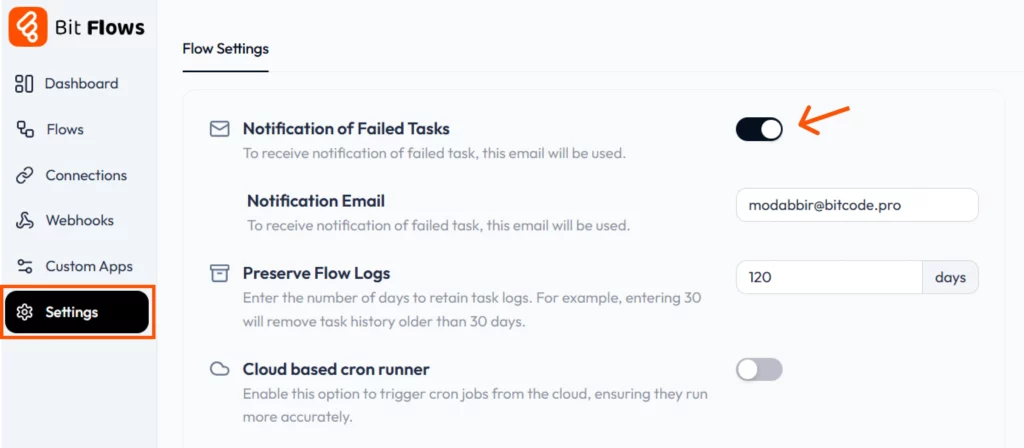
Una vez configurado, Bit Flows ver cómo se ejecuta cada flujo de trabajo, y si falla algún paso, envía una alerta a tu bandeja de entrada de inmediato. Esto significa que no tengas que estar comprobando el cuadro de mandos todo el día. El correo electrónico le avisará si algo necesita atención. Este es el aspecto de la notificación de tareas fallidas por correo electrónico:

Cuando recibes una alerta, puedes acceder a los registros de Bit Flows (como se ha descrito anteriormente) para ver qué ha fallado. Por ejemplo, los registros de Bit Flows facilitan ver exactamente dónde y por qué falló un paso, así que con la notificación por correo electrónico, no perderás esos detalles del registro. Esta función te ayuda a actuar con rapidez: ves el fallo, diagnosticarlo de los registros, y reejecutar el flujo.

Bit Flows también le ofrece flexibilidad para gestionar los errores directamente en el generador de flujos. En cualquier flujo, haga clic en el menú de tres puntos y seleccione Ajustes de caudal. Allí, puede establecer el comportamiento de error para todo su flujo:
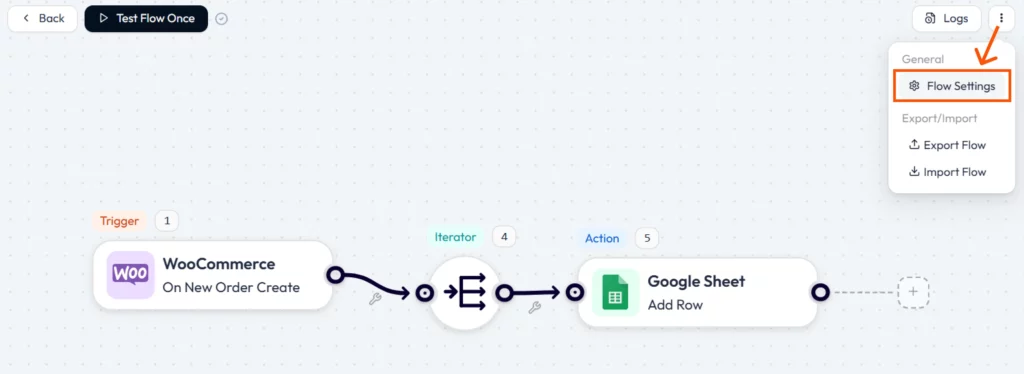

Estas opciones le permiten decidir qué tiene sentido para cada flujo de trabajo. Usted controla si los fallos son críticos o pueden omitirse, lo que aporta a sus automatizaciones una flexibilidad adicional.
Bit Flows no sólo consiste en crear tareas automatizadas, sino también en asegurarse de que se ejecutan. de forma fiable. Con registros detallados y alertas inmediatas por correo electrónico en caso de fallo, estarás totalmente informado. Cuando algo se rompe, lo verás en el registro con los detalles del error y recibirás un aviso en tu bandeja de entrada.
A continuación, puede solucionar el problema e incluso volver a ejecutar la tarea con un solo clic. Este nivel de supervisión y control se traduce en menos tiempo de inactividad y menos errores para su empresa. En definitiva, Bit Flows le ayuda a ahorre tiempo, reduzca errores y mantenga sus flujos de trabajo en perfecto funcionamiento.
Bit Flows es una herramienta de automatización visual que te ayuda a conectar WordPress y aplicaciones SaaS para automatizar tareas sin límites. Funciona mediante un sencillo constructor de lienzo visual de arrastrar y soltar.
Bit Flows puede enviarte una alerta instantánea por correo electrónico cada vez que falle una tarea. Sólo tienes que activar esta función en la configuración e introducir tu dirección de correo electrónico.
Le ayudan a responder con rapidez, reducir el tiempo de inactividad y evitar la pérdida de datos o ventas. Sabrás en qué momento se rompe algo, para poder arreglarlo enseguida.
Vaya a su panel de WordPress, abra Bit Flows > Ajustes, active “Notificación de tareas fallidas”.” y añade el correo electrónico al que quieres que se envíen las alertas.
Sí, Bit Flows proporciona registros detallados con desgloses paso a paso. Puedes ver qué paso falló, por qué falló y cuánto tiempo tardó cada paso.
Puede elegir lo que ocurre en la configuración del flujo: detener el flujo de trabajo o continuar con los pasos siguientes. Esto le da flexibilidad en función de la tarea.






 ES
ES  EN
EN  DE
DE  NL
NL  IT
IT