If you’re a WordPress user depending on Make (formerly Integromat) to automate your workflows, you’ve probably felt the pain of clunky integrations, steep learning curves, and rising costs that don’t quite match the value delivered.
While Make is powerful on paper, in practice, it often feels like you’re building a spaceship when all you needed was a reliable car.
Below are the top Make alternatives for WordPress in 2025, focusing on unlimited workflows and budget-friendly automation.
Make is feature-rich, but it has some limitations, so users look for alternatives. One major concern is pricing and task limits. Make’s plans are based on “operations” (each action in a workflow counts), and its free tier only offers 1,000 operations per month.
Even the entry paid plan ($9/month) only gives 10,000 operations. That means a growing business can hit the quota quickly. Worse, every trigger check or data lookup uses up operations. A workflow that triggers frequently might consume hundreds of operations in a day, unexpectedly exhausting your plan. Small businesses and solopreneurs with lots of daily automations can quickly end up paying more or needing to upgrade.
Another reason is flexibility and cost model. Make.com is entirely cloud-hosted with monthly or annual subscriptions. There’s no self-host option or lifetime deal. If you want to keep automations on your own servers (for data security or performance), Make can’t do that.
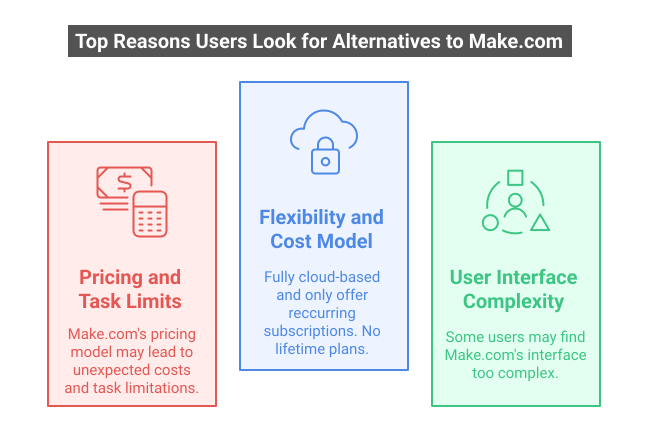
Also, some users simply want unlimited tasks without recurring fees. Several competing tools offer one-time lifetime pricing or truly unlimited workflows, making them more predictable and affordable for heavy users. Finally, if you find Make’s interface or terminology complex, you might prefer a more beginner-friendly platform. Together, these factors, task quotas, billing surprises, or desire for self-hosting, lead many to explore Make alternatives in search of a better fit.
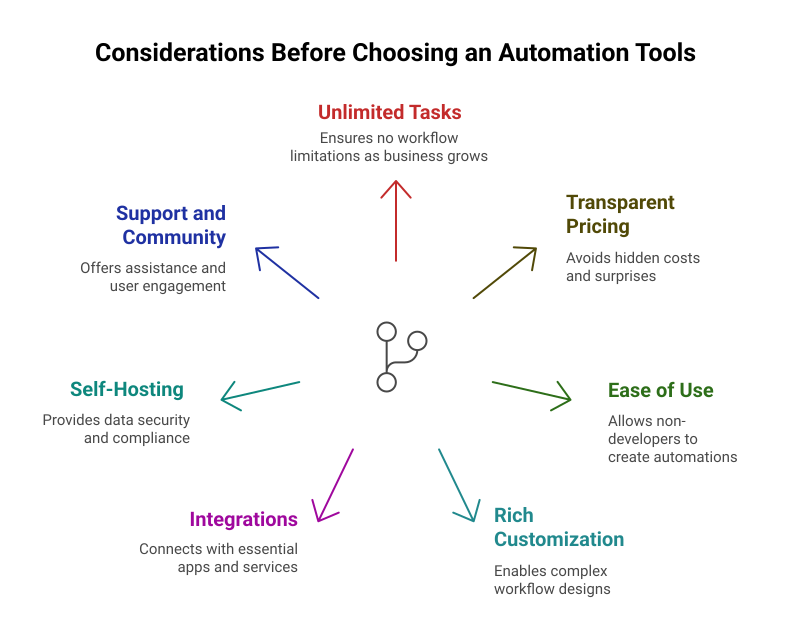
When comparing automation platforms, keep these criteria in mind so you can choose one that really helps your business:
Unlimited tasks and workflows. Look for a platform that won’t cut you off when you have many automations. For example, Bit Flows, Pabbly truly offers unlimited tasks and workflows, so you never hit a hard quota.
Transparent pricing. You want straightforward costs and no hidden fees. Avoid tools that quietly charge for background checks. Ideally, you know exactly what each plan includes.
Ease of use. A visual, drag-and-drop workflow builder lets anyone (not just developers) create automations. Platforms with templates and clear UI help you get started quickly.
Rich customization. Check that the tool supports conditional logic, loops or iterators, delays, and data parsing. These features let you build complex workflows. Bit Flows and others include things like routers (branching logic), repeaters (loops), and JSON parsing, which many users rely on.
Integrations. Make sure the alternative connects to the apps you use most (email services, CRM, e-commerce, etc.).
Self-hosting option. If keeping data on your own server matters (for security or compliance), prefer platforms that let you self-host. Bit Flows is a WordPress plugin running on your site, and n8n is open-source, so you can install it on any server. Make.com itself has no self-host path.
Support and community. New users benefit from good documentation and active support. See if the platform offers help via tutorials, forums, or live chat. Some smaller tools may offer direct vendor support or active user groups, which can be a plus.
By considering these factors, you’ll be better prepared to pick an automation platform that grows with your business needs.
Below is an overview of the top Make alternatives in WordPress, with their strengths and any weaknesses. We highlight Bit Flows as our top choice, but all of these tools can be a fit depending on your needs.
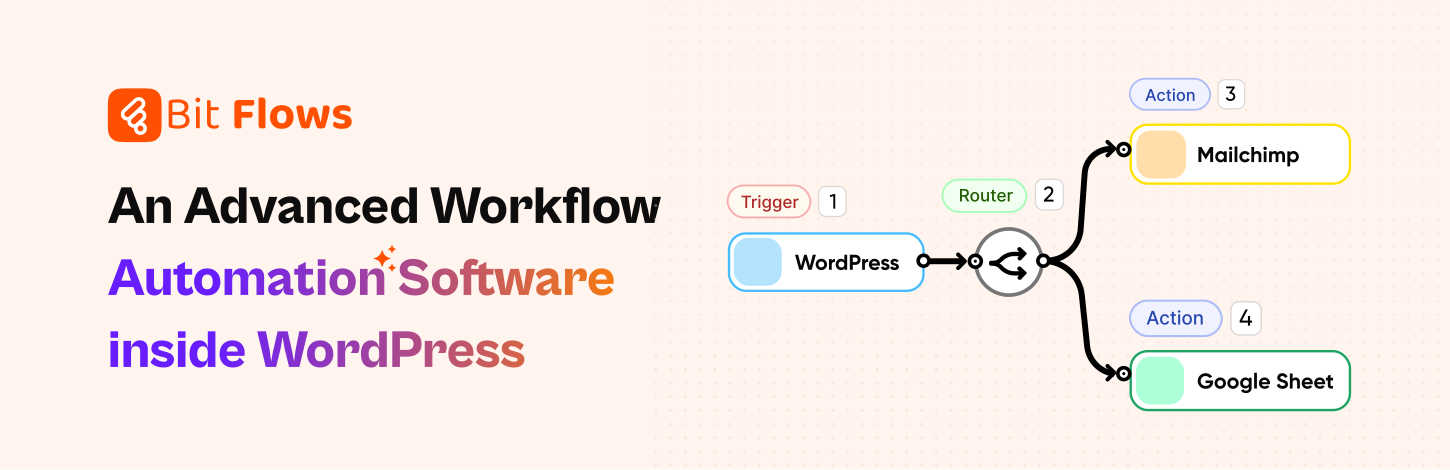
Bit Flows is a powerful automation plugin designed for unlimited workflows. It runs on your own site (self-hosted) and offers unlimited tasks, workflows, and steps. You pay one time and can automate as much as you like; there are no limits in Bit Flows.
The tool uses a no-code, drag-and-drop visual builder right in your WordPress dashboard. You can set up complex multi-step flows with features like conditional logic, loops, delays, and JSON parsing without writing any code. For example, Bit Flows includes a “Router” to split data into branches, an Iterator to handle lists, and a JSON Parser to extract data, all as built-in workflow actions.
Bit Flows integrates with many services, and if an app isn’t covered natively, you can create a custom API connection with Bit Flows Custom App features. Because it’s a plugin, it works perfectly with WordPress forms, posts, e-commerce orders, and other site events. The price structure is friendly: Bit Flows is usually offered with a one-time (lifetime) purchase and annual plans, meaning no recurring monthly fees.
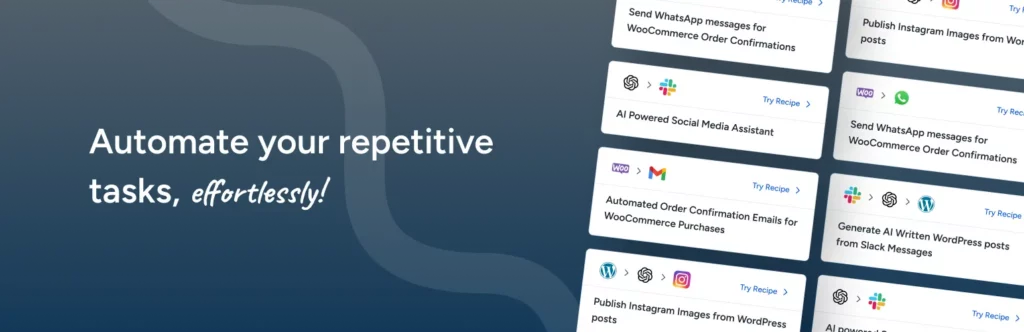
Ottokit (now rebranded from SureTriggers) is a WordPress-centric automation plugin. It connects over 1,000 services, including integrations with WordPress plugins. Ottokit runs inside your WordPress admin, so your automations execute without leaving the site.
A big plus is its pricing: Ottokit is known to be very affordable. It has a generous free plan (1,000 tasks per month and 3 workflow triggers), and paid plans start around $9–$12/month for thousands more tasks. It also offers lifetime license options, letting you buy in once and never pay again.
The platform is user-friendly with drag-and-drop flows. Compared to Make, Ottokit’s focus on WordPress and low price are advantages, but it doesn’t have as many built-in enterprise features or app count as Make. Still, if your site is WordPress-based and you want an inexpensive, lifetime-licensing automation tool, Ottokit is a great alternative. It’s essentially a Make alternative for WordPress users, especially handy for bloggers, course sites, and agencies on a budget.

n8n is an open-source automation platform. You can self-host it on your own server or use their cloud service. The key benefit is flexibility: since it’s source-available, you get unlimited workflows for free if you self-host. n8n connects to hundreds of apps and also lets you call any API through HTTP requests. Its visual editor is powerful, though it has a developer-friendly bend (things like setting up triggers and credentials can be more technical).
For developers and advanced users, n8n self-hosted is compelling: no task limits, no per-task fees, and full control over data. Running n8n requires some technical setup and maintaining it yourself. There’s no official support on the free plan, only community help.
If you prefer managed hosting, n8n Cloud has paid plans (starting at around €20/month) that charge by workflow executions instead of operations, which can work out cheaper if your automations do a lot in one run. n8n is an excellent Make alternative for tech-savvy teams or anyone needing a self-hosted solution.

Pabbly Connect is a newer automation tool that provides unlimited workflows and features across all plans. It supports 1,000+ apps and lets you build multi-step automations much like automation tool Make.
In Pabbly, triggers and workflow logic steps (like routers/paths) are free, and only action steps count toward your task limit. For example, Pabbly offers 100 tasks free forever, and its entry paid tier is cheaper than many competitors. All advanced features (paths, iterators, premium apps) are unlocked in all plans. Many users move to Pabbly to avoid the pay-per-task model of others.
Pabbly Connect has fewer integrations than Make and a smaller user base. Support and documentation have improved, but some users find the interface less intuitive. It also doesn’t natively run on your own servers (no self-host version).
If you’ve been using Make and feel it’s not doing exactly what you need, or you’re just curious to try something new, Bit Flows might be the tool you are looking for. In this quick comparison, we’ll look at what both Make.com and Bit Flows do well. That way, you can clearly see why Bit Flows is a smarter choice for unlimited automation with affordable pricing, especially for growing businesses.
Below is a quick features comparison of Bit Flows and Make, highlighting why Bit Flows is often the more capable choice for unlimited automation. The table summarizes key differences; further explanation follows.
| Feature | Bit Flows | Make.com |
| Tasks & Workflows | Unlimited tasks, steps, workflows (no extra charges) | Limits by plan. Triggers/actions count as operations. |
| Pricing Model | Lifetime and annual plans. No monthly fees. All paid plans include all features. | Subscription-based (monthly/annual). Higher tiers are needed for advanced features. |
| Hosting | Self-hosted. Data stays with you. | Cloud-only SaaS. Runs on Make’s servers. |
| No-Code Builder | Drag-and-drop workflow builder (visual). | Drag-and-drop scenario builder (visual). |
| Integration Support | 170+ pre-built apps. New integrations are added regularly. | Supports webhooks and features HTTP modules, allowing connections to custom APIs. |
| Custom Apps & API/Webhooks | Supports custom triggers/actions. Can call any REST API or handle webhooks. | Supports webhooks and has HTTP modules; can connect to custom APIs. |
| Built-in Tools | Router (conditional paths), Repeater, Iterator (loops), Delay, JSON Parser, Conditions, etc.. | Router (paths), Iterator, built-in functions (JSON, math, text), scheduling, error handlers. |
| Logging & History | Limit operations per month; exceeding this limit can be costly. | Execution history with logs per run. |
| Task Limits | No limits! You can execute as many tasks as you need. | Limit operations per month; overage can be costly. |
| Ease of Use | Beginner-friendly for all types of users. | Powerful, but some find the learning curve steeper for non-technical users. |
Here is how Bit Flows stacks up against Make.com feature by feature, highlighting why many see Bit Flows as a stronger choice in key areas:
Bit Flows has no limits on how many tasks or workflows you can run. Once installed, you can automate as much as you like. Make.com counts every action as an “operation.” Make Free plan only gives you 1,000 operations per month, and even the entry paid plan (Core) offers 10,000 ops. Bit Flows don’t limit you even on the free plan (For free trigger and actions).
That means Bit Flows lets you run unlimited heavy workflows without extra charges, while Make users can hit their quota fast. For example, a simple workflow that checks email every minute can burn through Make’s 10,000 operations in under a week. Bit Flows offers effectively unlimited automation capacity, whereas Make’s usage-based limits may force you to upgrade plans for usage.
Both Bit Flows and Make provide visual, no-code builders. Bit Flows integrates into the WP admin and uses a simple drag-and-drop interface. You set up triggers and actions in a flowchart-like canvas, and can see every step of your workflow clearly.
Make’s interface is also visual and powerful, but it exists on Make’s own website. Users who are comfortable with the WordPress dashboard often find Bit Flows quicker to pick up.
Bit Flows empowers both technical and non-technical users with its no-code interface. Make’s builder is very capable (and in some cases more elaborate), but it can feel overwhelming to non-developers. If your team likes WordPress, Bit Flows will feel more familiar; Make has a slight learning curve for newcomers.
Bit Flows runs inside your WordPress site, meaning you own the server and data. This self-hosted model gives you total control: no third party will hold your logs or your data.
Make.com is a hosted SaaS. You have to send your data to Make’s servers, and you rely on their uptime and security. For businesses concerned about data privacy, compliance, Bit Flows’ self-hosted approach is a clear advantage. Make offers with no self-host option.
Make offers a huge integration library, over 2,400 apps, and even more actions per app than many competitors. Bit Flows is newer, with 170+ built-in integrations listed. That means Make has more pre-made connections.

However, Bit Flows shines in flexibility: it lets you create custom app connections very easily by pointing to any API endpoint. So if you need a niche service not on the list, you can build it yourself in Bit Flows (something you can also do in Make, but Bit Flows makes it straightforward as part of the plugin).
Also, if your core tools are WordPress or web-based, Bit Flows covers them directly. In practice, Make covers a wider variety of apps immediately, but Bit Flows covers the most common ones and allows extending to any others via webhooks or custom API.
Bit Flows provides execution logs and error-handling tools so you can track what happened in each workflow run. Make.com keeps detailed logs of every scenario execution. In fact, Make’s paid plans let you search the execution logs by keyword, which can help with debugging complex flows.
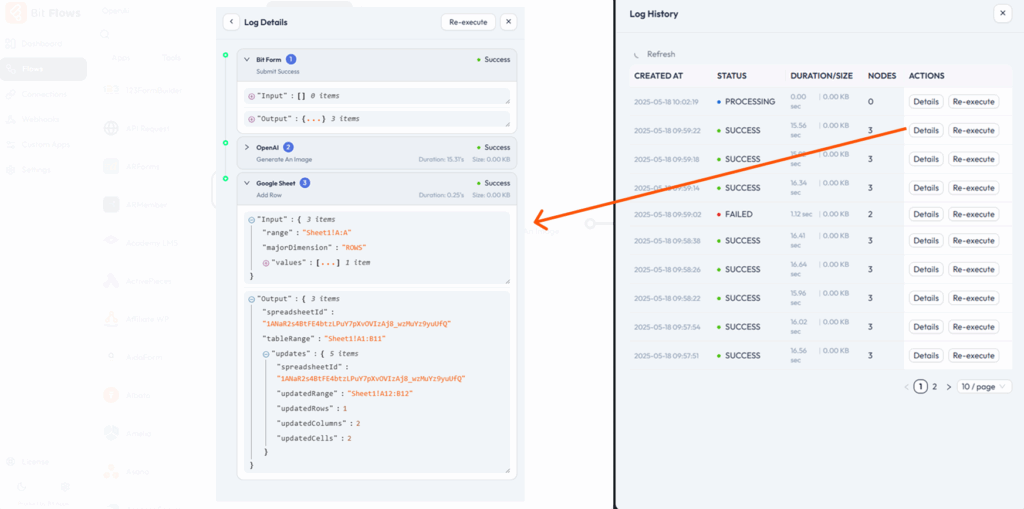
On the support side, Bit Flows is newer but offers quick support through its technical support team, tutorials, documentation, videos, community, and forums. Make has been around longer and provides extensive documentation, tutorials, and forums. Enterprise users of Make get priority support, whereas Bit Flows users get similar priorities for all plans.
Both platforms have active user communities, so you can find help. So both have solid logging and support, just different styles.
For complex automations, Bit Flows includes several powerful built-in tools. For example, it has a Router that splits one flow into multiple branches, a Repeater to loop through lists of items, a Delay step to pause between actions, and a JSON Parser to extract data from API responses. These let you build sophisticated logic without coding.
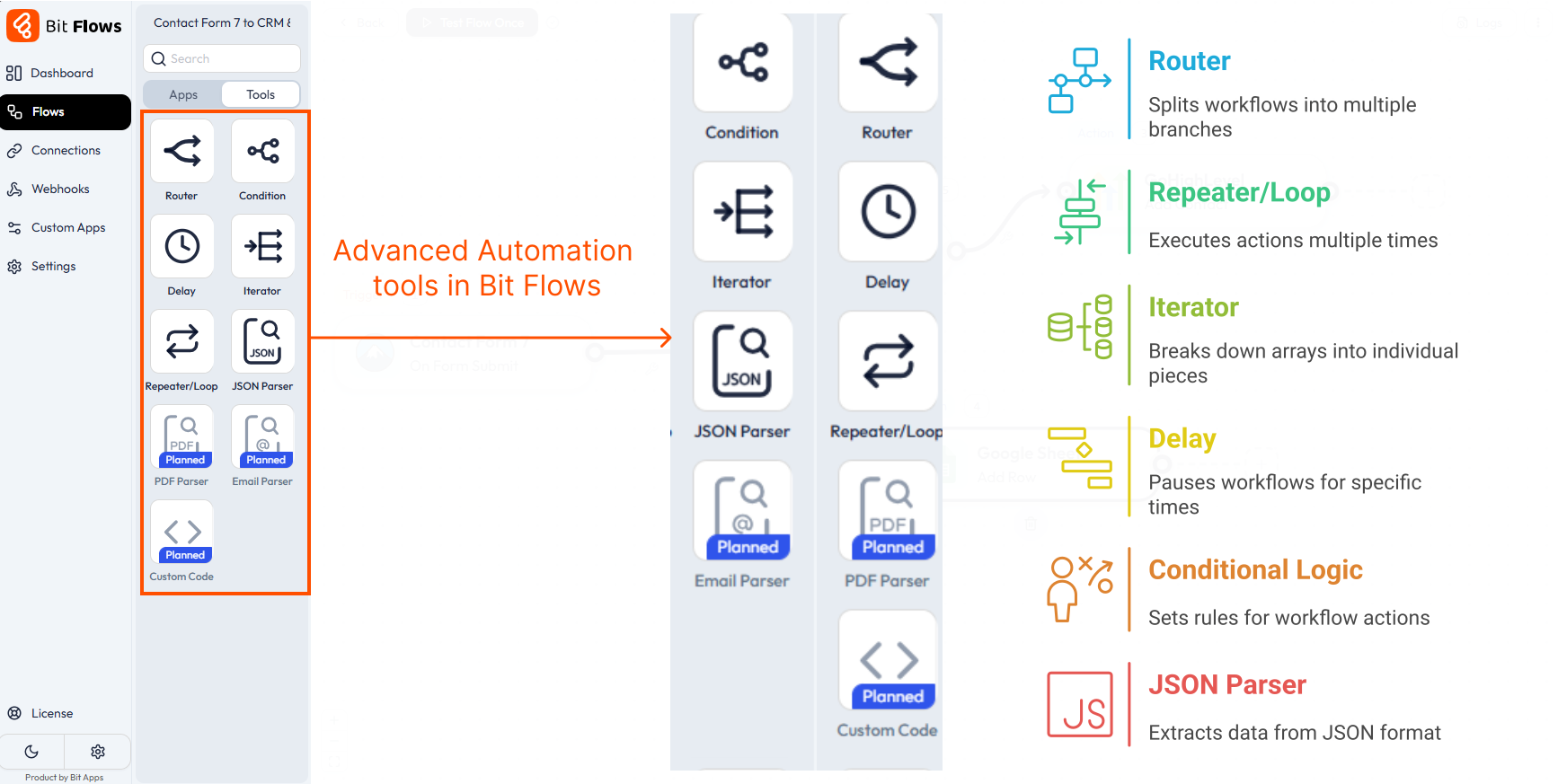
Make also offers similar capabilities (paths/branches, iterators, aggregators, etc.). Both platforms cover the core needs: you can implement conditional actions and loops. The advantage of Bit Flows is that these features come ready to use in a user-friendly way. Bit Flows matches these Make’s features while keeping things intuitive within your WordPress dashboard.
Bit Flows is typically sold with a one-time, lifetime-access fee or annual licenses. Make only has subscription plans (monthly or annual). Even though Make’s monthly rates appear low at first, the costs add up long-term. A small business automating daily tasks over the years could easily spend thousands on Make subscriptions.
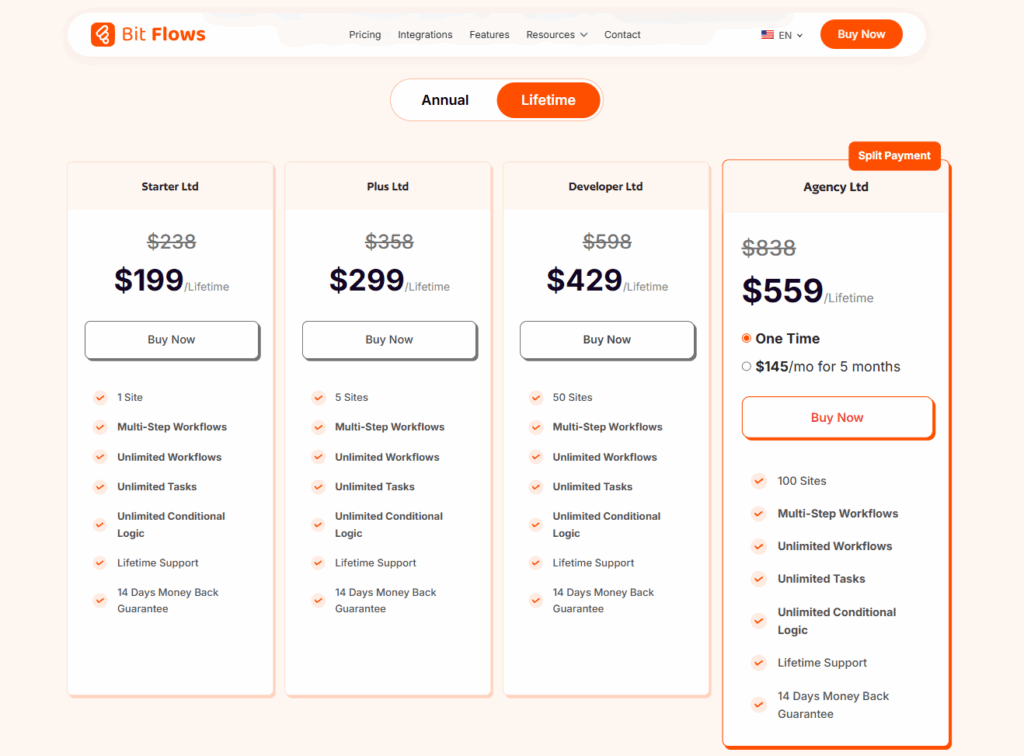
Bit Flows users pay once and then get free updates and unlimited use. The difference becomes noticeable if your automations are heavy. Tasks that would use up 10,000+ operations on Make (and it requires a higher tier) but no extra cost in Bit Flows.

Unlimited automation power. With Bit Flows, you never hit a usage cap. For example, an e-commerce store using Bit Flows can process hundreds of orders and updates every day without extra cost. In contrast, using Make for the same volume would quickly consume thousands of operations, forcing an upgrade. This unlimited capacity means you can scale your workflows confidently.
Affordable, one-time pricing. You can save hundreds or even thousands of dollars by using Bit Flows. A single lifetime purchase covers all future use. Imagine a marketing agency that sends 100,000 emails a month: on Make, they might pay high monthly fees; with Bit Flows, they pay once and send unlimited emails through a connected service, saving year after year.
Self-hosted security and control. Bit Flows runs on your own server (or WordPress host). You keep complete control of your data and automations. For example, a healthcare coach handling patient inquiries can use Bit Flows on a secure server, ensuring sensitive information never leaves their environment. Make.com, by contrast, handles your data in its cloud, which may concern privacy-focused businesses.
Built-in advanced tools. Everything from conditional splits to data parsing is included in Bit Flows at no extra charge. You won’t have to pay extra to unlock pro features as you might in other tools.
WordPress-ready. If your site is on WordPress, Bit Flows feels like a native WordPress automation tool. You manage workflows just like posts or plugins, and it ties into WordPress forms, email marketing tools, and e-commerce easily.
Cross-site automation: If you run multiple WordPress sites, Bit Flows can connect them. For example, a user registration on one site could automatically enroll that user in a course on another WordPress install via Bit Flows’ cross-site capabilities.
Custom data workflows: Bit Flows allows you to write a custom app or use its JSON parser to handle complex data. For example, if you collect form responses with nested fields, Bit Flows can parse that JSON data and loop through arrays easily (using its Iterator tool). This is useful for advanced scenarios like processing multiple related entries from a single event.
Bit Flows outperforms Make in many practical ways, especially if your workflows involve WordPress. It gives you the freedom to run unlimited automations, spend money on growing your business, and keep everything under your control. Bit Flows is a compelling top choice among Make alternatives.
Bit Flows comes with a no-task-limit model. You won’t pay more for adding steps. This means you can scale up your automations worry-free. Bit Flows’ lifetime pricing and unlimited usage have allowed users to save thousands over multi-year runs, with no surprise billing each month.
You should consider an alternative if you want unlimited tasks, affordable pricing, and more control over your data. Make Alternatives often provide simpler interfaces and self-hosting options.
Bit Flows is a WordPress plugin that offers unlimited workflows and tasks with a one-time payment or an annual plan. It runs on your own site for better data security and has a user-friendly, drag-and-drop builder.
Yes. Bit Flows offer unlimited workflows. Bit Flows has no task limits at all and works from inside your WordPress site.
Bit Flows is one of the most affordable options. It offers a one-time lifetime deal. You pay once and get unlimited use without monthly fees.
Yes. You can create custom workflows, use routers, loops, delays, and parse JSON data. Bit Flows gives you full control without coding.





 EN
EN  DE
DE  ES
ES  NL
NL  IT
IT