Do you spend too much time writing and uploading blog posts? Many bloggers and site owners feel stuck managing everything on their own. There’s a better way. With ChatGPT and WordPress working together, you can save hours every week. And Bit Flows makes it even easier to integrate ChatGPT into WordPress.
In this guide, you’ll learn how to auto-publish WordPress blog posts with ChatGPT. I’ll show you every step. You’ll set up a smooth workflow with Bit Flows. With just a few simple actions, you will see how to automate blog titles, write strong posts, and auto-publish them to WordPress. No code needed.
Let’s see how to make WordPress with ChatGPT your new content machine.
When you connect ChatGPT and WordPress, your blog becomes much easier to manage. You don’t have to worry about writing every post by yourself. Here’s why people love using ChatGPT with WordPress:
If you want to keep growing, let the ChatGPT WordPress combo work for you. You don’t need a big team. You just need a smart AI automation tool like Bit Flows.
Bit Flows is designed for people who want solid workflows with WordPress with ChatGPT. Here’s what stands out:
This all adds up to a reliable process. You’re in control and always know what’s going on.
Follow these steps to integrate ChatGPT into WordPress. You will see how to auto-publish WordPress blog posts with ChatGPT and Bit Flows.
After installing and activating the Bit Flows plugin, navigate to the Bit Flows menu in your WordPress dashboard> Flows> Create Flow.
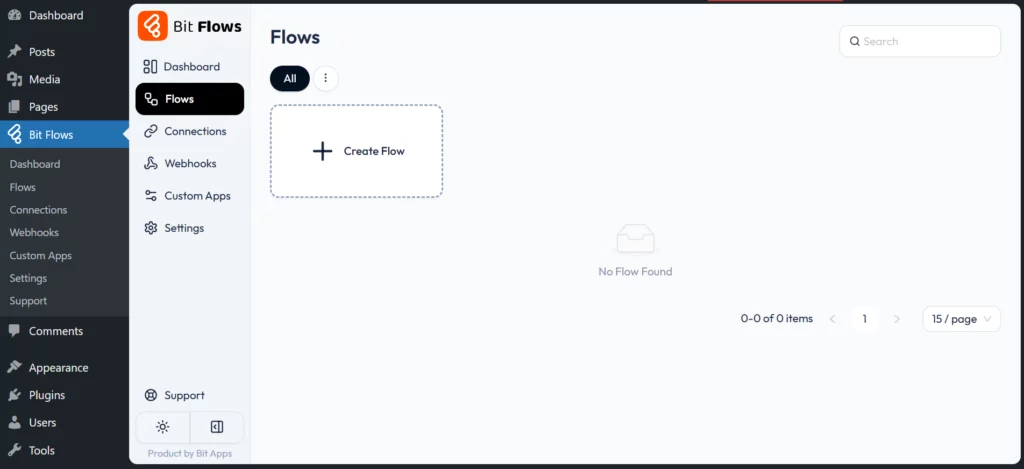
Create a new flow and give it a name. You can choose a template or go with a blank to build a flow from scratch.

After clicking on the Create button, you will see the cool Bit Flows builder, where you can play with the automation magic. The builder is super user-friendly, and you will feel like you are drawing something on a board!

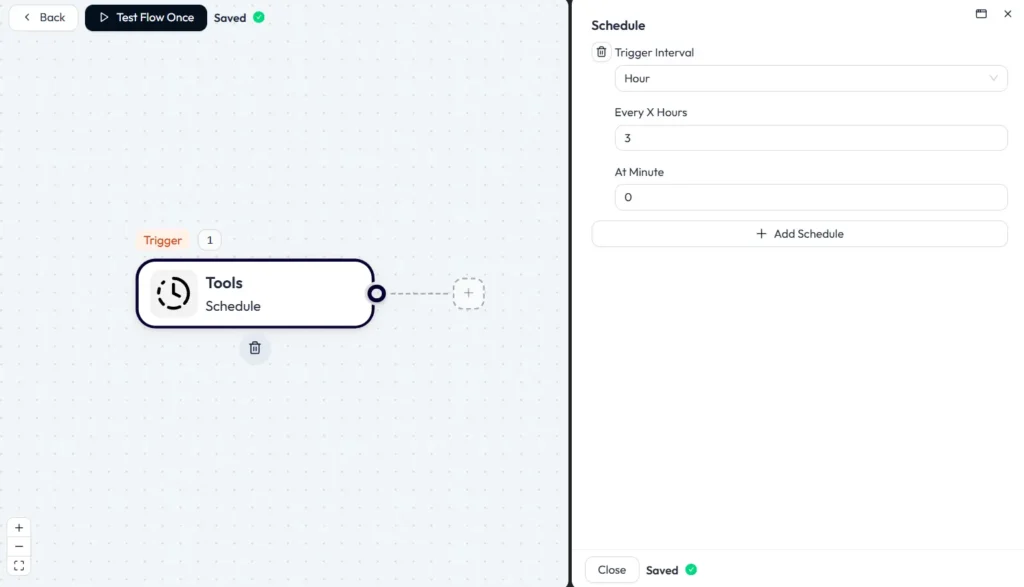
Start by setting up the Schedule Tool as the trigger in Bit Flows. Pick “every 3 hours” or set the frequency you want. This schedule tells Bit Flows when to begin the workflow. Now your WordPress with ChatGPT posts will follow a time pattern.
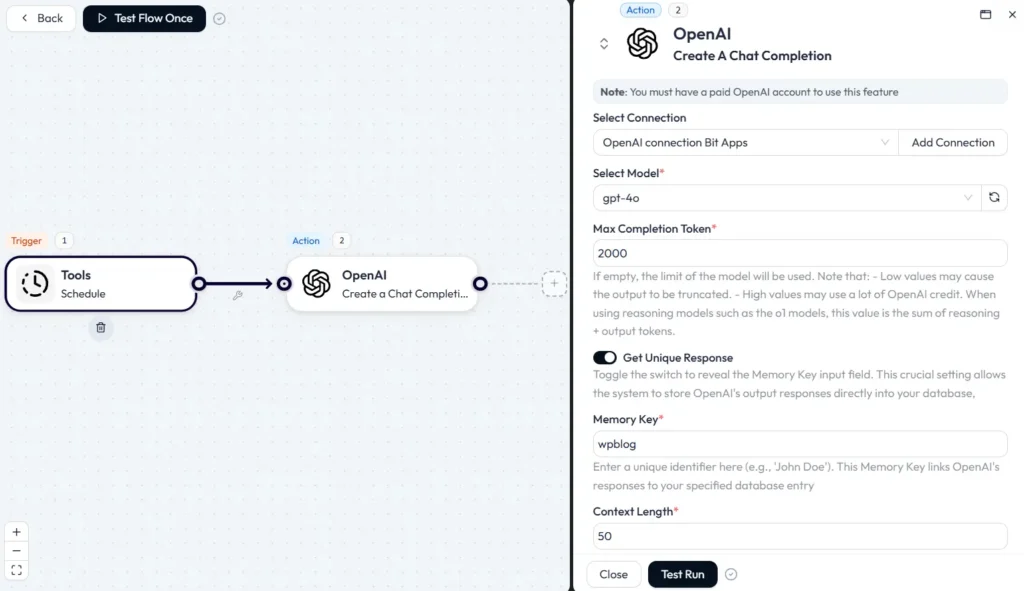
Now, add a ChatGPT (OpenAI Create a Chat Completion) action. If you haven’t done so, connect your OpenAI account now. Choose a good model like GPT-5. Set the Max Completion Token; 3000 works well for detailed titles and short content. Use “Get Unique Response” if you want every title to be different.
Now write a prompt for blog titles. Make it SEO-rich and clear. Try this:
Write a catchy SEO-optimized blog title about digital marketing tips.
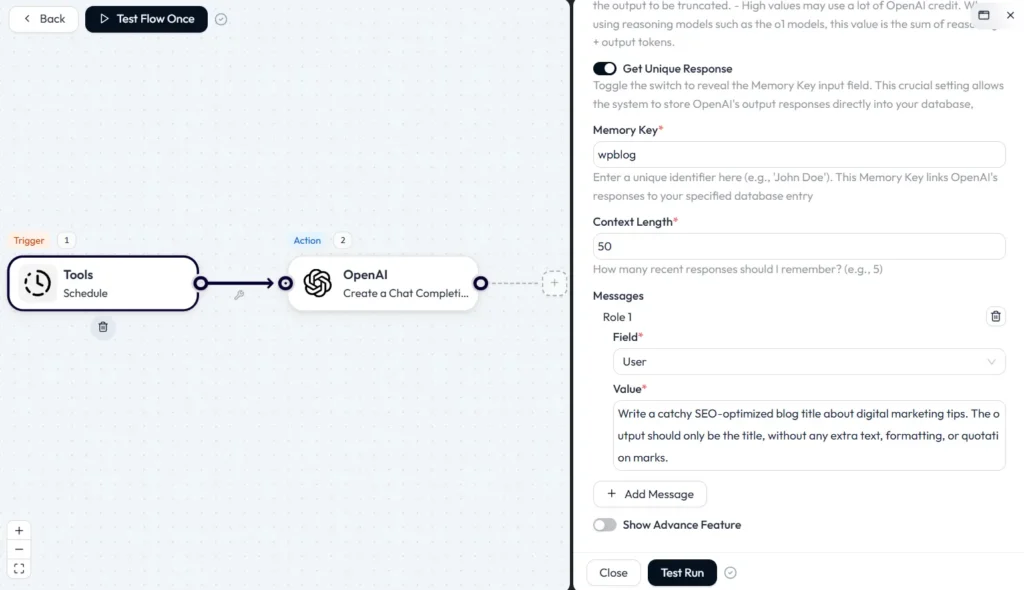
This will help ChatGPT with WordPress make titles that attract readers and fit SEO goals.
After the title, use another ChatGPT node to write the full blog article. Map the blog title into this step. Here, you set details for your blog post:
Prompt Example:
Write a 1,000-word SEO-friendly article using this title: [insert title]. Use headings, short paragraphs, and a summary at the end.

This step gives you a unique, strong post. You’re using ChatGPT WordPress and getting quality writing without extra work.
Now you need Bit Flows to send the new post to WordPress. Add the WordPress Action and pick “Create New Post.”

Map your blog title and content to the right fields. Decide the post status. You can publish it right away, save it as a draft, or set it to “pending review.” If you want, add more ChatGPT nodes to make an excerpt or SEO meta; this all adds value.

Once you finish the setup, Bit Flows will auto-publish WordPress blog posts with ChatGPT at every interval. This process lets ChatGPT with WordPress keep your blog fresh, active, and SEO friendly.
Check Bit Flows logs to track your workflows. You will see how the workflows are performing and how many tokens are being used. You can also set an email notification for failed tasks to get an instant alert if something goes wrong.

That’s all! You have successfully connected ChatGPT with your WordPress site!
You can integrate ChatGPT into WordPress, no matter your blog topic. Here are a few examples:
Travel Blogs: Write new travel tips or city guides every week on autopilot. Let ChatGPT with WordPress fill up your calendar.
E-commerce Stores: Use ChatGPT WordPress to write product descriptions and news for your shop. Customers learn about new stock on time.
Tech News Sites: WordPress with ChatGPT helps publish the latest reviews about gadgets or apps, right on schedule.
And more! No matter your website, ChatGPT with WordPress is a good fit for generating fresh content.
Imagine you have a real estate blog. With the ChatGPT WordPress connection, you can publish listings when they come up. Write prompts that send property details to ChatGPT.
It creates the text: summary, main features, and what makes it special. Use Bit Flows to auto-publish WordPress blog posts with ChatGPT. Every home shows up online fast. In real estate, being first matters; this keeps you ahead. This keeps you ahead.
To make the most of ChatGPT with WordPress, your prompts must be clear. Here are the keys for better results:
When you use these tips, you help ChatGPT WordPress work even better for your site. Your posts will be easier to find. Your readers will appreciate up-to-date content.
You can save time and keep your site growing by integrating ChatGPT into WordPress. This setup lets you auto-publish WordPress blog posts with ChatGPT on your schedule.
Bit Flows brings it all together. You work less. Your blog stays active. Your posts stand out with SEO. Try the WordPress with ChatGPT approach today to automate your blog posting and see real results!
Auto blogging means using tools to create and publish blog posts on WordPress without manual writing. ChatGPT with WordPress makes this easy.
Not directly, but Bit Flows helps connect ChatGPT to WordPress. Just set it up, and your posts will appear automatically.
Use Bit Flows’ Schedule Tool, add ChatGPT steps for titles and articles, and the WordPress action to publish simply and repeatably.
Yes. If prompts are unclear, the results might be too general. Tailor your prompts, and always include SEO keywords.



 EN
EN  DE
DE  ES
ES  NL
NL  IT
IT