
Modern businesses rely on efficient automation to handle repetitive tasks, improve accuracy, and save time. If you run a business, you may need to send emails after a delay, process large datasets, or execute actions based on specific conditions.
Advanced workflow management tools, such as Delays, Loops (Repeater/Iterator), and Conditional Logic, make these complex processes possible. For example, you can pause a sequence to wait for a user to respond, loop through an array of items, or split a flow into different paths depending on data values.
These tools ensure that workflows are useful, flexible, and customized to real-world scenarios. Using them, you can automate multi-step business processes, from e‑commerce order management to CRM updates, without writing code. Let’s see how these tools work in Bit Flows.
Bit Flows is a self-hosted workflow automation tool that connects your site with external platforms and apps. It functions much like Zapier, but is built right into WordPress. Features include a Drag & Drop workflow builder, Router for branching paths, Repeater/Loop and Iterator for handling lists, Delay for scheduling, Conditional Logic for if/then branching, and a JSON Parser for API data.
All of these tools can be combined in one workflow. Bit Flows supports popular integrations, so you can pull data from or push data to any service. For example, a WooCommerce order can automatically trigger updates to Google Sheets, your CRM, and an email campaign smoothly.

The plugin even lets you create Custom Apps for APIs without native support, so you can use tools like advanced AI models, shipping providers, or niche services by setting authentication and endpoints.
Bit Flows empowers both beginners and developers to design full automated business workflows without code. You simply drag in an automation trigger, add these special tools, and connect to the actions you need. This makes it easy to build complex processes, like multi-step marketing funnels, order processing flows, or dynamic lead routing.
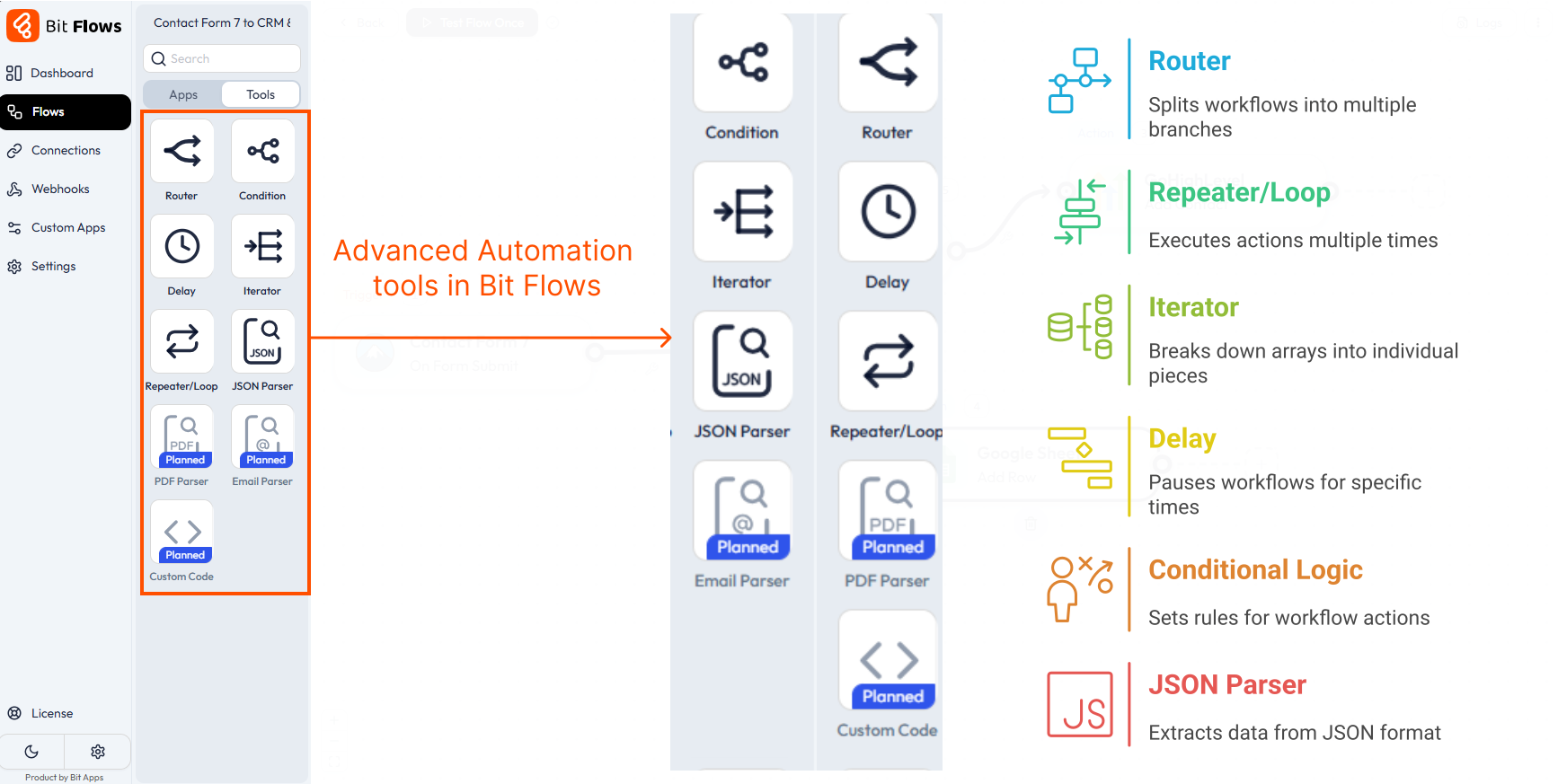
Bit Flows provides several advanced tools to control the logic and timing of automation. Below are the main ones, with simple introductions and practical use cases. Each can be applied to many types of businesses (e-commerce shops, online services, agencies, etc.) and connects WordPress with Shopify, WooCommerce, CRMs, email platforms, AI tools, and more.
The Router tool splits your workflow into multiple branches or paths. Think of it like a traffic director: when one event happens, you can send different data to different actions in parallel.
For example, after a WordPress form submission, you can route customer info to Google Sheets and send a notification to Slack on one branch. Routers are great for multi-step processes, like updating a CRM and Sheets when an order is placed.

Use the Delay tool to pause your flow for a specified time. This is useful for scheduling and rate-limiting.
For example, you could send a welcome notification immediately via Telegram when someone signs up, then add a “Delay 10 minutes” step, and finally add the user to your CRM after that delay. This spaces out actions (avoiding spam limits or server overload) and lets you implement timed workflows (like drip email campaigns).

The Repeater tool loops through a list or repeats actions a fixed number of times. It’s ideal for handling paginated data or bulk operations.
For example, if an external API returns 1,000 records but only sends 100 per page, you can use Repeater to call the API repeatedly for each page (e.g., 10 times). On each loop, it fetches the next set of 100 items using dynamic page numbers. This way, you can collect or process the full dataset in manageable chunks. Perfect for working with APIs that limit data per request.

Iterator is similar to Repeater but is designed to handle array data. It breaks an array or list into individual items and processes each one separately.
For example, a WooCommerce order contains 4 different products. The Iterator can take that list of products and run the workflow once per product. You might use this to send each product’s details to a supplier, update stock for each item, or record each item in a separate CRM entry. In essence, an Iterator makes it easy to automate work on multiple items, ideal for any business dealing with orders, lists of leads, or batch data processing.

Conditional Logic (the “If-Then-Else” tool) lets your workflow branch based on conditions. This is how you make your automation smart.
For example, if a customer’s order total is over $100, you might send them a special thank-you email, else just send a standard receipt. Or if a user signs up for your site, conditionally add them to different CRM lists based on their chosen plan.
You can check any data point (numeric, text, or custom fields) and direct the flow accordingly. Conditional branches mean one workflow can handle multiple scenarios without manual intervention.

Many apps and APIs send data as JSON. The JSON Parser tool extracts the specific pieces of data you need from a JSON object.
For example, if you receive webhook data from an external service, JSON Parser can pull out fields like customer_name or order_items. This makes it easy to take that data and use it in later steps. Essentially, JSON Parser allows you to handle complex API responses in Bit Flows workflows.

Each of these tools can be used in real business scenarios:
These advanced tools give you flexibility: you can run tasks, repeat or iterate over items, and make data-driven decisions all within one workflow. You can split, repeat, delay, and conditionally route data easily to make an advanced automation workflow.
You’ll need these tools whenever your automation must go beyond a simple, single-step action. Use a Delay whenever timing matters, for scheduling emails, waiting between notifications, or spacing out API calls to respect limits.
Use Loops (Repeater/Iterator) when dealing with multiple items: if you have a batch of emails to send or a list of order items to process, loops will run each one sequentially without extra setup. Use Conditional Logic and Routers when your flow needs branches: for example, if certain criteria are met (like order size, product type, or user role), route the workflow down different paths and run different tasks.

For example, an e-commerce manager might combine all of these: a WooCommerce order triggers a workflow, a Router sends data to finance and marketing branches, the workflow uses an Iterator to handle each product individually, a Delay waits 1 hour before sending shipping info, and Conditional Logic sends special coupons only for VIP customers.
By using Bit Flows’ tools, you cover every scenario. In short, these features are essential whenever your business processes require timing control, data loops, or logical branching to make the automation complete and reliable.
Delays, loops, and conditionals are essential when automating advanced WordPress workflows. They give you complete control over timing, data handling, and logic branching, turning basic tasks into powerful business processes.
Bit Flows brings these tools together in an intuitive interface, so you can build complex automations all within WordPress. Bit Flows helps you automate multi-step business flows.
By using these advanced tools, you can optimize operations, reduce manual errors, and free up time for other important tasks. Try Bit Flows today and unlock automated workflows that grow with your business.
The Delay tool adds a pause between steps in your workflow. You set a time (minutes, hours, days) to wait before the next action runs. For example, you can send a thank-you email 10 minutes after form submission.
Use the Iterator tool. When a WooCommerce order contains multiple products, Iterator takes each product item one by one. You can then handle each item. In Bit Flows, the Iterator breaks the product list into individual runs, so a 4-item order is processed as 4 sequential steps.
A Repeater is good for doing the same action multiple times or handling lists of unknown length in a loop. The Iterator specifically splits an array of items into separate executions. Use an Iterator if your trigger gives you an array of objects (like line items in an order) and you need one run per item.
Use Repeater if you simply need to repeat actions a set number of times (like retrying on failure) or loop through tasks in a known list. For example, Repeater can send 10 emails if you have 10 recipients, while Iterator would process each item in a returned list.
Absolutely. Bit Flows is designed as a no-code automation tool. The drag-and-drop interface makes it easy for anyone, even without coding skills, to set up advanced automations. It offers unlimited workflows and tasks at a low cost, making it great for businesses of all sizes.
The JSON Parser tool extracts specific data from a JSON response (like from an API or webhook). Use it when you receive complex data and only need certain fields.
For example, if you call an AI API and get back a JSON object with a result text and other info, JSON Parser lets you pick out the result text to use in your workflow. It’s essential for making API data usable inside your flow.






 EN
EN  DE
DE  ES
ES  NL
NL  IT
IT