
Tired of dealing with sketchy download sites full of ads and possible malware? Looking for a reliable way to convert YouTube videos to MP4 and MP3 formats and keep all your downloads organized in one place?
You’re not the only one facing this challenge. Content creators, educators, and professionals everywhere struggle to find a safe, quick, and simple way to download YouTube videos without putting their devices at risk or wasting time on manual tasks.
In this easy-to-follow guide, we’ll show you how to create a no-code automation workflow using Bit Flows, RapidAPI, and Google Sheets. This solution will help you safely and efficiently download YouTube videos while staying organized and secure.
Before diving into our solution, let’s address the issue. Most people turn to free online converters when they need to download content from YouTube. However, these tools come with significant drawbacks:
These limitations create frustration and reduce productivity, especially for professionals who regularly work with video content.
Our solution leverages three powerful tools to create a smooth, automated workflow. To create this workflow, you need the following tools:
Together, these tools eliminate manual work while providing enterprise-level security and reliability.
Follow this step-by-step guide to create an automated workflow with Bit Flows and RapidAPI to convert YouTube videos to MP4 and MP3.
First, install and activate the Bit Flows plugin. Then navigate to your Bit Flows dashboard and create a new workflow. Inside the workflow, add a Form to collect YouTube video URLs. You can use Bit Form, Contact Form 7, and more. After adding the form, you need to select or create a form to get the URL.
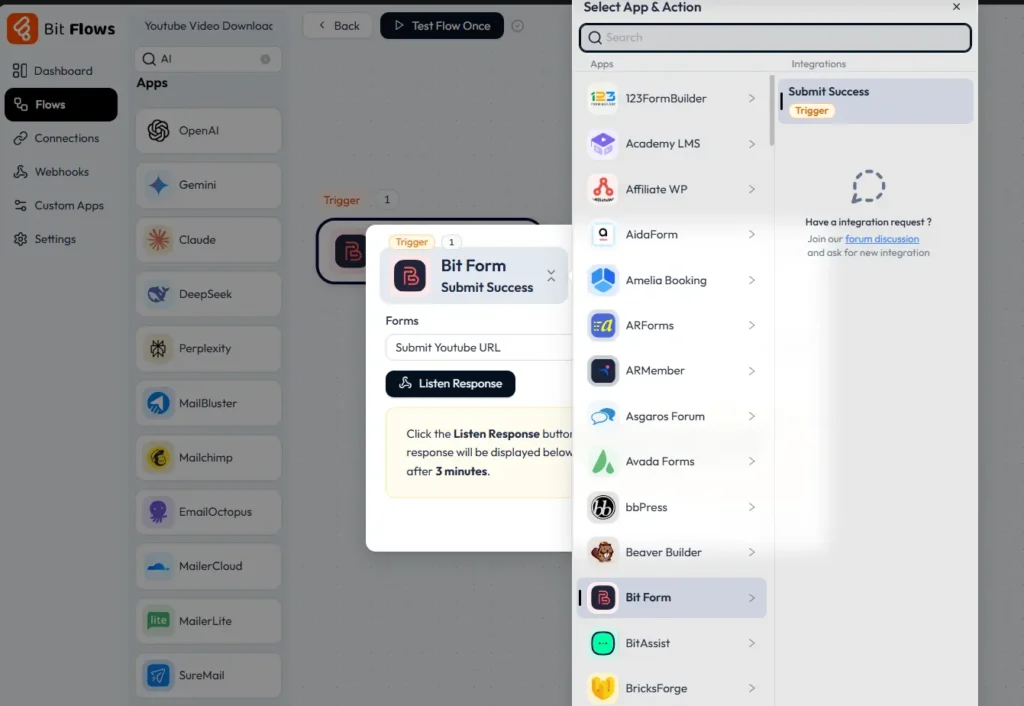
I am using Bit Form, so I have added the URL field of Bit Form. Here is the Form that I have created.
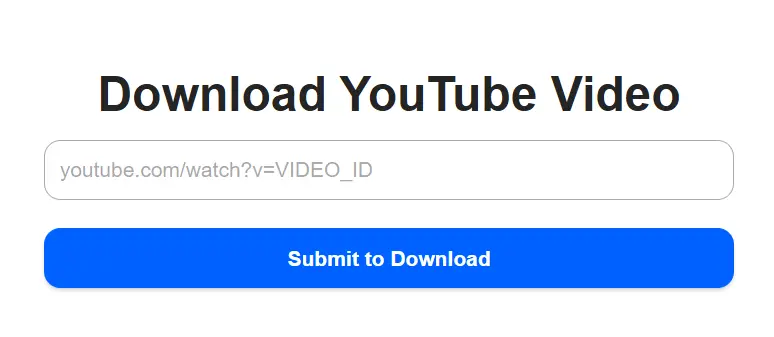
This form will be the starting point of the automation. Every time someone submits a YouTube URL, the workflow begins.
Once your form is ready, the next step is connecting the workflow to RapidAPI.
Follow this step to create the CUSTOM APP for RapidAPI connections:
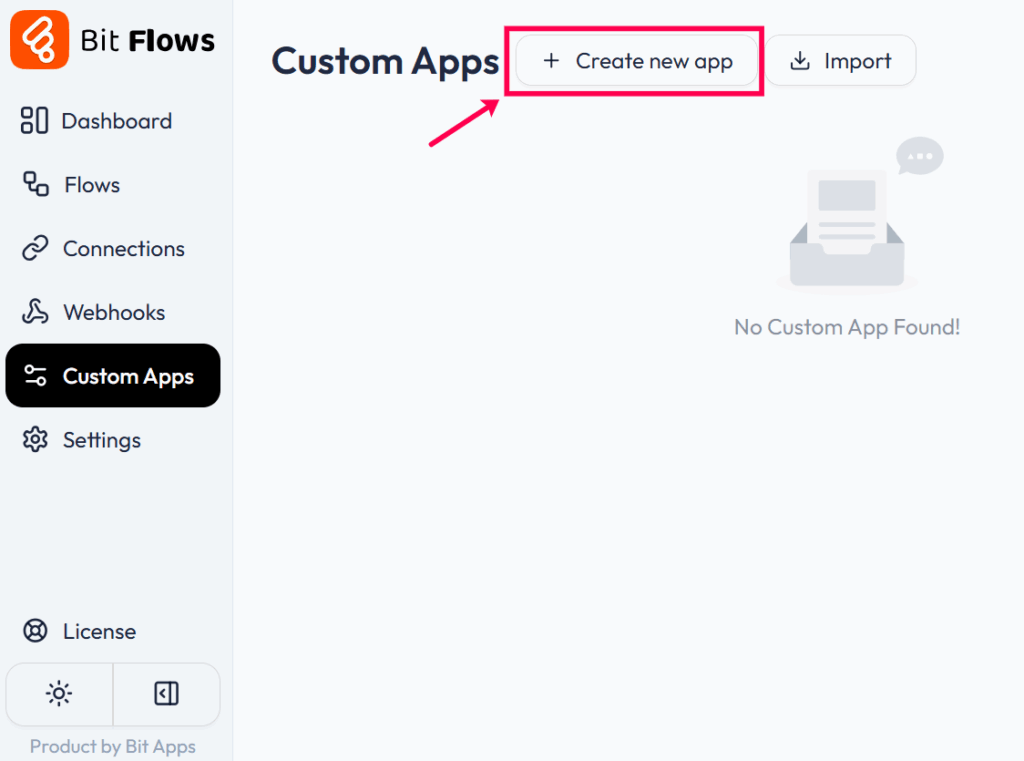
Navigate to the custom app section from your Bit Flows dashboard. Now, click on the Create new app button to make a Custom App.
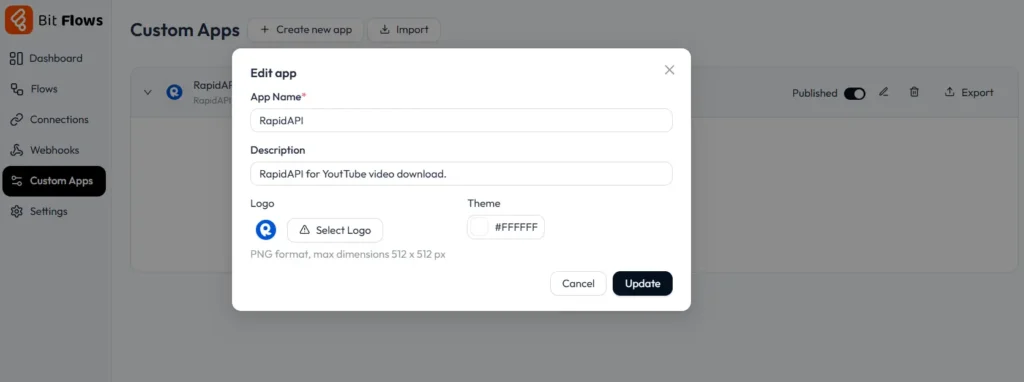
Give your app a name like “RapidAPI” and a short description. This helps you remember what it’s for.
After clicking on the Create/Update button, the custom app creation interface will appear. Now, click on the +Add Module button. Here you need to select the type of event; whether it’s a trigger or an action, and then need to add the request URL.
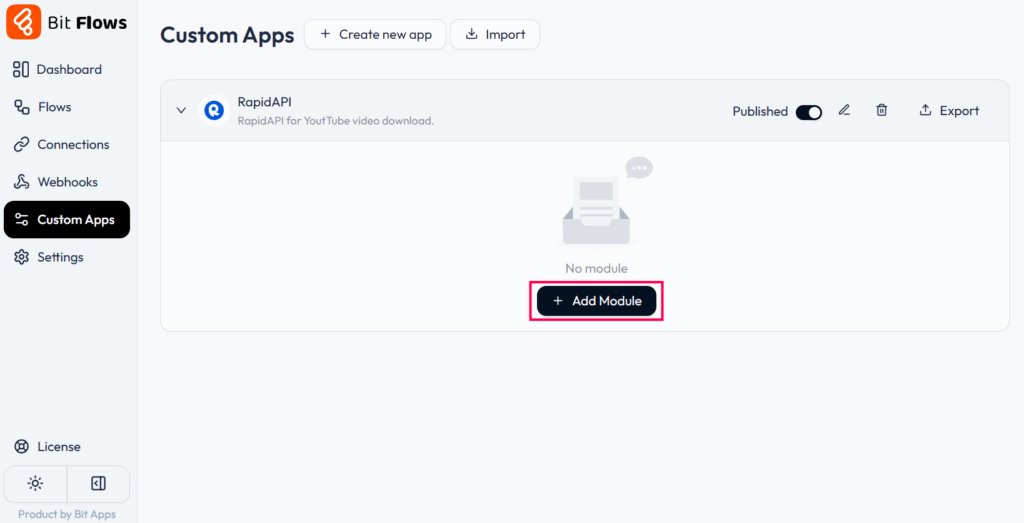
Now you will see the option for creating triggers and actions for the RapidAPI. For the connections, we need to select the actions.
Now get the YouTube Video Downloader Fast API information. This API is available in the RapidAPI marketplace, and you only need your RapidAPI key to connect. The setup uses a POST request where the YouTube URL from the form is sent as input.
POST: https://youtube-video-downloader-fast.p.rapidapi.com/download.phpIn return, the API gives you multiple download links, including MP4 files in 360p, 720p, and 1080p, along with an MP3 file for audio-only downloads.
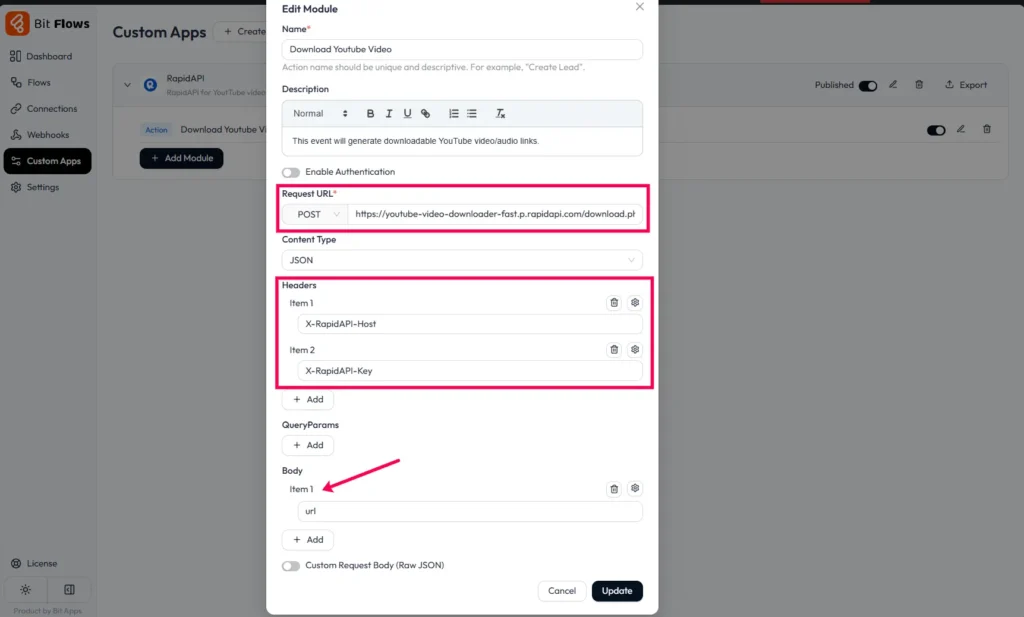
It also returns useful details like video title, duration, and thumbnail. With this step, you now have a secure way to fetch high-quality video and audio links automatically.
Now we need to connect the RapidAPI custom app to our workflow and map the URL submitted by the form with the RapidAPI URL body.
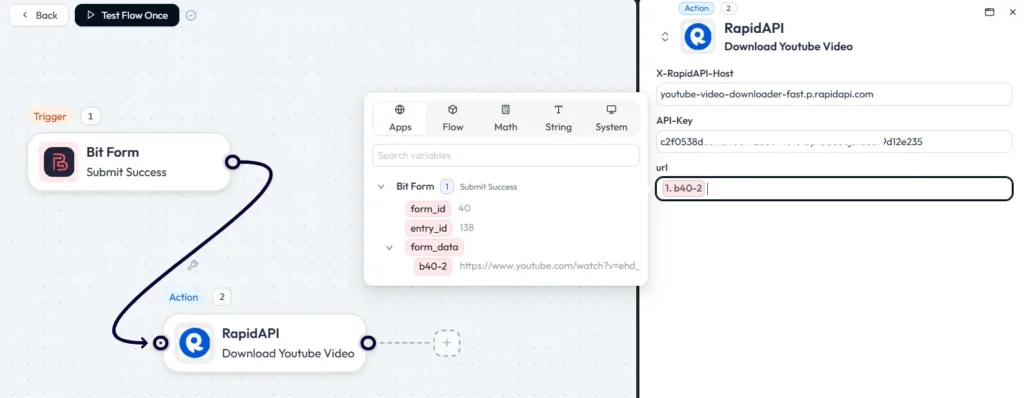
After field mapping, do a test run to make sure the connections are working. This will provide the downloadable links from the RapidAPI.
After RapidAPI provides the download links, the next step is to organize them. Connect Google Sheets inside Bit Flows and choose or create a sheet where your data will be stored.
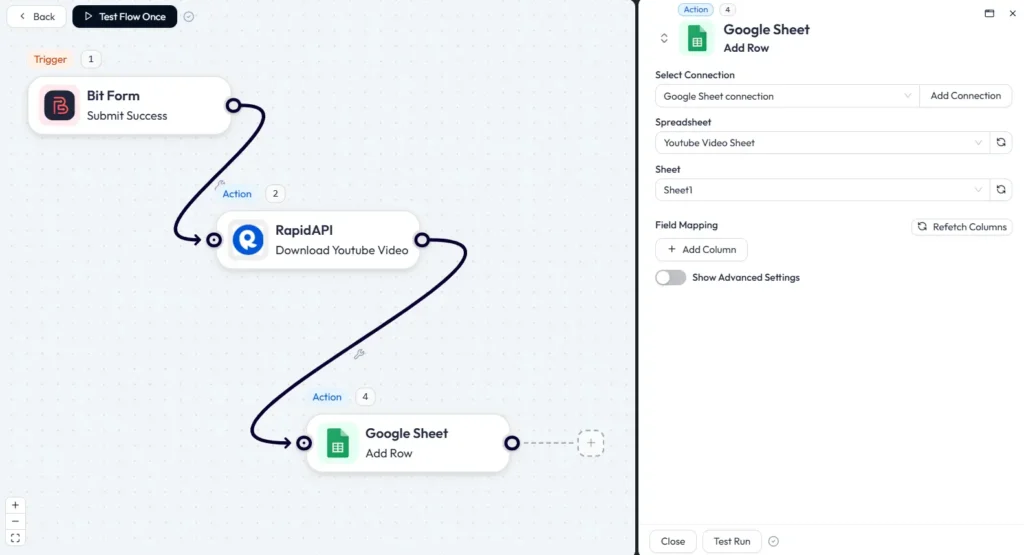
On your sheet, create the column with the respective information that you need, such as video title, link, downloadable video, and audio link in different resolutions. Here is how I created the sheets.
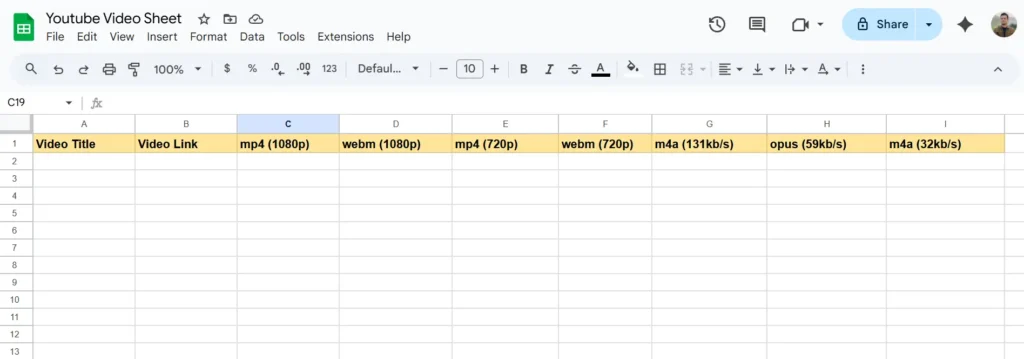
Then, map the API response fields to the correct sheet columns in Bit Flows.
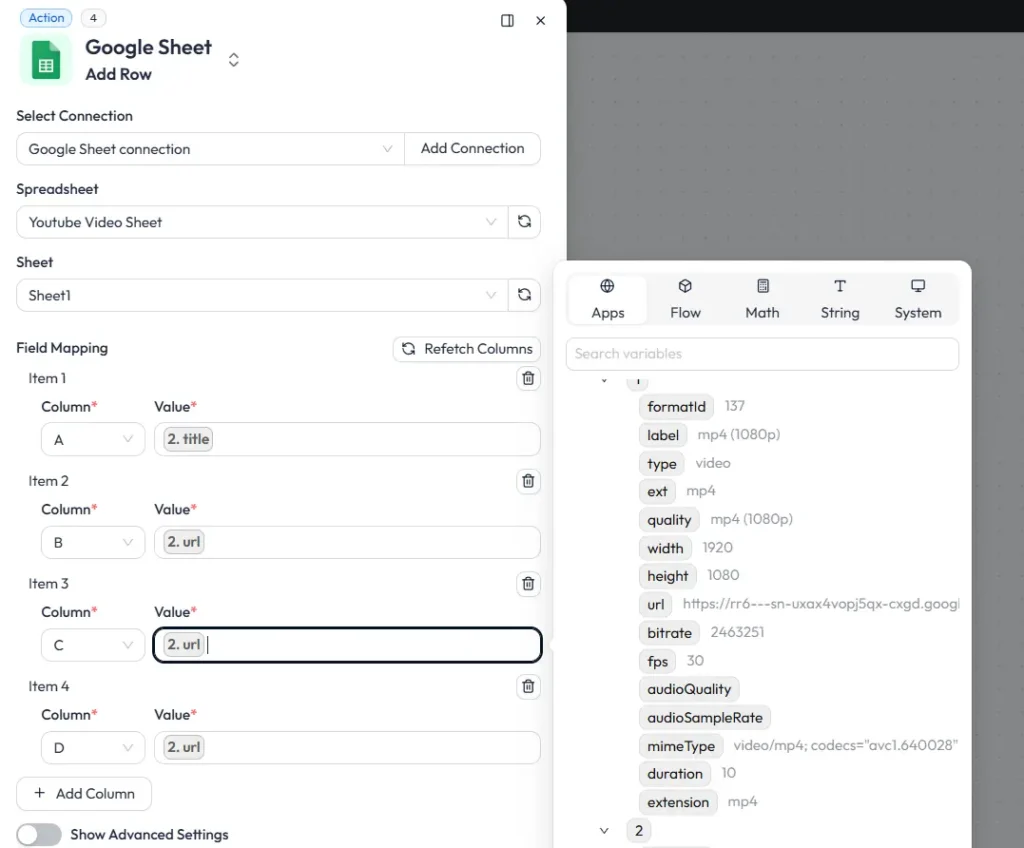
Now, every time a new video URL is submitted, the workflow will send all available download links directly into your sheet. This keeps everything in one place and makes it easy to track and manage your downloads. You can also add formatting, filters, or formulas in Bit Flows to make the data even more useful.
Before using the workflow regularly, it’s important to test it. Submit a few YouTube links to make sure the API is returning all the formats correctly. Check if the sheet updates properly with the right data in each column. Once testing is complete, you can use it for daily video conversions.
This workflow may help various professionals. including:
Video professionals need reliable access to content for editing projects, including backing up original uploads before platform changes, creating offline libraries for client projects, maintaining quality consistency across platforms, and archiving content for portfolios.
Suppose a YouTube creator with 100K subscribers uses this workflow to automatically back up all uploads, creating a comprehensive archive that saves their channel when a copyright strike temporarily removes videos.
Teachers and trainers need organized access to educational content, such as building offline lesson libraries for areas with poor internet, creating custom playlists from multiple sources, ensuring content availability despite platform changes, and complying with institutional policies on third-party content.
Digital marketers need efficient content management systems to collect competitor analysis videos for strategy development, archive campaign assets for future reference, create client presentation materials from various sources, and maintain brand asset libraries across multiple campaigns.
Academic and market researchers benefit from systematic content collection by gathering primary source materials for qualitative analysis, creating searchable databases of relevant content, ensuring long-term access to time-sensitive materials, and collaborating effectively with shared resource libraries.
This easy-to-use YouTube download system takes away the hassle of manual downloads and keeps everything secure and organized. By combining Bit Flows’ automation, RapidAPI’s trusted services, and Google Sheets’ ability to keep things organized, you get a solution that grows with your needs.
Though it takes a bit of time to set up, the benefits are worth it: you’ll increase productivity, stay better organized, and lower security risks. Whether you’re a content creator storing videos, a teacher collecting resources, or a marketer saving assets, this system can be customized to suit what you need.
Ready to improve your YouTube download process? Start building your Bit Flows workflow today and see how automation can make your life easier.





 EN
EN  DE
DE  ES
ES  NL
NL  IT
IT