
WordPress site owners often reach a point where manual work starts taking too much time.
A contact form needs to send leads to a CRM. A WooCommerce order needs to update an email list. A course enrollment needs to trigger a welcome email. A new blog post needs to notify the team or start a social media workflow.
Zapier is usually one of the first names people consider for this type of automation. It connects WordPress with thousands of apps and works well for many simple app-to-app workflows. But it is not always the best long-term fit for every WordPress website.
If most of your automation starts inside WordPress, runs through WordPress plugins, or needs deeper control from the WordPress dashboard, you should compare Zapier with a WordPress-native automation plugin before choosing your setup.

Zapier is an automation platform that connects WordPress with other apps through triggers and actions. A trigger is the event that starts a workflow. An action is what happens after that event. Zapier calls these workflows “Zaps.”
For example, you can create a Zap that starts when a new post is published in WordPress. Then Zapier can send the post details to another app, such as Slack, Google Sheets, Mailchimp, or a CRM.
Zapier also has an official Zapier for WordPress plugin that helps connect your WordPress site with Zapier and send site events to other apps.
According to the official Zapier WordPress integration page, Zapier can connect WordPress with 9,000+ apps. That broad app coverage is one of its biggest strengths.
Common Zapier WordPress automation examples include:
For many basic workflows, Zapier is fast to set up. You choose WordPress as the trigger app, choose another app as the action, map the fields, test the workflow, and turn it on.
That is enough for simple automation. The real question is whether it remains the best setup when your WordPress automation grows.
Zapier’s strengths are clear. But WordPress users should also understand where it can feel less ideal, especially as automation volume grows.
Zapier pricing is built around task usage. On the Zapier pricing page, task tiers are a major part of the plan structure. Zapier explains that a task is counted when an action step runs successfully.
Not every step counts as a task. Zapier states that triggers do not count toward task limits. It also says built-in tools such as Filter by Zapier, Formatter by Zapier, Path by Zapier, Delay, Looping, and some other Zapier tools do not count as tasks in standard Zaps.
Still, the main action steps in your workflows can add up.
For a low-volume site, this may not be an issue. For a busy WooCommerce store, membership site, LMS platform, or lead generation site, Zapier task usage can grow quickly. More orders, form entries, user updates, and notifications can mean more monthly automation cost.
Zapier supports advanced logic through features like filters and paths. The official Zapier filter documentation says filters are available on paid plans. Zapier also provides Paths by Zapier for branching workflows.
These are useful features. But if your WordPress workflow needs multiple conditions, routing, formatting, delays, and premium apps, you should check the plan requirements before building around Zapier.
The concern is not that Zapier cannot handle complex workflows. It can. The concern is whether the pricing model and plan structure match how often your WordPress site runs those workflows.
Zapier runs outside the WordPress dashboard.
That is fine when the workflow is mostly external. But if your automation depends heavily on WordPress data, plugin events, post types, user roles, WooCommerce order values, LMS activity, or site-specific logic, managing everything outside WordPress can feel less direct.
For example, a WordPress admin may want to check a form submission, route it based on field values, update user meta, create a post, send an email, and log the result inside WordPress. A native WordPress automation plugin can often feel closer to the actual workflow.
With Zapier, workflow data moves from WordPress to Zapier and then to the destination app.
For many businesses, that is acceptable. Zapier is a mature platform with strong security and governance features. But some site owners prefer keeping workflow handling closer to their WordPress site, especially when the automation uses customer data, order details, form entries, or internal process data.
This is not only about security. It is also about ownership, visibility, and operational control.
When a workflow has only two steps, debugging is usually simple.
But when a workflow passes data through several apps, filters, paths, delays, and formatting steps, it can take more time to find where something failed. You may need to check WordPress logs, plugin settings, Zapier history, app permissions, API limits, and the destination app.
For small workflows, this is manageable. For WordPress-heavy automation, having logs and re-execution options closer to the site can be more practical.
A good Zapier alternative for WordPress should do more than move data between apps. It should understand how WordPress workflows actually run. Look for:

Bit Flows is a WordPress workflow automation plugin built for users who want to create and manage automations directly inside WordPress.
It is not trying to replace Zapier for every possible SaaS-to-SaaS use case. Zapier is still stronger when your main need is broad external app automation across many platforms. Bit Flows fits a different need: WordPress-first automation.
Bit Flows runs as a self-hosted WordPress automation plugin. It lets users connect WordPress plugins, SaaS platforms, APIs, webhooks, AI tools, CRMs, email marketing tools, and external apps from a visual builder. The same page also states that workflows and data stay on the user’s own server.
That matters for WordPress users who want more control from the dashboard.
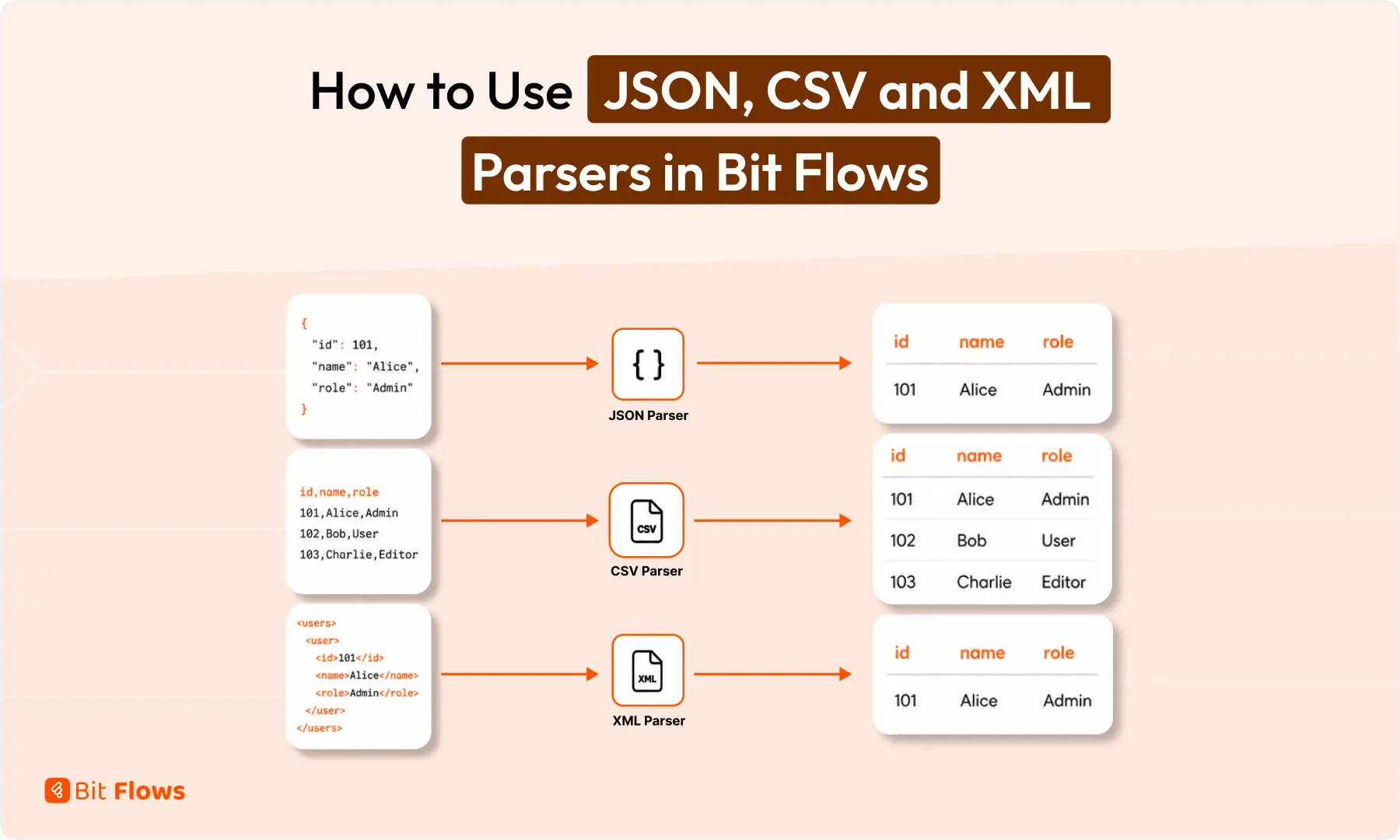
Bit Flows includes a no-code visual workflow builder, triggers and actions, conditional workflows, routers, delays, repeaters, iterators, webhooks, API/HTTP actions, parsers, logs, and advanced field mapping. Bit Flows is integrated across WordPress plugins, AI tools, CRMs, email marketing tools, SaaS apps, LMS platforms, and more.
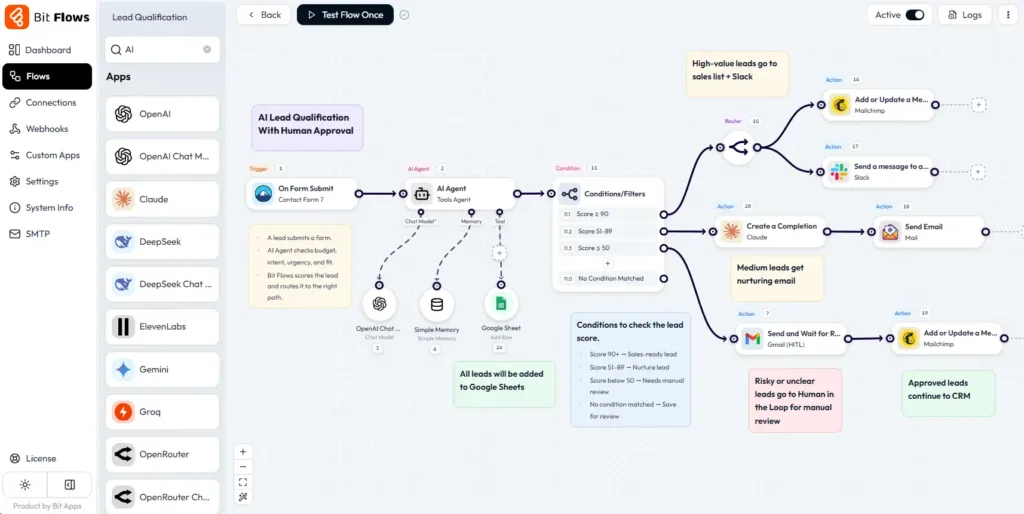
For AI-based workflows, Bit Flows supports AI actions. It can connect with tools such as OpenAI, Gemini, Claude, DeepSeek, and Perplexity, depending on the available integration and action.
Bit Flows also includes an AI-Agent for building smarter WordPress workflows where AI can read data, decide the next step, and trigger the right action based on the workflow context.
For review-based automation, Human in the Loop lets a team member approve or reject a step before the workflow continues, while MCP Client helps connect WordPress workflows with external MCP-supported tools and services.
If your workflows start inside WordPress and need WordPress-aware logic, Bit Flows deserves a serious look as a Zapier alternative for WordPress.
| Area | Zapier | Bit Flows |
| Best fit | Broad SaaS-to-SaaS automation across many apps | WordPress-first workflows tied to forms, WooCommerce, users, posts, LMS, and plugins |
| Setup location | Zapier dashboard | WordPress dashboard |
| WordPress control | Good for supported WordPress triggers and actions | More direct control over WordPress and plugin-based workflows |
| Pricing model | Task-tier based, depending on plan and usage | Usually plugin/license based, depending on product pricing |
| Complex workflow handling | Supports filters, paths, formatting, delays, and multi-step Zaps | Often stronger for site-specific logic, routing, and WordPress data handling |
| Data flow | Data moves through Zapier before reaching the destination app | Workflow handling can stay closer to the WordPress site |
| Debugging | Zap history plus app-side logs | Plugin logs and workflow history inside WordPress, depending on the tool |
| Scaling for WordPress-heavy workflows | Good, but task usage and plan requirements should be checked | More cost-friendly when many workflows run from WordPress events |
Zapier is not a poor choice. It is a strong automation platform. But for WordPress-heavy workflows, Bit Flows can give you more control over site-specific logic and ongoing workflow costs.
Pricing should not be the only reason to choose an automation tool, but it matters when your WordPress workflows run every day.
Zapier uses task-based pricing. Its pricing page lists monthly task tiers and shows Professional starting at $19.99/month billed annually, while Team starts at $69/month billed annually.
The final cost depends on your selected task tier, billing cycle, and plan features. Bit Flows uses a WordPress plugin pricing model and currently offers yearly and lifetime licenses, with all plans including unlimited workflows, tasks, and connections.
Here is a simple example using public starting prices at the time of writing.
| Monthly automation usage | Zapier sample cost | 3-year Zapier cost | 5-year Zapier cost | Bit Flows lifetime cost |
|---|---|---|---|---|
| Around 750 tasks/month | $19.99/month | $719.64 | $1,199.40 | $159 one-time |
| Around 2,000 tasks/month | $69/month | $2,484 | $4,140 | $159 one-time |
This is only a sample cost comparison, not a full pricing audit. Zapier may be worth it if your team needs broad SaaS-to-SaaS automation, shared workspaces, or a central automation platform outside WordPress.
For WordPress-heavy automation, the long-term cost difference can become clear. If your workflows mainly start from WordPress forms, WooCommerce orders, users, posts, LMS activity, or webhooks, Bit Flows can be more predictable because it does not charge based on monthly task volume.
Zapier has a much larger app directory, and that is one of its strongest advantages. If your workflow depends on many external SaaS tools, Zapier can be a better fit.
Bit Flows takes a more WordPress-focused approach. It supports 346+ integrations, covering the tools most WordPress workflows actually need, including form builders, WooCommerce, LMS plugins, CRMs, email marketing tools, AI platforms, webhooks, and APIs.
The useful part is not only the number. Bit Flows also includes API, HTTP, Incoming Webhook, Outgoing Webhook, and Custom App features. So if an app is not available in the integration list, you can still build a custom connection without waiting for a native integration.
Use Zapier if your automation is simple, low-volume, and mostly connected to external SaaS tools. It is a good choice when:
Consider a WordPress-native automation plugin like Bit Flows if your workflows start from WordPress and need deeper WordPress control. It is a better fit when:
The best choice depends on where your automation really lives.
If WordPress is only one small part of a larger SaaS stack, Zapier may be enough. If WordPress is the center of your business process, a native automation plugin is often the more practical route.
Zapier is still a useful automation platform. It has a large app directory, a mature workflow builder, and strong support for connecting SaaS tools. For simple WordPress-to-app workflows, it can be a good choice.
But WordPress users should not choose Zapier only because it is the most familiar name.
If your website depends on WooCommerce, form submissions, LMS events, user roles, posts, webhooks, CRM updates, email marketing, or AI workflows, you need to look beyond basic app connection. You need to think about workflow volume, pricing model, data flow, debugging, and how much control you want inside WordPress.
For WordPress-heavy automation, a native plugin can give you clearer workflow management, better site-level control, and more predictable scaling. Bit Flows is a practical option for users who want to build no-code WordPress automation from inside their own dashboard while still connecting with external apps, APIs, webhooks, and AI tools.
Zapier can be useful for WooCommerce workflows, especially when you want to send order or customer data to external apps. For more WordPress-specific logic, such as order value checks, customer tagging, or internal logs, a WordPress-native automation plugin may fit better.
The best option depends on your workflow. If you want automation inside WordPress with visual workflows, conditions, routers, webhooks, API actions, logs, and AI actions, Bit Flows is a strong Zapier alternative for WordPress.
A WordPress automation plugin can be better when most workflows start or run inside WordPress. Zapier is stronger for broad SaaS-to-SaaS automation across many external tools.
Yes. A WordPress automation plugin like Bit Flows can connect form submissions to CRMs, email marketing tools, spreadsheets, webhooks, and other apps without using Zapier. The exact options depend on the plugin and integrations available.
Zapier is good for simple WordPress-to-app automation, especially when most of the workflow happens outside WordPress.
But if your workflow needs to check WooCommerce order values, update user meta, route form entries, run AI actions, or keep logs inside WordPress, a WordPress-native automation plugin like Bit Flows is usually a better fit.
Yes, you can automate WordPress without Zapier. A WordPress automation plugin can connect forms, WooCommerce, LMS plugins, users, posts, CRMs, email tools, webhooks, and APIs without sending every workflow through Zapier.
Bit Flows is built for this kind of WordPress-native automation, especially when your workflow starts inside WordPress.




 DE
DE  EN
EN  ES
ES  NL
NL  IT
IT