
Most people do not wake up wanting “payment infrastructure.”
They want something simpler. They want to sell a product. Collect a donation. Start a fundraiser. Sell a ticket. Take a membership payment.
But the problem starts when the setup gets bigger than the task. A small seller is told to build a full website. A fundraiser is pushed toward a dedicated fundraising platform. A creator has to choose between link-in-bio stores, creator platforms, payment links, and digital product tools. A local organizer ends up collecting screenshots in a WhatsApp group because the proper tools feel too much.
That is the problem PaymentForm.io is built to solve.
It gives users a way to create a payment form, connect a payment gateway, collect details, and share a single checkout link.
This review looks at what PaymentForm.io does, how it works, its main modules, features, pricing, strengths, limitations, and how it compares with other tools.
PaymentForm.io is a no-code form-based checkout tool that helps users sell products, collect donations, run fundraising campaigns, sell event tickets online, and more without building a full website.
Instead of setting up a complete online store, donation platform, or event system, users can create a form-based checkout, connect their own payment gateway (Stripe, PayPal, and more), customize the form, and share it through a direct link, embed code, QR code, or custom domain.
It is especially useful for small businesses, social sellers, creators, nonprofits, fundraisers, event organizers, and individuals who need a faster way to collect money and buyer or donor information from one place.
The strongest parts are its multi-use modules, 0% platform transaction fee, unlimited transactions, free plan, product and donation support, invoices, custom emails, customer portal, QR sharing, built-in analytics, coupons, tax rules, custom domain, and webhooks.
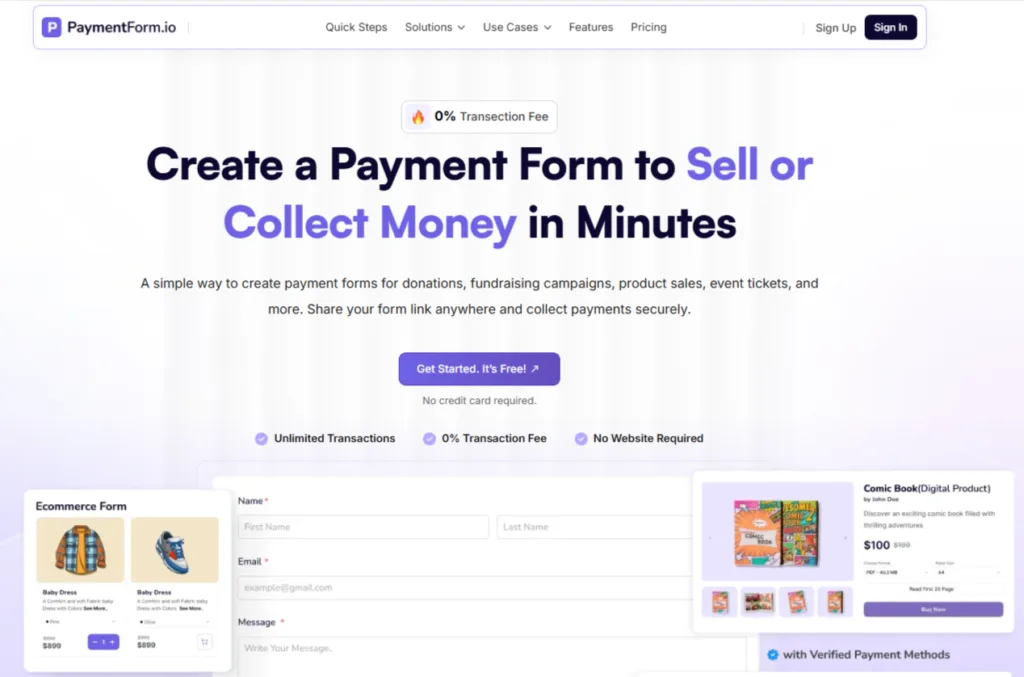
PaymentForm.io is a no-code tool that lets users create form-based checkouts for collecting money online.
The basic idea is simple.
You create a form, choose a module, add the fields you need to collect customer information, connect one or multiple payment gateways, publish the form, and share the link.
That form can be used for different payment needs, such as:
| Module | Anwendungsfall |
|---|---|
| Physical Product | Sell a single product or multiple physical products |
| Donations | Collect one-time or recurring donations |
| Fundraising | Run a goal-based campaign with progress tracking |
| Digital Products Coming Soon | Sell files, templates, ebooks, or downloadable resources |
| Event Tickets Coming Soon | Sell tickets and manage registrations |
| Memberships Coming Soon | Collect subscription or membership payments |
The main difference is that PaymentForm.io is not only a payment link tool. It is also not only an e-commerce tool. It sits somewhere in the middle. It gives users a structured form where they can collect both money and information.
That matters because most real payment situations need more than payment.
A payment link alone may not collect enough context. A full website may be too much. PaymentForm.io tries to make that middle path easier.
The team behind PaymentForm.io also works on Bit Apps products, including Bit Form, Bit Flows, Bit Social, Bit Assist, and Bit Integrations. In this review, we’ll look at where PaymentForm.io fits, what it does well, and where it may not be the right fit.
The setup follows a straightforward three-step flow.
Start by selecting the type of payment form you want to create.
For example, choose E-commerce if you want to sell products, Donation if you want to collect donations, or Fundraising if you want to run a campaign with a goal.
Each module gives you a more focused setup.
Link your Stripe account, your PayPal account, or both. PaymentForm.io does not hold your money. Payments go directly to your connected gateway account, which means faster payouts and full control over your funds.
Add the fields you need to collect customer information, then customize the form design and settings based on your module.
Next, connect your preferred payment gateways. PaymentForm.io does not hold your money. Payments go directly to your connected gateway account, which means faster payouts and full control over your funds.
After the form is ready, you can publish it and share it through:
After a payment is completed, automated confirmation emails can be sent to buyers or donors based on your form settings.
You can also review submissions and form analytics from the dashboard. Depending on the module and setup, this may include order details, form views, total revenue, submissions, and other useful data.
PaymentForm.io is built around practical payment collection. The features are not only about “getting paid.” They also help with setup, trust, tracking, and more.
PaymentForm.io is module-based, so different payment needs get different form setups. This is important because a donation form should not feel like a product checkout, and a fundraising campaign should not behave like a basic payment link.
You can create payment forms without writing code. This is helpful for sellers, creators, organizers, and fundraisers who want to launch quickly instead of waiting for a developer.
PaymentForm.io does not charge its own platform transaction fee. Users need to pay standard payment gateway fees from providers like Stripe, PayPal, Razorpay, Mollie, Square, or others.
PaymentForm.io supports unlimited transactions for free, which is useful for campaigns, small businesses, and sellers who do not want to worry about submission or payment limits.
Users can set email notifications for admins and payers. For example, a seller can receive a new order email, while the buyer receives order confirmation. A fundraiser can send thank-you emails after contributions.
PaymentForm.io includes invoice customization. Users can add branding, colors, mapped fields, and order or payment details, then send invoices through email. This is helpful for products, services, donations, and business records.
The customer portal lets payers view their order or payment details. For recurring payments, a payer can manage or pause recurring payments depending on the supported module flow. This reduces support messages and gives payers more control.
Users can generate QR codes for payment forms. This is useful for offline promotion, events, flyers, posters, booths, restaurants, local shops, and donation campaigns.
Custom domain support helps users share a more branded form URL. This can improve trust when sharing payment links through ads, email, social media, or printed materials.
Webhooks let users send form or payment data to another server or external tool. This is useful for automation, CRM updates, spreadsheets, custom dashboards, or internal workflows.
PaymentForm.io includes built-in analytics and supports tracking tools like Google Analytics and Meta Pixel. This helps users understand views, submissions, revenue, and campaign performance.
Users can protect forms with a password. This is useful for private offers, wholesale forms, early access sales, VIP events, internal payment forms, or limited campaigns.
Users can create tax rules for payment forms based on their selling needs. This is useful when a form needs tax calculation by country, state, province, billing address, or shipping address.
Multi-language support helps users create and manage payment forms for different audiences. This is useful for global sellers, nonprofits, event organizers, and businesses that serve customers in multiple languages.
Users can set their preferred currency for payment forms. This helps sellers, creators, and fundraisers collect payments in the currency that matches their audience, region, or payment gateway setup.
PaymentForm.io supports multiple payment gateways, including Stripe, PayPal, Razorpay, Mollie, and more. Users can connect their preferred gateways and collect payments directly through their connected payment gateway account.
Users can create coupon codes to offer discounts on products, campaigns, or special offers. This is useful for seasonal sales, social media offers, limited-time campaigns, and customer-specific discounts.
Users can add shipping fees for physical product forms. This helps sellers collect product price, customer details, payment, and delivery-related costs through the same form.
It includes 10+ form field types to collect the information needed with each payment.
Users can add fields such as name, email, phone, billing address, shipping address, dropdown, text, multiline text, and more, depending on the form’s purpose.
Theme customization lets users adjust the look and feel of their payment forms.
Users can update colors, fonts, layout, logo, and cover image so the form matches their brand and feels more professional to buyers, donors, or attendees.
Users can export form data for reporting, record-keeping, or business use. This is useful for reviewing orders, submissions, transactions, donor records, attendee lists, or customer data in CSV or Excel format.
Now let’s look at the module-wise breakdown.
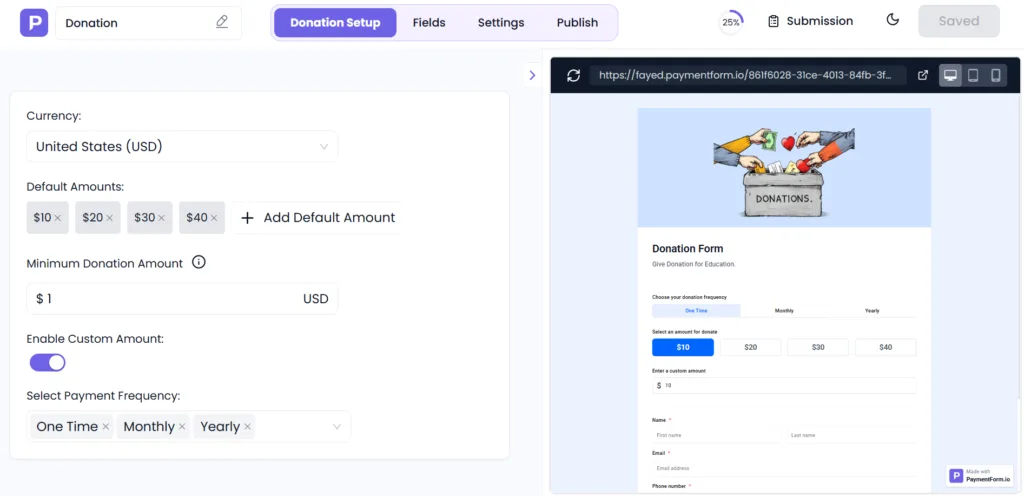
The donation module is built for nonprofits, charities, religious organizations, and individual cause supporters. You can accept one-time payments and set up recurring donations from a single form.
Key capabilities:
Best for: Nonprofits, mosques, churches, community organizations, and individuals collecting support for a cause.
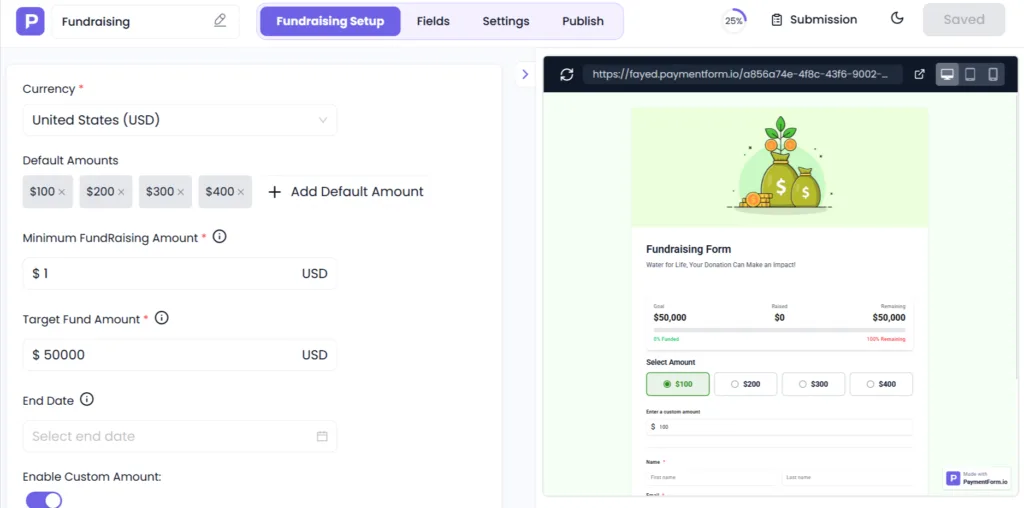
The fundraising module goes a step further than a basic donation form. It is designed for time-limited campaigns with a specific financial goal.
Key capabilities:
This is useful for medical emergencies, education funds, community projects, or any campaign where donors need to see real-time progress to stay motivated.
Best for: This is useful for medical emergencies, NGOs, education funds, community projects, or any campaign where donors need to see real-time progress to stay motivated.
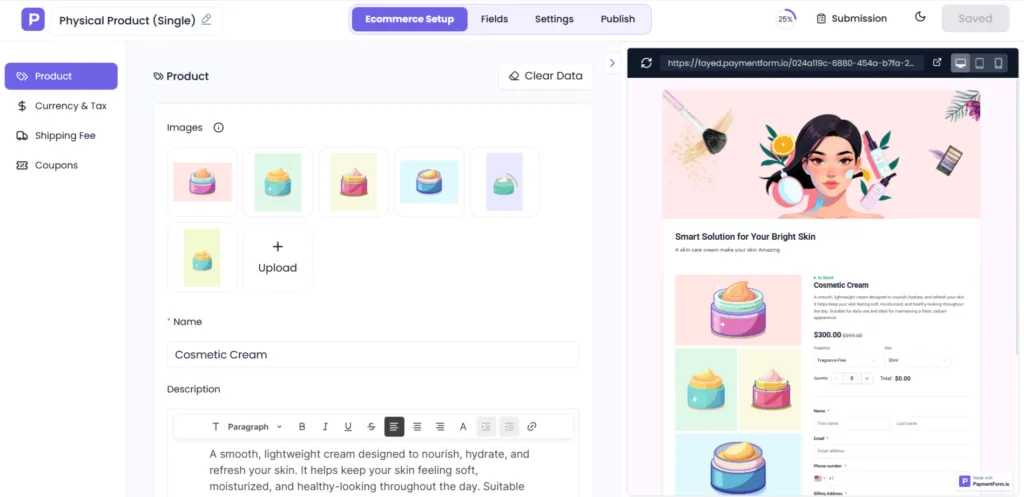
If you sell one specific item, this module gives you a focused, distraction-free checkout. Think handmade goods, merchandise drops, print-on-demand items, or any single product you want to move.
Key capabilities:
Best for: Independent makers, merchandise sellers, and small shop owners selling a flagship product.
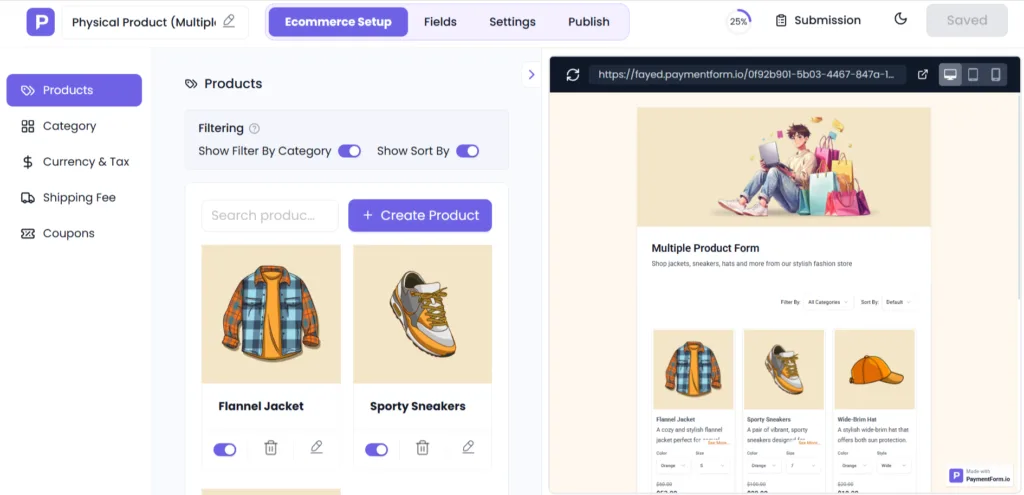
This module lets you sell products through a simple payment form without the setup work of a full eCommerce platform. You add multiple products, organize them into categories and subcategories, and let customers browse and order, all from a single shareable form link.
Key capabilities:
Best for: Small businesses, home-based sellers, social commerce sellers on Facebook, Instagram, WhatsApp, oder TikTok who need a quick and clean checkout experience.
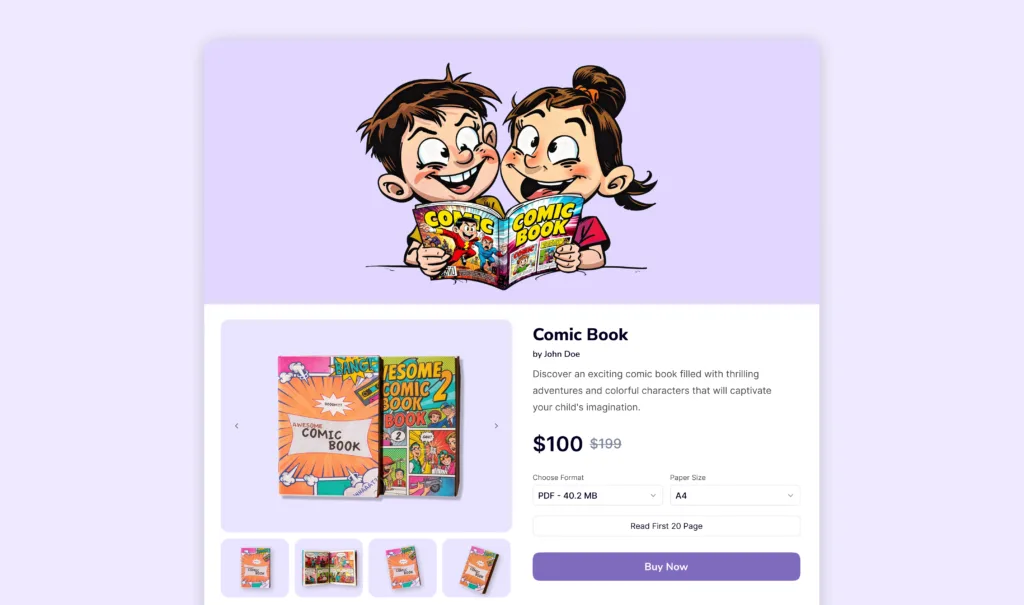
PaymentForm.io is building a digital delivery module that will allow creators to sell ebooks, templates, design assets, and other downloadable files directly through a payment form. After purchase, the buyer receives the file automatically, with watermarking and unique license key support planned.
Best for: Creators, designers, writers, and educators selling digital downloads.
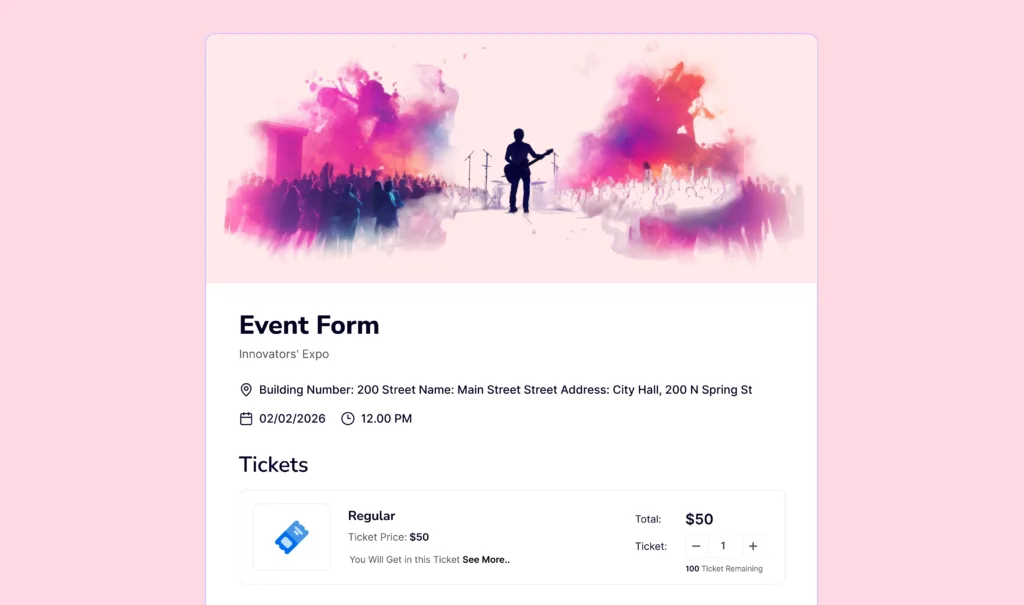
The event ticket module will handle the full event payment workflow. Sell ticket types, collect attendee information, and manage registrations in one place. QR code check-in is part of the planned feature set.
Best for: Event organizers, workshop hosts, venue managers, and community event coordinators.
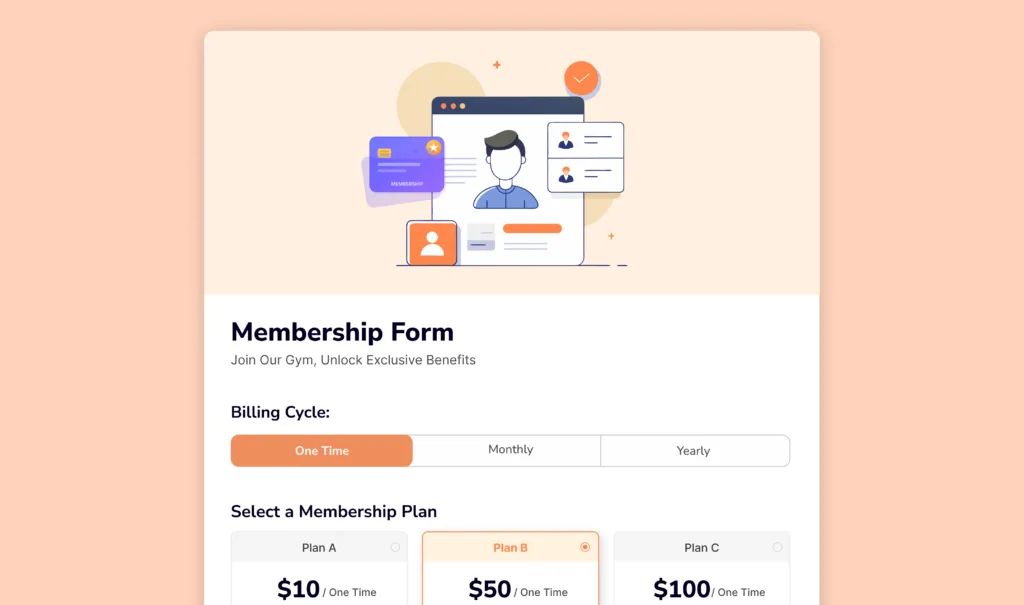
The membership module will enable recurring subscription-based payment collection for membership programs. Define plans, collect member details, and manage renewals automatically.
Best for (on launch): Clubs, associations, coaching programs, and any business running a subscription model.
PaymentForm.io currently has a free plan and a Pro plan.
At the time of writing, PaymentForm.io also offers a first-time signup bonus where the first 1,000 users can get 12 months of full Pro access for free.
| Plan | Am besten für | Key Details |
|---|---|---|
| Freier Plan | Beginners |
|
| Pro Plan: $5/month | Users who need more advanced features |
|
PaymentForm.io overlaps with several types of tools, but it is not exactly the same as any one of them.
Here is a practical comparison.
| Werkzeug | Best Known For | Pricing or Fee Model | Main Difference From PaymentForm.io |
|---|---|---|---|
| Stripe Payment Links | Payment links through Stripe | Stripe processing fees apply. Custom domain costs extra. | Great for simple Stripe payments, but less module-based for products, donations, fundraising, and events. |
| PayPal Payment Links | PayPal-hosted payment links | PayPal processing fees apply | Great for simple PayPal payments, but not a full form-based checkout system. |
| Payhip | Digital products, courses, coaching, memberships | The free plan has a transaction fee. Paid plans start from $29/month. | Good for digital creators, but more creator-commerce focused. |
| Gumroad | Digital products and creator sales | 10% + $0.50 per transaction | Creator marketplace style, but platform fees can add up. |
| GoGetFunding | Fundraising | Flat fee of 4% on the money raised | Good for fundraising, but not built for broad payment form use cases. |
| Stan Store | Link-in-bio creator storefront |
Creator: $29/month Creator Pro: $99/month |
Good for creators selling through social links, but less focused on donations, fundraising, events, and membership payments. |
| Ko-fi | Creator tips, memberships |
Contributor: $0/month with 5% service fee Gold: $12/month |
Good for creators, but less broad for multi-module payment forms. |
| Buy Me a Coffee | Creator support, memberships | 5% commission | Good for creators, but built around audience support rather than flexible payment forms. |
Gumroad charges 10% per sale and focuses on digital creator storefronts. It does not support physical products, donations, or fundraising. PaymentForm.io covers all of those at 0% platform fee.
Donorbox is built specifically for nonprofits and charges a platform fee of 2.95% to 3.95% per donation. PaymentForm.io handles donations and fundraising with no platform cut, while also supporting product sales that Donorbox does not.
Ko-fi and Buy Me a Coffee are popular for creator support, but neither handles physical product sales or structured fundraising campaigns. They also take a percentage on certain plan tiers.
Payhip and Stan Store are creator-commerce focused platforms. Both support digital products, but neither handles donation forms or fundraising campaigns.
GoGetFunding and GiveButter specialize in crowdfunding and nonprofit giving, but neither supports product sales. GoGetFunding charges a flat fee of 4% on the money raised. PaymentForm.io covers both fundraising and product commerce on the same free plan.
The clearest distinction is that PaymentForm.io is the only tool in this comparison that combines physical product sales, donation collection, and fundraising campaigns under a single platform with 0% platform fees and direct gateway payouts.
No tool is perfect. Here is the honest view.
PaymentForm.io is a strong fit for several types of users.
Small business owners and home-based sellers who want to sell on social media without building a full e-commerce website. Post a form link on Instagram or WhatsApp and start taking orders the same day.
Nonprofits and charitable organizations that collect donations regularly and want to avoid platform fees eating into their fundraising revenue.
Community organizers and campaign runners need a time-limited fundraising form with a visible goal and progress tracking.
Freelancers and creators are looking for a flexible checkout tool that works across multiple use cases without paying per-transaction fees to a third-party platform.
Event organizers who will benefit from the ticket module once it launches.
PaymentForm.io connects with trusted payment gateways.
That means payment processing is handled by the gateway the user connects, such as Stripe, PayPal, Razorpay, Mollie, or another supported provider.
PaymentForm.io is not meant to replace the payment processor.
It helps you create payment forms, connect your preferred gateway, collect the required details, generate invoices, and share payment links.
Users should still follow normal payment safety practices:
Trust matters when money is involved.
PaymentForm.io is a well-thought-out tool for anyone who needs to collect payments online without the overhead of a full e-commerce platform or the fees of a creator marketplace.
The 0% platform transaction fee is a real advantage. Direct gateway payouts mean faster access to your money. The multi-module approach means one account covers very different payment scenarios, from a nonprofit collecting monthly donations to a small business selling physical products.
The platform is still maturing. But the foundation is solid, and the free tier is genuinely useful without any limits designed to push you into a paid plan.
If you have been paying Gumroad 10 percent or Donorbox 3 percent on every transaction, PaymentForm.io is worth testing. For most use cases that are live today, the savings are immediate.
Ready to try it? Visit paymentform.io and claim your free access while the launch offer is still available.
PaymentForm.io is a no-code tool that lets users create form-based checkouts for products, donations, fundraising, event tickets, memberships, and more. Users can connect their own payment gateway, customize the form, and share it through a link, QR code, or embed code.
No. PaymentForm.io is not a payment gateway. It helps you create payment forms and connect them with supported gateways like Stripe, PayPal, Razorpay, Mollie, and others. The actual payment processing happens through the gateway you connect.
Yes. There is a free forever plan with 0% platform transaction fees and unlimited transactions. A Pro plan is available at $5 per month.
PaymentForm.io does not charge its own platform transaction fee. However, payment gateways like Stripe, PayPal, Razorpay, Mollie, or others will still charge their standard payment processing fees.
PaymentForm.io is useful for small businesses, social sellers, creators, fundraisers, nonprofits, event organizers, local sellers, and individuals who want to collect payments online without building a full website.
Not exactly. PaymentForm.io is better for simple form-based checkouts, product sales, donations, fundraising, and more, without building a full store. WooCommerce is better if you need a large online shop with advanced store management features.
No. PaymentForm.io does not replace Stripe, PayPal, or other payment processors. It helps you create the payment form, collect details, generate invoices, and connect the checkout experience with your preferred payment gateway.
No. PaymentForm.io does not hold your money. Payments are processed through the payment gateway you connect to, such as Stripe, PayPal, Razorpay, Mollie, or another supported provider.
Yes. PaymentForm.io lets users connect multiple payment gateways and use them in the same payment form. You can also connect multiple accounts under the same gateway.
Yes. PaymentForm.io supports custom domains. This helps make your payment form link look more branded and trustworthy when sharing it with customers or donors.



 DE
DE  EN
EN  ES
ES  NL
NL  IT
IT