MCP stands for Model Context Protocol, an open standard introduced by Anthropic in 2024. It is a common way for AI tools to connect with outside apps, data, and actions.
Think of it like a universal plug for AI. Instead of building a different custom connection for every single app, teams can use one shared standard. That matters because AI automation becomes easier to build, easier to connect, and more useful in real work.
If that still sounds a bit complex, here is the easy explanation: MCP helps an AI assistant stop being “just a chatbot” and start working with real tools. That could mean reading a file, checking a database, searching documentation, or taking an action in another system, depending on what it is allowed to do.
MCP matters for AI automation because it gives AI agents a cleaner, more standard way to use tools and live information. Instead of wiring every app one by one in a custom way, MCP creates a shared method for connecting AI to the systems around it. That can reduce integration complexity and make automation workflows much more capable.
MCP is not a product. It’s a set of rules. Think of it like a common language that lets AI apps talk to outside tools and services. Anthropic calls it a “standardization layer.”
The system has three simple roles:
These three parts talk to each other using a messaging format called JSON-RPC 2.0.
A lot of people hear “protocol” and immediately tune out. Fair enough. Here is a simpler way to think about it:
| Everyday idea | What does it mean here |
|---|---|
| USB-C for devices | One common way to connect many things |
| Translator between people | One common language between AI and tools |
| Reception desk in an office | A place where the AI learns what is available and how to use it |
The official MCP documentation itself compares it to USB-C for AI applications. The point is standard connection. One method, many possible tools.
So instead of saying:
MCP tries to make those connections more consistent. That is the real appeal.
At a simple level, MCP usually involves three parts.
This is the part you talk to. It could be an AI app, an agent, or a workflow system that uses AI. So, MCP is what allows AI applications like ChatGPT to connect to external systems.
This lives inside the AI application (the Host). It is the part that reaches out to MCP servers. It sends requests, receives responses, and manages the connection between the AI and the outside world. You do not interact with it directly. It just works in the background.
This is the bridge between the AI and your tools or data. Each server exposes a specific source, like a database, a file system, or an external service. It tells the AI what is available and how to use it. As Anthropic describes it, MCP servers are what make the secure, two-way connection between data sources and AI-powered tools possible.
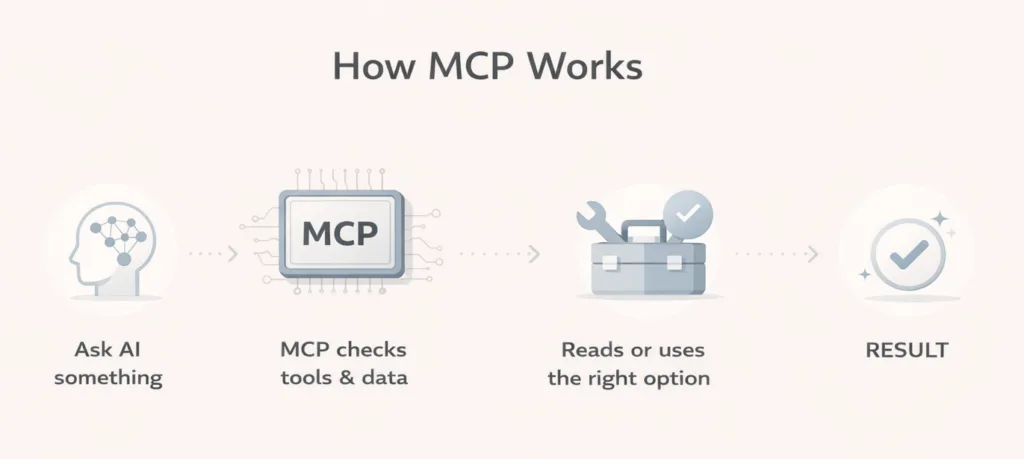
The MCP docs break this into three core capabilities:
That means an AI agent can do more than answer from memory. It can look at current information, use an approved tool, and return something more useful.
Here is the simple flow:
This is where it gets practical.
Without a shared standard, every AI-to-tool connection can turn into a separate project. MCP was created to solve that fragmentation. Anthropic describes it as replacing fragmented integrations with a single protocol, making it simpler and more reliable to give AI systems access to the data they need.
For automation teams, that is a big deal. Less custom plumbing often means faster setup and easier maintenance.
A lot of AI tools sound smart until they need fresh information. Then the limits show up.
MCP helps by giving AI access to things outside the model itself, such as files, databases, calculators, search tools, workflows, or documentation. This enables AI applications to access key information and perform tasks, not just generate text.
MCP benefits developers, AI applications, and end users. Developers get reduced complexity. AI systems get access to a wider ecosystem of data sources and tools. End users get more capable assistants that can access data and take actions when needed.
That is why MCP matters in automation. It is not just about one clever demo. It is about making connected AI more repeatable.
This is not just a theory project anymore. The MCP documentation lists support across clients and tools including Claude, ChatGPT, Visual Studio Code, and Cursor. OpenAI also describes MCP support in its Responses API, and Microsoft now publishes documentation for both Azure MCP Server e Power BI MCP workflows.
That matters because standards only become valuable when real platforms use them.
Here is where a non-technical person usually says, “Okay, but what would I actually do with it?”
A few easy examples:
In each case, the value is the same: the AI is not working alone. It has access to the right tools and context.
This part is important because MCP is getting talked about a lot, and hype tends to confuse people.
MCP is not ChatGPT, Claude, Gemini, or any other model. It is the connection layer that helps AI systems interact with tools and information more consistently.
It does not automatically make an AI agent smart, safe, or accurate. It simply gives the system a structured way to access outside capabilities.
A badly designed workflow can still be bad. An unclear prompt can still be unclear. Poor permissions can still create risk.
This is the part many beginners miss.
Anthropic warns that users should only connect to remote MCP servers they trust and review each server’s security practices. OpenAI also recommends not connecting to a custom MCP server unless you know and trust the underlying application. MCP servers can involve sensitive data and that write actions can increase both usefulness and risk.
So yes, MCP makes AI more powerful. It also means permissions, approvals, and trust matter more.
If you work with automation, MCP is worth paying attention to because it shows where AI workflows are heading. AI is becoming more useful when it can do more than generate text. It becomes much more practical when it can understand context, connect with tools, and help move work forward inside a real process.
For workflow teams, that matters because it can make Automazione AI more flexible and easier to scale. Instead of treating AI like a separate assistant, teams can use it as part of the workflow itself, where it helps read information, make decisions, and trigger the next step.
This is the kind of shift many automation users are already starting to notice. If you use Bit Flows, you can probably relate to that direction already. And with MCP expected to be introduced in Bit Flows soon, it becomes easier to see why this matters for the next stage of AI-powered automation.
And maybe that is the simplest way to look at it: the AI helps with thinking, the connected tools handle the work, and the workflow keeps everything moving in order.
So, what is MCP and why does it matter for AI automation?
It matters because AI becomes far more useful when it can work with the right tools and live context, not just generate answers from a prompt. MCP gives the industry a shared way to make that happen. It reduces custom connection work, helps AI agents interact with real systems, and supports more practical automation experiences.
For non-technical readers, the main thing to remember is simple: MCP helps AI connect to the outside world in a more organized way. That is why it matters. And that is why MCP will keep showing up more often in conversations about AI agents, workflow tools, and automation platforms.
No. Developers build and connect it, but the benefit shows up for everyone. End users get AI tools that can access data and take useful actions when needed.
Not exactly. APIs are individual ways systems expose functionality. MCP is a shared standard that helps AI applications discover and use tools, resources, and prompts more consistently across systems.
Because it helps agents move from simple chat responses to real tool use. That means checking live data, using approved actions, and working inside larger automations.
Yes. It supports across platforms and tools such as Claude, ChatGPT-related tooling, Visual Studio Code, Cursor, Azure MCP Server, and Power BI MCP resources.
It can be useful, but it should be used carefully. Connecting only to trusted MCP servers and being careful with permissions and data exposure.



 IT
IT  EN
EN  DE
DE  ES
ES  NL
NL