
Automation looks simple until a workflow starts doing real business work.
A form may need to create a CRM lead, notify sales, update a sheet, wait two days, check a condition, call an API, classify the lead with AI, and pause for approval. At that point, a basic trigger-action tool feel limiting, and cloud task costs can grow with usage.
Bit Flows is built for that next level: self-hosted WordPress automation with a visual canvas, advanced logic, APIs, webhooks, AI Agent, MCP, Human in the Loop, custom apps, logs, and unlimited workflows, steps, and task executions.
The real buying question: is Bit Flows Pro worth paying for instead of Bit Flows Free, Zapier, Make, n8n, OttoKit, Uncanny Automator, or AutomatorWP?
Bottom line: Pro makes the most sense when WordPress automation is becoming multi-step, API-heavy, AI-assisted, approval-based, or high-volume. For simpler workflows, Bit Flows Free is a sensible place to start.
Bit Flows is a no-code workflow automation plugin that runs inside WordPress. You build a flow visually by connecting a trigger to actions and logic tools.
A WordPress event, form submission, WooCommerce event, schedule, or webhook can start the workflow. Actions can then create records, send data, call APIs, update a CRM, write to a spreadsheet, send messages, or run AI steps.
Conditions, routers, loops, delays, parsers, schedules, AI decisions, and approvals can sit between those steps. That is what lets a flow match a real business process instead of a simple trigger-action recipe.
If workflow automation is new to you, the WordPress automation and integrations guide covers planning, testing, logs, and workflow basics.
This consideration matters when a simple “form to CRM” automation grows into scoring, routing, follow-ups, APIs, AI, approvals, retries, and reporting. You can extend the same workflow instead of rebuilding it elsewhere.
Bit Flows uses a connected visual canvas instead of a narrow linear recipe. With several branches, you can see where data starts, how it changes, which condition controls each path, where delays happen, and where the output goes.
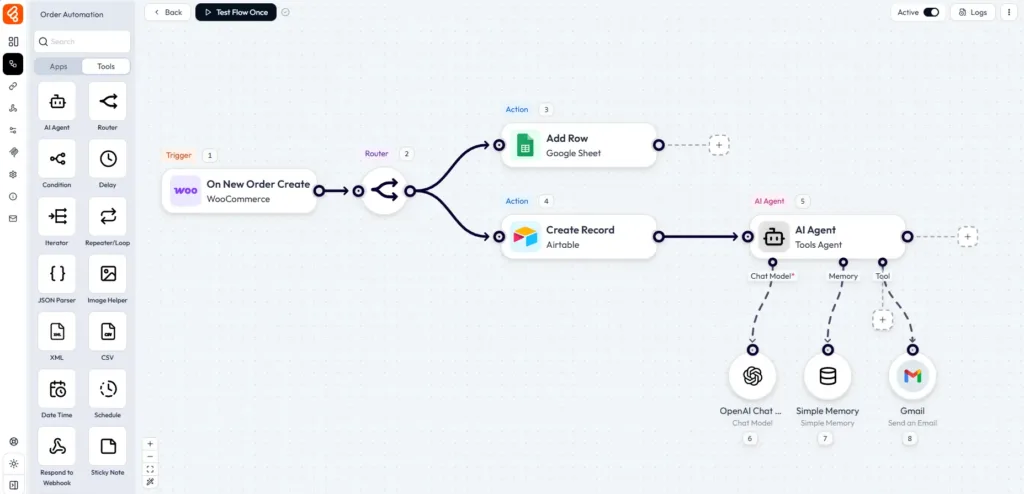
That matters far more in a 15-step workflow than in a two-step automation: you can understand the process without opening every step.
Many cloud automation tools bill by tasks, operations, credits, or executions. As usage grows, the bill can grow with it. Bit Flows includes unlimited workflows, task executions, steps, and connections. Your hosting still sets the practical capacity, but Bit Flows does not raise the license price because the same workflow runs more often.
Bit Flows connects with 318+ WordPress plugins and external platforms across forms, eCommerce, CRM, email, LMS, communities, memberships, AI, SaaS, messaging, and more.
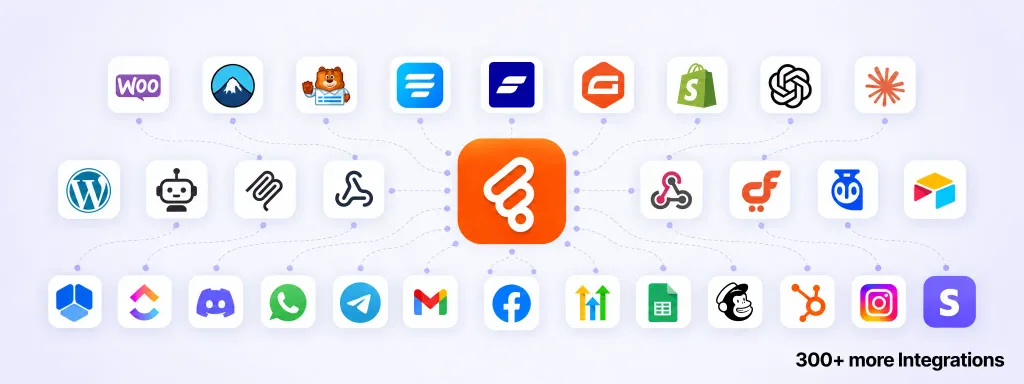
The number matters less than whether your stack is supported. Check the Bit Flows integrations directory for the exact trigger or action you need.
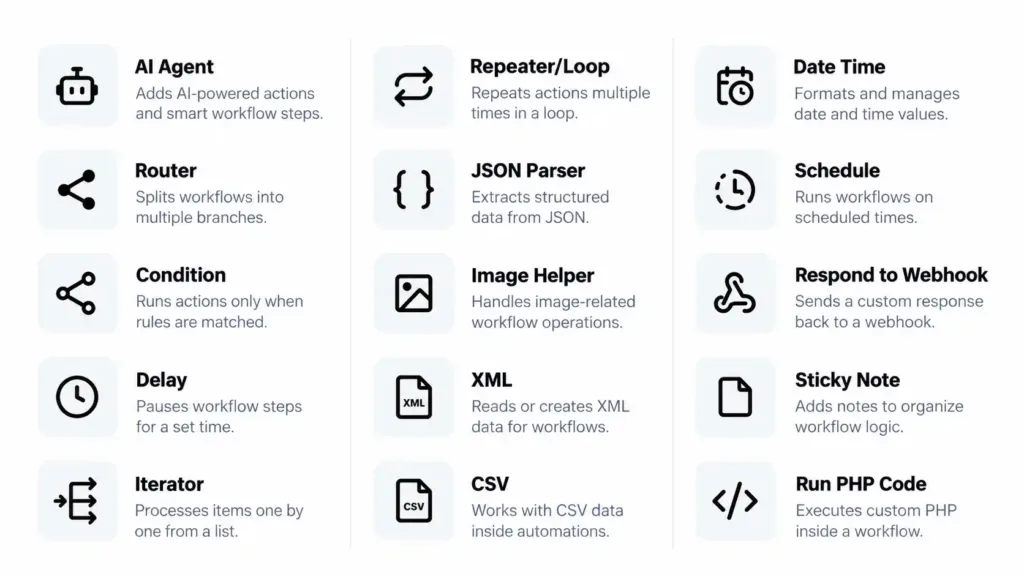
Die workflow automation guide walks through practical uses of delays, loops, and conditions.
AI becomes useful when a workflow needs to classify, summarize, extract, generate, or make a decision from unstructured input. Bit Flows puts an AI Agent inside the workflow, using connected models, prompts, memory, mapped fields, and tools. The reasoning step becomes part of the process instead of a separate chatbot.
For example, a support flow can classify a message, extract key details, route it to the right team, and create a structured CRM note. The Anleitung zum Bit Flows-KI-Agenten shows this with a support-triage workflow.
MCP (Model Context Protocol) lets compatible AI systems use approved tools exposed by another service.
Bit Flows includes an MCP Client inside its AI Agent, so an agent can call tools from supported MCP servers as part of the workflow, not just work with text in a prompt.
Bit Flows can also act as an MCP server.
Compatible MCP clients such as ChatGPT, Claude, and Cursor can securely connect to Bit Flows and use supported workflow tools without requiring you to open the WordPress dashboard for every task.
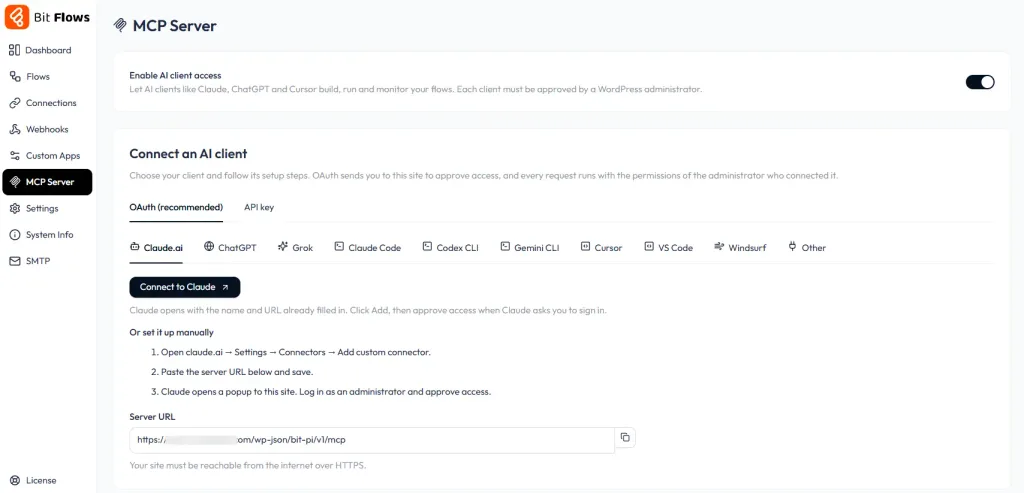
MCP Client: Bit Flows calls external MCP tools. MCP Server: an external AI client connects to Bit Flows.
The MCP Server uses OAuth-style registration, bearer tokens, scopes, and WordPress capability checks. Admin access is re-checked on every MCP call.
Refunds, expenses, leave requests, sensitive replies, order reviews, and content approvals may still need a human decision.
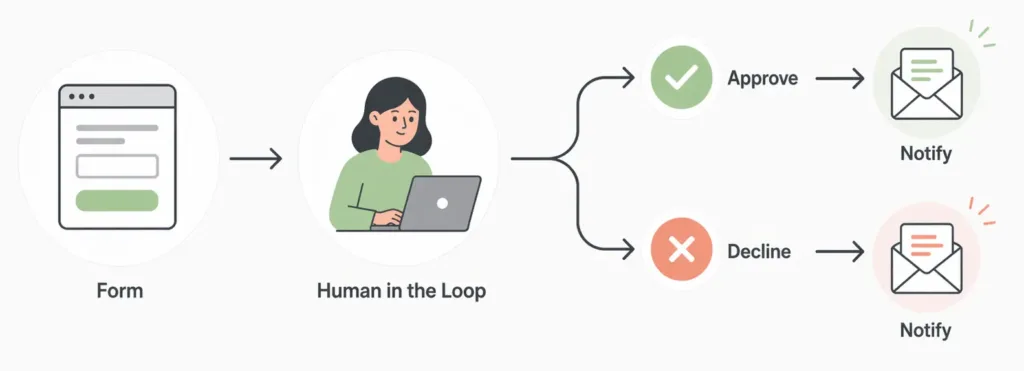
Human in the Loop can pause the workflow, request approval, wait for a response, and continue down the matching path. The approval becomes part of the automation instead of a manual handoff. The Human in the Loop guide shows an approve/decline workflow.
For unsupported tools, Bit Flows provides incoming/outgoing webhooks, API/HTTP requests, and a Custom App Builder. If the service has a usable API, you can often connect it yourself.
Custom Apps are useful for private APIs, niche SaaS tools, internal services, or client systems you use repeatedly. You can turn them into reusable triggers and actions instead of rebuilding requests every time. A no-code API integration example shows how this works with a custom service.
Bit Flows includes JSON, CSV, and XML parsers, dynamic field mapping, Date Time tools, and flow, math, and system variables for reshaping data between steps.
A nested webhook payload, for example, can be parsed and mapped directly into a CRM, spreadsheet, email, or follow-up API request.
Bit Flows includes workflow logs, failed-task alerts, reports, error handling, and re-execution. When a flow fails, you can see where it failed and retry it.
For orders, leads, payments, or approvals, that visibility and recovery matter.
Bit Flows uses background and queue-based processing so long workflows do not have to keep the visitor-facing request open while every action finishes.
Cloud cron can also make scheduled workflows more reliable when normal WordPress cron traffic is inconsistent.
Hosting still matters for high-volume automation. The Bit Flows performance guide explains queues, background execution, and hosting considerations.
Cloud platforms often connect to WordPress through a generic app, REST endpoint, or webhook. That can become limiting when the event you need lives inside a specific plugin.
Bit Flows goes deeper into WordPress. Its integrations use plugin-specific hooks, triggers, actions, helpers, and services, so workflows can react directly to events inside the plugins your site already uses.
A WooCommerce flow can start from a store event, an LMS flow from course activity, a community flow from a member action, and a CRM flow from a record change, without building a webhook bridge first.
For WordPress-heavy sites and agencies, that can remove a lot of glue code and extra connector plugins.
| Use case | Beispielarbeitsablauf |
|---|---|
| Lead management | Form submission → check conditions → AI lead classification → create CRM lead → notify sales → delayed follow-up |
| WooCommerce operations | New order → iterate line items → update sheet/CRM → alert team → delay → send post-purchase action |
| CRM automation | New lead → assign owner → create deal → add activity → notify rep → schedule next action |
| Approval workflows | Request submitted → manager approval → condition → approved or declined branch |
| AI support triage | Support message → AI Agent → classify intent → extract details → route to correct team |
| Reporting | Scheduled trigger → fetch data → parse response → calculate/format → send report |
| Content operations | Content event → AI summary → approval → publish/update another system → notify team |
| Custom API workflows | WordPress event → custom API → parse response → branch → save result |
| Agency automation | Reusable client workflow → import → reconnect credentials → customize per site |
Die Bit Flows and Bit CRM guide shows a complete CRM workflow with forms, WooCommerce, routing, AI, and approvals.
Bit Flows Free is useful on its own. It includes 12 triggers, 25 actions, 473 events, multi-step workflows, unlimited workflows and task execution, and the built-in AI Agent.
Move to Pro when you need premium integrations, broader event coverage, Human in the Loop, cloud cron, longer log retention, flow and Custom App import/export, recovery tools, or existing-data testing. Pro adds 219+ additional triggers, 169+ additional actions, and 2,787+ additional events. The Free vs Pro comparison lists the full trigger, action, event, and feature differences.
Bit Flows keeps paid licensing simple. Every paid plan includes all paid features. You are mainly choosing how many WordPress sites the license can activate on.
| Plan | Standorte | Preis |
|---|---|---|
| Starter Annual | 1 site | $59/year |
| Plus Annual | 5 sites | $99/Jahr |
| Agency Annual | Unlimited sites | $129/year |
| Starter Lebenszeit | 1 site | $159 einmalig |
| Plus Lifetime | 5 sites | $299 one-time |
| Agentur Lebenszeit | Unlimited sites | $499 one-time |
Pricing reflects the rates available on September 29, 2026. Promotions may change, so confirm the latest price on the Bit Flows pricing page before purchasing.
Every paid plan is backed by a 14-day money-back guarantee.
Bit Flows competes with cloud platforms such as Zapier, Make, n8n, and OttoKit, and WordPress-native plugins such as Uncanny Automator and AutomatorWP. The main differences are where workflows run, how usage is billed, and how deeply each tool works with WordPress.
Competitor pricing reflects publicly listed rates on September 29, 2026. These are cost comparisons, not claims that the plans have identical features or usage limits.

Core difference: Zapier is a mature cloud platform with a much broader SaaS app ecosystem. Bit Flows is more WordPress-focused and runs normal workflows in your own WordPress environment. If most of your stack lives outside WordPress, Zapier may fit better. If WordPress, WooCommerce, forms, LMS plugins, memberships, or WordPress CRMs sit at the center, Bit Flows has the more direct model.
Zapier Professional starts at $19.99/month billed annually with 750 tasks per month. Bit Flows Starter is $59/year with unlimited Bit Flows task executions, or $159 lifetime. The long-term cost difference is shown in the pricing tables below. The Bit Flows vs Zapier comparison goes deeper into the two platforms, while the WordPress automation guide focuses on Zapier in a WordPress workflow.

Core difference: Make is a powerful visual cloud automation platform with broad app coverage and strong data routing. Bit Flows brings a visual workflow model into WordPress, with native WordPress events and no Bit Flows credit meter on normal workflow execution.
Make Core starts at $9/month billed annually for 10,000 credits per month. Bit Flows Starter is $59/year or $159 lifetime. Make remains strong for cloud-first automation; Bit Flows is easier to budget when WordPress-heavy workflows run frequently. The Bit Flows vs Make comparison covers the workflow and pricing differences in more detail.
Core difference: n8n gives technical teams more control over custom logic, infrastructure, and self-hosting. Bit Flows lowers the setup burden for WordPress users because WordPress events, integrations, logs, credentials, AI tools, and workflow management live inside the WordPress dashboard.
n8n Cloud Starter is €20/month billed annually with 2,500 workflow executions per month. It also has a free self-hosted Community Edition, which requires you to manage the infrastructure. Bit Flows trades some developer flexibility for a more WordPress-native experience, unlimited Bit Flows task execution, and lifetime licensing. The Bit Flows vs n8n comparison explores that trade-off in more detail.

Core difference: OttoKit uses a WordPress plugin as a bridge while automation processing happens in its cloud. Bit Flows is self-hosted and runs normal workflows inside WordPress. OttoKit can reduce work on your hosting; Bit Flows gives you more control over execution and removes the Bit Flows task meter.
OttoKit Pro costs $108/year for five WordPress connections and 5,000 tasks per month, with a $499 lifetime option. Bit Flows Plus is $99/year or $299 lifetime for five sites. For unlimited WordPress connections, OttoKit Business is $228/year or $799 lifetime; Bit Flows Agency is $129/year or $499 lifetime. The tables below show the longer-term difference.

Core difference: Uncanny Automator is a strong WordPress-native competitor with deep plugin integrations and its own AI features. Bit Flows puts more emphasis on a node-based visual canvas, API and webhook workflows, AI Agent, MCP Client and Server, Human in the Loop, and lifetime licensing.
Uncanny Automator Basic starts at $240 for the first year for one site and renews at $300/year. Bit Flows Starter is $59/year or $159 lifetime. The packages are not feature-for-feature equivalents, but the subscription difference is significant if workflow automation is your main requirement.

Core difference: AutomatorWP uses a conventional trigger-action recipe model with a large add-on ecosystem. Bit Flows is easier to visualize when a workflow grows into branches, loops, API calls, AI steps, approvals, parsers, and multiple paths.
AutomatorWP All Access supports unlimited sites and costs $499 for one year, $1,199 for three years, or $1,499 for five years. Bit Flows Agency is $129/year or $499 lifetime. If you manage many sites, the licensing difference becomes substantial over several years.
The tables below use publicly listed annual or multi-year prices. They exclude overages, top-ups, hosting, and external AI/API fees.
| Werkzeug | Plan / included usage | 1 year | 3 years | 5 years | Lifetime option |
|---|---|---|---|---|---|
| Bit Flows | Starter, 1 WordPress site, unlimited Bit Flows tasks | $59 | $177 | $295 | $159 |
| Zapier | Professional, starts with 750 tasks/month | $239.88 | $719.64 | $1,199.40 | No lifetime plan listed |
| Machen Sie | Core, 10,000 credits/month | $108 | $324 | $540 | No lifetime plan listed |
| n8n | Cloud Starter, 2,500 executions/month | €240 | €720 | €1,200 | No Cloud lifetime plan; free self-hosted Community Edition available |
The pricing model matters as much as the sticker price: Zapier uses tasks, Make uses credits, n8n Cloud uses workflow executions, while Bit Flows does not meter normal workflow tasks.
| Werkzeug | Coverage | 1 year | 3 years | 5 years | Lebenslang |
|---|---|---|---|---|---|
| Bit Flows Plus | 5 sites | $99 | $297 | $495 | $299 |
| OttoKit Pro | 5 WordPress connections, 5,000 tasks/month | $108 | $324 | $540 | $499 |
| Bit Flows Agency | Unlimited sites | $129 | $387 | $645 | $499 |
| OttoKit Business | Unlimited WordPress connections, 10,000 tasks/month | $228 | $684 | $1,140 | $799 |
| AutomatorWP All Access | Unlimited sites | $499 | $1,199 | $1,499 | No lifetime plan listed |
Bit Flows Lifetime changes the long-term math: $159 for Starter, $299 for Plus, and $499 for Agency. That equals roughly 2.7, 3, and 3.9 years of the matching annual plans. Keep the plugin longer than that and Lifetime becomes cheaper than renewing Bit Flows itself.
For agencies, five years of Bit Flows Agency Annual is $645 and Agency Lifetime is $499, versus $1,140 for OttoKit Business annual billing and $1,499 for AutomatorWP All Access over five years.
Price is only part of the decision. Zapier and Make have broader cloud ecosystems; n8n gives developers more control; OttoKit runs in the cloud; Uncanny Automator and AutomatorWP have mature WordPress ecosystems. Bit Flows stands out when you want deep WordPress automation, visual workflows, AI/MCP, unlimited task execution, and predictable long-term licensing together.
Bit Flows hat 65 reviews on WordPress.org with a 4.9 out of 5 average rating, including 60 five-star reviews. Trustpilot has a much smaller sample, so WordPress.org is the stronger signal.
“Building complex automations becomes surprisingly simple.”
germelmic on WordPress.org, highlighting the AI Agent, OpenRouter support, development pace, and support.
“Exactly what I wanted. It is easy to use.”
n4vq on WordPress.org, after moving an invoicing workflow away from Zapier.
“The visual builder makes everything so much easier to understand.”
787host on WordPress.org, using Bit Flows with Voxel and Gemini.
“MCP support is next level.”
Uditha Wishvajith on Trustpilot, also highlighting the integration range and UI.
The recurring themes are practical: easier workflow building, less repetitive work, responsive support, and useful AI and MCP capabilities. More user feedback is available on WordPress.org und Trustpilot.
Bit Flows is a particularly strong fit when several of these are true:
Start with Free if your required triggers and actions are included and you do not yet need premium integrations, approvals, or recovery tools.
A simple rule: upgrade when the workflow needs a Pro capability. Build and test the useful automation first; pay when the next requirement reaches Pro.
Automation can touch customer data, credentials, orders, emails, webhooks, and AI services, so security matters.
manage_options.Bit Flows uses a modular codebase, separating controllers, validation, services, models, migrations, queues, workflow execution, authorization, MCP components, and integrations rather than packing the automation engine into one monolithic file.
Secure hosting, permissions, credentials, backups, and careful workflow design still matter. The Bit Flows security and privacy guide covers the security model in more detail.
Bit Flows is worth buying when automation is becoming part of how your WordPress business operates, not just an occasional convenience.
Its strongest case is the combination of deep WordPress integrations, visual multi-step workflows, APIs, AI and MCP, human approvals, recovery tools, unlimited Bit Flows task execution, and predictable annual or lifetime licensing.
If your workflows are still simple and the Free integrations cover what you need, start with Free. If you are already hitting premium integrations, complex logic, approvals, recovery, or higher workflow volume, Pro is the more practical long-term choice.
A useful test is to map one workflow that currently wastes time or requires several manual handoffs. Build it, test it, and compare the time and software cost it replaces.
See Bit Flows Pro pricing and choose your license.
Bit Flows is a self-hosted WordPress automation plugin. You build and manage workflows inside WordPress, while still connecting WordPress to external SaaS platforms, APIs, webhooks, AI tools, CRMs, email marketing systems, and other apps.
Bit Flows includes unlimited workflows, task executions, steps, and connections. Your real processing capacity still depends on your WordPress hosting and the limits of any external services used in the workflow.
Yes. Every paid plan includes the complete Pro feature set. Starter, Plus, and Agency mainly differ by the number of licensed WordPress sites and whether you choose annual or lifetime billing.
For many WordPress-first workflows, yes. Bit Flows can connect WordPress events, plugins, SaaS tools, APIs, webhooks, CRMs, spreadsheets, messaging apps, and AI tools. Zapier still has a very broad SaaS ecosystem, so the right choice depends on the apps and workflow model you need.
Yes. Bit Flows includes an AI Agent that can work with connected models, prompts, mapped data, memory, and tools. MCP Client support also allows the agent to use tools exposed by compatible MCP servers.
Human in the Loop pauses a workflow and waits for a human decision before continuing. It is useful for approvals such as refunds, leave requests, expenses, orders, content reviews, and other processes where automation should not make the final decision alone.
Often, yes. Bit Flows supports incoming and outgoing webhooks, API/HTTP requests, and a Custom App Builder. If the service provides a usable API, you can often build the connection yourself.
Yes. Lifetime licenses are available for one site, five sites, and unlimited sites at $159, $299, and $499 respectively.
Start with Free if the triggers, actions, and tools you need are included. Upgrade to Pro when your workflow needs premium integrations, broader event coverage, advanced recovery, Human in the Loop, cloud cron, flow and Custom App import/export, or other Pro features. This lets you prove the workflow before paying for capabilities you do not yet need.





 DE
DE  EN
EN  ES
ES  NL
NL  IT
IT  PT
PT  JA
JA