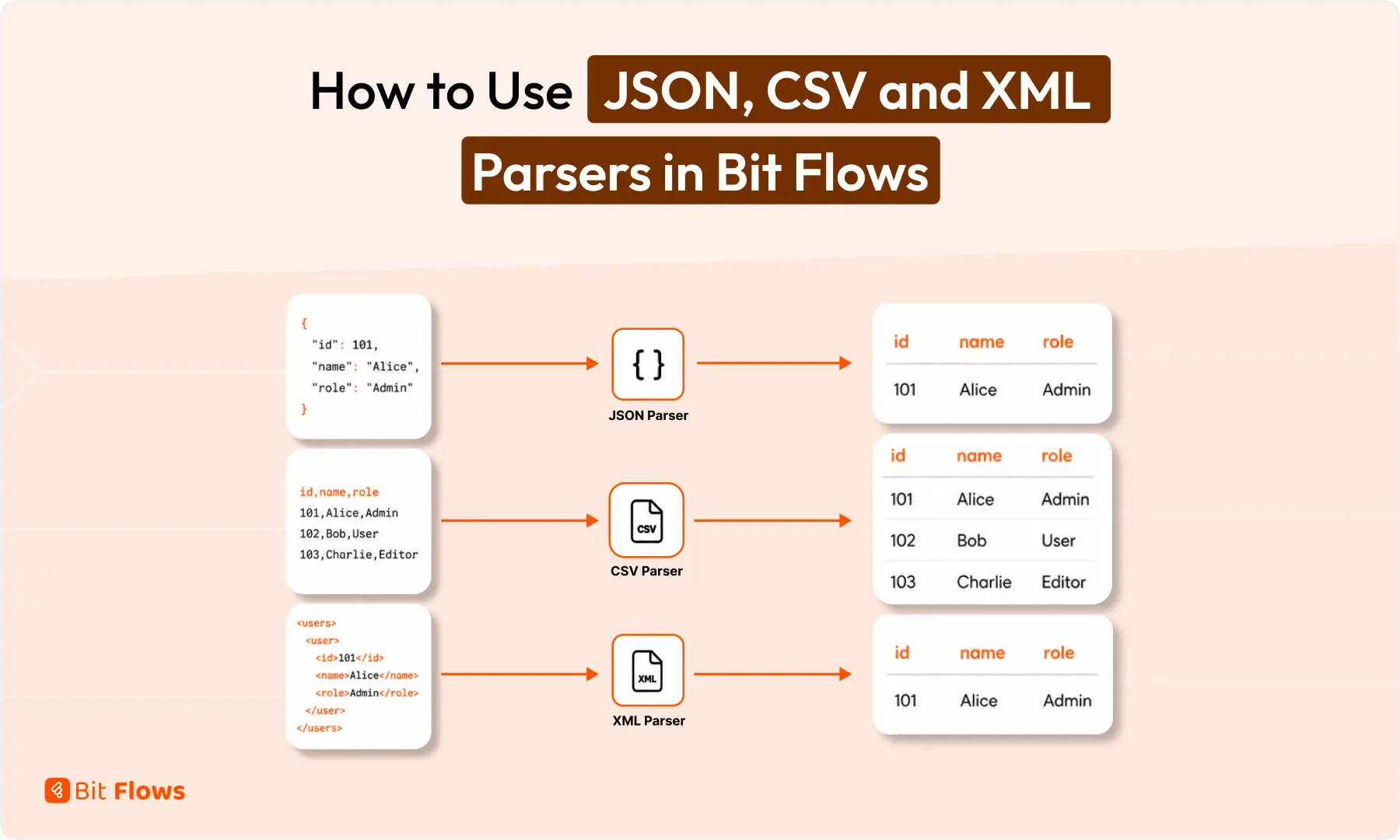
Los datos brutos no están listos para la automatización hasta que su flujo de trabajo pueda leerlos.
Un webhook puede enviar detalles de pedidos como JSON. Un informe puede llegar como filas CSV. Una API más antigua puede devolver datos de productos en XML.
Bit Flows incluye herramientas de análisis sintáctico integradas para leer estos formatos y convertirlos en campos bien estructurados. A continuación, puedes asignar los valores a Google Sheets, WooCommerce, herramientas de CRM, aplicaciones de correo electrónico, Slack, Telegram, AI Agent o cualquier otro paso de tu flujo de trabajo.
Respuesta rápida: Los analizadores de JSON, CSV y XML ayudan a Bit Flows a leer datos sin procesar procedentes de webhooks, API, informes y fuentes de datos. Una vez analizados, los datos quedan disponibles como campos independientes. A continuación, puedes asignar esos campos a Google Sheets, WooCommerce, sistemas CRM, correos electrónicos, Slack, Telegram, AI Agent u otros pasos del flujo de trabajo.
Los analizadores sintácticos son herramientas de Bit Flows que leen datos estructurados y los hacen utilizables dentro de un flujo de trabajo. Actualmente, Bit Flows incluye tres herramientas de análisis sintáctico:
Cada analizador está hecho para un formato de datos diferente. El objetivo es simple: tomar datos crudos, extraer los valores y usar esos valores en el siguiente paso del flujo de trabajo.

Por ejemplo, si un webhook envía datos del cliente, puedes analizar el nombre del cliente, el correo electrónico, el ID del pedido y el estado del pago. Luego, puedes enviar esos valores a una hoja de cálculo, CRM, correo electrónico o aplicación de notificaciones.
Necesitas un analizador cuando los datos llegan como un bloque crudo, no como campos separados.
Por ejemplo, un webhook entrante puede enviar la carga útil completa del pedido en un único cuerpo JSON. Una API puede devolver detalles del producto dentro de etiquetas XML. Un archivo CSV puede contener muchas filas que deben procesarse una por una.
Normalmente no necesitas un analizador cuando la aplicación anterior ya envía campos limpios, como nombre, correo electrónico, teléfono y mensaje.
La mayoría de los flujos de trabajo de automatización de WordPress dependen del mapeo de campos.
Si un formulario envía campos limpios, el mapeo es fácil. Pero las respuestas de la API, las cargas útiles de los webhooks, los feeds y los archivos exportados a menudo vienen en formatos que deben procesarse primero.
Un analizador te evita tener que escribir código personalizado para la extracción de datos sencillos. Con Bit Flows, puedes analizar los datos directamente en el generador visual de flujos de trabajo y utilizar el resultado en nodos posteriores.
En Parser JSON lee datos JSON y los convierte en campos de flujo de trabajo. JSON es común en APIs, webhooks, aplicaciones SaaS y respuestas de aplicaciones personalizadas. Si trabajas con datos de API modernos, este analizador se usará a menudo.
{
"order_id": 5821,
"customer_name": "Sarah Khan",
"email": "sarah@example.com",
"payment_status": "pagado"
}
Tras el análisis, Bit Flows puede utilizar cada valor por separado:
orden_idnombre_clientecorreo electrónicoestado_de_pago
Bit Flows recibe los datos del pedido a través de un webhook. El analizador JSON extrae los valores. Y ahora cada dato se puede asignar por separado.
En Analizador CSV lee datos separados por comas y convierte filas en campos estructurados. CSV es común en listas de clientes potenciales, informes exportados, hojas de productos, datos de reservas y registros masivos.

Tras el análisis, Bit Flows puede leer valores como:
identificaciónnombredepartamentoestado
Bit Flows lee un archivo CSV de origen, analiza las filas y utiliza un iterador para procesar cada una de ellas. A continuación, cada contacto se puede añadir a un CRM o enviarse a Google Sheets.
En Analizador XML lee datos XML y extrae valores de las etiquetas. XML todavía se usa en fuentes de productos, APIs heredadas, sistemas de reservas, sistemas de pago y plataformas empresariales.
303
Teclado
45
79,00
Tras el análisis sintáctico, Bit Flows puede utilizar:
identificaciónnombreaccionesprecio
Una API externa devuelve datos en formato XML. Bit Flows analiza la respuesta XML y asigna los valores a la siguiente acción.
Elige el analizador en función de cómo estén estructurados tus datos entrantes. El analizador correcto convierte los datos brutos en campos limpios, para que puedas mapearlos al siguiente paso del flujo de trabajo sin limpieza manual.
| Tipo de dato | Usa este analizador | Fuente común | Siguiente mejor paso |
|---|---|---|---|
| JSON | Parser JSON | Webhooks, APIs, aplicaciones SaaS, aplicaciones personalizadas | Mapear campos a CRM, Hojas de cálculo, Gmail, Agente de IA o Condiciones |
| CSV | Analizador CSV | Informes, hojas de cálculo, exportaciones, listas de clientes potenciales | Usar Iterador para procesar cada fila |
| XML | Analizador XML | Feeds de productos, APIs antiguas, sistemas de reservas | Extraer etiquetas, luego actualizar WooCommerce, Hojas de cálculo o solicitudes API |
Una forma rápida de elegir:
{ } o [ ] generalmente necesita Parser JSON<product> o <user> necesidades Analizador XMLLa configuración es sencilla.
Una vez que el analizador crea campos limpios, puedes usar esos campos en acciones, condiciones, enrutadores, indicaciones de agente de IA, correos electrónicos, registros y conexiones de aplicaciones.
En el caso de archivos CSV con varias filas o matrices JSON con varios elementos, añade un iterador después del analizador. Esto permite que Bit Flows procese una fila o un elemento cada vez.
Los analizadores Bit Flows resultan útiles cuando tu flujo de trabajo necesita procesar datos estructurados antes de enviarlos a otro lugar. Entre los casos de uso más habituales se incluyen:
Los problemas del analizador suelen provenir de una asignación de entrada incorrecta, un formato de datos no válido o la falta de manejo de bucles. Utilice las comprobaciones a continuación para encontrar la causa más rápido y corregir el flujo de trabajo antes de enviar los datos al siguiente paso.
| Problema | Razón probable | Qué revisar |
|---|---|---|
| La salida del analizador está vacía | Campo de entrada incorrecto seleccionado | Comprueba si mapeaste el cuerpo o el campo de respuesta sin procesar |
| El analizador JSON falla | Formato JSON inválido | Comprueba comas, comillas o corchetes que falten |
| Las filas CSV no son detectadas | Problema de cabecera o delimitador | Comprobar si la primera fila contiene nombres de campos |
| Faltan valores XML | Estructura de etiqueta incorrecta | Verificar etiquetas anidadas y elementos repetidos |
| Solo se procesa un artículo | Se necesitan múltiples filas o elementos para iterar | Agregar Iterador después del analizador |
| Los datos parecen correctos, pero la siguiente aplicación falla. | Mapeo de campo incorrecto | Revisa los valores mapeados en los registros del flujo de trabajo. |
Las herramientas de análisis son pequeñas, pero resuelven un problema común de automatización. Convierten datos desordenados de webhooks, APIs, feeds e informes en campos que tu flujo de trabajo puede utilizar realmente.
Utiliza el analizador JSON para las cargas útiles de las API y los webhooks. Utiliza el analizador CSV para los registros basados en filas. Utiliza el analizador XML para los feeds y los sistemas más antiguos. A continuación, puedes enrutar, filtrar, asignar, resumir, notificar o enviar los datos a cualquier lugar donde tu flujo de trabajo Bit Flows los necesite.
Un analizador de Bit Flows lee datos estructurados y los convierte en campos de flujo de trabajo utilizables. Puedes utilizar los analizadores para extraer valores de datos JSON, CSV o XML y asignarlos al siguiente paso.
Utiliza JSON Parser cuando tu flujo de trabajo reciba datos de webhooks, API, aplicaciones SaaS o respuestas de aplicaciones personalizadas. Es ideal para extraer valores como el ID del pedido, el correo electrónico del cliente, el estado del pago o los detalles del producto.
Usa el Analizador CSV cuando necesites procesar datos basados en filas de informes, hojas de cálculo, exportaciones, listas de clientes potenciales o registros masivos. Para múltiples filas, puedes usar el Iterador para procesar cada registro uno por uno.
Use el Analizador XML cuando su flujo de trabajo reciba datos basados en etiquetas de fuentes de productos, API heredadas, sistemas de reservas o plataformas empresariales. Extrae valores de las etiquetas XML para que pueda utilizarlos en pasos posteriores del flujo de trabajo.
Sí. Bit Flows puede recibir datos de webhooks y procesarlos mediante el analizador JSON, el analizador CSV o el analizador XML, en función del formato de los datos. Tras el análisis, puedes enviar los valores a Google Sheets, WooCommerce, herramientas de CRM, aplicaciones de correo electrónico o un agente de IA.
Utiliza el iterador después del analizador sintáctico. El iterador permite a Bit Flows procesar cada fila, registro o elemento por separado, lo cual resulta útil para archivos CSV, matrices JSON, fichas de productos y listas masivas de clientes potenciales.
Sí. Después de analizar, puedes usar los campos extraídos en Condiciones/Filtros o en el Enrutador. Por ejemplo, puedes verificar el estado del pago, la fuente del prospecto, el departamento, el nivel de existencias o el tipo de ticket antes de enviar los datos a la siguiente aplicación.
Sí. Puedes enviar valores analizados al agente de IA de Bit Flows para la elaboración de resúmenes, el enrutamiento, la clasificación, la generación de contenidos o el análisis de asistencia. Esto resulta útil cuando los datos sin procesar de webhooks o API necesitan un procesamiento basado en IA.
Los datos sin procesar pueden estar incompletos, ser inválidos o tener un formato diferente al esperado. Realiza pruebas con datos de muestra reales y revisa los registros de Bit Flows para comprobar qué se ha recibido, analizado y enviado al siguiente paso.






 ES
ES  EN
EN  DE
DE  NL
NL  IT
IT