WordPress kann Leads generieren, Bestellungen verarbeiten und ein Online-Geschäft führen. Doch die Vertriebsarbeit sitzt oft woanders. Leads bleiben in Formularfeldern, Verkaufschancen wandern in Tabellenkalkulationen und Nachfassaktionen hängen von persönlichen Erinnerungen ab.
Bit CRM bringt diese Teile in WordPress. Es ist ein verkaufsorientiertes CRM, das Leads, Kontakte, Unternehmen, Deals, Produkte, Rechnungen, Aktivitäten, Zahlungen, Workflows und Kundenzugang in einem System verbindet.
Für Bit Flows-Nutzer geht die Anbindung noch einen Schritt weiter. Bit CRM kann direkt innerhalb von Bit Flows als Trigger- und Aktions-App eingesetzt werden. Dadurch können CRM-Ereignisse umfassendere Automatisierungen auslösen und andere WordPress-Plugins, SaaS-Anwendungen, KI-Tools sowie Unternehmenssysteme können CRM-Daten erstellen oder aktualisieren.
In dieser Übersicht wird erläutert, wie diese Funktionen zusammenwirken und wie Bit Flows das CRM erweitert.
Bit CRM ist ein WordPress Sales CRM, das entwickelt wurde, um die Customer Journey von der ersten Anfrage bis zur Rechnungszahlung und der fortlaufenden Kundenbetreuung zu verwalten.
Seine sechs Kernmodule sind Leads, Kontakte, Unternehmen, Deals, Produkte und Rechnungen. Es beinhaltet außerdem Aufgaben, Besprechungen, Anrufe, E-Mail-Verlauf, Notizen, Dateien, Links, Tags, benutzerdefinierte Felder, Workflows, WooCommerce-Synchronisation, mehrere Währungen, Personalberechtigungen, ein Kundenportal und einen MCP-Server.
Bit CRM verwaltet die Vertriebsdaten. Bit Flows bindet diese Daten in einen umfassenderen Automatisierungsprozess ein. Gemeinsam können sie Leads erfassen, weiterleiten, CRM-Aktivitäten anlegen, externe Anwendungen koordinieren, KI-Entscheidungen einbinden und das Vertriebsteam auf dem Laufenden halten, ohne das CRM aus WordPress herausnehmen zu müssen.
Bit CRM ist ein WordPress-nativer Kundenbeziehungsmanagement-Plugin auf strukturierte Vertriebsarbeit aufgebaut. Es hält den Interessenten, Kunden, das Unternehmen, die Verkaufschance, die Produktaufschlüsselung, die Rechnung, die Zahlung und die Nachfassaktivität miteinander verbunden.
Eine neue Anfrage kann als Lead erfasst werden. Nach der Qualifizierung kann der Lead in einen Kontakt und ein Unternehmen umgewandelt werden, wobei gleichzeitig optional ein Verkauf (Deal) erstellt werden kann. Produkte können diesem Verkauf hinzugefügt werden, um dessen kommerziellen Wert zu berechnen. Sobald der Verkauf bereit ist, Angebot kann zu Rechnung werden dass der Kunde durch erhält und bezahlt WooCommerce Kasse.
Nach der Zahlung bleiben dieselben Aufzeichnungen für spätere Angebote, Kommunikation, Aktivitäten, Rechnungen und Portalzugang verfügbar. Unternehmen können sie neben der Website, Formularen, dem Shop und verbundenen WordPress-Plugins verwalten, die sie bereits nutzen.
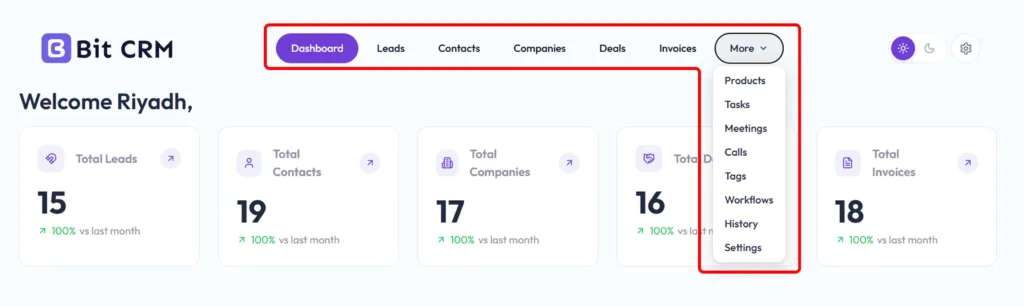
Bit CRM deckt die Kernaufzeichnungen und unterstützenden Werkzeuge ab, die für einen vollständigen WordPress-Verkaufsprozess erforderlich sind:
Die Hauptstärke von Bit CRM liegt darin, wie Informationen den gesamten Verkaufsprozess durchlaufen.
A prospect can be added manually, imported from CSV, created from a connected form, or passed into Bit CRM through automation. The lead record can store source, status, owner, company details, addresses, currency, tags, and other qualification data.
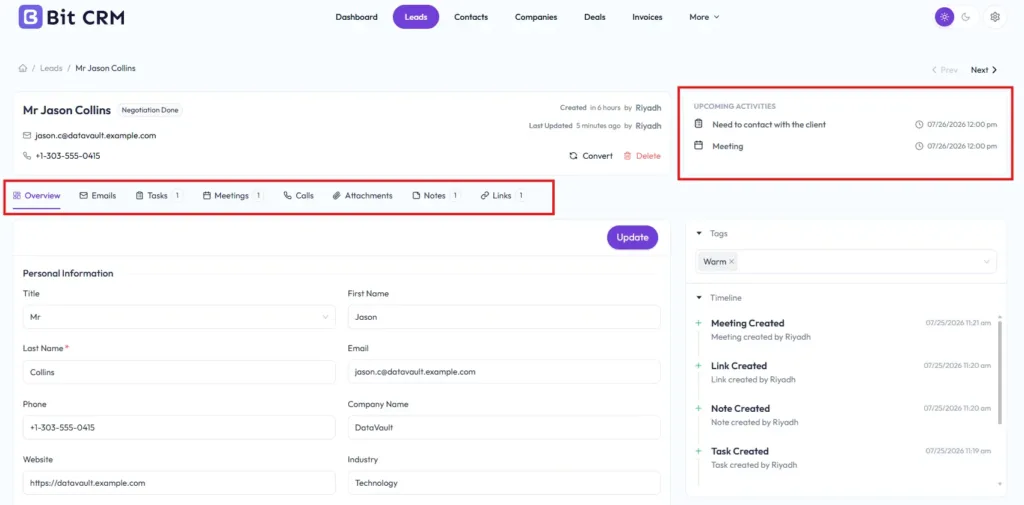
The salesperson can also connect emails, tasks, meetings, calls, notes, attachments, and useful links. Upcoming activities show what needs attention next, while the timeline shows what has already happened.
Once the prospect is qualified, Bit CRM can convert the lead into a contact and company. If there is already a real opportunity, it can create a deal during the same conversion.
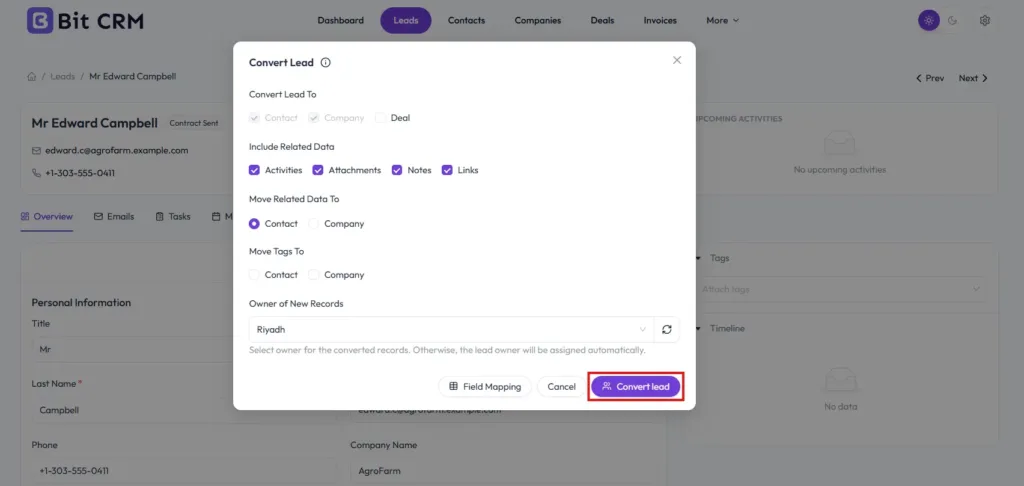
Conversion mapping controls how standard and custom lead fields move into the new records. Ownership, tags, activities, notes, files, and links can also be transferred. This keeps the sales context intact instead of forcing the team to copy information manually.
Deals can be managed in a standard list or on a drag-and-drop Kanban board. Bit CRM provides a complete sales pipeline with unlimited customizable stages. Each stage can have its own name, color, order, probability, and Open, Closed Won, or Closed Lost category.
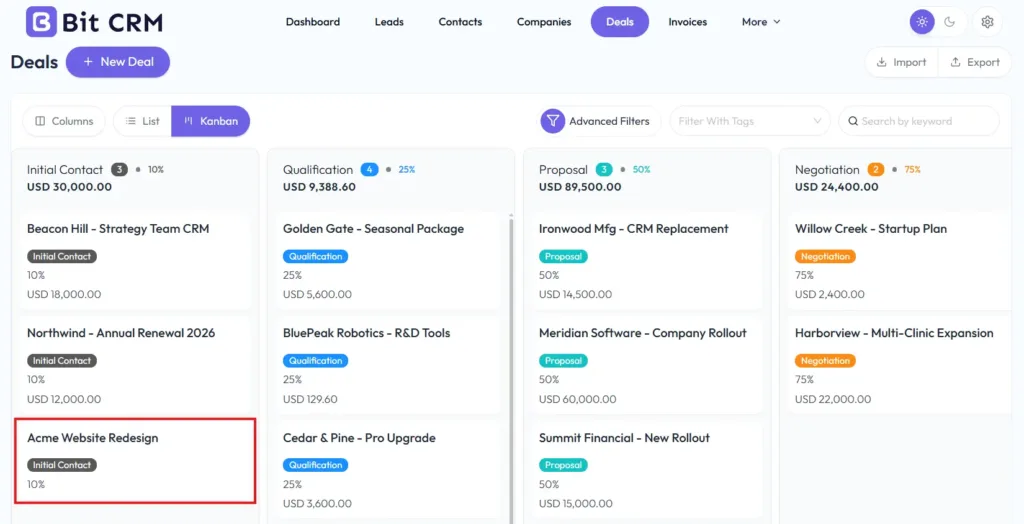
A deal can connect a contact, company, owner, source, type, currency, amount, start date, expected close date, activities, products, and invoices. The team can see both its position and the information behind it.
Bit CRM includes a reusable product catalogue for physical goods and services. A product can store a name, SKU or code, type, manufacturer or brand, description, unit price, cost price, tax rate, status, tags, and custom information.
Products can come from the local CRM catalogue or directly from WooCommerce. When adding a product to a deal, the salesperson can change its description, price, quantity, discount, and tax for that specific opportunity without changing the original product.
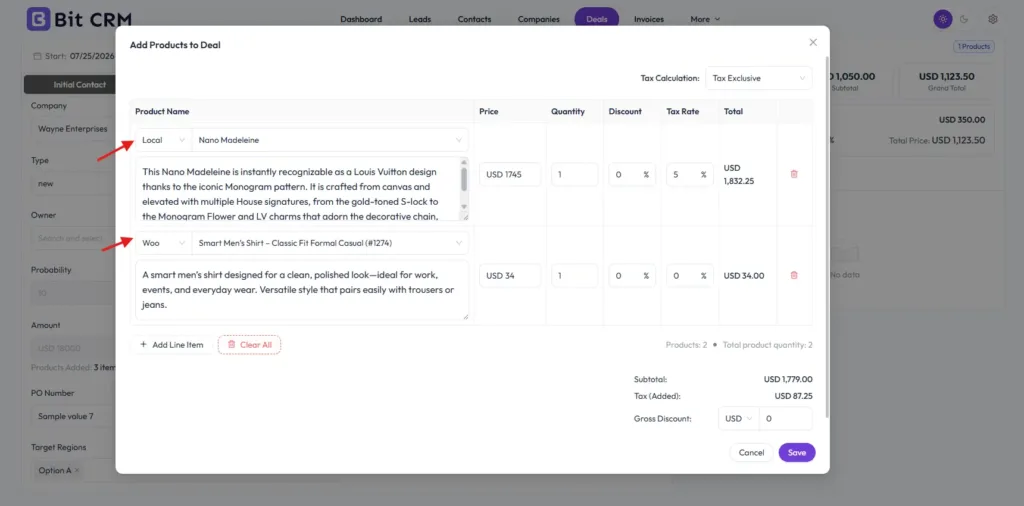
Bit CRM calculates line totals, subtotal, added tax, gross discount, and grand total. The calculated amount can still be adjusted when the agreed deal value needs to differ from the product breakdown.
Invoices are created from deals, so the customer, company, currency, products, and opportunity remain connected. Line items can use local products, WooCommerce products, or custom entries.
Die invoice builder supports the business logo, invoice number and prefix, dates, payment terms, sender and billing details, formatted content, notes, terms, discounts, taxes, and a live preview. The customer can receive the invoice by email with a PDF and access it through a public link or the client portal.
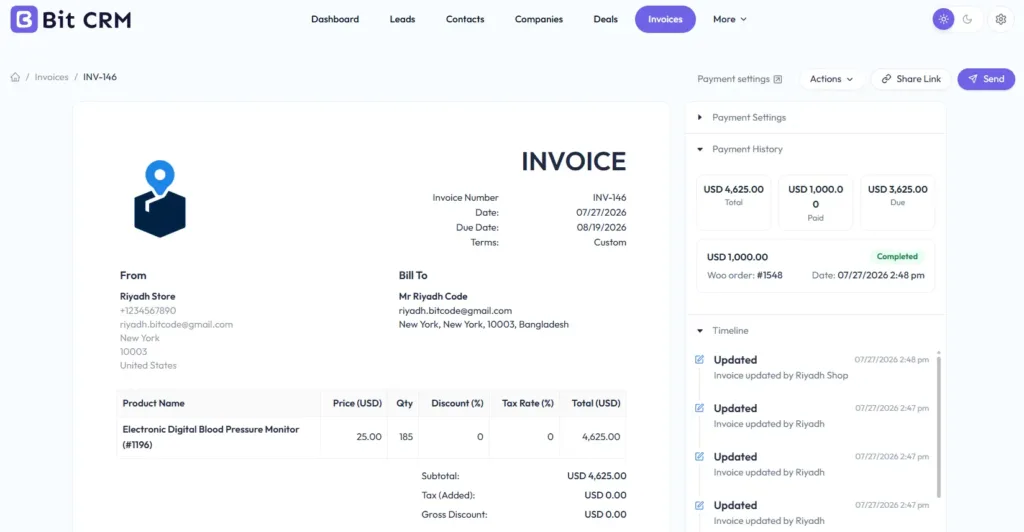
Payments are completed through WooCommerce checkout using the gateways enabled on the store. A business can accept the full amount or allow several partial payments with a fixed or percentage-based minimum. Payment History records each transaction, recalculates the remaining balance, and moves the invoice through Draft, Sent, Partially Paid, Paid, or Overdue status.
Bit CRM includes separate tools for tasks, meetings, and calls. Each activity can be created globally, from a related record, or through a workflow.
Tasks support an assignee, due date, priority, details, status, notes, and attachments. Meetings add scheduled dates and times. Calls provide a clear record of phone follow-ups, responsibility, and status. Global activity lists help team members review work across the CRM without opening every lead or deal.
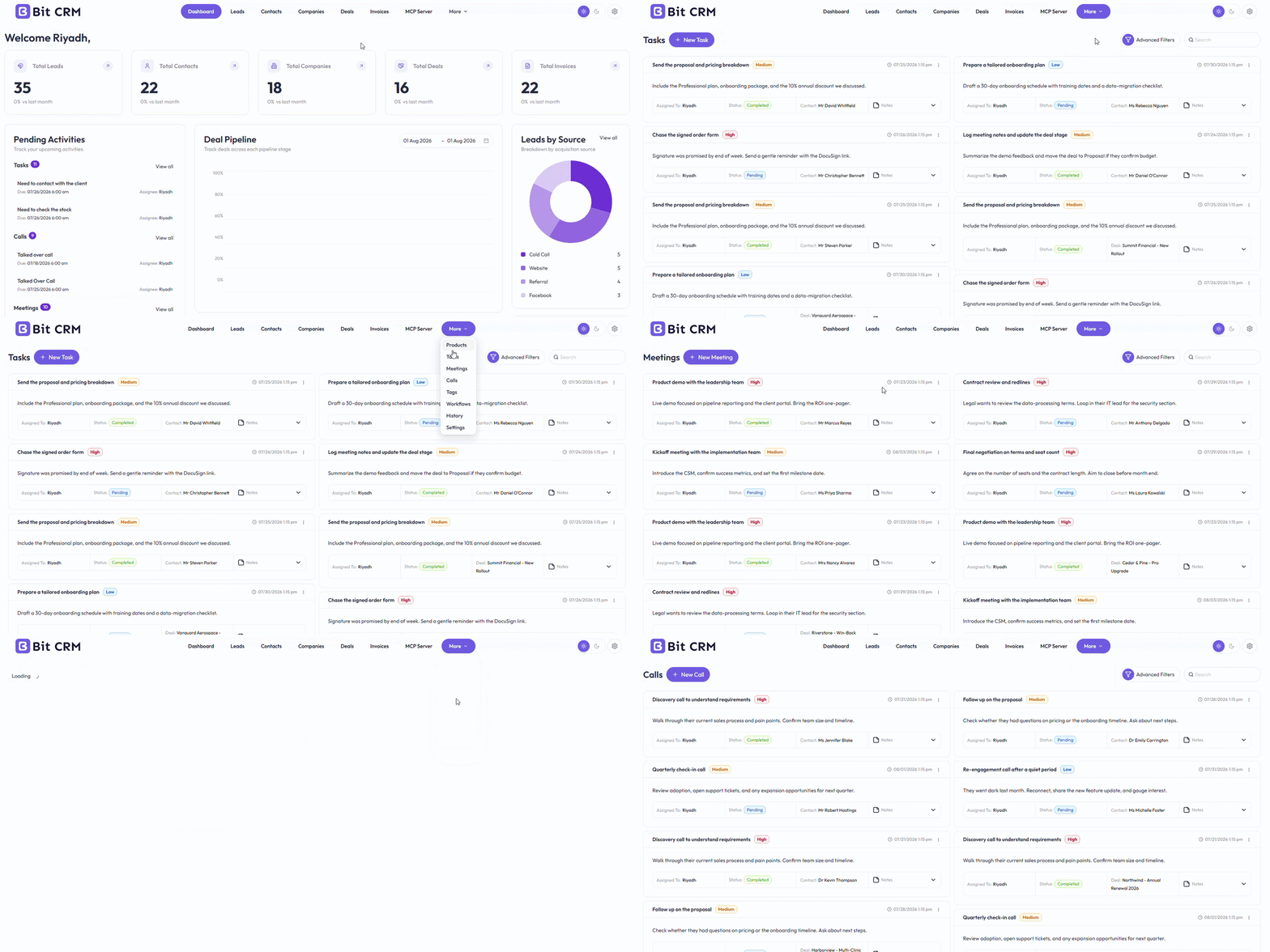
Relevant records can also hold email conversations, notes, files, and external links such as proposals, documents, or scheduling pages. The activity timeline records changes chronologically, while CRM-wide History gives administrators a broader view across modules and users.
Tags provide another practical layer of organization. They are module-specific, searchable, and usable in filters and workflows. A tag can be added manually, transferred during conversion, assigned from WooCommerce purchase activity, or managed automatically.
Bit CRM includes a visual workflow builder for automation that stays close to the CRM. A workflow can begin from supported module events, tag changes, or deal-stage changes. It can evaluate If and If-Else conditions, follow branches, wait for a delay, and then perform CRM actions.
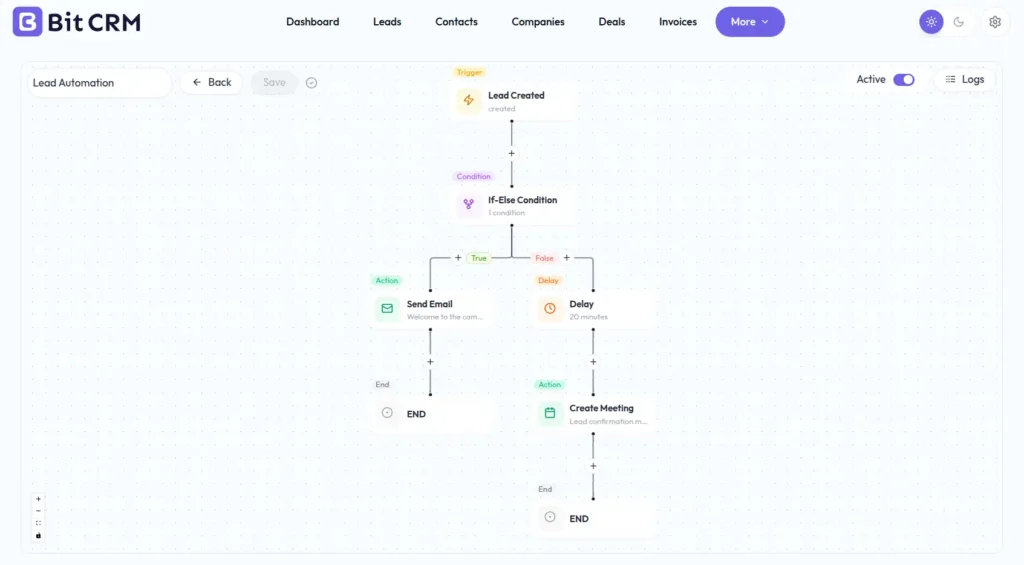
Supported actions include creating tasks, calls, and meetings; adding notes; sending emails; adding or removing tags; updating fields; converting leads; moving records to the Recycle Bin; running supported invoice actions; and sending webhooks. Logs show when a workflow ran, its status, and the steps executed.
This native builder is useful when the process mainly concerns Bit CRM records. For example, a deal moving to a new stage could create a follow-up task, attach a tag, and send an email.
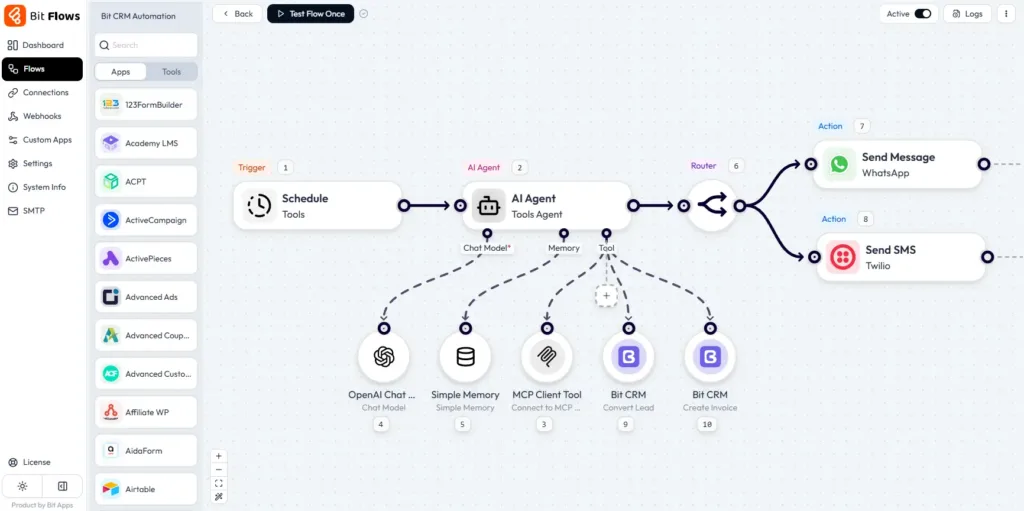
Bit Flows expands the process beyond the CRM. Bit CRM can act as both a trigger and an action in Bit Flows. Events such as a new or updated CRM record, a tag change, or a deal-stage update can start a broader workflow. A flow can also create or update supported Bit CRM records as part of a process that begins elsewhere.
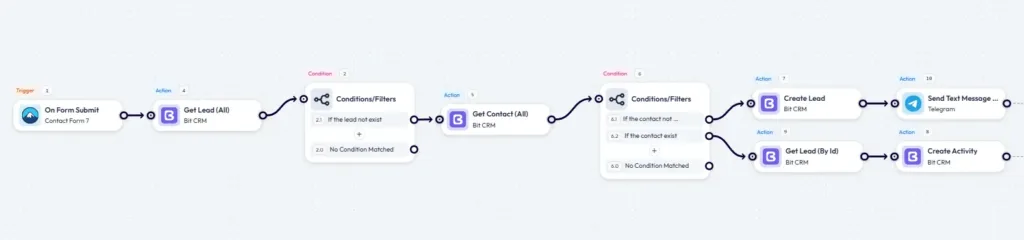
Bit Flows adds routers, conditions, delays, schedules, repeaters, iterators, date tools, data parsers, API requests, webhooks, AI Agent, Human in the Loop, and MCP Client. Detailed logs, failure notifications, and task re-execution help teams monitor longer automations.
Bit CRM manages sales data and CRM-specific processes. Bit Flows coordinates work across WordPress plugins, external apps, APIs, and AI tools.
For example, a form submission could start a Bit Flows workflow. The flow could clean the submitted data, use AI to classify the enquiry, route it by service or location, create the lead in Bit CRM, assign a follow-up task, notify the correct team, and record selected details in another business system. If approval is required before an important change, Human in the Loop can pause the process for review.
Bit CRM includes an MCP server. MCP, or Model Context Protocol, provides a structured way for compatible AI clients and agents to use approved tools from another system.
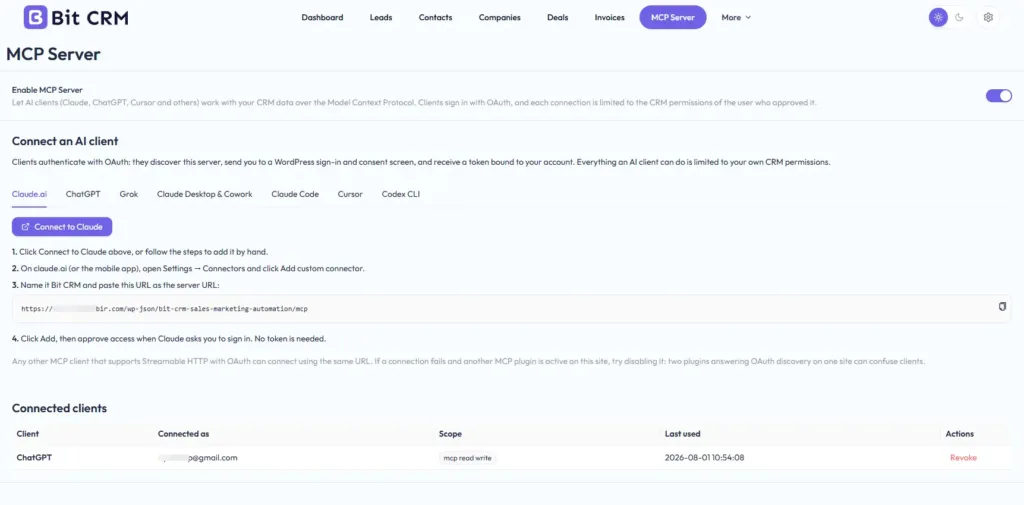
The Bit CRM MCP server currently provides 57 tools for supported CRM operations. These tools cover finding and managing leads, contacts, companies, deals, products, invoices, tasks, calls, meetings, tags, workflows, and related CRM information.
This means an AI client can work with structured CRM tools instead of relying only on copied text. Depending on the connected client and available tools, a user could ask it to find a contact and summarize the related account, prepare a lead from supplied information, create a follow-up activity, update supported records, or build an invoice with line items.
Bit CRM provides the MCP Server, while Bit Flows includes an MCP Client inside its AI Agent. When connected, the Bit Flows agent can use the CRM tools exposed through the server as part of a larger workflow. The native Bit CRM integration remains useful for predictable trigger-and-action automation, while MCP gives an AI agent a tool-based way to decide which supported CRM operation is needed.
Bit CRM connects directly with WooCommerce. When an order is created or updated, customer details can be matched to CRM contacts by email. Contacts can also receive tags based on purchased products or coupon codes. WooCommerce products remain available for deals and invoices without being recreated in the local product catalogue.
Invoice payments use the store checkout and active payment gateways, while Bit CRM updates the balance, payment history, and status.
For email, each CRM user can configure a separate inbox through IMAP. Matching messages can appear with the relevant CRM records. Bit SMTP handles outgoing CRM, workflow, and invoice emails.
Other Bit Apps cover different stages of the customer journey. Bit Form captures enquiries, Bit Integrations moves WordPress data between supported platforms, Bit Flows handles multi-step automation, Bit Social supports content distribution, and Bit Assist provides customer communication options. Bit CRM keeps the resulting sales records organized.
Die Bit CRM client portal gives each approved contact a separate login without exposing the WordPress dashboard. Administrators decide which portal areas and actions are available to that client.
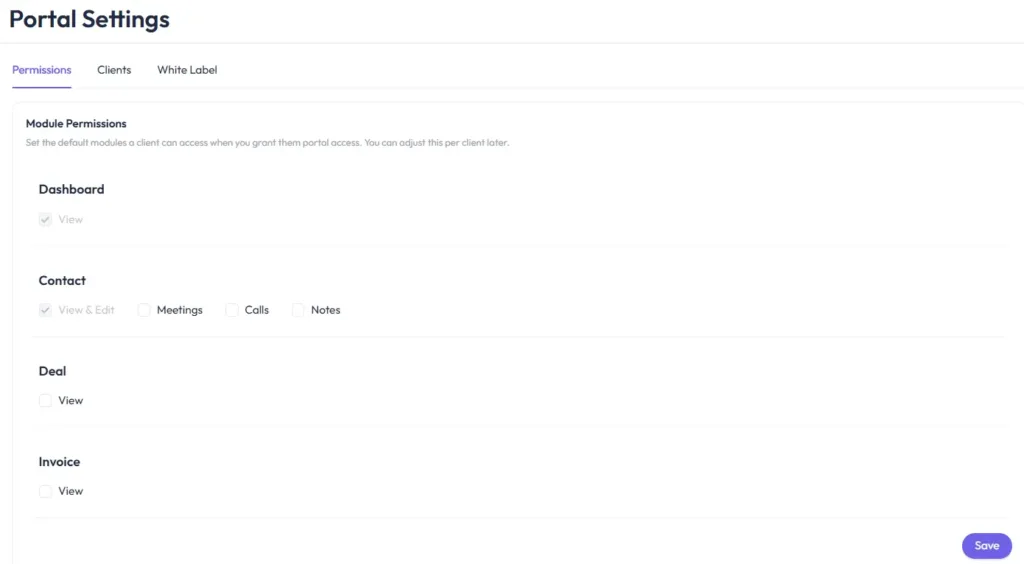
Access can include the portal dashboard, contact profile, calls, meetings, notes, deals, and invoices. Field-level controls determine which contact and deal fields the client may view or edit. A customer might update a phone number or billing address while ownership, probability, internal notes, and other private CRM fields remain hidden.
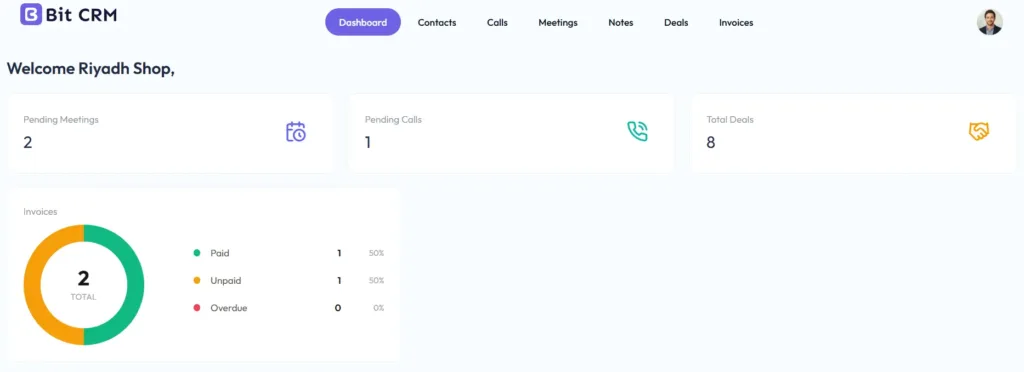
Clients can review shared deals, find invoices, download documents, and follow invoice links to WooCommerce checkout. Portal branding can replace Bit CRM branding with the business name and logo.
This suits agencies, service providers, consultants, and B2B businesses that need to share account information without exposing internal sales data.
Leads, Contacts, Companies, Deals, and Products can each have their own custom fields, sections, ordering, and one-column or two-column layouts. Available field types include text, multiline text, number, select, multi-select, radio, and other supported formats. This allows each module to reflect the information the business actually collects.
Team access is also granular. Administrators can give existing or new WordPress users access to Bit CRM, then control their ability to view, create, update, delete, import, or export records. Settings for modules, workflows, email, integrations, currency, data, and CRM users can be restricted separately.
Multi-currency support allows a company or contact currency to pass into a deal and then its invoice. A fixed home currency provides the reporting base, with manually entered exchange rates used for conversion.
For data management, supported modules provide CSV import and export. Transfer history records import and export activity. Deleted records can be restored from the Recycle Bin before the trash is emptied. Administrators can also control how long workflow logs are retained.
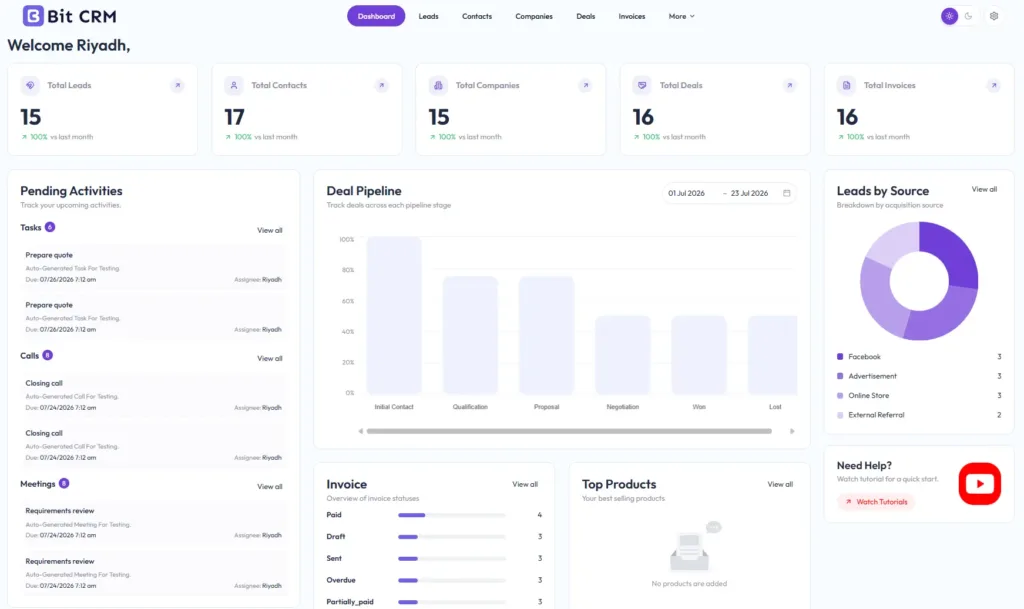
The dashboard provides a quick view of total leads, contacts, companies, deals, and invoices. Pending Activities brings upcoming tasks, calls, and meetings together with their dates and assigned users.
Additional reports cover the deal pipeline, leads by source, invoice status, and top products based on paid CRM invoices. These views help the team find work that needs attention without opening each module first.
Bit CRM is a practical fit for:
Bit CRM is not positioned as a mass email marketing platform, inventory system, complete accounting package, public booking tool, or calling service. Its main purpose is sales CRM. Businesses that need those other functions can connect dedicated tools while keeping the customer and sales process in Bit CRM.
Bit CRM turns WordPress into a connected sales workspace. It keeps the lead, customer, company, opportunity, product calculation, invoice, payment, communication, and follow-up history related from beginning to end.
Its native workflows handle repeatable CRM work. The Bit Flows integration extends that data into broader business automation with cross-app actions, advanced logic, AI Agent, human approval, and MCP Client support. The Bit CRM MCP server adds another path for compatible AI clients and agents to work with supported CRM tools.
The result is a structured WordPress sales system that can grow with the business, team, and connected tools.
Ja. Bit CRM läuft im WordPress-Adminbereich und verwaltet Leads, Kontakte, Unternehmen, Deals, Produkte, Rechnungen, Vertriebsaktivitäten, Workflows, Teamzugriff und Kunden-Zugriff.
Ja. Bit CRM ist als Trigger- und Aktions-App mit Bit Flows verbunden. CRM-Ereignisse können Workflows auslösen, und unterstützte CRM-Datensätze oder -Aktivitäten können im Rahmen umfassenderer Bit Flows-Automatisierungen angelegt oder aktualisiert werden.
Die Workflows von Bit CRM konzentrieren sich auf CRM-Ereignisse und -Aktionen wie Datensatzaktualisierungen, Tags, Aktivitäten, E-Mails, Lead-Konvertierungen und Webhooks. Bit Flows bietet darüber hinaus umfangreichere App-Anbindungen, erweiterte Logik-Tools, Zeitplanung, Parser, API-Anfragen, einen KI-Agenten, manuelle Freigaben, den MCP-Client sowie Funktionen zur Workflow-Wiederherstellung.
Ja. Bit CRM stellt einen MCP-Server mit 57 Tools für unterstützte CRM-Suchen und Verwaltungsaktionen bereit. Kompatible KI-Clients und -Agenten können diese Tools nach Konfiguration der erforderlichen Verbindung nutzen.
Ja. Es kann WooCommerce-Kunden mit CRM-Kontakten per E-Mail abgleichen, produkt- oder gutscheinbasierte Tags anwenden, WooCommerce-Produkte in Deals und Rechnungen verwenden und Rechnungszahlungen über den Shop-Checkout einziehen.
Ja. Bit CRM kann Rechnungszahlungen über den WooCommerce-Checkout senden. Unternehmen können volle Zahlungen akzeptieren oder mehrere Teilzahlungen mit einem festen oder prozentualen Mindestbetrag zulassen.
Ja. Administratoren können einzelnen Kontakten Zugriff auf ein separates Kundenportal gewähren. Berechtigungen steuern, welche Dashboard-Bereiche, Aktivitäten, Deals, Rechnungen, Kontaktfelder und Deal-Felder jeder Kunde einsehen oder bearbeiten kann.
Bit CRM ist in erster Linie ein Vertriebs-CRM. Es verwaltet Leads, Kontakte, Unternehmen, Deals, Vertriebsaktivitäten, Produkte, Rechnungen, Zahlungen und Kundenbeziehungen. Marketingplattformen können angebunden werden, wenn Unternehmen Kampagnen, Newsletter oder eine breitere Marketingautomatisierung benötigen.




 DE
DE  EN
EN  ES
ES  NL
NL  IT
IT  PT
PT  JA
JA