Power Automate alternatives become worth considering when the way you automate work no longer aligns with how Microsoft licenses, hosts, or builds those workflows.
That does not mean Power Automate is a bad tool. If your company runs on Outlook, SharePoint, Teams, Dataverse, Excel, and other Microsoft services, staying inside Power Platform can be the easiest route. Microsoft 365 licenses include limited Power Automate rights for cloud flows using standard connectors, while Power Automate Premium adds premium and custom connectors plus attended desktop RPA. Microsoft currently lists Premium at $15 per user/month, Process at $150 per bot/month, and Hosted Process at $215 per bot/month, all paid yearly in US dollars.
The decision gets more interesting when most of your tools sit outside Microsoft, WordPress or WooCommerce starts the workflow, you want to self-host, AI agents are becoming part of the process, or you need a pricing model based on executions instead of users or individual actions. That is where this comparison starts.
The right Power Automate alternative depends on where your workflow starts and what kind of automation you need.
| Gereedschap | Geschikt voor | Hosting / deployment | Gratis optie | Visuele bouwer | Webhooks / API |
| Bit Flows | WordPress and WooCommerce automation | Self-hosted WordPress | Ja | Node-based visual canvas | Sterk: incoming/outgoing webhooks, HTTP, API Request, Custom App |
| Zapier | Beginners and broad SaaS automation | Wolk | Ja | Linear workflow editor | Yes; advanced webhook/API use is mainly paid |
| Maak | Visual, multi-branch cloud workflows | Wolk | Yes, 1,000 credits/month | Scenariocanvas | Sterk: webhooks, HTTP, API |
| n8n | Developers, APIs, AI agents, self-hosting | Cloud of self-hosted | Editie Gemeenschap | Knooppuntcanvas | Zeer sterk: webhooks, REST/API, custom code |
| Werkstukken | Open-source and self-hosted automation | Cloud of self-hosted | Yes + Community Edition | Visuele flow-bouwer | Sterk: webhooks, API, and custom pieces |
| Gumloop | AI-first workflows and agents | Wolk | Yes. 5,000 credits/month | Visual AI workflow canvas | Yes: API and workflow webhooks |
| Workato | Enterprise integration and governance | Cloud/enterprise | Trial | Recipe-based visual builder | Zeer sterk: HTTP, webhooks, APIs and API recipes |
| UiPath | Desktop RPA and legacy application automation | Cloud, desktop and enterprise deployments | Community plan | Visual RPA designer | Yes: APIs and integration capabilities |
| Pabbly Verbinden | Budget-friendly SaaS automation | Wolk | Ja | Linear workflow + routers | Yes: webhooks and API connections |
| Automation Anywhere | Enterprise desktop RPA | Cloud/enterprise | Editie Gemeenschap | Visual bot/process builder | Sterk: REST APIs, API Tasks and incoming webhooks |
I compared these Power Automate alternatives based on pricing, hosting, integrations, AI, workflow flexibility, debugging, and RPA capabilities.
Pricing and major feature claims were checked against official vendor sources in August 2026, with each tool positioned by where it fits best.
Beste voor: WordPress businesses, WooCommerce stores, agencies, and teams whose workflows begin inside WordPress.
Bit Flows solves a narrower problem than Zapier, Make, or Power Automate, and that is exactly where it becomes useful.
It runs as a self-hosted WordPress workflow automation plugin, but workflows do not have to start inside WordPress. A flow can begin with a WordPress event, form submission, WooCommerce event, plugin trigger, or data sent from an external app or system through a webhook, then continue through conditions, routers, loops, APIs, SaaS apps, AI tools, and approval steps. A lead workflow could be:
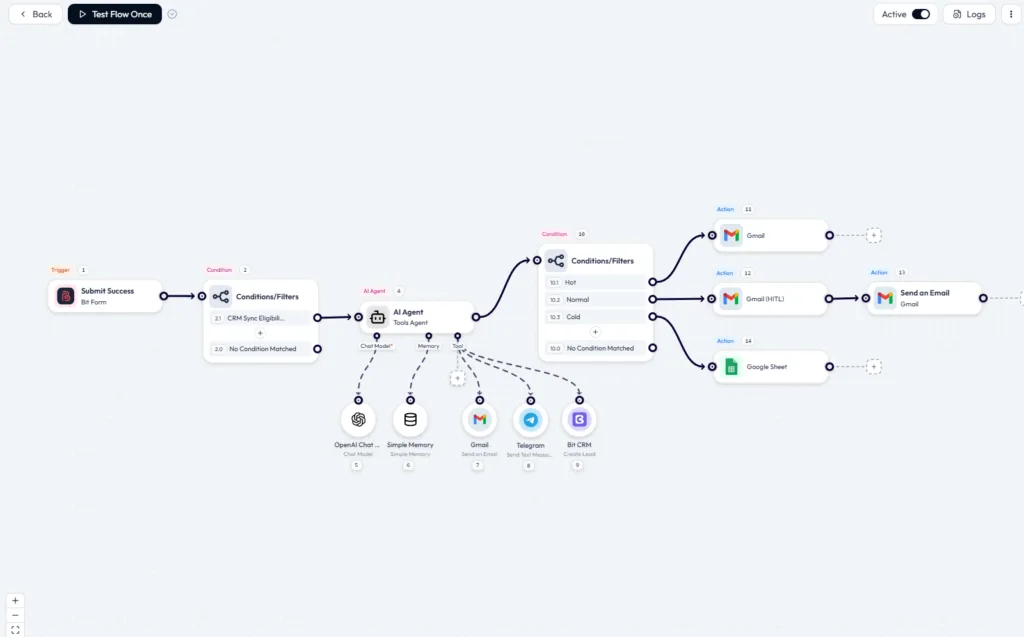
The current platform supports 390+ app integrations along with AI Agent, MCP Client, Human in the Loop, JSON/CSV/XML parsing, and cloud cron. That combination matters more once a workflow moves beyond a simple “trigger one app, update another” setup.
Bit Flows has a free plan which includes core workflow-building features with unlimited workflows, tasks, and steps, making it useful for testing whether Bit Flows fits your setup.
Pricing works differently from task-metered cloud platforms. Current plans start at $59 per year for one site, while a $159 one-site lifetime option is also available. Paid plans include unlimited workflows, tasks, and connections, so adding another action to a workflow does not create another billable task in the same way it can on task-based SaaS platforms.
Where Bit Flows fits well: For WordPress and WooCommerce businesses, Bit Flows can be a more affordable alternative to Power Automate, especially when workflows run frequently.
Main limitations: It does not replace Power Automate Desktop or enterprise RPA tools that control Windows and legacy desktop applications.
Beste voor: Teams that need to connect a large number of SaaS apps without building custom integrations.
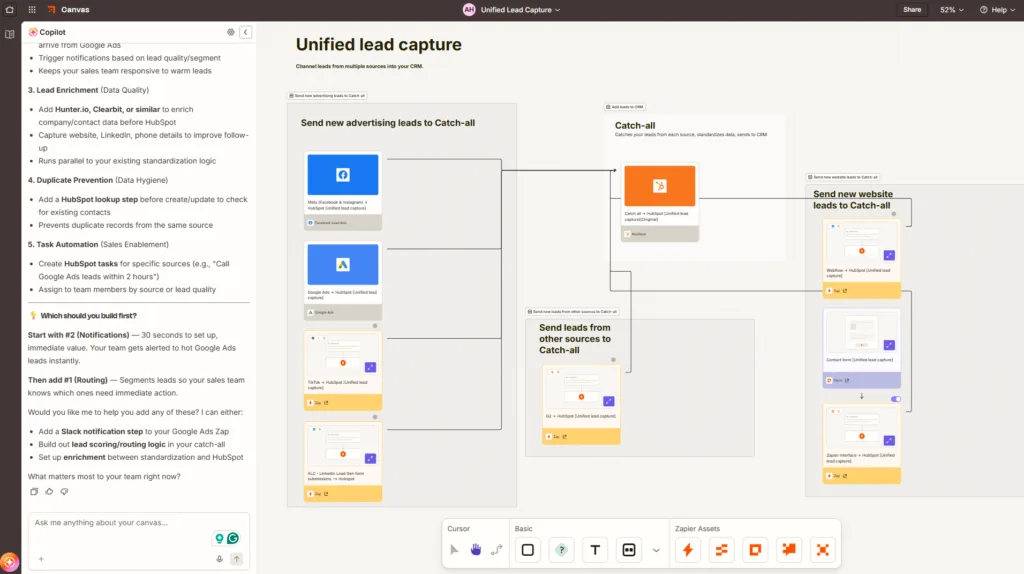
Zapier is a practical Power Automate alternative when your workflows span tools outside the Microsoft ecosystem. It currently supports 9,000+ apps, so there is a good chance a ready-made integration already exists for the CRM, marketing platform, support tool, or niche SaaS product you use.
The builder is simple to follow but can still handle multi-step automation through Paths, Filters, Formatter, webhooks, code steps, API requests, and AI steps. Copilot can also turn a plain-language description into a Zap outline and help add, edit, and configure steps as you build.
Pricing is where the tradeoff becomes clearer. Zapier Free includes 100 tasks per month, while Professional starts at $29.99/month billed for 750 tasks. Paid plans can continue running through pay-per-task billing after the included allowance is reached.
AI can increase usage faster. Since June 2026, AI by Zapier uses model-based task rates: Standard costs 1x, Advanced 3x, and Premium 5x, with Advanced currently the default tier for new AI steps.
That makes Zapier easy to start with, but high-volume multi-step workflows deserve a cost check.
Where Zapier fits well: You want a quick setup, a large app library, and a workflow builder that non-technical staff can understand.
Main limitation: Task usage can increase quickly as workflows become longer or AI-heavy.
Beste voor: Operations teams, marketers, and no-code users who want to build complex workflows on a visual canvas.
Make is a good Power Automate alternative for teams that prefer building and managing workflows on a visual canvas. Instead of stacking actions in a long list, Make shows routers, filters, iterators, and data paths directly on the scenario canvas, making complex workflows easier to understand and manage.
A lead-routing workflow, for example, could look like:
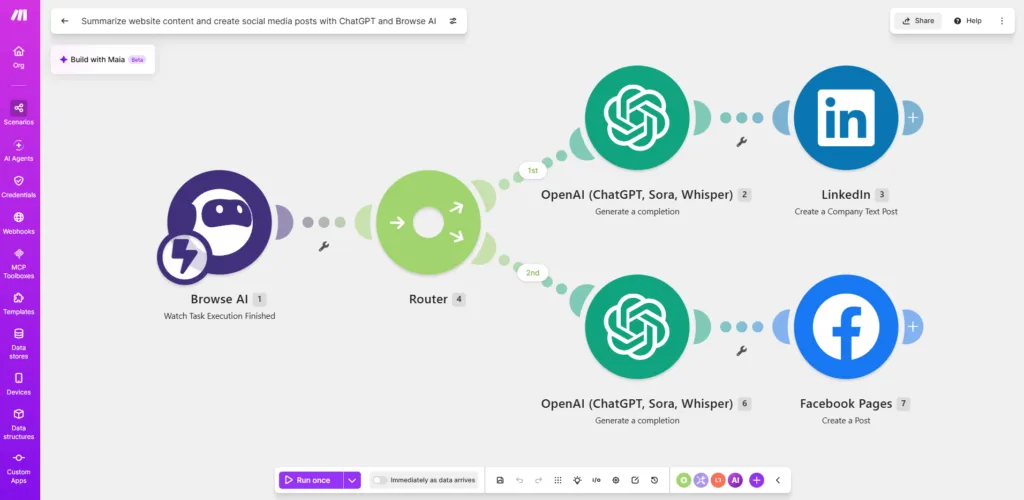
This makes Make a practical alternative to Power Automate for marketing automation, data transformation, API workflows, ecommerce processes, and other automations that need several branches.
Make also supports thousands of app integrations, webhooks, HTTP/API requests, filters, routers, and AI capabilities. Its free plan provides a monthly credit allowance, while paid plans increase credits and reduce scheduling limits.
The main tradeoff is the credit model. The Free plan includes 1,000 credits per month, two active scenarios, and a 15-minute minimum scheduling interval. Core starts at $10.59 per month for 10,000 credits, removes the active-scenario limit, and supports scheduling down to one minute.
Since August 2025, Make has billed in credits rather than operations. The important part is how complex workflows consume those credits. Loops process items individually, and each active router branch can run additional modules, so a workflow with several branches or repeated records may use credits much faster than a simple two-step scenario.
Where Make fits well: Visual, multi-step cloud automation.
Main limitation: Complex branching and loops can increase credit usage quickly.
Beste voor: Developers, technical agencies, SaaS teams, and businesses that want self-hosting, API flexibility, and deeper workflow control.
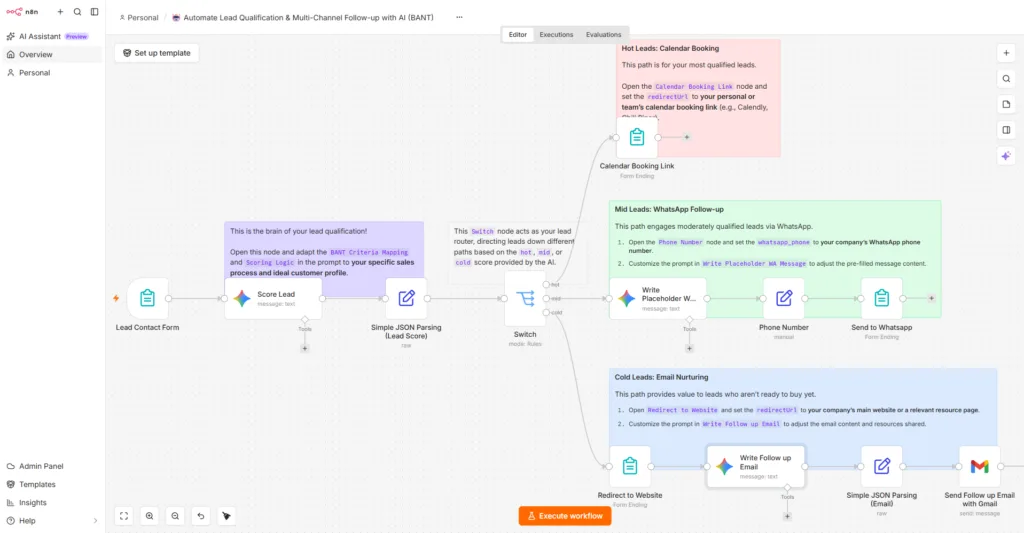
n8n is a practical Power Automate alternative for teams that are comfortable going beyond no-code automation. You still get a visual node-based builder, but when a connector does not cover everything you need, n8n lets you use HTTP requests, custom APIs, JavaScript, or Python instead of abandoning the workflow.
Pricing is one of n8n’s main differences. Starter costs around $20 per month when billed annually, or $24 month-to-month, and includes 2,500 workflow executions with unlimited workflows and users. One execution is a complete workflow run regardless of how many steps it contains, which can make n8n attractive for longer, multi-step automations.
The execution limit still matters. Frequent polling can consume the allowance quickly, while webhook-based and event-driven workflows generally use executions more efficiently.
n8n also offers a free self-hosted Community Edition. You avoid the cloud execution plan, but your team becomes responsible for the server, security, updates, backups, and performance.
For businesses comparing Power Automate alternatives, n8n makes more sense when technical control, self-hosting, custom APIs, and developer-level flexibility matter more than ease of setup.
Best fit: APIs, custom integrations, AI workflows, complex data processing, and self-hosting.
Main limitation: The flexibility comes with a steeper learning curve and greater technical responsibility.
Beste voor: Startups, developers, and technical teams that want open-source automation with cloud and self-hosted deployment.
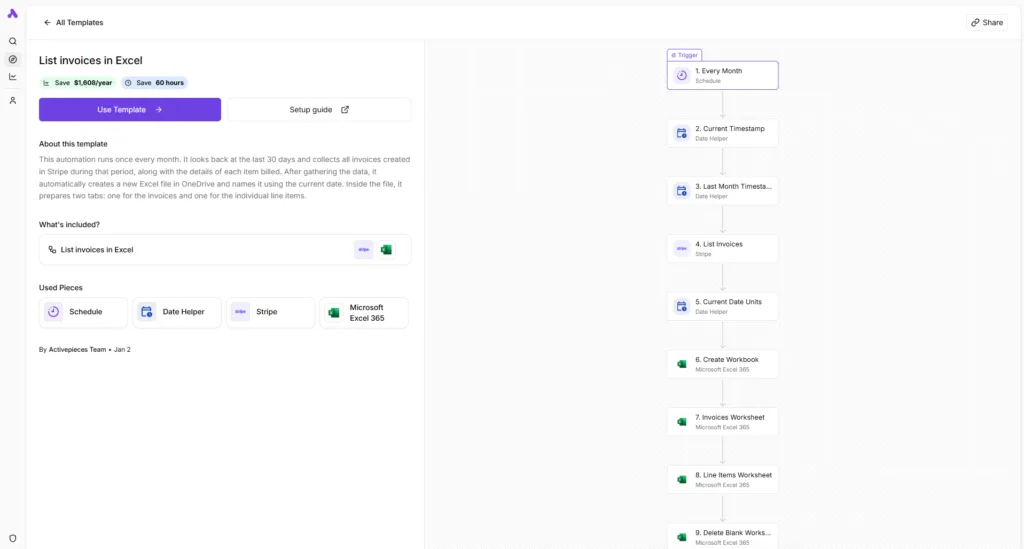
Activepieces is built for teams that want open-source automation, self-hosting, and more control over how and where their workflows run. Its Community Edition is released under the MIT license, while enterprise-specific features use a commercial license. Developers can also create custom integrations, called Pieces, in TypeScript when a ready-made connector does not cover the job.
The platform currently lists 700+ integrations and combines a visual workflow builder with branches, loops, HTTP requests, code steps, AI agents, MCP, and human-in-the-loop automation.
Pricing is approachable for smaller teams. Free costs $0 and includes unlimited flows, daily-refreshing credits, agents, tables, MCPs, and API access. The hosted pricing changed recently and is worth understanding. Plus is $20 a month for more credits, up to five users, and the option to bring your own AI keys. Activepieces also supports on-premises deployment, including its open-source Community Edition.
Compared with Power Automate, the main advantage is deployment freedom. You can use Activepieces Cloud or run the Community Edition on infrastructure you control instead of depending entirely on Microsoft’s environment.
That freedom comes with responsibility. Self-hosting means your team handles the server, updates, security, backups, and scaling.
Best fit: Open-source automation, self-hosting, APIs, AI workflows, and custom integrations.
Main limitation: Self-hosting requires more technical ownership than a fully managed Power Automate setup.
Beste voor: Teams that want AI agents, research, classification, enrichment, and model-driven decisions to sit at the center of their workflows.
Gumloop takes a more AI-first approach than traditional workflow builders. You can combine visual automations with agents, specialized AI nodes, company data, external tools, and models from providers such as OpenAI, Anthropic, and Google. Its own documentation shows AI being used for support-ticket classification, email routing, lead management, and summarization.
A workflow could look like:
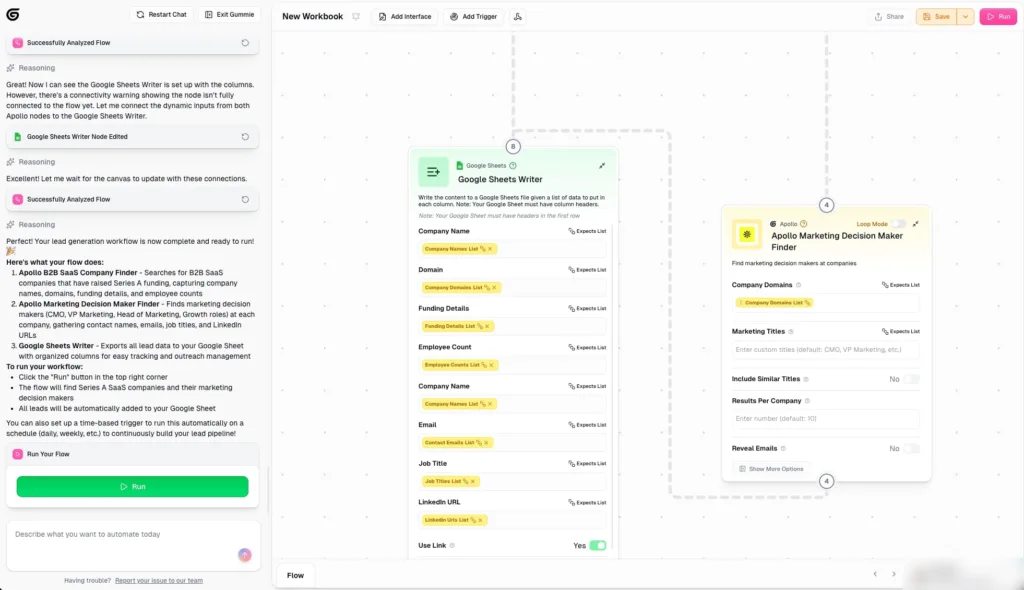
That is where Gumloop differs from simpler trigger-action automation. AI can interpret the incoming data and influence what happens next rather than only generating text in one step.
The current Pro plan starts at $37/month and includes 20,000 credits per month, 35+ models, unlimited agents, five concurrent workflow runs, and 25 concurrent agent chats. Gumloop also lists an 8% orchestration fee, so model and compute usage still matter when estimating the cost of AI-heavy workflows.
Compared with Power Automate, Gumloop makes more sense when AI reasoning and agents drive a large part of the process. Power Automate may still fit better when workflows revolve around Microsoft 365 or desktop RPA.
Best fit: AI agents, research, lead qualification, support triage, classification, and enrichment.
Main limitation: AI-heavy workflows can increase usage costs through credits, model consumption, compute, and the orchestration fee.
Beste voor: Larger organizations that need to connect enterprise systems, govern automation across teams, and manage complex business processes at scale.
Workato is built for a different level of automation than most self-serve Power Automate alternatives. It combines workflow automation with enterprise iPaaS, API management, data orchestration, governance, and agentic capabilities across a large app ecosystem. Workato currently says its platform can execute work across 14,000+ apps.
A typical enterprise workflow might connect:
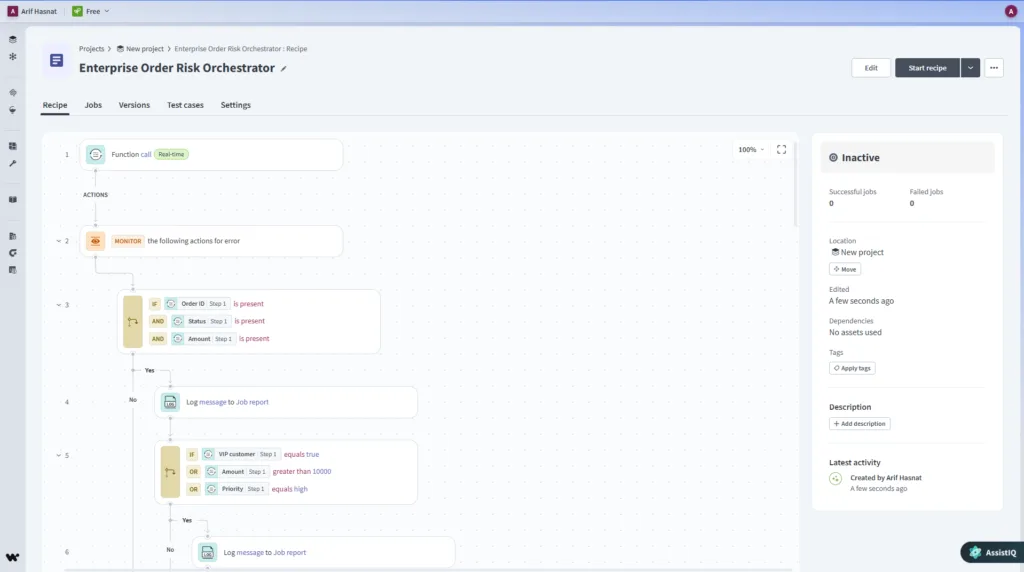
That is where Workato becomes relevant. The buyer is not only thinking about whether a workflow runs. Roles, security, auditability, lifecycle management, environments, APIs, and central governance become part of the decision.
Pricing now has two layers worth understanding. Workato’s self-service offering includes a Free plan with 50,000 one-time credits en Pro at $100/month with 3,500 credits per month, while Enterprise remains custom-priced. For direct customers on Workato’s usage-based model, pricing combines a platform edition fee plus usage fees, with Standard, Business, Enterprise, and Workato One editions adding progressively deeper orchestration, security, governance, and agentic capabilities.
Workflow usage is measured through eligible Business actions; conditions themselves do not count, but eligible actions inside loops and branches do.
Best fit: Enterprise iPaaS, cross-department automation, API orchestration, governance, and large integration programs.
Main limitation: Workato’s enterprise pricing and governance model can be more complex than smaller self-service automation tools.
Beste voor: Organizations that need desktop automation, attended or unattended RPA, document processing, and automation across legacy applications.
UiPath is one of the more relevant Power Automate Desktop alternatives when the work depends on software that cannot be automated through a normal API or cloud connector. UiPath Studio Desktop is built for complex RPA, desktop automation, and coded workflows, while the wider platform can orchestrate agents, robots, people, documents, and business processes.
A typical workflow might look like:
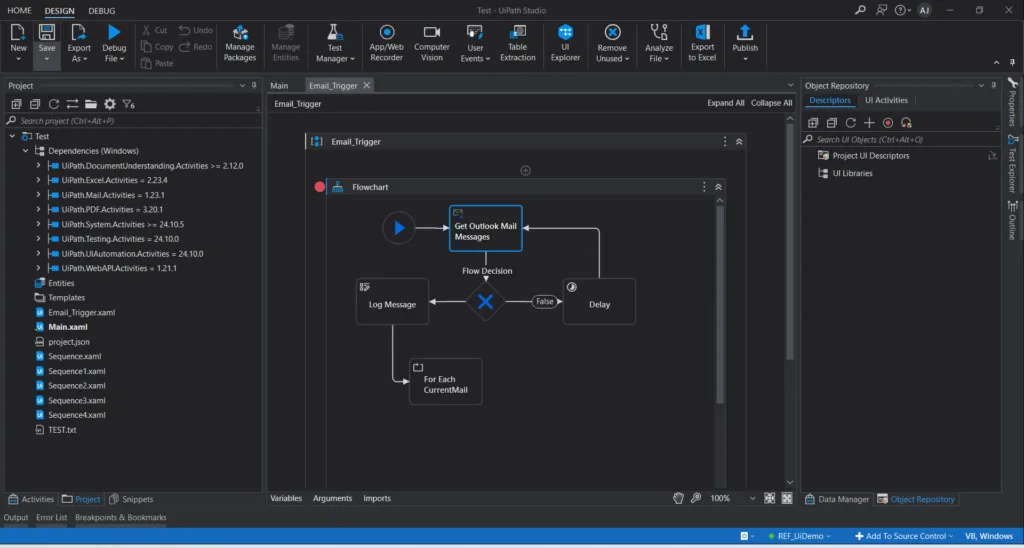
UiPath’s own desktop automation guidance explains that its software robots can replicate user actions across desktop applications, including extracting information from one application and entering it into another.
Pricing starts with the Basic plan at $25 per month, aimed at individuals and small teams building personal automations. Standard and Enterprise are quote-based. Standard adds enterprise automations, agents, document extraction, orchestration, and governance, while Enterprise adds capabilities such as self-healing UI automation, process optimization, and broader security controls.
Compared with Power Automate, UiPath makes the most sense when desktop RPA is the main requirement rather than ordinary SaaS integration.
Best fit: Legacy applications, desktop UI automation, document-heavy processes, and enterprise RPA.
Main limitation: UiPath can be more platform than you need if most of your workflows simply connect modern cloud apps.
Beste voor: Cost-conscious businesses that want cloud automation, a large SaaS integration library, and flexible task accounting.
Pabbly Connect is worth considering among Power Automate alternatives because it does not count every workflow step as a billable task. Triggers and internal tools such as filters, routers, formatters, schedules, and iterators do not consume tasks; external actions do.
Bijvoorbeeld:
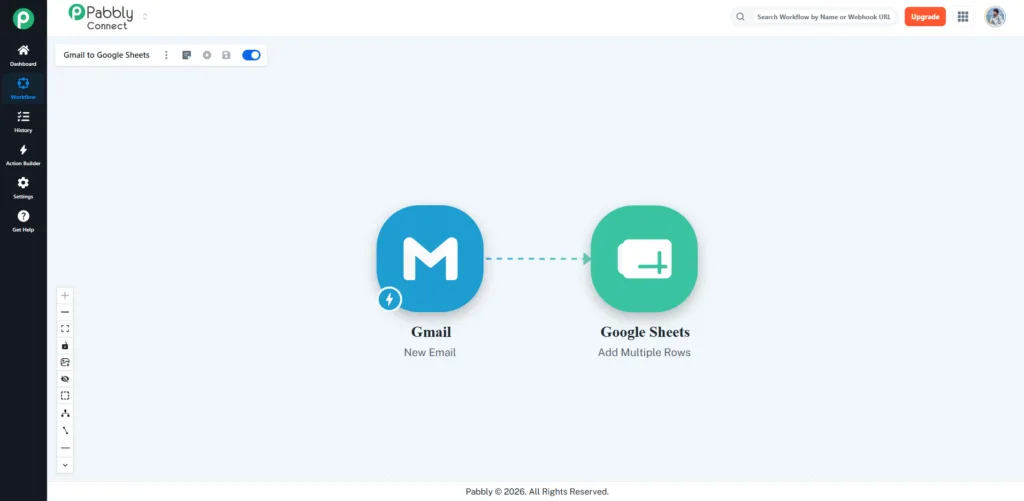
The filtering, formatting, and routing steps do not increase the task count. The external CRM action does. That can make longer workflows more affordable than platforms that meter more of the steps.
Pabbly currently advertises 2,000+ integrations, along with webhooks, multi-step workflows, recurring plans, and one-time lifetime purchase options. Paid plans start around $19 per month for 10,000 tasks, although Pabbly runs frequent promotions, so check the live pricing page before choosing a plan.
The tradeoff is that Pabbly is still cloud-based and external actions remain task-limited. Its workflow builder is also closer to a step-by-step editor than a full visual canvas.
Best fit: Budget-focused SaaS automation, CRM updates, lead routing, notifications, and app-to-app workflows.
Main limitation: External actions still consume tasks, so higher-volume workflows need some usage planning.
Beste voor: Enterprises that need large-scale desktop automation, legacy-system workflows, and governed RPA across multiple departments.
Automation Anywhere can be used when desktop RPA is a core requirement. Its current platform is positioned around Agentic Process Automation (APA), bringing AI agents, RPA, and orchestration together so organizations can automate longer business processes rather than isolated tasks.
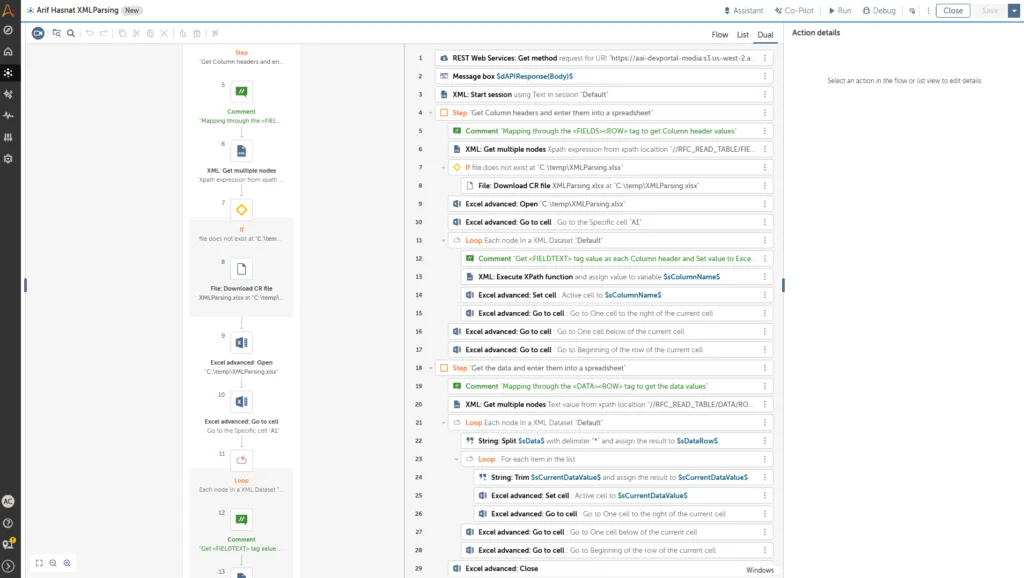
That makes Automation Anywhere a better fit for finance operations, insurance claims, IT service processes, healthcare workflows, document processing, and applications that cannot be handled through a normal API.
There is also a free Cloud Community Edition for students, developers, and people who want to learn or prototype automations before moving into an enterprise deployment. Automation Anywhere describes it as free access to its Automation 360 cloud platform.
Commercial licensing is more enterprise-oriented. Automation 360 uses different license types such as Bot Creator and Bot Runner, while pricing for production deployments generally requires working with Automation Anywhere rather than selecting a simple public monthly plan.
Where Power Automate may fit better: Organizations already invested in Microsoft RPA and Power Platform.
Main limitation: Commercial deployment is enterprise-oriented and requires more implementation effort than ordinary no-code SaaS automation.
There are free alternatives to Power Automate, but the word gratis hides several different models.
n8n Community Edition gives technical teams a self-hosted version, but remember that n8n uses a fair-code Sustainable Use License rather than a conventional open-source license.
Activepieces Free provides hosted daily credits, while its Community Edition has MIT-licensed core code for self-hosting.
Bit Flows Gratis includes core WordPress workflow capabilities, unlimited workflows and tasks, multi-step flows, logs, re-execution, and a selected set of integrations and tools.
Zapier Free provides 100 tasks per month.
Make Free provides a limited monthly credit allowance before users move into the paid credit plans.
The right free option depends on what you already have.
A WordPress business may get more value from Bit Flows Free than from operating another server. A developer comfortable with infrastructure may prefer n8n. Someone learning SaaS automation may simply start with Zapier or Make.
The strongest Power Automate Desktop alternatives in this list are UiPath and Automation Anywhere because they actually compete in robotic process automation rather than only cloud integration.
This distinction matters.
Power Automate cloud flows typically connect systems through connectors, APIs, and events.
Power Automate Desktop can automate software by simulating the way a person interacts with the computer. Microsoft’s own licensing documentation describes RPA as automating applications through mouse movements and keyboard input when suitable APIs or connectors are unavailable.
If none of your existing automations use desktop flows, you probably do not need an RPA replacement.
If your company relies on desktop flows heavily, tools such as Zapier, Make, Bit Flows, Gumloop, and Pabbly should not be treated as one-for-one replacements.
A comparison can narrow down the Power Automate alternatives, but the real test is how each tool handles a workflow your business already depends on.
Pick one process you run every week and rebuild it in your top two choices. Compare how long setup takes, how clearly data can be mapped, how failures appear in the logs, what happens when volume increases, and what the workflow would actually cost each month.
If that process starts with a WordPress form, WooCommerce order, plugin event, or external webhook connected to WordPress, Bit Flows is worth testing. Its site-based pricing and unlimited workflow tasks can make it a more predictable option for frequent WordPress automation.
If the same process depends heavily on SharePoint, Teams, Dataverse, Outlook, or desktop RPA, Power Automate may still be the better fit.
Do not switch because another platform has more features or a nicer canvas. Test the workflow that matters, compare the result, and choose the platform that creates the least friction for the way your business actually works.
Welk alternatief voor Power Automate het beste is, hangt af van de workflow: Zapier is geschikt voor brede SaaS-automatisering, Make voor visuele workflows, n8n voor technische teams, Bit Flows voor WordPress en UiPath voor desktop-RPA.
Ja; n8n Community Edition, Activepieces Community Edition, Bit Flows Free, Zapier Free en Make Free bieden verschillende gratis opties, afhankelijk van de behoeften op het gebied van hosting en gebruik.
Bit Flows is ontworpen voor automatisering rondom WordPress, met ingebouwde triggers voor WordPress en WooCommerce, een onbeperkt aantal workflows en taken, een AI-agent, API's, logbestanden en tools voor het herstellen van workflows.
n8n kan veel cloud-, API-, data- en AI-workflows vervangen, maar vervangt niet direct Power Automate Desktop voor Windows UI-automatisering en traditionele RPA.
Zapier can be easier for cross-SaaS automation and offers 9,000+ app connections, while Power Automate fits Microsoft 365 and desktop automation more naturally.
UiPath and Automation Anywhere are the strongest Power Automate Desktop alternatives in this comparison because both are built for desktop RPA, legacy applications, and enterprise automation.
Activepieces is a strong open-source option with MIT-licensed Community Edition code, while n8n is self-hostable but uses a fair-code Sustainable Use License.
Power Automate currently lists Premium at $15/user/month, Process at $150/bot/month, and Hosted Process at $215/bot/month when paid yearly in the US.
Microsoft 365 licenses provide limited Power Automate use rights for cloud flows using standard connectors, while premium and custom connector scenarios may require additional licensing.
Map your apps, monthly run volume, premium connector use, AI requirements, hosting preference, desktop RPA needs, debugging requirements, and migration effort before choosing another automation platform.





 NL
NL  EN
EN  DE
DE  ES
ES  IT
IT  PT
PT  JA
JA