Bit Connect Early Bird Offer

Termina em:
00
D D
00
H H
00
M M
00
S S

D D
H H
M M
S S
Zoho Flow is a capable automation platform, especially for teams already using Zoho apps. But it is not the best fit for every workflow. The real differences show up in pricing, task limits, hosting, app coverage, workflow complexity, API access, AI features, and how much control you want over execution.
For this comparison, I focused on five Zoho Flow alternatives that solve different problems: Bit Flows, AutomatorWP, n8n, Zapier, and Make. Some are better for WordPress, some are stronger for cloud apps, and others give technical teams more control over self-hosting, code, APIs, and complex workflow logic.
I tested all five alternatives myself and built working automations in each platform before comparing their setup, workflow logic, pricing model, and day-to-day usability.
Pricing and usage details were checked on October 12, 2026. Plans can change, so recheck pricing before buying.
Zoho Flow is still a good choice if your business relies heavily on Zoho products or its task-based cloud model already fits your workload.
| Ferramenta | Melhor para | Hospedagem | Usage model | Força principal |
|---|---|---|---|---|
| Bit Flows | Advanced WordPress automation | Runs in WordPress | No per-task billing | WordPress-first workflows with external app support |
| AutomatorWP | Plugin-to-plugin automation | Runs in WordPress | License/add-on based | Deep WordPress plugin event coverage |
| n8n | Technical and self-hosted automation | Nuvem ou auto-hospedado | Cloud plans use workflow executions | APIs, code, AI, and infrastructure control |
| Zapier | Broad SaaS automation | Nuvem | Task based | Large app ecosystem and simple setup |
| Faça | Visual multi-app workflows | Nuvem | Credit based | Visual routing and data mapping |
Zoho Flow’s free plan includes 5 live flows and 100 tasks per month. Standard starts at $25/month billed annually for 5,000 tasks, enquanto o Professional começa em $41/month billed annually for 10,000 tasks. Triggers, decisions, and set-variable steps do not count as tasks. Most successfully executed actions do.
That model works well for many cloud workflows, but there are several reasons to compare alternatives.
I tested each tool by building a real workflow rather than comparing feature pages alone. Where possible, I used the same basic pattern: trigger data, apply a condition or filter, send the result to another app, and check the execution output.
I also compared how each platform handled setup, field mapping, branching, debugging, usage limits, and workflow visibility. The screenshots in each section come from the workflows I built during testing.
The goal was not to find one universal winner. I wanted to see which tool made the most sense for different use cases, including Automação do WordPress, self-hosting, broad SaaS integrations, and visual multi-step workflows.
Melhor para: WordPress and WooCommerce sites that need multi-step automation across WordPress, SaaS apps, APIs, CRMs, spreadsheets, and AI services.
Bit Flows runs inside WordPress, so a workflow can start from a WordPress event and continue into external systems without moving workflow management to a separate automation account.
I built a form submission → condition → CRM → Google Sheets → notification workflow. Mapping the WordPress form fields was straightforward, and keeping the condition and downstream actions on the same canvas made the logic easy to follow. The execution log also made it easy to confirm which branch ran and inspect the data passed between steps.

The bigger difference appears in longer workflows. Bit Flows includes conditions, Router, Repeater, Iterator, Delay, Schedule, JSON/XML/CSV parsers, API and HTTP requests, incoming and outgoing webhooks, Custom App Builder, AI Agent, MCP, Human in the Loop, logs, retry, and re-execution.
Annual plans currently start at $59/year for 1 site. The 5-site plan is $99/year and the unlimited-site Agency plan is $129/year. Lifetime pricing starts at $159 one time for 1 site. Paid plans include the full paid feature set and mainly differ by site count.
Choose Bit Flows when: WordPress is central to the process and you need more than simple trigger-to-action automation. It is also attractive when frequent runs make per-task SaaS pricing a concern. External AI, email, CRM, or API providers can still have their own charges.
Melhor para: WordPress sites whose automations mainly connect one plugin event to another.
AutomatorWP is a WordPress automation plugin with integrations for 200+ WordPress plugins and platforms. It uses a trigger-and-action model that works well for LMS, membership, form, WooCommerce, CRM, and community workflows that mostly stay inside WordPress.
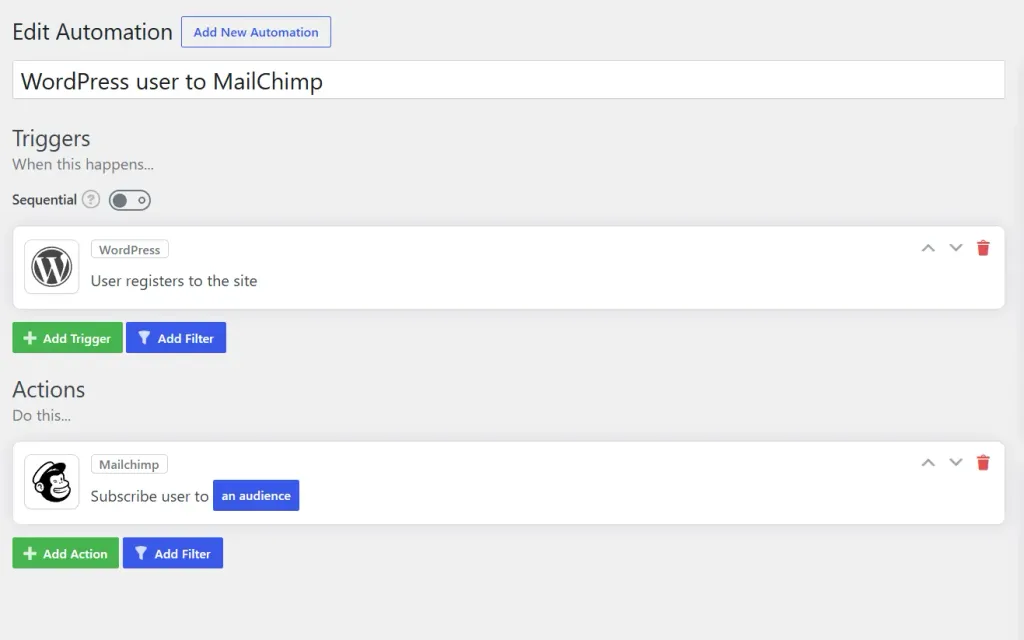
I created a simple automation triggered by a WordPress user registration and sent the email to MailChimp. The trigger-and-action setup was quick to understand and easy to scan, but compared with a node-based canvas, I had less visual context once the workflow started to grow.
The core plugin is free. Annual passes currently cost $149 for 2 sites, $249 for 10 sites, e $499 for unlimited sites. These passes include access to all add-ons.
Choose AutomatorWP when: You mainly need WordPress plugin-to-plugin automation and its existing triggers and actions already cover your stack.
Melhor para: Developers and technical teams that want self-hosting, code, APIs, AI workflows, and control over the automation environment.
n8n is not WordPress-native. It treats WordPress as one system in a wider automation stack, which can be an advantage when workflows also touch databases, internal services, custom APIs, AI tools, or developer infrastructure.
I sent WordPress data into n8n through a webhook, added an IF node, and passed the matching branch to an external service. I could inspect the incoming JSON and transform fields precisely, but credential setup and node configuration took more work than with the WordPress-native tools.

Its cloud plans are priced by full workflow executions rather than by the number of normal steps inside each run. n8n also provides a self-hosted Community Edition for teams willing to manage deployment and maintenance themselves.
n8n Cloud Starter is currently €20/month billed annually for 2,500 workflow executions with unlimited steps. Pro is €50/month billed annually for 10,000 executions. The self-hosted Community Edition is available separately.
Choose n8n when: Your team is comfortable with technical setup and values self-hosting, code, custom APIs, and broader system orchestration more than a WordPress-native interface.
Melhor para: Businesses that want managed cloud automation and a large catalog of SaaS integrations.
Zapier is a practical alternative when you need to connect marketing, sales, support, productivity, and operations apps without managing infrastructure. WordPress can be one part of that stack rather than the center of it.
I built a WordPress-to-CRM Zap with a Filter step before the CRM action. Field mapping was easy to follow, and testing each step was quick. The main thing I watched was task usage because the successful downstream action counts toward the monthly allowance.

Its main tradeoff is task usage. A successful action generally counts as a task, although built-in tools such as Filters, Paths, and Formatter do not consume tasks. AI by Zapier uses model-based multipliers: Standard uses 1x, Advanced 3x, and Premium 5x task usage before additional tool calls are considered.
The free plan includes 100 tarefas por mês. Professional starts at $19.99/month billed annually with 750 tasks per month. Team starts at $69/month billed annually with 2,000 tasks per month.
Choose Zapier when: App coverage and managed cloud convenience matter more than self-hosting or avoiding task-based pricing.
Melhor para: Teams that want a visual cloud workflow builder for multi-app automation and data routing.
Faça‘s scenario canvas is useful when a workflow has several routes, filters, iterators, transformations, and connected apps. It works well when several systems need to be visible in one workflow.
I built a scenario with WordPress user registration data, a Router, and splitting into two filtered paths. Seeing both routes on the canvas made the logic easy to follow, and field mapping was clear. The tradeoff was that every additional module mattered when I estimated credit use.

Make uses credits. Most module actions consume one credit, while some advanced AI features can consume more. Router and error-handler modules are among the exceptions that do not consume credits. The free plan includes 1,000 credits per month.
The free plan includes 1.000 créditos por mês. At the 10,000-credit level, Core is currently $12/mês, Pro $21/month, and Teams $38/month.
Choose Make when: You want visual cloud automation across many apps and are comfortable with credit-based usage.
| Ferramenta | Free/entry option | Paid starting point | Usage model |
|---|---|---|---|
| Zoho Flow | Free: 5 flows, 100 tasks/month | Standard: $25/month annually for 5K tasks | Successful actions generally count as tasks |
| Bit Flows | Free plugin available | $59/year for 1 site | No Bit Flows per-task billing; hosting/provider costs still apply |
| AutomatorWP | Free core plugin | $149/year for 2 sites | License/add-on based |
| n8n | Self-hosted Community Edition | €20/month annually for 2.5K cloud executions | Cloud plans count full workflow executions |
| Zapier | Free: 100 tasks/month | $19.99/month annually for 750 tasks | Successful actions generally count as tasks |
| Faça | Free: 1K credits/month | $12/month at 10K credits | Most module actions consume credits |
Escolha Bit Flows when WordPress is central to the workflow and you need advanced cross-app automation without Bit Flows per-task billing. Choose AutomatorWP when the job is mostly plugin-to-plugin. Choose n8n when technical flexibility and self-hosting matter most. Choose Zapier when app coverage and managed cloud convenience come first. Choose Faça when visual multi-app workflows are the priority.
Zoho Flow remains a good option when Zoho products are central to the business, or when its managed cloud setup, premium apps, on-premises integrations, and task tiers match your requirements.
Testing one real workflow is more useful than comparing feature counts. A simple form-to-email flow is easy to reproduce almost anywhere. The differences show up when the workflow branches, touches several systems, handles failures, or runs at higher volume.
Zoho Flow is a capable cloud automation platform, especially for businesses already using the Zoho ecosystem. The alternatives above are better choices when your priorities shift toward self-hosting, deeper WordPress automation, broader SaaS coverage, visual workflow design, or more technical control.
After testing all five tools, the biggest differences were not in basic triggers and actions. They became much clearer once I added conditions, multiple steps, external apps, and usage limits.
For WordPress-first automation, Bit Flows is the first option I would evaluate. n8n is the better fit for technical self-hosting and code-heavy workflows, Zapier is stronger for broad SaaS convenience, Make is better for visual cloud scenarios, and AutomatorWP works well for simpler WordPress plugin-to-plugin automation.
Before migrating, rebuild one workflow you already use in Zoho Flow and compare setup effort, app coverage, failure handling, usage cost, and maintenance.
It depends on the workflow. Bit Flows is the strongest fit here for advanced WordPress automation, n8n for technical self-hosting, Zapier for broad SaaS coverage, Make for visual multi-app workflows, and AutomatorWP for WordPress plugin-to-plugin automation.
For advanced WordPress-first automation, Bit Flows is the strongest fit in this comparison. It runs inside WordPress and supports multi-step workflows, conditions, routing, APIs, webhooks, AI Agent, MCP, custom integrations, and external SaaS actions without Bit Flows per-task billing.
Yes. Bit Flows and AutomatorWP have free WordPress plugins, n8n has a self-hosted Community Edition, and Zapier and Make offer free cloud plans with usage limits.
n8n is a better fit for technical teams that need self-hosting, code, APIs, AI workflows, and infrastructure control. Zoho Flow is easier to manage when you want a hosted platform and rely heavily on Zoho applications.
Yes. Zapier is a strong alternative when SaaS app coverage and managed cloud automation are the priority. Its task-based pricing matters more as workflow volume and the number of successful actions increase.
Not always. Make uses credits and Zoho Flow uses tasks, so the cheaper option depends on how many actions your workflow performs and how often it runs. Compare the same real workflow on both pricing models.
Bit Flows is worth evaluating when task volume is a concern because it does not charge per workflow task. Hosting resources and third-party API or provider charges still apply, so compare the full operating cost rather than the plugin price alone.